Windows 7 doesn't recognize second monitor.

Kevin86

New member
Local time
4:56 PM
Messages
16
I got a new pc running windows 7. I have a VGA splitter that I used with my Vista pc and was able to run 3 monitors. Now when I connect a second monitor using the VGA splitter and I can only clone the second monitor, for some reason Windows 7 doesn't recognize there is a second monitor connected.

Amy help appreciated
 

My Computer My Computer

At a glance

Windows 7 64bit
OS
Windows 7 64bit
bump
 

My Computer My Computer

At a glance

Windows 7 64bit
OS
Windows 7 64bit
I got a new pc running windows 7. I have a VGA splitter that I used with my Vista pc and was able to run 3 monitors. Now when I connect a second monitor using the VGA splitter and I can only clone the second monitor, for some reason Windows 7 doesn't recognize there is a second monitor connected.

Amy help appreciated

Kevin, welcome to the forum! :)
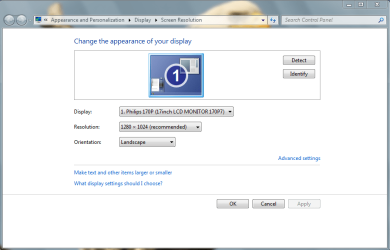
Did you try: right click on desktop>screen resolution; in order to see if the second monitor is recognized?
(any way,make a print screen preview, or use snipping tool(in start type "snipping tool"))

p.s. My attachment is a example of what window you should post back.
 

Attachments

  • Monitor.PNG
    Monitor.PNG
    29.1 KB · Views: 10
Last edited:

My Computer My Computer

At a glance

Windows 7 x86 UltimateIntel Pentium 4 (3.2GHz) @3.6GHz3 GB DDR2 (2GB @800MHz + 1GB @533MHz)-3 inuvi...ATI Radeon HD 5450 1GB DDR3
Computer Manufacturer/Model Number
Me, Myself and I (:
OS
Windows 7 x86 Ultimate
CPU
Intel Pentium 4 (3.2GHz) @3.6GHz
Motherboard
Asus P5N-D SLI
Memory
3 GB DDR2 (2GB @800MHz + 1GB @533MHz)-3 inuvidual sticks
Graphics Card(s)
ATI Radeon HD 5450 1GB DDR3
Sound Card
Realtek HD Audio
Monitor(s) Displays
Philips Brilliance 170p 17" DVI/VGA
Screen Resolution
1280x1024 @60 Hz
Hard Drives
WDC WD400BD-08LRAO 40 GB Blue Caviar-Sata II
PSU
LC-Power LC6480S Scorpio-480W 18A@ +12V
Cooling
CPU~Arctic Freezer 7 Pro; 2 92mm case fans; HDD fan;
Keyboard
Logitec Usb
Mouse
Dell optical mouse Usb
Internet Speed
2 Mb/s
Other Info
SOLD MY PC 6 MONTHS AGO IN ORDER TO BUY A MOTORCYCLE :D I don't need a PC :D
Thanks for the reply Petko.

Yes I did try that already, the second monitor is not recognized...
 

My Computer My Computer

At a glance

Windows 7 64bit
OS
Windows 7 64bit
Thanks for the reply Petko.

Yes I did try that already, the second monitor is not recognized...

Did you try the "Detect" button?
And did you install the device drivers after installing windows7?
 

My Computer My Computer

At a glance

Windows 7 x86 UltimateIntel Pentium 4 (3.2GHz) @3.6GHz3 GB DDR2 (2GB @800MHz + 1GB @533MHz)-3 inuvi...ATI Radeon HD 5450 1GB DDR3
Computer Manufacturer/Model Number
Me, Myself and I (:
OS
Windows 7 x86 Ultimate
CPU
Intel Pentium 4 (3.2GHz) @3.6GHz
Motherboard
Asus P5N-D SLI
Memory
3 GB DDR2 (2GB @800MHz + 1GB @533MHz)-3 inuvidual sticks
Graphics Card(s)
ATI Radeon HD 5450 1GB DDR3
Sound Card
Realtek HD Audio
Monitor(s) Displays
Philips Brilliance 170p 17" DVI/VGA
Screen Resolution
1280x1024 @60 Hz
Hard Drives
WDC WD400BD-08LRAO 40 GB Blue Caviar-Sata II
PSU
LC-Power LC6480S Scorpio-480W 18A@ +12V
Cooling
CPU~Arctic Freezer 7 Pro; 2 92mm case fans; HDD fan;
Keyboard
Logitec Usb
Mouse
Dell optical mouse Usb
Internet Speed
2 Mb/s
Other Info
SOLD MY PC 6 MONTHS AGO IN ORDER TO BUY A MOTORCYCLE :D I don't need a PC :D
I did try the detect button which shows the number 1 on both monitors. I have not installed any device driver. By 'device' drivers, you mean the drivers for the monitor that Windows doesn't recognize I assume?

Thanks again.
 

My Computer My Computer

At a glance

Windows 7 64bit
OS
Windows 7 64bit
I did try the detect button which shows the number 1 on both monitors. I have not installed any device driver. By 'device' drivers, you mean the drivers for the monitor that Windows doesn't recognize I assume?

Thanks again.

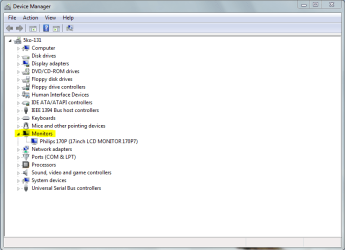
Open device manager from start, and then open "Monitors" as shown here. post a screen shot of yours!
 

Attachments

  • Device manager.PNG
    Device manager.PNG
    20.2 KB · Views: 9

My Computer My Computer

At a glance

Windows 7 x86 UltimateIntel Pentium 4 (3.2GHz) @3.6GHz3 GB DDR2 (2GB @800MHz + 1GB @533MHz)-3 inuvi...ATI Radeon HD 5450 1GB DDR3
Computer Manufacturer/Model Number
Me, Myself and I (:
OS
Windows 7 x86 Ultimate
CPU
Intel Pentium 4 (3.2GHz) @3.6GHz
Motherboard
Asus P5N-D SLI
Memory
3 GB DDR2 (2GB @800MHz + 1GB @533MHz)-3 inuvidual sticks
Graphics Card(s)
ATI Radeon HD 5450 1GB DDR3
Sound Card
Realtek HD Audio
Monitor(s) Displays
Philips Brilliance 170p 17" DVI/VGA
Screen Resolution
1280x1024 @60 Hz
Hard Drives
WDC WD400BD-08LRAO 40 GB Blue Caviar-Sata II
PSU
LC-Power LC6480S Scorpio-480W 18A@ +12V
Cooling
CPU~Arctic Freezer 7 Pro; 2 92mm case fans; HDD fan;
Keyboard
Logitec Usb
Mouse
Dell optical mouse Usb
Internet Speed
2 Mb/s
Other Info
SOLD MY PC 6 MONTHS AGO IN ORDER TO BUY A MOTORCYCLE :D I don't need a PC :D
I did try the detect button which shows the number 1 on both monitors. I have not installed any device driver. By 'device' drivers, you mean the drivers for the monitor that Windows doesn't recognize I assume?

Thanks again.

Open device manager from start, and then open "Monitors" as shown here. post a screen shot of yours!

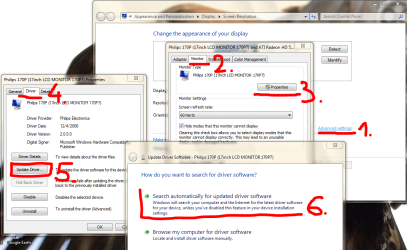
As for the monitor drivers follow this picture!
Do this for the monitor that windows doesn't detect, but witch you can see in the screen resolution settings.

Always willing to help ;)
 

Attachments

  • Monitor driver.PNG
    Monitor driver.PNG
    104.1 KB · Views: 26

My Computer My Computer

At a glance

Windows 7 x86 UltimateIntel Pentium 4 (3.2GHz) @3.6GHz3 GB DDR2 (2GB @800MHz + 1GB @533MHz)-3 inuvi...ATI Radeon HD 5450 1GB DDR3
Computer Manufacturer/Model Number
Me, Myself and I (:
OS
Windows 7 x86 Ultimate
CPU
Intel Pentium 4 (3.2GHz) @3.6GHz
Motherboard
Asus P5N-D SLI
Memory
3 GB DDR2 (2GB @800MHz + 1GB @533MHz)-3 inuvidual sticks
Graphics Card(s)
ATI Radeon HD 5450 1GB DDR3
Sound Card
Realtek HD Audio
Monitor(s) Displays
Philips Brilliance 170p 17" DVI/VGA
Screen Resolution
1280x1024 @60 Hz
Hard Drives
WDC WD400BD-08LRAO 40 GB Blue Caviar-Sata II
PSU
LC-Power LC6480S Scorpio-480W 18A@ +12V
Cooling
CPU~Arctic Freezer 7 Pro; 2 92mm case fans; HDD fan;
Keyboard
Logitec Usb
Mouse
Dell optical mouse Usb
Internet Speed
2 Mb/s
Other Info
SOLD MY PC 6 MONTHS AGO IN ORDER TO BUY A MOTORCYCLE :D I don't need a PC :D
I did try the detect button which shows the number 1 on both monitors. I have not installed any device driver. By 'device' drivers, you mean the drivers for the monitor that Windows doesn't recognize I assume?

Thanks again.

Open device manager from start, and then open "Monitors" as shown here. post a screen shot of yours!

As for the monitor drivers follow this picture!
Do this for the monitor that windows doesn't detect, but witch you can see in the screen resolution settings.

Always willing to help ;)
When both monitors are connected I don't see any monitors in the device manager list, see the screenshot

When I have both monitors connected and follow the steps, properties is 'grayed' out and not available to click. When I disconnect one of the monitors, I AM able to follow the steps and Windows tells me I have the latest drivers already installed...
 

My Computer My Computer

At a glance

Windows 7 64bit
OS
Windows 7 64bit
*forgot to upload the attachment. Here you go :)
 

Attachments

  • device manager.jpg
    device manager.jpg
    27.6 KB · Views: 14

My Computer My Computer

At a glance

Windows 7 64bit
OS
Windows 7 64bit
What GPU (Graphics card) do you have?
If you don't know, check in device manager under "Display adapters"
 

My Computer My Computer

At a glance

Windows 7 x86 UltimateIntel Pentium 4 (3.2GHz) @3.6GHz3 GB DDR2 (2GB @800MHz + 1GB @533MHz)-3 inuvi...ATI Radeon HD 5450 1GB DDR3
Computer Manufacturer/Model Number
Me, Myself and I (:
OS
Windows 7 x86 Ultimate
CPU
Intel Pentium 4 (3.2GHz) @3.6GHz
Motherboard
Asus P5N-D SLI
Memory
3 GB DDR2 (2GB @800MHz + 1GB @533MHz)-3 inuvidual sticks
Graphics Card(s)
ATI Radeon HD 5450 1GB DDR3
Sound Card
Realtek HD Audio
Monitor(s) Displays
Philips Brilliance 170p 17" DVI/VGA
Screen Resolution
1280x1024 @60 Hz
Hard Drives
WDC WD400BD-08LRAO 40 GB Blue Caviar-Sata II
PSU
LC-Power LC6480S Scorpio-480W 18A@ +12V
Cooling
CPU~Arctic Freezer 7 Pro; 2 92mm case fans; HDD fan;
Keyboard
Logitec Usb
Mouse
Dell optical mouse Usb
Internet Speed
2 Mb/s
Other Info
SOLD MY PC 6 MONTHS AGO IN ORDER TO BUY A MOTORCYCLE :D I don't need a PC :D
AMD Radeon HD 6530D
 

My Computer My Computer

At a glance

Windows 7 64bit
OS
Windows 7 64bit
You mentioned a "VGA splitter" in your first post, could you provide more info on what that is exactly? If it's what I think it is it just sends the same VGA signal to two monitors at once. One monitor will mirror the other. If so, to use dual displays each monitor must be on a separate video connector on your video card. Each monitor needs its own source.
 

My Computer My Computer

At a glance

Windows 10 Education 64 bitAMD Phenom II X4 980 Black Edition Deneb 3.7GHz8GB 4GBx2 Kingston PC10600 DDR3 1333 MemoryZotac NVIDIA Geforce GT640 2 Gig DDR3 PCIe
Computer type
PC/Desktop
Computer Manufacturer/Model Number
Home Built
OS
Windows 10 Education 64 bit
CPU
AMD Phenom II X4 980 Black Edition Deneb 3.7GHz
Motherboard
Asus M4N68T-M V2 µATX Motherboard
Memory
8GB 4GBx2 Kingston PC10600 DDR3 1333 Memory
Graphics Card(s)
Zotac NVIDIA Geforce GT640 2 Gig DDR3 PCIe
Sound Card
VIA VT1708s High Definition Audio 8-channel Onboard
Monitor(s) Displays
22" LG E2242 1080p and 2 19" I-INC AG191D
Screen Resolution
1280x1024 - 1920x1080 - 1280x1024
Hard Drives
Crucial M100 256 GB SSD and 500 GB WD Blue SATA
PSU
Thermaltake TR 620
Case
Power Up Black ATX Mid-Tower Case
Cooling
Stock heatsink and fan
Keyboard
Logitech Wireless K350 Wave
Mouse
Logitech Wireless M570 Trackman Wheel
Internet Speed
80 Mbps Down 30 Mbps Up
Antivirus
Windows Defender
Browser
Internet Explorer 11
Other Info
HP DVD1040e Lightscribe - External USB2
AMD Radeon HD 6530D

That's an integrated card, so could you possibly connect both monitors to the card (from the net specifications i see that it has 1 VGA and 2 DVI, so it is possible) if you have the needed cables, and if the monitors support this kind of connection...
I'm suggesting all of this in order to avoid using the VGA splitter you mentioned earlier.
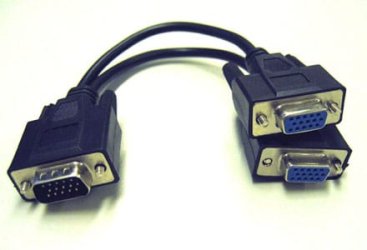
I assume that your VGA splitter looks like this:
 

Attachments

  • VGA_Splitter_Cable.jpg
    VGA_Splitter_Cable.jpg
    13.4 KB · Views: 4

My Computer My Computer

At a glance

Windows 7 x86 UltimateIntel Pentium 4 (3.2GHz) @3.6GHz3 GB DDR2 (2GB @800MHz + 1GB @533MHz)-3 inuvi...ATI Radeon HD 5450 1GB DDR3
Computer Manufacturer/Model Number
Me, Myself and I (:
OS
Windows 7 x86 Ultimate
CPU
Intel Pentium 4 (3.2GHz) @3.6GHz
Motherboard
Asus P5N-D SLI
Memory
3 GB DDR2 (2GB @800MHz + 1GB @533MHz)-3 inuvidual sticks
Graphics Card(s)
ATI Radeon HD 5450 1GB DDR3
Sound Card
Realtek HD Audio
Monitor(s) Displays
Philips Brilliance 170p 17" DVI/VGA
Screen Resolution
1280x1024 @60 Hz
Hard Drives
WDC WD400BD-08LRAO 40 GB Blue Caviar-Sata II
PSU
LC-Power LC6480S Scorpio-480W 18A@ +12V
Cooling
CPU~Arctic Freezer 7 Pro; 2 92mm case fans; HDD fan;
Keyboard
Logitec Usb
Mouse
Dell optical mouse Usb
Internet Speed
2 Mb/s
Other Info
SOLD MY PC 6 MONTHS AGO IN ORDER TO BUY A MOTORCYCLE :D I don't need a PC :D
It's weird, online it says my graphi card suppose to has two dvi slots, but there are no dvi slots at all, just one VGA and one HDMI...

This is the splitter I'm using
vga_splitter_lg.jpg
 

My Computer My Computer

At a glance

Windows 7 64bit
OS
Windows 7 64bit
It's weird, online it says my graphi card suppose to has two dvi slots, but there are no dvi slots at all, just one VGA and one HDMI...

This is the splitter I'm using
vga_splitter_lg.jpg

To be honest, the splitter doesn't make the difference, but it's weird that your GPU doesn't have the mentioned connectors (2 DVIs missing)...
You say that you have only changed the operating system (upgraded from Vista to 7), and now you can't use the 2 monitors you used before?
No hardware changes???
~Then the Drivers are left to be checked out... :confused:
When you have both monitors connected, what appears on the "left" and "right" monitor?
 

My Computer My Computer

At a glance

Windows 7 x86 UltimateIntel Pentium 4 (3.2GHz) @3.6GHz3 GB DDR2 (2GB @800MHz + 1GB @533MHz)-3 inuvi...ATI Radeon HD 5450 1GB DDR3
Computer Manufacturer/Model Number
Me, Myself and I (:
OS
Windows 7 x86 Ultimate
CPU
Intel Pentium 4 (3.2GHz) @3.6GHz
Motherboard
Asus P5N-D SLI
Memory
3 GB DDR2 (2GB @800MHz + 1GB @533MHz)-3 inuvidual sticks
Graphics Card(s)
ATI Radeon HD 5450 1GB DDR3
Sound Card
Realtek HD Audio
Monitor(s) Displays
Philips Brilliance 170p 17" DVI/VGA
Screen Resolution
1280x1024 @60 Hz
Hard Drives
WDC WD400BD-08LRAO 40 GB Blue Caviar-Sata II
PSU
LC-Power LC6480S Scorpio-480W 18A@ +12V
Cooling
CPU~Arctic Freezer 7 Pro; 2 92mm case fans; HDD fan;
Keyboard
Logitec Usb
Mouse
Dell optical mouse Usb
Internet Speed
2 Mb/s
Other Info
SOLD MY PC 6 MONTHS AGO IN ORDER TO BUY A MOTORCYCLE :D I don't need a PC :D
No sorry, I bought a brand new pc. When both monitors are connected my desktop is cloned on to both monitors.
 

My Computer My Computer

At a glance

Windows 7 64bit
OS
Windows 7 64bit
No sorry, I bought a brand new pc. When both monitors are connected my desktop is cloned on to both monitors.

Ok, then i didn't read carefully the first post. :p :D
As alphanumeric said:
You mentioned a "VGA splitter" ... it just sends the same VGA signal to two monitors at once. One monitor will mirror the other. If so, to use dual displays each monitor must be on a separate video connector on your video card. Each monitor needs its own source.

It's 100% true, but, then i can't explain how it worked on the vista PC????? :eek:
 

My Computer My Computer

At a glance

Windows 7 x86 UltimateIntel Pentium 4 (3.2GHz) @3.6GHz3 GB DDR2 (2GB @800MHz + 1GB @533MHz)-3 inuvi...ATI Radeon HD 5450 1GB DDR3
Computer Manufacturer/Model Number
Me, Myself and I (:
OS
Windows 7 x86 Ultimate
CPU
Intel Pentium 4 (3.2GHz) @3.6GHz
Motherboard
Asus P5N-D SLI
Memory
3 GB DDR2 (2GB @800MHz + 1GB @533MHz)-3 inuvidual sticks
Graphics Card(s)
ATI Radeon HD 5450 1GB DDR3
Sound Card
Realtek HD Audio
Monitor(s) Displays
Philips Brilliance 170p 17" DVI/VGA
Screen Resolution
1280x1024 @60 Hz
Hard Drives
WDC WD400BD-08LRAO 40 GB Blue Caviar-Sata II
PSU
LC-Power LC6480S Scorpio-480W 18A@ +12V
Cooling
CPU~Arctic Freezer 7 Pro; 2 92mm case fans; HDD fan;
Keyboard
Logitec Usb
Mouse
Dell optical mouse Usb
Internet Speed
2 Mb/s
Other Info
SOLD MY PC 6 MONTHS AGO IN ORDER TO BUY A MOTORCYCLE :D I don't need a PC :D
Using Vista I used a DVI splitter and it worked fine. Could that be the reason?
 

My Computer My Computer

At a glance

Windows 7 64bit
OS
Windows 7 64bit
Using Vista I used a DVI splitter and it worked fine. Could that be the reason?

"DVI is better than VGA for TFTs because they are digital and VGA is analog. A TFT displayes its picture digitally, pixel per pixel. Via DVI the panel gets data for each pixel, so the picture generated in the graphics card will match exact with the pixels on the panel itself.

Not so with VGA. First, the picture is generated digitally in the graphics card. Then it's converted to analog. In the TFT they will be converted again to digital (=> senseless twice conversion => quality loss), using the phase and the clock, and it'll be calculated which pixel should display what color. As the phase and clock can't be adjusted so precisely that a pixel of a picture generated by the graphics card will be displayed by the appropriate pixel on the panel. Means that the picture will be interpolated a little bit, which again means quality loss.

The electron cannons of the CRT need analog signals, that's why VGA is the best for CRTs and DVI would make no sense here.
For TFTs, DVI is the best. I won't get a TFT with no DVI."

This is from the internet, think that the VGA output has not enough quality for the 2 monitors... can you try connecting the 1st monitor to the VGA (with out splitter), and the 2nd to the HDMI (if you have a cable, but your monitor doesn't support it, try connecting it to a tv :p )
 

My Computer My Computer

At a glance

Windows 7 x86 UltimateIntel Pentium 4 (3.2GHz) @3.6GHz3 GB DDR2 (2GB @800MHz + 1GB @533MHz)-3 inuvi...ATI Radeon HD 5450 1GB DDR3
Computer Manufacturer/Model Number
Me, Myself and I (:
OS
Windows 7 x86 Ultimate
CPU
Intel Pentium 4 (3.2GHz) @3.6GHz
Motherboard
Asus P5N-D SLI
Memory
3 GB DDR2 (2GB @800MHz + 1GB @533MHz)-3 inuvidual sticks
Graphics Card(s)
ATI Radeon HD 5450 1GB DDR3
Sound Card
Realtek HD Audio
Monitor(s) Displays
Philips Brilliance 170p 17" DVI/VGA
Screen Resolution
1280x1024 @60 Hz
Hard Drives
WDC WD400BD-08LRAO 40 GB Blue Caviar-Sata II
PSU
LC-Power LC6480S Scorpio-480W 18A@ +12V
Cooling
CPU~Arctic Freezer 7 Pro; 2 92mm case fans; HDD fan;
Keyboard
Logitec Usb
Mouse
Dell optical mouse Usb
Internet Speed
2 Mb/s
Other Info
SOLD MY PC 6 MONTHS AGO IN ORDER TO BUY A MOTORCYCLE :D I don't need a PC :D
Back
Top