Solved Windows 7 don't have my screen resolution, HELP!

crunksmiley

New member
Local time
10:20 AM
Messages
12
Location
Fairfax, SC
I just upgraded from Windows Xp to Windows 7 today and I'm using a 1366 by 768 Flat screen monitor...I can't change the screen resolution to 1366 by 768 because only 640 x 480 is availible...Everything is big and blurred looking...Will Windows Update supply a solution??? Or is this a serious problem.....I need Help :cry:
 

My Computer My Computer

Computer Manufacturer/Model Number
HP
OS
Windows 7 Home Premium 32bit
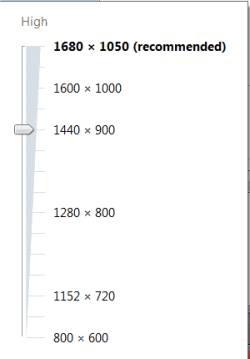
I think you are missing the driver for your monitor. Look at the manufacturers webpage. E.g. for my monitor I have all those:
 

Attachments

  • 2010-12-28_2215.png
    2010-12-28_2215.png
    3.2 KB · Views: 4

My Computer My Computer

Computer Manufacturer/Model Number
HP, Dell, Gateway, Toshiba - 4 laptops and 2 desktops
OS
Vista, Windows7, Mint Mate, Zorin, Windows 8
CPU
from 1.6GHz Duo to i7
Monitor(s) Displays
2x HP w2207
Hard Drives
5x HDD, 7x SSD, 12x Externals
Keyboard
with trackball - no mices
Mouse
Trackball mice
Internet Speed
DSL 6000
I have a acer x163w flatscreen monitor, and i went to their website and downloaded something but its just a folder with 3 files...nothing has changed..nothing happens when I click any of the 3 files...
 

My Computer My Computer

Computer Manufacturer/Model Number
HP
OS
Windows 7 Home Premium 32bit
Welcome to SevenForums.
Did you have a look in windows update for a graphics card updated driver? You can find windows update in start/ all programs. You may need to go to the manufactures website and download a win 7 driver. Good luck to you with your new install.
 

My Computer My Computer

Computer Manufacturer/Model Number
Gateway GT5692
OS
Windows 7 Ulti. x64
CPU
AMD Phenom 8450 triple-core 2.10 ghz
Memory
4GB
Graphics Card(s)
ATI Radion HD 3200
Monitor(s) Displays
Gateway FPD1775W
Screen Resolution
1280x720
Hard Drives
465.6613 Gibibytes
The driver seems to be up to date, and there's no graphic card update under Windows Update....The manufacter website (Acer) does not seem to have anything
 

My Computer My Computer

Computer Manufacturer/Model Number
HP
OS
Windows 7 Home Premium 32bit
I have a acer x163w flatscreen monitor, and i went to their website and downloaded something but its just a folder with 3 files...nothing has changed..nothing happens when I click any of the 3 files...

Is their a .inf file in the 3 you downloaded? If so go to device manager right click on monitor>update driver>browse my computer>have disk>browse to where you downloaded the .inf file>click or double click it and see if it will install.
If your monitor is listed in device manager as PnP this is why you don't have control of it's native resolution.
Fabe
 

My Computer My Computer

Computer Manufacturer/Model Number
Self Built
OS
Windows 7 ultimate 64 bit / XP Home sp3
CPU
intel Core 2 Duo E8400 3.0ghz
Motherboard
Asus P5ND bios 1401
Memory
8 gigs 1066 OCZ Fata1ty
Graphics Card(s)
EVGA GTX 580 Call of Duty Black Ops Edition
Sound Card
Creative Soundblaster Audigy 2zs
Monitor(s) Displays
Asus 24in LCD's 2MS X2
Screen Resolution
1920x1080p @60Hz
Hard Drives
WD Caviar 500 Black/ WD Caviar 200 Blue
PSU
OCZ 700W GameXtreme
Case
NZXT Apollo
Cooling
Corsair H50 CPU/120mm x3 /60mm x2 /Corsair Dominator Ram
Keyboard
Logitech Bluetooth Wireless MX5000
Mouse
Logitech Bluetooth Wireless MX1000
Internet Speed
Download 19.83 Upload 0.97
Other Info
Logitech Z2300 Speakers/ Bose Noise Cancelling Headphones/Avermedia PCI-e Hybrid TV Bravo/Epson NX415 all in one/ 4 Port Powered USB Hub/ LG 10x Bluray Burner /TSST Corp DVDRW External
Also what video card do you have ?
 

My Computer My Computer

Computer type
PC/Desktop
Computer Manufacturer/Model Number
Built them myself, Science Experiments !
OS
Win7 Enterprise, Win7 x86 (Ult 7600), Win7 x64 Ult 7600, TechNet RTM on AMD x64 (2.8Ghz)
CPU
AMD fx8350 4ghz, AMD-32 2400mhz, AMD-64 3200mhz, AMDx64 2.8G
Motherboard
SIS 755, ECS-K8M890M-M (Ult 7600), GigaByte & others
Memory
2gb, 4gb on the Ult 7600, 4gb on Technet RTM, 32gb on FX8350
Graphics Card(s)
Draw my own Graphics, several nVidia cards
Sound Card
on motherboard
Monitor(s) Displays
19" flat scr, 28" I-Inc widescr,22" Emprex Widescr, 23" Acer
Screen Resolution
1280 x 1024, 1440 x 900, 1920 x 1080
Hard Drives
6 pata Ide HD's & 2 Sata HD's
added 80gb external on Ult 7600 computer,
numerous extra 1tb, 2TB, 3Tb SATA HD's
A collection of ext HD Docks w/ HDs
PSU
430w, 550w, 600w, 700, 800, etc
Case
All Generic Full Towers
Cooling
Open Air & a few fans, some w/ colored LEDs
Keyboard
Compaq & Dell recycled from GoodWill
Mouse
Made in China Optical Wired Mouse
Internet Speed
Fast Cable InterNet
Antivirus
AVG Free on 24 different Desktops, NO Problems!
Browser
IE 8 is preferred, but use FireFox sometimes
Other Info
Linksys Routers, switches, & Hubs
Too Many USB Flash Drives to count, Biggest is 64GB !
Eight computers in my home network.
Sixteen computers at my business network.
Linked via TeamViewer !
Lots of old used spare computer parts everywhere!
The driver seems to be up to date, and there's no graphic card update under Windows Update....The manufacter website (Acer) does not seem to have anything
crunksmiley, What is the model number of your pc? In your system specs you have hp listed?:cool:
 

My Computer My Computer

Computer Manufacturer/Model Number
Gateway GT5692
OS
Windows 7 Ulti. x64
CPU
AMD Phenom 8450 triple-core 2.10 ghz
Memory
4GB
Graphics Card(s)
ATI Radion HD 3200
Monitor(s) Displays
Gateway FPD1775W
Screen Resolution
1280x720
Hard Drives
465.6613 Gibibytes
I have a acer x163w flatscreen monitor, and i went to their website and downloaded something but its just a folder with 3 files...nothing has changed..nothing happens when I click any of the 3 files...

Is their a .inf file in the 3 you downloaded? If so go to device manager right click on monitor>update driver>browse my computer>have disk>browse to where you downloaded the .inf file>click or double click it and see if it will install.
If your monitor is listed in device manager as PnP this is why you don't have control of it's native resolution.
Fabe

YES, My monitor is listed as Generic PnP Monitor, and I have click the three files and nothing happened...Device Manager does not recognize the files....The three files that i got from (Acer Website) are a security file, a ICC profile file, and a setup information file that opens up as a notepad file...
 

My Computer My Computer

Computer Manufacturer/Model Number
HP
OS
Windows 7 Home Premium 32bit
The driver seems to be up to date, and there's no graphic card update under Windows Update....The manufacter website (Acer) does not seem to have anything
crunksmiley, What is the model number of your pc? In your system specs you have hp listed?:cool:

I HAVE THIS!!
-I have a HP Pavilion 533w Computer
-Acer 163W LCD Monitor
-Windows 7 Home Premium 32bit
-1gb RAM
-Intel Celeron CPU 2.00GHZ 1.99GHz
-Standard VGA Graphic Adapter
 

My Computer My Computer

Computer Manufacturer/Model Number
HP
OS
Windows 7 Home Premium 32bit
Also what video card do you have ?

-I have a HP Pavilion 533w Computer
-Acer 163W LCD Monitor
-Windows 7 Home Premium 32bit
-1gb RAM
-Intel Celeron CPU 2.00GHZ 1.99GHz
-Standard VGA Graphic Adapter

And Brookdale-G Graphic Chip Accelerated VGA BIOS
 

My Computer My Computer

Computer Manufacturer/Model Number
HP
OS
Windows 7 Home Premium 32bit
Also what video card do you have ?

-I have a HP Pavilion 533w Computer
-Acer 163W LCD Monitor
-Windows 7 Home Premium 32bit
-1gb RAM
-Intel Celeron CPU 2.00GHZ 1.99GHz
-Standard VGA Graphic Adapter

And Brookdale-G Graphic Chip Accelerated VGA BIOS
crunksmiley. Download this graphics driver to your desktop then run the compatibility tutorial to make it compatible to your install. then run the download as administator. Good luck to you.
Software & Driver Downloads HP Pavilion 533w Desktop PC (US) - HP Customer Care (United States - English)

http://www.sevenforums.com/tutorials/316-compatibility-mode.html
 

My Computer My Computer

Computer Manufacturer/Model Number
Gateway GT5692
OS
Windows 7 Ulti. x64
CPU
AMD Phenom 8450 triple-core 2.10 ghz
Memory
4GB
Graphics Card(s)
ATI Radion HD 3200
Monitor(s) Displays
Gateway FPD1775W
Screen Resolution
1280x720
Hard Drives
465.6613 Gibibytes
myzr7

That is the only driver at HP. There isn't even a Vista driver.

Video driver is the the top one in the list.


The only other option maybe is here: Intel® Driver Update Utility

Click "Check your system for latest updates" maybe and only a maybe a direct Intel driver may work. 20% chance?

Mike
 
Last edited:

My Computer My Computer

Computer Manufacturer/Model Number
Hopalong/ Godzilla
OS
Windows7 Pro 64bit SP-1; Windows XP Pro 32bit
CPU
Intel Core i7-870 Lynnfield 2.93GHz LGA 1156 95W Quad-Core
Motherboard
ASUS P7P55D-E PRO
Memory
8GB@1400MHz Crucial Ballistix DDR3-1600 4x2GB
Graphics Card(s)
ASUS ENGTX460 DirectCU/2DI/1GD5 1GB 256-bit GDDR5
Sound Card
VIA Onboard
Monitor(s) Displays
Asus VS248H-P 24"; Samsung SyncMaster 941BW 19"ws
Screen Resolution
1920x1080; 1440x900
Hard Drives
Samsung 830 120GB SSD
Intel 320 120GB SSD
Western Digital Caviar Black WD7501AALS 750GB 7200 RPM SATA 3.0Gb/s
Western Digital Caviar Black WD6401AALS 640GB 7200 RPM SATA 3.0Gb/s
PSU
COOLER MASTER Silent Pro RS850-AMBAJ3-US 850W Modular
Case
COOLER MASTER HAF 932 RC-932-KKN5-GP Black
Cooling
Scythe "Mugen-2 Rev.B" (2 ScytheKaze-Jyuni PWM fans)
Keyboard
Logitech K-320
Mouse
Kensington
Antivirus
Avast Inernet Suite
Browser
IE 9 ; Chrome
myzr7

That is the only driver at HP. There isn't even a Vista driver.

Video driver is the the top one in the list.


The only other option maybe is here: Intel® Driver Update Utility

Click "Check your system for latest updates" maybe and only a maybe a direct Intel driver may work. 20% chance?

Mike
Your right Hoppie but an xp driver would clean up his resolution problem if he could get it to install. With that old of a pc he is kinda stuck with whatever he can make work.
 

My Computer My Computer

Computer Manufacturer/Model Number
Gateway GT5692
OS
Windows 7 Ulti. x64
CPU
AMD Phenom 8450 triple-core 2.10 ghz
Memory
4GB
Graphics Card(s)
ATI Radion HD 3200
Monitor(s) Displays
Gateway FPD1775W
Screen Resolution
1280x720
Hard Drives
465.6613 Gibibytes
myzr7

That is the only driver at HP. There isn't even a Vista driver.

Video driver is the the top one in the list.


The only other option maybe is here: Intel® Driver Update Utility

Click "Check your system for latest updates" maybe and only a maybe a direct Intel driver may work. 20% chance?

Mike
Your right Hoppie but an xp driver would clean up his resolution problem if he could get it to install. With that old of a pc he is kinda stuck with whatever he can make work.

I downloaded to HP driver desktop, and still nothing.....Installed the HP Driver And still nothing...What to dew next?
 

My Computer My Computer

Computer Manufacturer/Model Number
HP
OS
Windows 7 Home Premium 32bit

My Computer My Computer

Computer Manufacturer/Model Number
Hopalong/ Godzilla
OS
Windows7 Pro 64bit SP-1; Windows XP Pro 32bit
CPU
Intel Core i7-870 Lynnfield 2.93GHz LGA 1156 95W Quad-Core
Motherboard
ASUS P7P55D-E PRO
Memory
8GB@1400MHz Crucial Ballistix DDR3-1600 4x2GB
Graphics Card(s)
ASUS ENGTX460 DirectCU/2DI/1GD5 1GB 256-bit GDDR5
Sound Card
VIA Onboard
Monitor(s) Displays
Asus VS248H-P 24"; Samsung SyncMaster 941BW 19"ws
Screen Resolution
1920x1080; 1440x900
Hard Drives
Samsung 830 120GB SSD
Intel 320 120GB SSD
Western Digital Caviar Black WD7501AALS 750GB 7200 RPM SATA 3.0Gb/s
Western Digital Caviar Black WD6401AALS 640GB 7200 RPM SATA 3.0Gb/s
PSU
COOLER MASTER Silent Pro RS850-AMBAJ3-US 850W Modular
Case
COOLER MASTER HAF 932 RC-932-KKN5-GP Black
Cooling
Scythe "Mugen-2 Rev.B" (2 ScytheKaze-Jyuni PWM fans)
Keyboard
Logitech K-320
Mouse
Kensington
Antivirus
Avast Inernet Suite
Browser
IE 9 ; Chrome

My Computer My Computer

Computer Manufacturer/Model Number
Hopalong/ Godzilla
OS
Windows7 Pro 64bit SP-1; Windows XP Pro 32bit
CPU
Intel Core i7-870 Lynnfield 2.93GHz LGA 1156 95W Quad-Core
Motherboard
ASUS P7P55D-E PRO
Memory
8GB@1400MHz Crucial Ballistix DDR3-1600 4x2GB
Graphics Card(s)
ASUS ENGTX460 DirectCU/2DI/1GD5 1GB 256-bit GDDR5
Sound Card
VIA Onboard
Monitor(s) Displays
Asus VS248H-P 24"; Samsung SyncMaster 941BW 19"ws
Screen Resolution
1920x1080; 1440x900
Hard Drives
Samsung 830 120GB SSD
Intel 320 120GB SSD
Western Digital Caviar Black WD7501AALS 750GB 7200 RPM SATA 3.0Gb/s
Western Digital Caviar Black WD6401AALS 640GB 7200 RPM SATA 3.0Gb/s
PSU
COOLER MASTER Silent Pro RS850-AMBAJ3-US 850W Modular
Case
COOLER MASTER HAF 932 RC-932-KKN5-GP Black
Cooling
Scythe "Mugen-2 Rev.B" (2 ScytheKaze-Jyuni PWM fans)
Keyboard
Logitech K-320
Mouse
Kensington
Antivirus
Avast Inernet Suite
Browser
IE 9 ; Chrome
Thanks for posting back your solution.Just so you know once you have resolved your issue you can click on the red triangle and report it as resolved.
Fabe
 

My Computer My Computer

Computer Manufacturer/Model Number
Self Built
OS
Windows 7 ultimate 64 bit / XP Home sp3
CPU
intel Core 2 Duo E8400 3.0ghz
Motherboard
Asus P5ND bios 1401
Memory
8 gigs 1066 OCZ Fata1ty
Graphics Card(s)
EVGA GTX 580 Call of Duty Black Ops Edition
Sound Card
Creative Soundblaster Audigy 2zs
Monitor(s) Displays
Asus 24in LCD's 2MS X2
Screen Resolution
1920x1080p @60Hz
Hard Drives
WD Caviar 500 Black/ WD Caviar 200 Blue
PSU
OCZ 700W GameXtreme
Case
NZXT Apollo
Cooling
Corsair H50 CPU/120mm x3 /60mm x2 /Corsair Dominator Ram
Keyboard
Logitech Bluetooth Wireless MX5000
Mouse
Logitech Bluetooth Wireless MX1000
Internet Speed
Download 19.83 Upload 0.97
Other Info
Logitech Z2300 Speakers/ Bose Noise Cancelling Headphones/Avermedia PCI-e Hybrid TV Bravo/Epson NX415 all in one/ 4 Port Powered USB Hub/ LG 10x Bluray Burner /TSST Corp DVDRW External
Back
Top