Hi everyone. I am having some difficulties finding solutions for the trouble I am having with my new Windows 7. I'm no expert at this kind of thing so I would very much appreciate a laymen explanation if possible.
I had a Vista Home Premium which I performed a clean install out of.
Here are the computer information:
Computer: HP G60 468CA
Processor: AMD Athlon-Dual Core QL-64 2.10 GHz
Ram: 4.00 GB
System Type: 64-bit
All the devices in the Device Manager seem to be correctly installed without any yellow exclamation marks signalling uninstalled components,
The Problem:
1) Seems as though there are drivers that are not correctly functioning and I'm not sure how to solve it. Here is the NTBTLOG.TXT starting from where the problem is:
Did not load driver \SystemRoot\System32\drivers\vga.sys
Loaded driver \SystemRoot\System32\Drivers\NDProxy.SYS
Did not load driver \SystemRoot\System32\Drivers\NDProxy.SYS
Did not load driver \SystemRoot\System32\Drivers\NDProxy.SYS
Did not load driver \SystemRoot\System32\Drivers\NDProxy.SYS
Did not load driver \SystemRoot\System32\Drivers\NDProxy.SYS
Loaded driver \SystemRoot\system32\drivers\HdAudio.sys
Loaded driver \SystemRoot\system32\drivers\ksthunk.sys
Loaded driver \SystemRoot\system32\DRIVERS\VSTAZL6.SYS
Loaded driver \SystemRoot\system32\DRIVERS\VSTDPV6.SYS
Loaded driver \SystemRoot\system32\DRIVERS\VSTCNXT6.SYS
Loaded driver \SystemRoot\system32\drivers\modem.sys
Loaded driver \SystemRoot\system32\drivers\nvhda64v.sys
Loaded driver \SystemRoot\system32\DRIVERS\usbccgp.sys
Loaded driver \SystemRoot\System32\Drivers\usbvideo.sys
Loaded driver \SystemRoot\system32\DRIVERS\USBSTOR.SYS
Loaded driver \SystemRoot\system32\DRIVERS\hidusb.sys
Loaded driver \SystemRoot\system32\DRIVERS\mouhid.sys
Loaded driver \SystemRoot\system32\drivers\luafv.sys
Loaded driver \SystemRoot\system32\drivers\WudfPf.sys
Did not load driver \SystemRoot\system32\DRIVERS\MpFilter.sys
Loaded driver \SystemRoot\system32\DRIVERS\lltdio.sys
Loaded driver \SystemRoot\system32\DRIVERS\nwifi.sys
Loaded driver \SystemRoot\system32\DRIVERS\ndisuio.sys
Loaded driver \SystemRoot\system32\DRIVERS\rspndr.sys
Loaded driver \SystemRoot\system32\drivers\HTTP.sys
Loaded driver \SystemRoot\system32\DRIVERS\bowser.sys
Loaded driver \SystemRoot\System32\drivers\mpsdrv.sys
Loaded driver \SystemRoot\system32\DRIVERS\mrxsmb.sys
Loaded driver \SystemRoot\system32\DRIVERS\mrxsmb10.sys
Loaded driver \SystemRoot\system32\DRIVERS\mrxsmb20.sys
Loaded driver \SystemRoot\system32\drivers\peauth.sys
Loaded driver \SystemRoot\System32\Drivers\secdrv.SYS
Loaded driver \SystemRoot\System32\DRIVERS\srvnet.sys
Loaded driver \SystemRoot\System32\drivers\tcpipreg.sys
Loaded driver \SystemRoot\System32\DRIVERS\srv2.sys
Loaded driver \SystemRoot\System32\DRIVERS\srv.sys
Did not load driver \SystemRoot\System32\DRIVERS\srv.sys
Loaded driver \SystemRoot\system32\DRIVERS\WUDFRd.sys
Loaded driver \SystemRoot\system32\DRIVERS\monitor.sys
Loaded driver \SystemRoot\system32\DRIVERS\MpNWMon.sys
Loaded driver \SystemRoot\system32\DRIVERS\nvm62x64.sys
Loaded driver \SystemRoot\system32\DRIVERS\nvsmu.sys
Loaded driver \SystemRoot\system32\DRIVERS\nvmf6264.sys
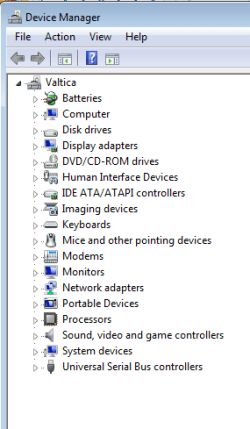
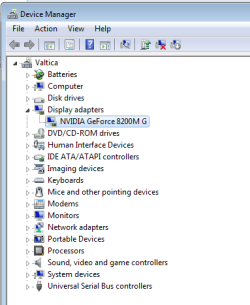
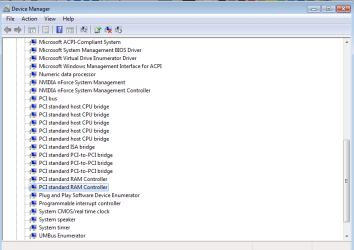
Problem 2: I'm not sure if this is a problem but I don't know if this is normal. There are a few drivers that repeat it self [shown in the image of the Device Manager]. Could someone please help me? Thank you.
I had a Vista Home Premium which I performed a clean install out of.
Here are the computer information:
Computer: HP G60 468CA
Processor: AMD Athlon-Dual Core QL-64 2.10 GHz
Ram: 4.00 GB
System Type: 64-bit
All the devices in the Device Manager seem to be correctly installed without any yellow exclamation marks signalling uninstalled components,
The Problem:
1) Seems as though there are drivers that are not correctly functioning and I'm not sure how to solve it. Here is the NTBTLOG.TXT starting from where the problem is:
Did not load driver \SystemRoot\System32\drivers\vga.sys
Loaded driver \SystemRoot\System32\Drivers\NDProxy.SYS
Did not load driver \SystemRoot\System32\Drivers\NDProxy.SYS
Did not load driver \SystemRoot\System32\Drivers\NDProxy.SYS
Did not load driver \SystemRoot\System32\Drivers\NDProxy.SYS
Did not load driver \SystemRoot\System32\Drivers\NDProxy.SYS
Loaded driver \SystemRoot\system32\drivers\HdAudio.sys
Loaded driver \SystemRoot\system32\drivers\ksthunk.sys
Loaded driver \SystemRoot\system32\DRIVERS\VSTAZL6.SYS
Loaded driver \SystemRoot\system32\DRIVERS\VSTDPV6.SYS
Loaded driver \SystemRoot\system32\DRIVERS\VSTCNXT6.SYS
Loaded driver \SystemRoot\system32\drivers\modem.sys
Loaded driver \SystemRoot\system32\drivers\nvhda64v.sys
Loaded driver \SystemRoot\system32\DRIVERS\usbccgp.sys
Loaded driver \SystemRoot\System32\Drivers\usbvideo.sys
Loaded driver \SystemRoot\system32\DRIVERS\USBSTOR.SYS
Loaded driver \SystemRoot\system32\DRIVERS\hidusb.sys
Loaded driver \SystemRoot\system32\DRIVERS\mouhid.sys
Loaded driver \SystemRoot\system32\drivers\luafv.sys
Loaded driver \SystemRoot\system32\drivers\WudfPf.sys
Did not load driver \SystemRoot\system32\DRIVERS\MpFilter.sys
Loaded driver \SystemRoot\system32\DRIVERS\lltdio.sys
Loaded driver \SystemRoot\system32\DRIVERS\nwifi.sys
Loaded driver \SystemRoot\system32\DRIVERS\ndisuio.sys
Loaded driver \SystemRoot\system32\DRIVERS\rspndr.sys
Loaded driver \SystemRoot\system32\drivers\HTTP.sys
Loaded driver \SystemRoot\system32\DRIVERS\bowser.sys
Loaded driver \SystemRoot\System32\drivers\mpsdrv.sys
Loaded driver \SystemRoot\system32\DRIVERS\mrxsmb.sys
Loaded driver \SystemRoot\system32\DRIVERS\mrxsmb10.sys
Loaded driver \SystemRoot\system32\DRIVERS\mrxsmb20.sys
Loaded driver \SystemRoot\system32\drivers\peauth.sys
Loaded driver \SystemRoot\System32\Drivers\secdrv.SYS
Loaded driver \SystemRoot\System32\DRIVERS\srvnet.sys
Loaded driver \SystemRoot\System32\drivers\tcpipreg.sys
Loaded driver \SystemRoot\System32\DRIVERS\srv2.sys
Loaded driver \SystemRoot\System32\DRIVERS\srv.sys
Did not load driver \SystemRoot\System32\DRIVERS\srv.sys
Loaded driver \SystemRoot\system32\DRIVERS\WUDFRd.sys
Loaded driver \SystemRoot\system32\DRIVERS\monitor.sys
Loaded driver \SystemRoot\system32\DRIVERS\MpNWMon.sys
Loaded driver \SystemRoot\system32\DRIVERS\nvm62x64.sys
Loaded driver \SystemRoot\system32\DRIVERS\nvsmu.sys
Loaded driver \SystemRoot\system32\DRIVERS\nvmf6264.sys
Problem 2: I'm not sure if this is a problem but I don't know if this is normal. There are a few drivers that repeat it self [shown in the image of the Device Manager]. Could someone please help me? Thank you.
Attachments
My Computer
- OS
- You tell me


 )
)