Windows 7 Dual Boot problems. Please help

spaceface

New member
Local time
12:55 PM
Messages
8
I have recently upgraded my home computer to Windows 7 64-bit, but need to create a dual boot machine with XP so i can work from home.

Firstly i will confirm that i do need dual boot. I cannot install the software i need on my windows 7, neither does compatibility mode work.

I created a small partition on my new 500GB sata HDD and installed windows 7 first. Which works fine. I've been trying to create the dual boot using the guide on the following page (from this website):

http://www.sevenforums.com/tutorials/8057-dual-boot-installation-windows-7-xp.html

I only have a windows XP serv pack 1 upgrade disk, so i bought a windows 98 full disk as the cheapest option to get windows installed (these are all official copies with the key).

I am able to get just beyond point 5 in the linked webpage guide - i select the partition i made, and then the system takes 5-10 minutes to copy across the installation files. It then says the computer must restart to finish installation. When the computer restarts it gets as far as a startup screen that says:

Loading Operating System ....
Boot From CD/DVD :
Press any key to boot from CD or DVD.....

I always see this screen when booting Windows 7 and a disk is in the drive, except this time if i do not press any key (which under normal circumstances the computer would carry on booting from the hard drive) the screen just hangs. Pressing any buttons at this point does nothing, and i have to reset my computer. If i restart the computer the same screen will continually appear. I have to use the windows 7 installation disk to in repair mode to allow Windows 7 to boot correctly again.

Both installations are done using NTFS file system. I don't see any bios settings that could be causing an issue, but then i am no expert.

System set-up:
Intel i5 750 2.66 cpu
Gigabyte GA-P55A-UD3R motherboard
Seagate Barracuda 500GB sata - boot HDD
(there are also 3 other HDDs, one sata and 2 IDE)

Any help would be greatly appreciated.

Thanks
 
Last edited:

My Computer

OS
windows 7
CPU
Intel i5 750 2.66gHz
Motherboard
Gigabyte GA-P55A-UD3R
Hard Drives
Seagate Barracuda 7200 500 GB
Better to take the install cd out just before you get to that stage - it's trying to boot the cd again as it is first in bios boot order.

Your keyboard is not responding at - it may only work with a ps2 keyboard.
 

My Computers

System One System Two

  • Computer type
    PC/Desktop
    OS
    7 X64
    CPU
    i5 8400
    Motherboard
    gigabyte b365m ds3h
    Memory
    2x8gb 3200mhz
    Hard Drives
    various
    PSU
    pure power 11 400w cm
    Case
    Coolermaster
    Cooling
    cryorig m9i
  • Computer type
    PC/Desktop
    OS
    7x64
    CPU
    g5400
    Motherboard
    ga b365m ds3h
    Memory
    8gb ddr4 2400
    PSU
    xfx pro 450w
Thanks for the quick reply, but unfortunately that didn't work. This simply omits the third line when the machine reboots so that the screen reads:

Loading Operating System ....
Boot From CD/DVD :

and it still hangs...

Also, i am using a PS2 keyboard.
 

My Computer

OS
windows 7
CPU
Intel i5 750 2.66gHz
Motherboard
Gigabyte GA-P55A-UD3R
Hard Drives
Seagate Barracuda 7200 500 GB
Do I have the command name right?

Oh, for the days of Format /mbr

:rolleyes:

I say this, because I remember booting to the DOS prompt and setting up the Master Boot Record with that after screwing up a LINUX install. HEH
 

My Computer

Computer type
PC/Desktop
Computer Manufacturer/Model Number
iBuyPower NZXT
OS
Microsoft Windows 10 Home Build 15036
CPU
Intel(R) Core(TM) i7-860 @ 2.80GHz
Motherboard
Gigabyte Technology Co., Ltd. P55-UD3L
Memory
4.00 GB
Graphics Card(s)
NVIDIA GeForce GTX 750
Sound Card
(1) Line 6 UX2 (2) Realtek High Definition Audio
Monitor(s) Displays
23" acer
Screen Resolution
1920 x 1080 x 32 bits (4294967296 colors) @ 60 Hz
Hard Drives
(1) WDC WD5000AAKS-00D2B0 ATA Device (2) Seagate FreeAgent Go 250G USB Device
Cooling
Corsair H75 liquid cooler (Very easy to install, actually)
Internet Speed
60M cable modem-->Linksys E1200-->1Gbps net card
Browser
Chrome
Other Info
This is probably the longest I've ever had a Windows machine run without having to restore it to scratch. I'm used to restoring to "factory" about every 2 yrs. I've run with Win7 since new in 2009 and only recently (Nov, '14) restored to clean up the machine from all my 'xperimenting. LOL!! I may never need another machine.

Upgraded to 10 when it was still free, then installed 2017 update.
PeaB4YouGo - could you please clarify, bearing in mind that i'm not an expert when it comes to this kind of stuff? Do you mean to say that when i reach the point where the computer is hanging, i should then startup in dos mode and execute the command you've stated? Do you expect this will allow the computer to boot into XP and finish the install?

gregrocker - i reset my bios settings, and then set boot device to CD first then HDD. I also checked the HDD boot order (another bios setting) to ensure that the correct HDD with my OS was first. I then tried to reinstall again but got exactly the same issue. I'm quite sure this is how i had them set previously, but done again just to make sure.

Also can i ask what you mean about running the XP disk from windows 7? If i try to start the install from within Windows 7 i am unable, since the 'install Windows XP' option is not permitted when i run it directly. Or do you mean once it hangs i should repair using the Windows 7 disk, and then run the XP disk from Windows 7 to complete the installation?

Thanks both for the replies.
 

My Computer

OS
windows 7
CPU
Intel i5 750 2.66gHz
Motherboard
Gigabyte GA-P55A-UD3R
Hard Drives
Seagate Barracuda 7200 500 GB
Still needing help if anyone has any advice, thanks!
 

My Computer

OS
windows 7
CPU
Intel i5 750 2.66gHz
Motherboard
Gigabyte GA-P55A-UD3R
Hard Drives
Seagate Barracuda 7200 500 GB

My Computer

Computer Manufacturer/Model Number
Gateway GT5692
OS
Windows 7 Ulti. x64
CPU
AMD Phenom 8450 triple-core 2.10 ghz
Memory
4GB
Graphics Card(s)
ATI Radion HD 3200
Monitor(s) Displays
Gateway FPD1775W
Screen Resolution
1280x720
Hard Drives
465.6613 Gibibytes

My Computer

Computer Manufacturer/Model Number
HP Pavilion Elite HPE-410f
OS
Windows 7 Ultimate x64
CPU
AMD Phenom x6 1045t
Motherboard
N/A
Memory
8 GB
Graphics Card(s)
ATI Radeon HD 5570
Sound Card
Realtek Highdefinition Audio / 5.1 Dolby Setup
Monitor(s) Displays
HP w2207h Widescreen
Screen Resolution
1680*1050
Hard Drives
1 TB (fixed), 320 Portable maxtor, Server Hard drives
PSU
350 Watt
Case
HP CASE
Cooling
Bass
Keyboard
Logitech MX 5500
Mouse
Logitech MX 5500
Internet Speed
ROAD RUNNER 16MB D/512 U
I would try slipstreaming another ISO, then burn it using ImgBurn at 4x speed with Verify.

The prob could be either in the compiling of the ISO or burning of CD.

If you load the ISO into ImgBurn it will tell you in the text if it is "bootable."
 
I hadn't done this because i didn't think i needed to - it was my understanding that the slipstream disk is only necessary if the sata drives are not recognised when installing. However when i install XP, both my C: and G; drives (the small partiton off the C: ) are both visible already. (my additional sata data drive is also visible at this stage). Hence i can copy all the install files across to the G:, and then only after the restart does the problem occur. I've been reading my motherboard manual and i understand that its a bios setting that allows the sata drives to be detected.

Does this make sense? Is my understanding correct?
 
Last edited:

My Computer

OS
windows 7
CPU
Intel i5 750 2.66gHz
Motherboard
Gigabyte GA-P55A-UD3R
Hard Drives
Seagate Barracuda 7200 500 GB
Yes, you understanding is correct to my knowledge.

Are you installing Win98 when this happens, or XP? You said you had bought Win98 to upgrade to XP, so I am wondering if this is what is causing the hang. It is a very old OS.

Try removing the formatting for the G: partition and apply it from the installer, as the partition table is slightly different with Win7.
 
I am installing XP. I start by putting the XP upgrade disk in, then the installer gets to a point where it says that it cannot find a full windows OS to upgrade. It asks that i put in any other full Windows OS disk to verify that i have a full installation, so at this point i insert the windows 98 disk. Once checked, it asks that i put the upgrade disk back in and starts copying files across. As far as i can tell it only uses the 98 disk for verification, it doesn not appear to use any files at all from that disk.

As regards your second point, are you saying i should do the NTFS format as part of the install, rather than doing it in windows 7 disk manager before the install? If so then i am already doing this. i have tried everything i can think of and this is driving me crazy.

It did still occur to me that it could be an issue with XP SP1 though. Is it possible that even this is old enough to be causing compatibility issues with my new hardware? Unfortunately I have no way of trying the upgrade using a full XP SP2 disk which is something i would like to test.
 

My Computer

OS
windows 7
CPU
Intel i5 750 2.66gHz
Motherboard
Gigabyte GA-P55A-UD3R
Hard Drives
Seagate Barracuda 7200 500 GB
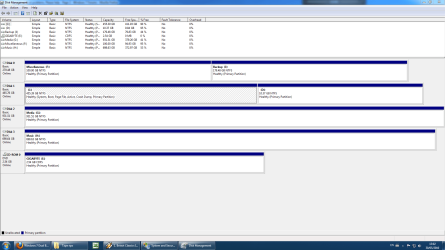
Yes, a screenshot would be helpful. Are there any hidden or EISA partitions on the HD?

Can you borrow another XP CD to try it?
 
No problem, just to clarify, is it only a screenshot of sisk management within windows 7 that you want to see? Thanks for your assistance here guys by way, i appreciate the help very much.
 

My Computer

OS
windows 7
CPU
Intel i5 750 2.66gHz
Motherboard
Gigabyte GA-P55A-UD3R
Hard Drives
Seagate Barracuda 7200 500 GB
Yes, full Disk Mgmt drive map and listings; use Snipping Tool in Start menu, attach file using paper clip in Reply box.

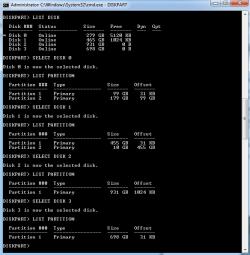
Check also for any hidden partitions by typing CMD in start search box, rightclick result to Run as Admin, type:

DISKPART
LIST DISK
SELECT DISK # (replace # with Win7 HD #)
LIST PARTITION

Now check for any partitions in list which don't appear in Disk Mgmt. Copy down all info for such a partition and post back.

EXIT
 
My apologies for the delay in getting back but i've been away. I've attached both screeshots requested, but i don't see anything out of the ordinary in the way of hidden partitions.
 

Attachments

  • disk mgmt.PNG
    disk mgmt.PNG
    51.3 KB · Views: 6
  • partition.PNG
    partition.PNG
    14.9 KB · Views: 5

My Computer

OS
windows 7
CPU
Intel i5 750 2.66gHz
Motherboard
Gigabyte GA-P55A-UD3R
Hard Drives
Seagate Barracuda 7200 500 GB
Try deleting the partition you made for XP in Win7 Disk Mgmt, then using the XP CD to create and format the partition in that space.

Try removing all but 2gb of RAM for the install. Swap RAM. Test RAM.

Test your HD using maker's diagnostics/repair full CD scan: Hard Drive Diagnostics Tools and Utilities (Storage) - TACKtech Corp.

Check the CD carefully for scratches or dirt and clean carefully.
Borrow or download another XP installer for your version.

Check also the SATA controller setting in BIOS. What is it?
 
Back
Top