Windows 7 Dual Boot

feetand nches

New member
Power User
VIP
Local time
8:04 PM
Messages
555
Can I Dual Boot Windows 7 With Windows 7? Haha, yes I know, you guys are doing a double take. I want to dual boot W7 with my current Toshiba install because it is slow to boot, explanation below.

http://speccy.piriform.com/results/1I0kvU3JPDnNeaWscG8OcUh

My current Toshiba is slow to boot but runs well. Did some stuff with "autoruns" that seemed to help, and removed some stuff that I know I didn't need. I look at the startups and not much there, but there are more things than I would like to be running once all is started up. And, when starting up, it seems that there are way more things started than should be? Lot's of my HP Printer stuff, Toshiba stuff etc. I know you will want to see some logs if helping, so just say the word and will create them with whatever software needed.

I do have a RAW W7 iso that I would like to install (dualboot) to compare, without all the Tosh and HP Junk, and just leave this install on the local HDD also. This time will not install the whole HP Printer Package and just the Driver.

This is a newish install, clean and otherwise in good health. I do scans with avast, MBAM, run MBAE, NoScript, SafeScript, ABP, Ghostery and do my best to stay out of trouble. I will see if I can Update my Signature with my Speccy.

This is a great forum, and I loooove me some W7 man! Just takes forever to boot.

Thanks Nasty7
 

My Computer

Computer type
Laptop
Computer Manufacturer/Model Number
HP Pavilion dv7-6c23cl
OS
Windows 7 Home Premium 64bit
CPU
AMD A8-3520M
Motherboard
Hewlett-Packard 180B (Socket FS1)
Memory
6.00GB DDR3 @ 674MHz (9-9-9-24)
Graphics Card(s)
512MB ATI AMD Radeon HD 6620G
Sound Card
IDT High Definition Audio CODEC
Monitor(s) Displays
Generic PnP Monitor
Screen Resolution
(1600x900@60Hz)
Hard Drives
Samsung 850 EVO 250GB SSD
Mouse
Logitec M525
Internet Speed
30-75Mbps
Antivirus
Avast Free, Unfortunately
Browser
Google Chrome, Firefox, IE
Yes you can that, best to use something like Partition Wizard and create a new partition for the other Win7 install, if you already have the hidden 100mb partition on the same drive the new Win7 will update the boot code and automatically create the boot menu for you.
 

My Computer

Computer type
Laptop
Computer Manufacturer/Model Number
Sony
OS
Windows 7 x64 SP1
CPU
Intel
Motherboard
Sony
Memory
4gb
Graphics Card(s)
Nvidia
Hard Drives
WD
Internet Speed
Dial up wasn't as bad as this !
Antivirus
Avast
Browser
Firefox
@Andyrids, thanks, that's the info I needed! I was wondering about the Partition Creation, and which tool to use. I was going to use the Inbuilt W7 tool, but you think it is better to use a third party tool? I will go that route then.
 

My Computer

Computer type
Laptop
Computer Manufacturer/Model Number
HP Pavilion dv7-6c23cl
OS
Windows 7 Home Premium 64bit
CPU
AMD A8-3520M
Motherboard
Hewlett-Packard 180B (Socket FS1)
Memory
6.00GB DDR3 @ 674MHz (9-9-9-24)
Graphics Card(s)
512MB ATI AMD Radeon HD 6620G
Sound Card
IDT High Definition Audio CODEC
Monitor(s) Displays
Generic PnP Monitor
Screen Resolution
(1600x900@60Hz)
Hard Drives
Samsung 850 EVO 250GB SSD
Mouse
Logitec M525
Internet Speed
30-75Mbps
Antivirus
Avast Free, Unfortunately
Browser
Google Chrome, Firefox, IE
No problem :)

Yes the Mini Tool Partition Wizard is more comprehensive than the built in Windows one and quicker.

On thing I did not make very clear is it is easier to make the new partition on the same HDD as the existing Win7 install so the boot loader files will get updated in the existing hidden 100mb partition...

There is quite a few other ways to do this but if your not to familiar with duel boot systems I would say it is better to do it that way...

It would be wise to make an image backup of your existing Win7 install also just in case something go's wrong, unlikely but still a possibility you know what sods law is like lol
 

My Computer

Computer type
Laptop
Computer Manufacturer/Model Number
Sony
OS
Windows 7 x64 SP1
CPU
Intel
Motherboard
Sony
Memory
4gb
Graphics Card(s)
Nvidia
Hard Drives
WD
Internet Speed
Dial up wasn't as bad as this !
Antivirus
Avast
Browser
Firefox
Okay, will use minitool, already have it on DVD.

Yes, same HDD.

System Image all done with AOMEI.

One thing you might help me with, sometimes I see NTFS as a choice, and sometimes it is FAT32, and sometimes it seems they are considered the same? I'll google it, but sometimes the answers are to technical for me.

Thanks.
 

My Computer

Computer type
Laptop
Computer Manufacturer/Model Number
HP Pavilion dv7-6c23cl
OS
Windows 7 Home Premium 64bit
CPU
AMD A8-3520M
Motherboard
Hewlett-Packard 180B (Socket FS1)
Memory
6.00GB DDR3 @ 674MHz (9-9-9-24)
Graphics Card(s)
512MB ATI AMD Radeon HD 6620G
Sound Card
IDT High Definition Audio CODEC
Monitor(s) Displays
Generic PnP Monitor
Screen Resolution
(1600x900@60Hz)
Hard Drives
Samsung 850 EVO 250GB SSD
Mouse
Logitec M525
Internet Speed
30-75Mbps
Antivirus
Avast Free, Unfortunately
Browser
Google Chrome, Firefox, IE
I don't quite follow you here mate sorry... I know NTFS and FAT32 of course but please specify where you see these options ?
 

My Computer

Computer type
Laptop
Computer Manufacturer/Model Number
Sony
OS
Windows 7 x64 SP1
CPU
Intel
Motherboard
Sony
Memory
4gb
Graphics Card(s)
Nvidia
Hard Drives
WD
Internet Speed
Dial up wasn't as bad as this !
Antivirus
Avast
Browser
Firefox
I don't quite follow you here mate sorry... I know NTFS and FAT32 of course but please specify where you see these options ?

Forget about this question, I understand now, thanks!

All went well, backed up original system and installed the second Vanilla Windows 7 at the far end of the drive. I installed to the far end because this drive is failing, CrystalDisk said "Caution" and HDTune would not even make it through most of the diagnostics. I thought this might be a better section of the drive to use, thinking maybe it had not been written to as much as the beginning or the middle, I was wrong, this install failed after a few days and could not be fixed, or even re-installed to.

I learned a lot doing this and it will be good to know when I get my new drive. Would like to attempt it again just to the right of the current install, next to C Drive. I'm trying to learn how to install all the drivers and such in prep for install to new drive.

What I would like to do now is "Restore" the MBR so that it don't have Three entries all for Windows 7, and attempt another install to the middle after shrinking the C Drive again. I know there are tutorials here but forgot where, so will post the one I was currently looking at. Not sure which option to use, could someone tell me?
How to Manually Repair Windows 7 Boot Loader Problems

I will post a screenshot of my drives, I have not made Unallocated space yet from C Drive. The E Drive is the one that is to damaged to work. I know this is not a solution to anything but for me to learn and not mess up my new Drive with the Vanilla Install.
TPEnJup.png
[/IMG]
 
Last edited:

My Computer

Computer type
Laptop
Computer Manufacturer/Model Number
HP Pavilion dv7-6c23cl
OS
Windows 7 Home Premium 64bit
CPU
AMD A8-3520M
Motherboard
Hewlett-Packard 180B (Socket FS1)
Memory
6.00GB DDR3 @ 674MHz (9-9-9-24)
Graphics Card(s)
512MB ATI AMD Radeon HD 6620G
Sound Card
IDT High Definition Audio CODEC
Monitor(s) Displays
Generic PnP Monitor
Screen Resolution
(1600x900@60Hz)
Hard Drives
Samsung 850 EVO 250GB SSD
Mouse
Logitec M525
Internet Speed
30-75Mbps
Antivirus
Avast Free, Unfortunately
Browser
Google Chrome, Firefox, IE
Last edited:

My Computer

Computer type
Laptop
Computer Manufacturer/Model Number
HP Pavilion dv7-6c23cl
OS
Windows 7 Home Premium 64bit
CPU
AMD A8-3520M
Motherboard
Hewlett-Packard 180B (Socket FS1)
Memory
6.00GB DDR3 @ 674MHz (9-9-9-24)
Graphics Card(s)
512MB ATI AMD Radeon HD 6620G
Sound Card
IDT High Definition Audio CODEC
Monitor(s) Displays
Generic PnP Monitor
Screen Resolution
(1600x900@60Hz)
Hard Drives
Samsung 850 EVO 250GB SSD
Mouse
Logitec M525
Internet Speed
30-75Mbps
Antivirus
Avast Free, Unfortunately
Browser
Google Chrome, Firefox, IE

My Computer

Computer type
PC/Desktop
Computer Manufacturer/Model Number
Skylake Special #666
OS
Windows 10 Pro x64
CPU
Intel Core i7 6700K
Motherboard
Asus Sabertooth Z170 Mark 1
Memory
GSkill TridentZ RGB 16GB 3600 16-16-16-36
Graphics Card(s)
EVGA GTX 980 Ti SC x2
Sound Card
Realtek High Definition
Monitor(s) Displays
AOC G2460PG
Screen Resolution
1920 x 1080 144Hz
Hard Drives
Samsung 860 Pro 256GB, Seagate Barracuda 4TB x2
PSU
EVGA 1000 P2, EVGA White Custom Braided Cables
Case
Corsair Vengeance C70 Gunmetal Black
Cooling
Corsair H100i v2, Corsair ML120 x2, Thermal Grizzly Kryonaut
Keyboard
Logitech G910 Orion Spectrum
Mouse
Logitech G700s
Internet Speed
Verizon Fios Quantum Gateway 75/75
Antivirus
Windows Defender, Malwarebytes Free 3.8.3
Browser
Chrome
Other Info
Corsair SP120 x4, LG Blu-ray Drive, Durabrand HT-395 100 Watt Dolby Digital Amp, Corsair H2100 Wireless 7.1 Headset
What I would like to do now is "Restore" the MBR so that it don't have Three entries all for Windows 7, and attempt another install to the middle after shrinking the C Drive again.

From what i've read i don't understand why you have Three entries for Windows 7.
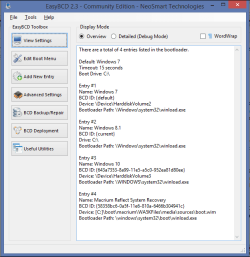
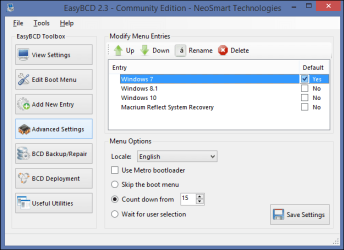
Post screen prints of EasyBCD View Settings and EasyBCD Edit Boot Menu.
If your boot menu has 3 entries all with the same name, you can rename them so they are different.
That way you will know which OS you are choosing when booting the PC, and see what works and what doesn't.

Example of EasyBCD View Settings:

EasyBCD-01.PNG

Example of EasyBCD Edit Boot Menu:

EasyBCD-02.PNG

Your Disk Management (DM) screen print in post #7 doesn't show a System partition.
I don't know if the Recovery partition is the System partition, I don't have a Recovery partition.
Maybe someone else knows about that and can explain.

Also, the DM screen print doesn't show the PURPLE32GB [F] drive in the lower pane.
Here's how to post a maximized/resized DM screen print to show all info:
http://www.sevenforums.com/tutorials/274797-disk-management-post-screen-capture-image.html
 

My Computer

Computer type
PC/Desktop
Computer Manufacturer/Model Number
home built
OS
Multi-Boot W7_Pro_x64 W8.1_Pro_x64 W10_Pro_x64 +Linux_VMs +Chromium_VM
CPU
AMD Athlon II x4 620
Motherboard
Gigabyte GA-MA785G-UD3H
Memory
6GB GSkill DDR2 800
Graphics Card(s)
AMD 4670 GPU + AMD 4200 IGP
Sound Card
on board Realtek ALC889A
Monitor(s) Displays
RCA 40" LCD TV, Insignia 32" LCD TV, HP 15" LCD monitor
Screen Resolution
1680 x 1050
Hard Drives
OCZ Vertex 3 120GB,
Samsung F3 1TB (3),
Several others - WD, Seagate, Hitachi, ...
PSU
Corsair 500 W
Case
Rosewill mid tower
Cooling
CM 90mm rifle
Keyboard
Gyration wireless, Logitech wireless, Dell USB wired
Mouse
Gyration wireless, Logitech wireless, V7 USB wired
Internet Speed
Spectrum - 100Mbps D / 10Mbps U
Antivirus
Avast, MBAM3, EMET, WinPatrol
Browser
Pale Moon, Firefox, IE
Other Info
2 multi-boot PC's
Mainly HTPC/Office/Gen purpose (no gaming).
Trendnet USB KVM.
LG DVD burner/Blue Ray Player.
Tray system for removable SATA backup drives.

Not currently OCd, under-volted.
I use Hybrid sleep, rarely re-boot or shutdown.

Hauppauge HD-PVR, Avermedia PCIe TV Tuner, Hauppauge PCI TV Tuner.
Really, you should only have 2, but just use EasyBCD as David suggests, but make sure you don`t delete the wrong entry.

Also, look at MSconfig, what does it show there ?

The reason your boot takes so long is because you`re using a spinner, and maybe so many startup programs, you need to kill all those accept 1 AV and MBAM

Everything you don`t want to run at startup can be disabled with msconfig, or even easier done with ccleaner.

When you get an ssd you will see the difference, I wouldn`t waste a dime on a spinner for the OS.
 

My Computer

Computer type
PC/Desktop
Computer Manufacturer/Model Number
Skylake Special #666
OS
Windows 10 Pro x64
CPU
Intel Core i7 6700K
Motherboard
Asus Sabertooth Z170 Mark 1
Memory
GSkill TridentZ RGB 16GB 3600 16-16-16-36
Graphics Card(s)
EVGA GTX 980 Ti SC x2
Sound Card
Realtek High Definition
Monitor(s) Displays
AOC G2460PG
Screen Resolution
1920 x 1080 144Hz
Hard Drives
Samsung 860 Pro 256GB, Seagate Barracuda 4TB x2
PSU
EVGA 1000 P2, EVGA White Custom Braided Cables
Case
Corsair Vengeance C70 Gunmetal Black
Cooling
Corsair H100i v2, Corsair ML120 x2, Thermal Grizzly Kryonaut
Keyboard
Logitech G910 Orion Spectrum
Mouse
Logitech G700s
Internet Speed
Verizon Fios Quantum Gateway 75/75
Antivirus
Windows Defender, Malwarebytes Free 3.8.3
Browser
Chrome
Other Info
Corsair SP120 x4, LG Blu-ray Drive, Durabrand HT-395 100 Watt Dolby Digital Amp, Corsair H2100 Wireless 7.1 Headset

My Computer

Computer type
Laptop
Computer Manufacturer/Model Number
HP Pavilion dv7-6c23cl
OS
Windows 7 Home Premium 64bit
CPU
AMD A8-3520M
Motherboard
Hewlett-Packard 180B (Socket FS1)
Memory
6.00GB DDR3 @ 674MHz (9-9-9-24)
Graphics Card(s)
512MB ATI AMD Radeon HD 6620G
Sound Card
IDT High Definition Audio CODEC
Monitor(s) Displays
Generic PnP Monitor
Screen Resolution
(1600x900@60Hz)
Hard Drives
Samsung 850 EVO 250GB SSD
Mouse
Logitec M525
Internet Speed
30-75Mbps
Antivirus
Avast Free, Unfortunately
Browser
Google Chrome, Firefox, IE
Your Disk Management (DM) screen print in post #7 doesn't show a System partition.
I don't know if the Recovery partition is the System partition, I don't have a Recovery partition.
Maybe someone else knows about that and can explain.
Yes that is a good question. I looked it up to understand the Terminology, but I think you are correct in thinking, it is indeed a "System" Partition and not a Recovery Partition. Recovery would be much bigger right? And it is always marked as "Active" so I think that would signify it is "System" Partition. I don't have a Recovery Partition.

Sorry was unclear, I was concerned about having another Boot Entry if I did another Install. Already had done the second install and had two Entries. But that install failed, so wanted to do another to a better part of the drive, so wanted to remove the second before I installed again, so I wouldn't end up with three Entries. Repeat: My drive is failing, so I am using this as an opportunity to sharpen my Install skills to prepare for new Drive. As I can see it was a good idea lol. I am learning some basic stuff that will help a lot.

I fixed the Entry problem by just Deleting the Volume of E-Drive, which was the Volume that the second install went to. Did not have to use EasyBCD after all, but did download it for future use.

The PRUPLE32GB is just a USB.

Thanks DavidE! That is an impressive triple boot you got there, I guess it might not be yours though. Thanks for all the screenshots of EBCD that will be of help later. Hopefully I can afford a decent size Drive but it's not looking that way, so will most likely be a single boot. I need RAM also, so might have to go with a 120GB SSD.

Good for now guys, you have been a lot of help, and this forum is awesome. Should get new Drive soon and will be back!
 
Last edited:

My Computer

Computer type
Laptop
Computer Manufacturer/Model Number
HP Pavilion dv7-6c23cl
OS
Windows 7 Home Premium 64bit
CPU
AMD A8-3520M
Motherboard
Hewlett-Packard 180B (Socket FS1)
Memory
6.00GB DDR3 @ 674MHz (9-9-9-24)
Graphics Card(s)
512MB ATI AMD Radeon HD 6620G
Sound Card
IDT High Definition Audio CODEC
Monitor(s) Displays
Generic PnP Monitor
Screen Resolution
(1600x900@60Hz)
Hard Drives
Samsung 850 EVO 250GB SSD
Mouse
Logitec M525
Internet Speed
30-75Mbps
Antivirus
Avast Free, Unfortunately
Browser
Google Chrome, Firefox, IE
Also, look at MSconfig, what does it show there ?

The reason your boot takes so long is because you`re using a spinner, and maybe so many startup programs, you need to kill all those accept 1 AV and MBAM

Everything you don`t want to run at startup can be disabled with msconfig, or even easier done with ccleaner.
I did a bunch of cleaning with Revo and autoruns, startups look pretty lean now. Startup is much better considering hardware issues. Still need to do more but learning. The Vanilla startup was even better while it was running, but then it failed. I might try another Vanilla Install to learn more about installing drivers. I have the Driver Managers already and all drivers Backed up multiple times. Looking forward to a Vanilla install on an SSD! that should be really fast.

Nasty7
 

My Computer

Computer type
Laptop
Computer Manufacturer/Model Number
HP Pavilion dv7-6c23cl
OS
Windows 7 Home Premium 64bit
CPU
AMD A8-3520M
Motherboard
Hewlett-Packard 180B (Socket FS1)
Memory
6.00GB DDR3 @ 674MHz (9-9-9-24)
Graphics Card(s)
512MB ATI AMD Radeon HD 6620G
Sound Card
IDT High Definition Audio CODEC
Monitor(s) Displays
Generic PnP Monitor
Screen Resolution
(1600x900@60Hz)
Hard Drives
Samsung 850 EVO 250GB SSD
Mouse
Logitec M525
Internet Speed
30-75Mbps
Antivirus
Avast Free, Unfortunately
Browser
Google Chrome, Firefox, IE
Yea, i misundertood, i thought you already had 3 Windows boot entries.

Look at Minitool Partition Wizard to see what it shows for Status.
That might clearly show where your bootloader is located.
Your Recovery Partiton might have recovery utilites (and the bootloader).
You would have to research what it is used for, for your PC make/model at the manufacturer support site.

DM and PW have different meanings for the same "status word", so it makes it confusing.

i.e.

DM Status
- Boot = the partition Windows is running on
- System = the partition the bootloader is on

PW Status
- Boot = the partition the bootloader is on
- System = the partition Windows is running on

My screen prints in post #10 are from my PC.
I can post screen prints of DM and PW if that will help you.
 

My Computer

Computer type
PC/Desktop
Computer Manufacturer/Model Number
home built
OS
Multi-Boot W7_Pro_x64 W8.1_Pro_x64 W10_Pro_x64 +Linux_VMs +Chromium_VM
CPU
AMD Athlon II x4 620
Motherboard
Gigabyte GA-MA785G-UD3H
Memory
6GB GSkill DDR2 800
Graphics Card(s)
AMD 4670 GPU + AMD 4200 IGP
Sound Card
on board Realtek ALC889A
Monitor(s) Displays
RCA 40" LCD TV, Insignia 32" LCD TV, HP 15" LCD monitor
Screen Resolution
1680 x 1050
Hard Drives
OCZ Vertex 3 120GB,
Samsung F3 1TB (3),
Several others - WD, Seagate, Hitachi, ...
PSU
Corsair 500 W
Case
Rosewill mid tower
Cooling
CM 90mm rifle
Keyboard
Gyration wireless, Logitech wireless, Dell USB wired
Mouse
Gyration wireless, Logitech wireless, V7 USB wired
Internet Speed
Spectrum - 100Mbps D / 10Mbps U
Antivirus
Avast, MBAM3, EMET, WinPatrol
Browser
Pale Moon, Firefox, IE
Other Info
2 multi-boot PC's
Mainly HTPC/Office/Gen purpose (no gaming).
Trendnet USB KVM.
LG DVD burner/Blue Ray Player.
Tray system for removable SATA backup drives.

Not currently OCd, under-volted.
I use Hybrid sleep, rarely re-boot or shutdown.

Hauppauge HD-PVR, Avermedia PCIe TV Tuner, Hauppauge PCI TV Tuner.
Yea, i misundertood, i thought you already had 3 Windows boot entries.

Look at Minitool Partition Wizard to see what it shows for Status.
That might clearly show where your bootloader is located.
Your Recovery Partiton might have recovery utilites (and the bootloader).
You would have to research what it is used for, for your PC make/model at the manufacturer support site.

DM and PW have different meanings for the same "status word", so it makes it confusing.

I can post screen prints of DM and PW if that will help you.
I will do this in Minitool! Yes "Recovery and bootloader" on that Recovery Paritition, it's all a bit confusing to non-techie's like me. I was assuming the Recovery had the bootloader because it is always marked as "Active".

"DM and PW": Yes, confusing to say the least lol.

"I can post screen prints of DM and PW": Really appreciate that but I think I'm all good for now. I just need more money and more practive lol. I'm booting straight into W7 as a single boot now after Deleting the "Volume" of the Practice Install Partition. There was a really Bad Sector there somewhere so it failed, and could not even reinstall to it. This was a second hand drive I got for free from a friend so all is not lost. No important data etc.

I recently realized that I had an old laptop laying around that is pretty low mileage. It has poor hardware and is quite old, xp, single core cpu, amd graphics(and not the popular one)no sound etc. I never thought that the HDD would be compatible with the one on this Modern Toshiba, but it is. For now, I think I will use it and see how it goes. This time of course will just do a single boot with Vanilla W7, that's all I really need for now. The HDD is only 80GB anyhow, so think I'll learn some more with this old HDD and then try to get an SSD when I got all the install stuff learned.

This is a great forum, being Windows 7 Specific is truly awesome!
 
Last edited:

My Computer

Computer type
Laptop
Computer Manufacturer/Model Number
HP Pavilion dv7-6c23cl
OS
Windows 7 Home Premium 64bit
CPU
AMD A8-3520M
Motherboard
Hewlett-Packard 180B (Socket FS1)
Memory
6.00GB DDR3 @ 674MHz (9-9-9-24)
Graphics Card(s)
512MB ATI AMD Radeon HD 6620G
Sound Card
IDT High Definition Audio CODEC
Monitor(s) Displays
Generic PnP Monitor
Screen Resolution
(1600x900@60Hz)
Hard Drives
Samsung 850 EVO 250GB SSD
Mouse
Logitec M525
Internet Speed
30-75Mbps
Antivirus
Avast Free, Unfortunately
Browser
Google Chrome, Firefox, IE
Good, you should start learning how to use the PW Boot CD, I use it to setup any new OS drive.

Create 1 primary partition out of the entire drive, Format it NTFS, mark it Active and Align it, it`s a great tool, and you end up with 1 partition, no System Reserved partition (unneeded anyway) once you learn to use it you can go crazy :)

https://www.partitionwizard.com/partition-wizard-bootable-cd.html
 

My Computer

Computer type
PC/Desktop
Computer Manufacturer/Model Number
Skylake Special #666
OS
Windows 10 Pro x64
CPU
Intel Core i7 6700K
Motherboard
Asus Sabertooth Z170 Mark 1
Memory
GSkill TridentZ RGB 16GB 3600 16-16-16-36
Graphics Card(s)
EVGA GTX 980 Ti SC x2
Sound Card
Realtek High Definition
Monitor(s) Displays
AOC G2460PG
Screen Resolution
1920 x 1080 144Hz
Hard Drives
Samsung 860 Pro 256GB, Seagate Barracuda 4TB x2
PSU
EVGA 1000 P2, EVGA White Custom Braided Cables
Case
Corsair Vengeance C70 Gunmetal Black
Cooling
Corsair H100i v2, Corsair ML120 x2, Thermal Grizzly Kryonaut
Keyboard
Logitech G910 Orion Spectrum
Mouse
Logitech G700s
Internet Speed
Verizon Fios Quantum Gateway 75/75
Antivirus
Windows Defender, Malwarebytes Free 3.8.3
Browser
Chrome
Other Info
Corsair SP120 x4, LG Blu-ray Drive, Durabrand HT-395 100 Watt Dolby Digital Amp, Corsair H2100 Wireless 7.1 Headset
Good, you should start learning how to use the PW Boot CD, I use it to setup any new OS drive.

Create 1 primary partition out of the entire drive, Format it NTFS, mark it Active and Align it, it`s a great tool, and you end up with 1 partition, no System Reserved partition (unneeded anyway) once you learn to use it you can go crazy :)

https://www.partitionwizard.com/partition-wizard-bootable-cd.html
That is a good tip AddRAM! You don't think there is any advantage to have the System Reserved Partition?

For some reason I was thinking it was for Boot Files only but that is not true is it?

Thanks, Nasty7
 

My Computer

Computer type
Laptop
Computer Manufacturer/Model Number
HP Pavilion dv7-6c23cl
OS
Windows 7 Home Premium 64bit
CPU
AMD A8-3520M
Motherboard
Hewlett-Packard 180B (Socket FS1)
Memory
6.00GB DDR3 @ 674MHz (9-9-9-24)
Graphics Card(s)
512MB ATI AMD Radeon HD 6620G
Sound Card
IDT High Definition Audio CODEC
Monitor(s) Displays
Generic PnP Monitor
Screen Resolution
(1600x900@60Hz)
Hard Drives
Samsung 850 EVO 250GB SSD
Mouse
Logitec M525
Internet Speed
30-75Mbps
Antivirus
Avast Free, Unfortunately
Browser
Google Chrome, Firefox, IE
Back
Top