Windows 7 DvD Missing After Re-install

MICKFREE

New member
Local time
7:41 PM
Messages
8
In short reinstalled Windows 7 and now the DVD is Missing

- DVD AD-7581A
- Tried the auto windows fix no luck
- checked for lower/upper filters not in registry
- ATARI /CONTROL0 enTRY LISTED
- nothing seem to working
 

My Computer

Computer type
Laptop
Computer Manufacturer/Model Number
hp and Dell
OS
Windows Home Premium
CPU
amd tm 64 tl-60 2.00ghz
Memory
3gb
Hi welcome to the forum

turn laptop off take out drive then turn back on laptop then shut down again and put drive back in. does it show in device manager now?

also before doing the above does the drive show in bios?
 

My Computer

Computer type
PC/Desktop
Computer Manufacturer/Model Number
dell xps 9000
OS
win 10
yes it shows in bios i tried that but will try again. thanks so much.
 

My Computer

Computer type
Laptop
Computer Manufacturer/Model Number
hp and Dell
OS
Windows Home Premium
CPU
amd tm 64 tl-60 2.00ghz
Memory
3gb
still didn't work
 

My Computer

Computer type
Laptop
Computer Manufacturer/Model Number
hp and Dell
OS
Windows Home Premium
CPU
amd tm 64 tl-60 2.00ghz
Memory
3gb
i tried those options
a different drive from another pc
copy cdrom.sys and cdrom.inf and pnf files to the drivers and inf directories still no luck
 

My Computer

Computer type
Laptop
Computer Manufacturer/Model Number
hp and Dell
OS
Windows Home Premium
CPU
amd tm 64 tl-60 2.00ghz
Memory
3gb
I won't have time to follow up, sorry. So only giving some ideas! :)

Another filter driver may be disabling the DVD-drive perhaps, though I am not sure if it would cause drive to vanish. Could you try running Autoruns (https://technet.microsoft.com/en-us/sysinternals/bb963902.aspx) please? When it opens switch to "Drivers" tab and filter by word "filter". Screenshot perhaps..

Does it show and work in Safe Mode?

Does it work if you boot with a Live Linux distro?
 

My Computer

Computer type
PC/Desktop
Computer Manufacturer/Model Number
Custom Build
OS
Windows 7 Ultimate x64 SP1
CPU
AMD Phenom 2 1090T
Motherboard
Gigabyte GA-890FXA-UD5
Memory
2x8GB Kingston HyperX Fury Black 1600Mhz Unganged
Graphics Card(s)
MSI GTX 970 Gaming 4G
Sound Card
Realtek On-Board HD 7.1 Audio / Logitech G35
Monitor(s) Displays
3xAcer GD245HQ
Screen Resolution
1920x1080
Hard Drives
Samsung 850 Pro 512GB SSD - OS /
WD Caviar Black SATA 3 - 1 TBx2 - Dynamic RAID 0 /
WD Caviar Green SATA 2 - 640GBx2 - Dynamic RAID 0 /
WD Caviar Green SATA 2 - 640GB - Internal Backup /
Seagate Barracude SATA 3 - 3TB - External Backup/ Sync
PSU
HighPower 1000W
Case
Cooler Master HAF 932
Cooling
Noctua NH-D14
Keyboard
Logitech G19
Mouse
Logitech G500
Internet Speed
100/4 Mbit Cable (100GB quota)
Antivirus
ZoneAlarm Extreme Security / MBAM Pro / MBAE Free / SAS Free
Browser
IE 11 - Firefox - Chrome
Other Info
Logitech F710/ G27/ G940/ Z5500 // TrackIR 5 // Nvidia 3D Surround Vision
Mick mate are you running a SSD and is it a Samsung if you are? because most folks who have the Samsung SSD's run the Magician software for that drive and it can cause loss of other hardware disappearances. I lost my USB ports on one of my desktops for that very reason the cure get rid of the software and then reinstall it if you want to.

I am also assuming you have installed all the drivers for this machine?? Now while I am thinking of it you don't mention (unless I have missed it) the model of the laptop that is giving you grief as you have two listed in specs so model number please.
 

My Computer

Computer type
PC/Desktop
Computer Manufacturer/Model Number
Own build (new) Desk1 / Asus ROG Win 7 / Desk2 1st build
OS
Desk1 7 Home Prem / Desk2 10 Pro / Main lap Asus ROG 10 Pro 2 laptop Toshiba 7 Pro Asus P2520 7 & 10
CPU
Desk1 i5 3750K / Laptop i7 GTX 860M / Desk2 i5 2500
Motherboard
Desk1 Asus P877-V / Desk2 Gigabyte H67 UD3H / Laptop ?
Memory
Desk1 8GB (1866) / Desk2 16GB (1333) / Laptop 8Gb DDR3
Graphics Card(s)
Desk 1& 2NVidia GTX 650 & Laptops on board Intel
Sound Card
Desk 1 & 2 -XONAR DG Realtek High Def audio Laptop
Monitor(s) Displays
Desk 1 Benq HD 2450 / Desk2 Philips 24" / Laptop 17.5"
Screen Resolution
1920x1080 D1 & D2 & Laptop 1
Hard Drives
Desk1 Samsung 120GB 830 SSD
Asus ROG 256GB 850 Pro SSD
Desk2 Samsung 840 256 SSD
Toshiba 120GB EVO
PSU
Desk 1 Corsair HX 1050/ Laptop ? / Desk 2 Corsair HX 650
Case
Desk 1 Cooler HAF XM ? Toshiba laptop / Desk2 Coolermaster
Cooling
Fans on all Desk1 -2 Desk2 - all Coolermasters 5 Laptop ?
Keyboard
Desk 1 MS Sidewinder X6 Desk 2 MS Sidewinder X 4
Mouse
Desk 1&2 - Gigabyte MS 900 gamer - laptop - Logitec wireless
Internet Speed
ADSL2+
Other Info
One other Desktop (tester) and spare Toshba laptop both with SSD's
Running Kaspersky 2016 ISS on all machines config'd identically
Logitec audio stereo systems on each machine (x3)
Canon MG5250MFC
Router/modem TP-Link running WPA2SK
no i don't have a ssd. I'm about to really give up on this. Despite this being so common i'm having the hardiest time with it. I now thinking it a hardware issue. What decided to do is trying re-verting back to the previous install by copying back the windows.old folder. But i'm getting an error trying to

c:\move -y "c:\windows.old\Documents and settings" c;\

error cant locate the file specified or something like that
 

My Computer

Computer type
Laptop
Computer Manufacturer/Model Number
hp and Dell
OS
Windows Home Premium
CPU
amd tm 64 tl-60 2.00ghz
Memory
3gb
In short reinstalled Windows 7 and now the DVD is Missing
I have noticed that it is a laptop; still asking just to be sure .... it it the OEM disk or a retail pack of two disks?
 
Last edited:

My Computer

Computer type
PC/Desktop
Computer Manufacturer/Model Number
Self Assembled
OS
Microsoft Windows 10 Pro Insider Preview 64-bit
CPU
Intel(R) Core(TM) i3-4130 CPU @ 3.40GHz
Motherboard
Gigabyte Technology Co., Ltd. B85M-D3H
Memory
Corsair Vengence 4GB x2 (8.00GB Dual-Channel DDR3 @ 798MHz)
Graphics Card(s)
2047MB GeForce GTS 450 (ZOTAC International)
Sound Card
Onboard (Realtek High Definition Audio)
Monitor(s) Displays
LG Flatron E2040T
Screen Resolution
1600x900
Hard Drives
Western Digital 1 TB
Seagate 500 GB
PSU
Corsair VS550
Case
Cooler Master K380
Cooling
Cooler Master Seidon 120V Plus
Keyboard
Logitech MK260r
Mouse
Logitech MK260r
Internet Speed
PMPL Broadband
Antivirus
Windows Defender + MBAM
Browser
Firefox
Other Info
Dell Studio 15" Laptop
This is an HP DV6700 laptop.
- tired copying back the old installation but ran into issues moving directories from windows.old to the windows directory. So i got frustrated created a bootable usb with vista and re-installed vista still no cd-rom it seem like i tried all the posted fixes several times. But no luck. I have other devices listed in and message that new hardware is detected but it can install the drivers. I downloaded the driver and copied to the drivers and inf folders but no luck. Soo im at the point of installing Win 7 with a usb DVD, but and the moment don't know if the cdrom will appear.
 

My Computer

Computer type
Laptop
Computer Manufacturer/Model Number
hp and Dell
OS
Windows Home Premium
CPU
amd tm 64 tl-60 2.00ghz
Memory
3gb
Mick sorry late reply but I just don't undrstand why the device is showing in the BIOS yet not anywhere else?? So nothing at all in the Device Manager??
 

My Computer

Computer type
PC/Desktop
Computer Manufacturer/Model Number
Own build (new) Desk1 / Asus ROG Win 7 / Desk2 1st build
OS
Desk1 7 Home Prem / Desk2 10 Pro / Main lap Asus ROG 10 Pro 2 laptop Toshiba 7 Pro Asus P2520 7 & 10
CPU
Desk1 i5 3750K / Laptop i7 GTX 860M / Desk2 i5 2500
Motherboard
Desk1 Asus P877-V / Desk2 Gigabyte H67 UD3H / Laptop ?
Memory
Desk1 8GB (1866) / Desk2 16GB (1333) / Laptop 8Gb DDR3
Graphics Card(s)
Desk 1& 2NVidia GTX 650 & Laptops on board Intel
Sound Card
Desk 1 & 2 -XONAR DG Realtek High Def audio Laptop
Monitor(s) Displays
Desk 1 Benq HD 2450 / Desk2 Philips 24" / Laptop 17.5"
Screen Resolution
1920x1080 D1 & D2 & Laptop 1
Hard Drives
Desk1 Samsung 120GB 830 SSD
Asus ROG 256GB 850 Pro SSD
Desk2 Samsung 840 256 SSD
Toshiba 120GB EVO
PSU
Desk 1 Corsair HX 1050/ Laptop ? / Desk 2 Corsair HX 650
Case
Desk 1 Cooler HAF XM ? Toshiba laptop / Desk2 Coolermaster
Cooling
Fans on all Desk1 -2 Desk2 - all Coolermasters 5 Laptop ?
Keyboard
Desk 1 MS Sidewinder X6 Desk 2 MS Sidewinder X 4
Mouse
Desk 1&2 - Gigabyte MS 900 gamer - laptop - Logitec wireless
Internet Speed
ADSL2+
Other Info
One other Desktop (tester) and spare Toshba laptop both with SSD's
Running Kaspersky 2016 ISS on all machines config'd identically
Logitec audio stereo systems on each machine (x3)
Canon MG5250MFC
Router/modem TP-Link running WPA2SK
Nothing in device manager saying dvd\cd
Bios give option for CD.
 

My Computer

Computer type
Laptop
Computer Manufacturer/Model Number
hp and Dell
OS
Windows Home Premium
CPU
amd tm 64 tl-60 2.00ghz
Memory
3gb
Bios give option for CD

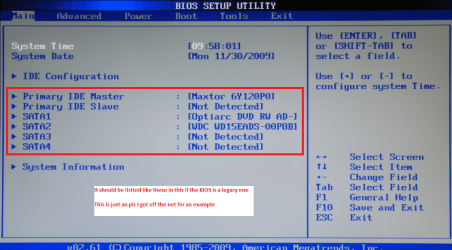
Ok mate so I have it right the BIOS only gives an option for an optical drive boot choice? it doesn't actually list the optical drive as such - usually the devices have their brand or some wort of serial number listed in the BIOS. Any chance of a pic of the BIOS as opened it should be and I stand to be corrected the General or the first section as you open the BIOS. see pic
 

Attachments

  • BIOS 1.PNG
    BIOS 1.PNG
    293.3 KB · Views: 1

My Computer

Computer type
PC/Desktop
Computer Manufacturer/Model Number
Own build (new) Desk1 / Asus ROG Win 7 / Desk2 1st build
OS
Desk1 7 Home Prem / Desk2 10 Pro / Main lap Asus ROG 10 Pro 2 laptop Toshiba 7 Pro Asus P2520 7 & 10
CPU
Desk1 i5 3750K / Laptop i7 GTX 860M / Desk2 i5 2500
Motherboard
Desk1 Asus P877-V / Desk2 Gigabyte H67 UD3H / Laptop ?
Memory
Desk1 8GB (1866) / Desk2 16GB (1333) / Laptop 8Gb DDR3
Graphics Card(s)
Desk 1& 2NVidia GTX 650 & Laptops on board Intel
Sound Card
Desk 1 & 2 -XONAR DG Realtek High Def audio Laptop
Monitor(s) Displays
Desk 1 Benq HD 2450 / Desk2 Philips 24" / Laptop 17.5"
Screen Resolution
1920x1080 D1 & D2 & Laptop 1
Hard Drives
Desk1 Samsung 120GB 830 SSD
Asus ROG 256GB 850 Pro SSD
Desk2 Samsung 840 256 SSD
Toshiba 120GB EVO
PSU
Desk 1 Corsair HX 1050/ Laptop ? / Desk 2 Corsair HX 650
Case
Desk 1 Cooler HAF XM ? Toshiba laptop / Desk2 Coolermaster
Cooling
Fans on all Desk1 -2 Desk2 - all Coolermasters 5 Laptop ?
Keyboard
Desk 1 MS Sidewinder X6 Desk 2 MS Sidewinder X 4
Mouse
Desk 1&2 - Gigabyte MS 900 gamer - laptop - Logitec wireless
Internet Speed
ADSL2+
Other Info
One other Desktop (tester) and spare Toshba laptop both with SSD's
Running Kaspersky 2016 ISS on all machines config'd identically
Logitec audio stereo systems on each machine (x3)
Canon MG5250MFC
Router/modem TP-Link running WPA2SK

My Computer

Computer type
PC/Desktop
Computer Manufacturer/Model Number
Home made Desktop
OS
Windows 10 Pro. 64/ version 1709 Windows 7 Pro/64
CPU
Intel i7-6800K @ 4.3
Motherboard
ASUS X-99 Deluxe II
Memory
Corsair Platinum 16 gig @2400
Graphics Card(s)
EVGA GTX 1070 OC
Monitor(s) Displays
Asus 27" LED LCD/VE278Q
Screen Resolution
1920-1080 or 1280-720 HDMI
Hard Drives
INTEL SSD 730-240 Gb Sata 3.0/
PSU
EVGA Platium 1200W
Case
Phanteks Luxe Tempered Glass 8 fans/ one radiator
Cooling
XSPC/ Water Cooled CPU
Keyboard
Das 4 Professional
Mouse
Logitech M705/MX Anywhere 2-S
Internet Speed
100 mbits
Antivirus
Microsoft Security Essentials/ Malwarebytes Premium 3.0/ SAS
Browser
I.E. 11 default/Firefox/ ISP Time Warner Cable/Spectrum
Other Info
LG BluRay Burner/
Sound system-KLipsch-THX/
Icy Dock ssd Hot Swap bays.
Okay here is the latest I rebooted my machine went into my BIOS the bio show the option to change boot order and the option for CD DVD to be disabled and running however when I reboot my machine and press F9 to change boot order the CD does not appear in the list only my hard drive in my thumb drive that I had inserted I tried to remove the CD ROM boot up where it's not detected power down reinserted boot up and it's still not listed in the boot order my BIOS doesn't look like the files listed on the screen where I have the option for the CD to be set up or install so I'm anticipating that I'm having a hardware issue with it not being detected on the motherboard.
 

My Computer

Computer type
Laptop
Computer Manufacturer/Model Number
hp and Dell
OS
Windows Home Premium
CPU
amd tm 64 tl-60 2.00ghz
Memory
3gb
Yes well the BIOS should have any device listed like the pic I only used that as an example it might take some digging around in the BIOS settings to find it.

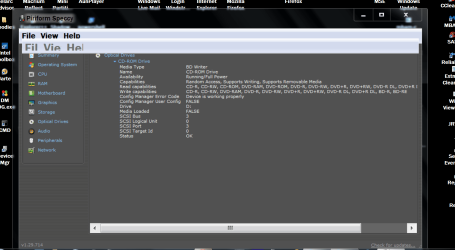
In addition to Layback Bears suggestion this is also good for finding details and in quite some depth too on your machines internals.
Using HW Info
PART A:
You can test the volts on the PSU with HW Info HWiNFO, HWiNFO32/64 - Download < download the right bit version and close the right hand window select Sensors and scroll down to the power section where you will see what the volts are doing see my pic. In my pic the section (Nuvoton) with VBATT is a dead give away you are in the section for the rail voltages. There are other section titles and one that pops up often is ITE
Now the voltage on the different rails have to be within 5% =+/- of what is required or the machine will not work properly if at all.
Limits +/-
12v = 11.4 – 12.6v
5v = 4.74 – 5.25v
3.3v = 3.135 – 3.465v
The Power good signal voltage at pin 8 on the 24 pin plug (grey cable) should be the same as the 5v rail reading/s
See this for the rail voltage info
Power Supply 101: A Reference Of Specifications - Power Supplies (Section 2.)
The original right hand window shows the machine running and is handy for that but for looking at the components in some detail close it and use the main left hand side panel
FOR OTHER COMPONENTS
PART B:
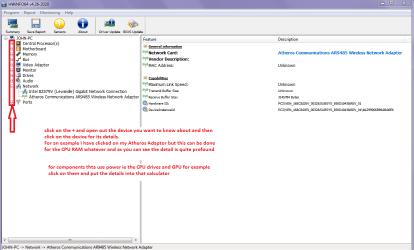
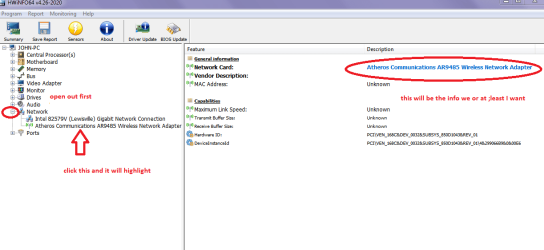
Open each small square with + in it on the section the components are in and then click on the individual component/s (it will highlight in blue) - in the right hand side will appear all sorts of details including brands speeds and other essential info that particular device. See pic for example.

Use PART B: Have attached two example pics

 

Attachments

  • HW INFO DEVICES.PNG
    HW INFO DEVICES.PNG
    32.3 KB · Views: 0
  • HW INFO NETWORK ADAPTOR.PNG
    HW INFO NETWORK ADAPTOR.PNG
    25.1 KB · Views: 0

My Computer

Computer type
PC/Desktop
Computer Manufacturer/Model Number
Own build (new) Desk1 / Asus ROG Win 7 / Desk2 1st build
OS
Desk1 7 Home Prem / Desk2 10 Pro / Main lap Asus ROG 10 Pro 2 laptop Toshiba 7 Pro Asus P2520 7 & 10
CPU
Desk1 i5 3750K / Laptop i7 GTX 860M / Desk2 i5 2500
Motherboard
Desk1 Asus P877-V / Desk2 Gigabyte H67 UD3H / Laptop ?
Memory
Desk1 8GB (1866) / Desk2 16GB (1333) / Laptop 8Gb DDR3
Graphics Card(s)
Desk 1& 2NVidia GTX 650 & Laptops on board Intel
Sound Card
Desk 1 & 2 -XONAR DG Realtek High Def audio Laptop
Monitor(s) Displays
Desk 1 Benq HD 2450 / Desk2 Philips 24" / Laptop 17.5"
Screen Resolution
1920x1080 D1 & D2 & Laptop 1
Hard Drives
Desk1 Samsung 120GB 830 SSD
Asus ROG 256GB 850 Pro SSD
Desk2 Samsung 840 256 SSD
Toshiba 120GB EVO
PSU
Desk 1 Corsair HX 1050/ Laptop ? / Desk 2 Corsair HX 650
Case
Desk 1 Cooler HAF XM ? Toshiba laptop / Desk2 Coolermaster
Cooling
Fans on all Desk1 -2 Desk2 - all Coolermasters 5 Laptop ?
Keyboard
Desk 1 MS Sidewinder X6 Desk 2 MS Sidewinder X 4
Mouse
Desk 1&2 - Gigabyte MS 900 gamer - laptop - Logitec wireless
Internet Speed
ADSL2+
Other Info
One other Desktop (tester) and spare Toshba laptop both with SSD's
Running Kaspersky 2016 ISS on all machines config'd identically
Logitec audio stereo systems on each machine (x3)
Canon MG5250MFC
Router/modem TP-Link running WPA2SK
Back
Top