Solved Windows 7 Error Memory2.5Gb Ram

LegendAndy

New member
Local time
3:25 AM
Messages
8
I have a laptop with win 7 installed. The problem is that win 7 see only 2.5 Gb ram
instead of 3 Gb (real).
So, please give me a helping hand in order to solve this problem.:D
 

My Computer

OS
Windows 7 Ultimate x86 (32-bit)
Do you have any onboard graphic card?
You can enable 'Memory Remap' in your BIOS if it is listed
 

My Computer

Computer type
PC/Desktop
Computer Manufacturer/Model Number
Custom Build
OS
Windows 10 Pro x64, Arch Linux
CPU
Intel Core 2 Quad Q8200 OC'd 3.08GHz
Motherboard
Asus Rampage formula LGA775
Memory
8GB DDR2 900Mhz
Graphics Card(s)
MSI GT730 2GB GDDR5 (Kepler)
Sound Card
Supreme FX2
Monitor(s) Displays
Samsung LS22F350 LED
Screen Resolution
1080P
Hard Drives
Kingston SSDNow UV400 120GB, 500GB Hitachi, 2TB Samsung, 500GB Seagate FreeAgent, 640GB Samsung, 160GB Toshiba (Arch)
PSU
AeroCool 500W Bronze
Cooling
Cooler Master V6 + 3X fans
Keyboard
Prolink keyboard
Mouse
Logitech M705
Internet Speed
1MiB/s
Browser
Chrome Beta
Yes i have a Graphic Card nVidia GeForce Gt 420M.
The option memory remap is not listed in my bios.
 

My Computer

OS
Windows 7 Ultimate x86 (32-bit)
Then the 0.5GB may be hardware reserved for your 420M, theres nothing you can do, but you can add additional RAM
 

My Computer

Computer type
PC/Desktop
Computer Manufacturer/Model Number
Custom Build
OS
Windows 10 Pro x64, Arch Linux
CPU
Intel Core 2 Quad Q8200 OC'd 3.08GHz
Motherboard
Asus Rampage formula LGA775
Memory
8GB DDR2 900Mhz
Graphics Card(s)
MSI GT730 2GB GDDR5 (Kepler)
Sound Card
Supreme FX2
Monitor(s) Displays
Samsung LS22F350 LED
Screen Resolution
1080P
Hard Drives
Kingston SSDNow UV400 120GB, 500GB Hitachi, 2TB Samsung, 500GB Seagate FreeAgent, 640GB Samsung, 160GB Toshiba (Arch)
PSU
AeroCool 500W Bronze
Cooling
Cooler Master V6 + 3X fans
Keyboard
Prolink keyboard
Mouse
Logitech M705
Internet Speed
1MiB/s
Browser
Chrome Beta
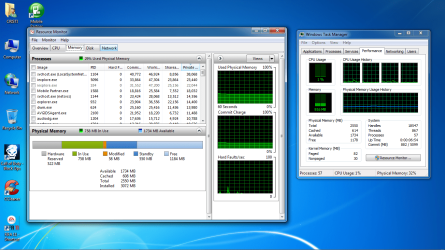
Right click on bottom task bar
Bring up task manger
Resource monitor
Memory tab
See how its being used?
 

My Computer

Computer type
PC/Desktop
Computer Manufacturer/Model Number
Dell XPS 420
OS
Windows 10, Home Clean Install
CPU
Intel Core2 processsor Q8200(2.33Ghz 1333FSB) Quad Core Tech
Motherboard
Dell
Memory
6 gb
Graphics Card(s)
ATI Radeon 256MB HD3650
Sound Card
Intergrated 7.1 Channel Audio
Monitor(s) Displays
Dell SP2009W 20"
Hard Drives
640 GB Serial ATA Hard drive
Cooling
Fan
Keyboard
Dell USB Keyboard
Mouse
Dell Premium Optical USB
Internet Speed
DSL 2.85
Avaible 1860
Cached 1008
Total 2550
Installed 3072
What i must do to run all of my Ram ?
 

My Computer

OS
Windows 7 Ultimate x86 (32-bit)
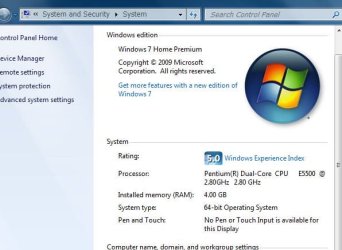
You won't be able to use all your RAM as the 500MB is allocated to your 420M
 

My Computer

Computer type
PC/Desktop
Computer Manufacturer/Model Number
Custom Build
OS
Windows 10 Pro x64, Arch Linux
CPU
Intel Core 2 Quad Q8200 OC'd 3.08GHz
Motherboard
Asus Rampage formula LGA775
Memory
8GB DDR2 900Mhz
Graphics Card(s)
MSI GT730 2GB GDDR5 (Kepler)
Sound Card
Supreme FX2
Monitor(s) Displays
Samsung LS22F350 LED
Screen Resolution
1080P
Hard Drives
Kingston SSDNow UV400 120GB, 500GB Hitachi, 2TB Samsung, 500GB Seagate FreeAgent, 640GB Samsung, 160GB Toshiba (Arch)
PSU
AeroCool 500W Bronze
Cooling
Cooler Master V6 + 3X fans
Keyboard
Prolink keyboard
Mouse
Logitech M705
Internet Speed
1MiB/s
Browser
Chrome Beta
Avaible 1860
Cached 1008
Total 2550
Installed 3072
What i must do to run all of my Ram ?
help plzzzzzzzzz
Hi, LegendAndy, welcome to the Seven Forums. :)

Going by the figures you posted you are using all of your RAM. Take a screenshot of the memory usage bar in the "Resource Monitor" to which rich46 directed you. That would be very helpful. You will more than likely find yowanvista to be correct in stating the RAM you think you are missing is reserved for hardware.
 

My Computer

Computer Manufacturer/Model Number
Toshiba L355D
OS
Windows 7 Ultimate x64 SP1
CPU
Core2 Duo
Motherboard
Intel
Memory
4 GB
Graphics Card(s)
GM965 on-board
Sound Card
RealTek on-board
Monitor(s) Displays
19"+17"(laptop)
Screen Resolution
1440x900 (x 2)
Hard Drives
500GB Ext. 200GB Internal
PSU
N/A
Case
N/A
Cooling
N/A
Avaible 1860
Cached 1008
Total 2550
Installed 3072
What i must do to run all of my Ram ?
help plzzzzzzzzz
Hi, LegendAndy, welcome to the Seven Forums. :)

Going by the figures you posted you are using all of your RAM. Take a screenshot of the memory usage bar in the "Resource Monitor" to which rich46 directed you. That would be very helpful. You will more than likely find yowanvista to be correct in stating the RAM you think you are missing is reserved for hardware.
My windows is not activated . These must be the problem ? :huh:
 

My Computer

OS
Windows 7 Ultimate x86 (32-bit)
I'm having the same problem with my old rig I use for gaming old games like ravenshield when I cant use my main rig, I have an HP media center m1270n with 4 gigs of ram but only 2.87 is being shown!(and its bugging the sh*t out of me) I have a ATI HD 4600 series video card! which scores very high on the WEI score...no matter what I try I cant get it to show 4gb! grrrr
 

My Computer

Computer type
PC/Desktop
Computer Manufacturer/Model Number
Asus clone / Gateway DX4850-57
OS
Se7en X64 ultimate/Se7en X64 ultimate
CPU
Intel quad [email protected]/intel i7 quad [email protected]
Motherboard
Asus P5KPL-CM/Intel H67
Memory
kingston 4GB/32GB DDR3 Dual-Channel 1333MHz
Graphics Card(s)
ATI Radeon HD5770 1GB/NVidia GeForce GTX560 2GB
Sound Card
5.1 onboard/5.1 onboard
Monitor(s) Displays
sharp Aqous 46" 120MHz/LG 32" LCD/Asus VW266H 26"
Screen Resolution
1824X1026/1920X1080
Hard Drives
2x150GB=300GB raptor drives 10,000rpm+1TB seagate portable hard drive for movies/music/pictures/game iso's /programs
Gateway: Kingston 240GB Solid State Drive and 1.5 TB for storage
PSU
700 watts / 700 watts coolermaster extreme/on board
Case
Asus mid tower / Gateway mid tower
Cooling
stock / stock
Keyboard
logitech / razor Lycosa gaming
Mouse
logitech gaming mouse G500 5700DPI/Razer Lycosa & DeathAdder
Internet Speed
60MB/s
I'm having the same problem with my old rig I use for gaming old games like ravenshield when I cant use my main rig, I have an HP media center m1270n with 4 gigs of ram but only 2.87 is being shown!(and its bugging the sh*t out of me) I have a ATI HD 4600 series video card! which scores very high on the WEI score...no matter what I try I cant get it to show 4gb! grrrr

This is very likely because your RAM is being allocated to your GPU and is hardware reserved
 

My Computer

Computer type
PC/Desktop
Computer Manufacturer/Model Number
Custom Build
OS
Windows 10 Pro x64, Arch Linux
CPU
Intel Core 2 Quad Q8200 OC'd 3.08GHz
Motherboard
Asus Rampage formula LGA775
Memory
8GB DDR2 900Mhz
Graphics Card(s)
MSI GT730 2GB GDDR5 (Kepler)
Sound Card
Supreme FX2
Monitor(s) Displays
Samsung LS22F350 LED
Screen Resolution
1080P
Hard Drives
Kingston SSDNow UV400 120GB, 500GB Hitachi, 2TB Samsung, 500GB Seagate FreeAgent, 640GB Samsung, 160GB Toshiba (Arch)
PSU
AeroCool 500W Bronze
Cooling
Cooler Master V6 + 3X fans
Keyboard
Prolink keyboard
Mouse
Logitech M705
Internet Speed
1MiB/s
Browser
Chrome Beta
but why? I have a dedicated card! and in my bios I put use PCI-E so it shouldn't be allocating anything for the GPU...also can I do something to change how the memory is being allocated?
 

My Computer

Computer type
PC/Desktop
Computer Manufacturer/Model Number
Asus clone / Gateway DX4850-57
OS
Se7en X64 ultimate/Se7en X64 ultimate
CPU
Intel quad [email protected]/intel i7 quad [email protected]
Motherboard
Asus P5KPL-CM/Intel H67
Memory
kingston 4GB/32GB DDR3 Dual-Channel 1333MHz
Graphics Card(s)
ATI Radeon HD5770 1GB/NVidia GeForce GTX560 2GB
Sound Card
5.1 onboard/5.1 onboard
Monitor(s) Displays
sharp Aqous 46" 120MHz/LG 32" LCD/Asus VW266H 26"
Screen Resolution
1824X1026/1920X1080
Hard Drives
2x150GB=300GB raptor drives 10,000rpm+1TB seagate portable hard drive for movies/music/pictures/game iso's /programs
Gateway: Kingston 240GB Solid State Drive and 1.5 TB for storage
PSU
700 watts / 700 watts coolermaster extreme/on board
Case
Asus mid tower / Gateway mid tower
Cooling
stock / stock
Keyboard
logitech / razor Lycosa gaming
Mouse
logitech gaming mouse G500 5700DPI/Razer Lycosa & DeathAdder
Internet Speed
60MB/s
My windows is not activated . These must be the problem ? :huh:
It's been said several times, but the problem is, your video card is using some of your system memory as it's own memory. That's what shared memory is. There isn't anything you can do about this.
 

My Computer

OS
Windows 7 Ultimate x64 SP1
CPU
Intel Core i7-2600
Motherboard
Gigabyte GA-P67A-UD3P-B3
Memory
12 GB Patriot Extreme DDR3-1333
Graphics Card(s)
Nvidia GTX 470
Monitor(s) Displays
Dell UltraSharp 2209WA
Hard Drives
OCZ Agility3 240 GB, WD5001AALS, WD7501AALS
PSU
OCZ ModStream 700W
Case
CoolerMaster HAF 912 Advanced
Cooling
CoolerMaster Hyper 212 Plus
Yep, Andy, hardware reserved; nothing you can do about that. Thanks for the screenshot, Andy! Nice job. :)

Your non-activation doesn't have anything to do with it either but I'd get that sorted as soon as possible.
 

My Computer

Computer Manufacturer/Model Number
Toshiba L355D
OS
Windows 7 Ultimate x64 SP1
CPU
Core2 Duo
Motherboard
Intel
Memory
4 GB
Graphics Card(s)
GM965 on-board
Sound Card
RealTek on-board
Monitor(s) Displays
19"+17"(laptop)
Screen Resolution
1440x900 (x 2)
Hard Drives
500GB Ext. 200GB Internal
PSU
N/A
Case
N/A
Cooling
N/A
Yep, Andy, hardware reserved; nothing you can do about that. Thanks for the screenshot, Andy! Nice job. :)

Your non-activation doesn't have anything to do with it either but I'd get that sorted as soon as possible.
And if those will be allocated 0.5 gb hard, the games will consume less than 0.5 gb ram ? :)
 

My Computer

OS
Windows 7 Ultimate x86 (32-bit)
I have a laptop with win 7 installed. The problem is that win 7 see only 2.5 Gb ram
instead of 3 Gb (real).
So, please give me a helping hand in order to solve this problem.:D

Avaible 1860
Cached 1008
Total 2550
Installed 3072
What i must do to run all of my Ram ?

Out of the 3,072MB installed memory, use can only use 2,560MB. The "missing" 512MB is, as was mentioned in an earlier post, reserved by hardware. With such a large amount being reserved, it is likely for the graphics hardware of the laptop.

If they provide the facility to do so, so into the BIOS, and try to adjust the amount of memory being used for the graphics card. Most desktops with on-board graphics provide this option, so maybe your laptop will to?
 

My Computer

Computer type
PC/Desktop
Computer Manufacturer/Model Number
Virtual Machine
OS
Windows 7 Professional 32-bit SP1
CPU
AMD A4/A6
Motherboard
Intel Corporation 440BX Desktop Reference Platform
Memory
3.00GB EDO
Graphics Card(s)
VMware SVGA 3D
Sound Card
High Definition Audio Device
Monitor(s) Displays
Generic Non-PnP Monitor on VMware SVGA 3D
Screen Resolution
1440x900
Hard Drives
1 x 60GB VMware Virtual SATA Hard Drive ATA Device
Antivirus
Kaspersky Total Security
32 bit cant address all ram to start with, only 64bit will address all ram if bios allows it to
 

Attachments

  • Capture.JPG
    Capture.JPG
    41.1 KB · Views: 18

My Computer

Computer type
PC/Desktop
OS
Windows 7 X64 Bit
CPU
Intel(R) Core(TM)i7-4771 CPU @ 3.50GH
Motherboard
Asus Sabertooth Z87
Memory
Corsair 4x8 Vengeance (32GB)
Graphics Card(s)
NVIDIA GeForce GTX780
Monitor(s) Displays
LG
Screen Resolution
1920x1080
PSU
Corsair CX750
Case
Corsair 200 series
Cooling
H80i Liquid Cooler
Keyboard
Microsoft
Mouse
Microsoft
Internet Speed
good times-500-850 kbs bad times-50-100 kbs
32 bit cant address all ram to start with, only 64bit will address all ram if bios allows it to
But is a minus if is write 2.49 instead of 3.00? This same is i have a 1.5gb video card ?
 

My Computer

OS
Windows 7 Ultimate x86 (32-bit)
Back
Top