Windows 7 Explorer Hanging Up

DJSEVEN

New member
Member
Local time
3:47 PM
Messages
54
Hello Forum!

I am experiencing a problem with windows 7 Explorer. After being logged in for short time (1/2 hour or less) I select a folder / application on my desktop and Windows (Explorer) will just sit & spin (the ‘thinking’ circular icon) until I either select another function, or try to reboot. In some cases, this situation prohibits me from shutting down / rebooting in that Windows goes to the ‘Logging Off’ window and just stays there. In that case the only way to shut down is to press & hold the power on / of button. Sometimes I will get an error message stating that Windows Explorer is ‘not responding’, and if I want to stop the process or restart.
I encountered this problem a few months back. To correct this I restored my system to an earlier restore point and everything seemed OK. But since this problem is back, I’m reaching out to anyone who may have experienced a similar dysfunction with Windows Explorer and if there is a solution to correct it.

Thanks!
 

My Computer

OS
Windows 7 Home Premium 64 bit
Lets check for system file corruptions:

1. Click Start
orb.png

2. In the search box, type cmd
3. In the list that appears, right-click on cmd.exe and choose Run as administrator
4. In the command window that opens, type sfc /scannow and hit enter.

Report the output from the command window once it finishes.

More detail: http://www.sevenforums.com/tutorials/1538-sfc-scannow-command-system-file-checker.html
 

My Computer

Computer type
PC/Desktop
Computer Manufacturer/Model Number
Golden Mk. I.4
OS
Windows 10 Pro x64 ; Xubuntu x64
CPU
Intel i7 860 @ 2.80 GHz O/C'ed to 4.0GHz
Motherboard
Gigabyte P55A-UD3R Rev.1. Award BIOS F13
Memory
16GB Corsair Vengance DDR3 @ 661 MHz Dual Channel (9-9-9-24)
Graphics Card(s)
EVGA NVidia GTX 560 1024MB
Sound Card
Realtek Integrated
Monitor(s) Displays
Dual Samsung SyncMaster 2494HS
Screen Resolution
1920*1080 and 1920*1080
Hard Drives
1*Samsung 840 EVO 120GB SSD;
1*OCZ Vertex 2 60GB SSD;
2*Samsung F3 SpinPoint 1TB in RAID0;
1*Samsung F1 SpinPoint 1TB;
2*Western Digital 1TB External USB 3.0
1*Western Digital 500GB External USB 3.0
1*Seagate 500GB External USB 2.0
PSU
Thermaltake ToughPower QFan 750W
Case
Thermaltake Element S VK60001W2Z
Cooling
Corsair H60 Water Cooling, 2*230mm and 2*80mm case fans
Keyboard
Logitech G110
Mouse
Logitech MX518
...will do Golden, I'll post the output ASAP ...Thanks!
 

My Computer

OS
Windows 7 Home Premium 64 bit
Golden ...as per your recommendation,

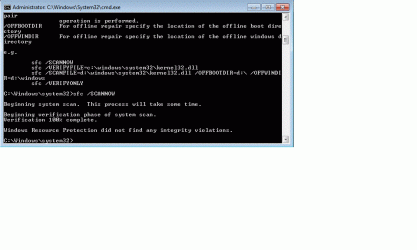
I ran the sfc / scannow command, the scan found no integrity violations (see attached). Do you have any other suggestions??

Thanks & Regards,
DJSEVEN
 

Attachments

  • SFC Scan Results.gif
    SFC Scan Results.gif
    25.7 KB · Views: 0

My Computer

OS
Windows 7 Home Premium 64 bit
Since the problem is repeating reliably (so to speak), try booting into Safe Mode with Networking and see if the freeze happens there (this is not a fix, but a test)

http://www.sevenforums.com/tutorials/69585-safe-mode.html

If the problem DOES NOT happen in safe mode, try a Clean Start to see what might be conflicting

http://www.sevenforums.com/tutorial...ation-conflicts-performing-clean-startup.html

You might also fine a Restart Explorer shortcut on the right click context menu might be handy until you figure this out (and beyond)

http://www.sevenforums.com/tutorials/179436-explorer-add-restart-explorer-desktop-context-menu.html

If Safe mode exibits the same behavior, we'll go forward. A Guy
 

My Computer

Computer type
PC/Desktop
OS
Windows 10 Home x64
CPU
INTEL Core i5-750 Quad-Core 3.37GHz
Motherboard
ASUS P7P55D
Memory
HyperX Fury Black Series 8GB (2 x 4GB) 1866Mhz
Graphics Card(s)
EVGA GeForce GTX 750 Superclocked 1GB 128-Bit GDDR5
Monitor(s) Displays
LG 32MA68HY 32" IPS
Screen Resolution
1920 x 1080
Hard Drives
Samsung 840 Evo 120GB, SEAGATE 500GB Barracuda® 7200.12, SATA 3 Gb/s, 7200 RPM, 16MB cache
PSU
ANTEC TruePower New TP-550, 80 PLUS, 550W
Case
ANTEC Three Hundred Illusion
Cooling
COOLER MASTER Hyper 212 Plus, 4 x 120mm 1 x 140mm Noctua's
Internet Speed
85 + Mbps
Antivirus
Avast
Browser
Vivaldi
...Thanks 'A Guy', and all the other helpful forum members for your time and responses. For now, the problem seems to have gone away, not sure why, or what caused it in the first place. If the problem comes up in the future I'll be sure to reference your helpful tips!

Thanks once again to all!
 

My Computer

OS
Windows 7 Home Premium 64 bit
If it never repeats, we'll accept the mystery ;) A Guy
 

My Computer

Computer type
PC/Desktop
OS
Windows 10 Home x64
CPU
INTEL Core i5-750 Quad-Core 3.37GHz
Motherboard
ASUS P7P55D
Memory
HyperX Fury Black Series 8GB (2 x 4GB) 1866Mhz
Graphics Card(s)
EVGA GeForce GTX 750 Superclocked 1GB 128-Bit GDDR5
Monitor(s) Displays
LG 32MA68HY 32" IPS
Screen Resolution
1920 x 1080
Hard Drives
Samsung 840 Evo 120GB, SEAGATE 500GB Barracuda® 7200.12, SATA 3 Gb/s, 7200 RPM, 16MB cache
PSU
ANTEC TruePower New TP-550, 80 PLUS, 550W
Case
ANTEC Three Hundred Illusion
Cooling
COOLER MASTER Hyper 212 Plus, 4 x 120mm 1 x 140mm Noctua's
Internet Speed
85 + Mbps
Antivirus
Avast
Browser
Vivaldi
Back
Top