Windows 7 Explorer not showing Computer

ckoiner

New member
Local time
11:52 PM
Messages
4
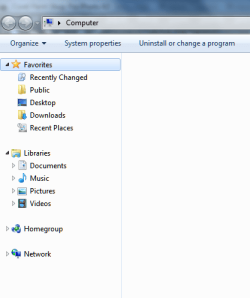
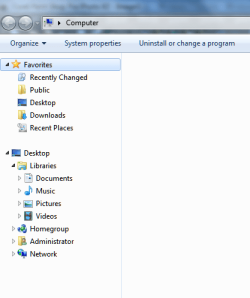
In Windows 7 Explorer, the Computer icon is not showing in the left pane--neither in the default view or the 'show all folders' view.

You can see from the screen captures that I have Explorer set to open to Computer, but no Computer in left pane, and no drives are accessible directly through Explorer.

The drives are fine (from using alternate Explorer alternatives).

How can I get the Computer icon back in the left pane?
 

Attachments

  • W7E1.png
    W7E1.png
    14.1 KB · Views: 45
  • W7E2.png
    W7E2.png
    15.2 KB · Views: 18

My Computer

OS
Windows 7
Make a shortcut to windows explorer and in properties for the shortcut,
place the following in the target line.

%SystemRoot%\explorer.exe /n,/e,C:\

This might or might not be what you want to see.
 

My Computer

OS
Win 7 32 bit , Win xp Sp3
Interesting.

Can you get the computer icon on the desktop and run it from there?
 

My Computers

System One System Two

  • Computer type
    PC/Desktop
    OS
    7 X64
    CPU
    i5 8400
    Motherboard
    gigabyte b365m ds3h
    Memory
    2x8gb 3200mhz
    Hard Drives
    various
    PSU
    pure power 11 400w cm
    Case
    Coolermaster
    Cooling
    cryorig m9i
  • Computer type
    PC/Desktop
    OS
    7x64
    CPU
    g5400
    Motherboard
    ga b365m ds3h
    Memory
    8gb ddr4 2400
    PSU
    xfx pro 450w
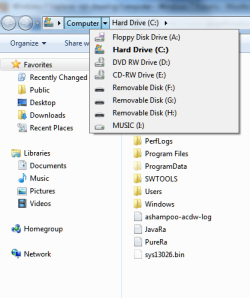
Nosmo's suggestion helped some - shows up in the top bar. But it still does not show up in the left pane.

And no, there is no way to access it through the Desktop icon in the left pane.
 

Attachments

  • W7E3.png
    W7E3.png
    19.3 KB · Views: 281
Last edited:

My Computer

OS
Windows 7
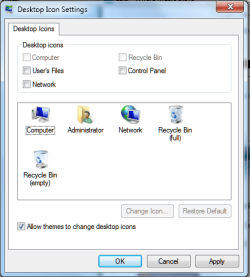
Rt click your desktop>Personalize>Change Desktop Icons

Tick Computer, Apply,OK.

See if the shortcut is on the desktop now and if it functions.
 

My Computers

System One System Two

  • Computer type
    PC/Desktop
    OS
    7 X64
    CPU
    i5 8400
    Motherboard
    gigabyte b365m ds3h
    Memory
    2x8gb 3200mhz
    Hard Drives
    various
    PSU
    pure power 11 400w cm
    Case
    Coolermaster
    Cooling
    cryorig m9i
  • Computer type
    PC/Desktop
    OS
    7x64
    CPU
    g5400
    Motherboard
    ga b365m ds3h
    Memory
    8gb ddr4 2400
    PSU
    xfx pro 450w
Not possible. Computer and Recycle Bin are grayed out.
 

Attachments

  • W7E4.png
    W7E4.png
    16.7 KB · Views: 43

My Computer

OS
Windows 7
I have the exact same problem, and by playing around I found that if i create a new account it has access to computer... it must be somewhere in the user profile
 

My Computer

Computer Manufacturer/Model Number
Lenovo W500
OS
Win7
Do you have multiple user profiles on your setup? you might be in a guest profile where the icon is disabled.

try logging into your admin profile then go to user accounts then you can adjust the profile there to show the icons ;)
 

My Computer

Computer Manufacturer/Model Number
Bo's "Kitchen" - Custom
OS
Windows 7 Ultimate 64bit
CPU
Intel Core2 Quad
Motherboard
i7 extreme
Memory
4gb ddr2 1066
Graphics Card(s)
8800GTS
Sound Card
Realtec
Monitor(s) Displays
Sony HD
Hard Drives
1 TB Western Digital
Cooling
Thermaltake Spin-Q Universal CPU Cooler
no
i'm in an admin profile.
i did just create another profile, also admin, to see if it was any different there...
 

My Computer

Computer Manufacturer/Model Number
Lenovo W500
OS
Win7

My Computer

Computer Manufacturer/Model Number
Keeps changing - (Custom)
OS
Windows 7 Professional x64
CPU
Intel Core i7 860
Motherboard
Gigabyte GA-P55-UD4P
Memory
4GB DDR3 Mushkin 1600Mhz @ 7-8-7-20
Graphics Card(s)
MSI GTS250 1GB DDR3 Twin Frozr
Sound Card
Onboard realtek
Monitor(s) Displays
Samsung SyncMaster 24" P2450 + Samsung 20" 2033
Screen Resolution
1920 X 1080 and 1600 X 900 (#2 system 1440 X 900)
Hard Drives
Patriot Inferno 120GB SSD + 3 WD Blue 640GB drives
PSU
Corsair 750 HX Modular
Case
Lancool PC-K62
Cooling
Cooler Master TX3 CPU cooler and 4-140mm and 1-120mm case
Keyboard
Gigabyte USB keyboard
Mouse
Microsoft wireless laser mouse 5000
Internet Speed
7 Mb down 1.5 up
Other Info
System #2: AMD Phenom II X6 1055T (Freezer 7 Pro cooler) - Gigabyte 880GMA-UD2H - WD 500GB Black - 9500GT (1GB) 500W OCZ modular PSU - Antec 200 case. System #3 (LapTop) Core 2 Duo T6670 - 320GB 7200RPM HD - 4GB DDR3 RAM.
i can but it doesn't make a difference.
Somehow i think our problem is that for the current user there is a restriction on the access to computer
 

My Computer

Computer Manufacturer/Model Number
Lenovo W500
OS
Win7
has anyone solved this? i have exact the same problem, and i have no idea how to fix it.
i would really appreciate some help with it
[sorry for my English, still learning]
 

My Computer

Computer Manufacturer/Model Number
6.1.7600
OS
Windows 7 Home Premium
CPU
Pentium(R) Dual-Core CPU T4300 @ 2.10GHz
Memory
Kingston DDR2 2x2048 MB
Graphics Card(s)
NVIDIA GeForce GT 220M
Screen Resolution
1366x768
Internet Speed
4 MB/s
Please, somebody, was ckoiner's issue of non-display of Computer resolved, and how? I would really like to know, because I have exactly the same issue. And because Computer doesn't show up in the folder tree pane, file browsing dialogs for opening or saving files in applications often don't work now, and I can't use my regular FTP client (Wise-FTP) at all because of this problem - it clearly using an Explorer based listing in its 'local' pane.

My regular file manager still works fine, and for the moment I'm using its (basic, non-multithreaded and unfortunately non-secure) FTP facility to make do while I wait to get the Explorer issue resolved. In my case the issue has arisen in a late stage of my installing all my software (some 70 programs) onto a new PC running Win7 Home Premium x64. So far I haven't been able to get any sense about this issue from the hopelessly inadequate MS Support people on the MS Support Forum.

I do think it looks as though some security setting has been covertly applied, which hides Computer in all Explorer windows and dialogs - but I am already in an admin account, so I cannot change things by changing from guest to admin.
 

My Computer

Computer Manufacturer/Model Number
Nofan A40-Z68 Silent PC
OS
Windows 7 Home Premium x64
CPU
Intel Core i3 2125 3.3GHz Sandy Bridge Dual Core
Motherboard
Gigabyte GA-Z68X-UD3H-B3 LGA1155 ATX
Memory
8 GB
Graphics Card(s)
On-board
Sound Card
On-board
Monitor(s) Displays
Xerox 700P LCD
Screen Resolution
1280x1024
Hard Drives
2 internal nominally 128 GB SSDs
plus intermittent use of USB-connected HDDs
PSU
Nofan 400W (fanless)
Case
Nofan CS-30
Cooling
Nofan IcePipe
Keyboard
Microsoft Natural Media
Mouse
Microsoft optical
Internet Speed
Nominal c. 17 mbps
Other Info
I have NO plans to return to the stressful noise of fan cooled computers, such time as I need to get a new system!
Click Start/right click in blank spot/properties/Display as a link
 
Last edited:

My Computer

Computer type
PC/Desktop
Computer Manufacturer/Model Number
Home made Desktop
OS
Windows 10 Pro. 64/ version 1709 Windows 7 Pro/64
CPU
Intel i7-6800K @ 4.3
Motherboard
ASUS X-99 Deluxe II
Memory
Corsair Platinum 16 gig @2400
Graphics Card(s)
EVGA GTX 1070 OC
Monitor(s) Displays
Asus 27" LED LCD/VE278Q
Screen Resolution
1920-1080 or 1280-720 HDMI
Hard Drives
INTEL SSD 730-240 Gb Sata 3.0/
PSU
EVGA Platium 1200W
Case
Phanteks Luxe Tempered Glass 8 fans/ one radiator
Cooling
XSPC/ Water Cooled CPU
Keyboard
Das 4 Professional
Mouse
Logitech M705/MX Anywhere 2-S
Internet Speed
100 mbits
Antivirus
Microsoft Security Essentials/ Malwarebytes Premium 3.0/ SAS
Browser
I.E. 11 default/Firefox/ ISP Time Warner Cable/Spectrum
Other Info
LG BluRay Burner/
Sound system-KLipsch-THX/
Icy Dock ssd Hot Swap bays.
Not sure that is going to help - if Phillip's issue id the same as the OP - there ,may be an issue with the registry.

@Phil

Export these two keys into .reg files and post them up:

HKEY_LOCAL_MACHINE\Software\Microsoft\Windows\CurrentVersion\Policies

and

HKEY_CLASSES_ROOT\CLSID\{20D04FE0-3AEA-1069-A2D8-08002B30309D}
 

My Computers

System One System Two

  • Computer type
    PC/Desktop
    OS
    7 X64
    CPU
    i5 8400
    Motherboard
    gigabyte b365m ds3h
    Memory
    2x8gb 3200mhz
    Hard Drives
    various
    PSU
    pure power 11 400w cm
    Case
    Coolermaster
    Cooling
    cryorig m9i
  • Computer type
    PC/Desktop
    OS
    7x64
    CPU
    g5400
    Motherboard
    ga b365m ds3h
    Memory
    8gb ddr4 2400
    PSU
    xfx pro 450w
Thanks for your interest. Here are the particular key contents:

REGEDIT4

[HKEY_LOCAL_MACHINE\Software\Microsoft\Windows\CurrentVersion\Policies]

[HKEY_LOCAL_MACHINE\Software\Microsoft\Windows\CurrentVersion\Policies\ActiveDesktop]
"NoAddingComponents"=dword:00000001
"NoComponents"=dword:00000001

[HKEY_LOCAL_MACHINE\Software\Microsoft\Windows\CurrentVersion\Policies\Attachments]
"ScanWithAntiVirus"=dword:00000003

[HKEY_LOCAL_MACHINE\Software\Microsoft\Windows\CurrentVersion\Policies\Explorer]
"NoActiveDesktop"=dword:00000001
"NoActiveDesktopChanges"=dword:00000001
"ForceActiveDesktopOn"=dword:00000000

[HKEY_LOCAL_MACHINE\Software\Microsoft\Windows\CurrentVersion\Policies\NonEnum]
"{BDEADF00-C265-11D0-BCED-00A0C90AB50F}"=dword:00000001
"{6DFD7C5C-2451-11d3-A299-00C04F8EF6AF}"=dword:40000021
"{0DF44EAA-FF21-4412-828E-260A8728E7F1}"=dword:00000020

[HKEY_LOCAL_MACHINE\Software\Microsoft\Windows\CurrentVersion\Policies\System]
"ConsentPromptBehaviorAdmin"=dword:00000000
"ConsentPromptBehaviorUser"=dword:00000003
"EnableInstallerDetection"=dword:00000001
"EnableLUA"=dword:00000000
"EnableSecureUIAPaths"=dword:00000001
"EnableUIADesktopToggle"=dword:00000000
"EnableVirtualization"=dword:00000001
"PromptOnSecureDesktop"=dword:00000000
"ValidateAdminCodeSignatures"=dword:00000000
"dontdisplaylastusername"=dword:00000000
"legalnoticecaption"=""
"legalnoticetext"=""
"scforceoption"=dword:00000000
"shutdownwithoutlogon"=dword:00000001
"undockwithoutlogon"=dword:00000001
"FilterAdministratorToken"=dword:00000000
"EnableLinkedConnections"=dword:00000001

[HKEY_LOCAL_MACHINE\Software\Microsoft\Windows\CurrentVersion\Policies\System\UIPI]

[HKEY_LOCAL_MACHINE\Software\Microsoft\Windows\CurrentVersion\Policies\System\UIPI\Clipboard]

[HKEY_LOCAL_MACHINE\Software\Microsoft\Windows\CurrentVersion\Policies\System\UIPI\Clipboard\ExceptionFormats]
"CF_TEXT"=dword:00000001
"CF_BITMAP"=dword:00000002
"CF_OEMTEXT"=dword:00000007
"CF_DIB"=dword:00000008
"CF_PALETTE"=dword:00000009
"CF_UNICODETEXT"=dword:0000000d
"CF_DIBV5"=dword:00000011


REGEDIT4

[HKEY_CLASSES_ROOT\CLSID\{20D04FE0-3AEA-1069-A2D8-08002B30309D}]
@="Computer"
"InfoTip"=hex(2):40,25,53,79,73,74,65,6d,52,6f,6f,74,25,5c,73,79,73,74,65,6d,\
33,32,5c,73,68,65,6c,6c,33,32,2e,64,6c,6c,2c,2d,32,32,39,31,33,00
"LocalizedString"=hex(2):40,25,53,79,73,74,65,6d,52,6f,6f,74,25,5c,73,79,73,74,\
65,6d,33,32,5c,73,68,65,6c,6c,33,32,2e,64,6c,6c,2c,2d,39,32,31,36,00

[HKEY_CLASSES_ROOT\CLSID\{20D04FE0-3AEA-1069-A2D8-08002B30309D}\DefaultIcon]
@=hex(2):25,53,79,73,74,65,6d,52,6f,6f,74,25,5c,53,79,73,74,65,6d,33,32,5c,69,\
6d,61,67,65,72,65,73,2e,64,6c,6c,2c,2d,31,30,39,00

[HKEY_CLASSES_ROOT\CLSID\{20D04FE0-3AEA-1069-A2D8-08002B30309D}\InProcServer32]
@=hex(2):25,53,79,73,74,65,6d,52,6f,6f,74,25,5c,73,79,73,74,65,6d,33,32,5c,73,\
68,65,6c,6c,33,32,2e,64,6c,6c,00
"ThreadingModel"="Apartment"

[HKEY_CLASSES_ROOT\CLSID\{20D04FE0-3AEA-1069-A2D8-08002B30309D}\shell]

[HKEY_CLASSES_ROOT\CLSID\{20D04FE0-3AEA-1069-A2D8-08002B30309D}\shell\find]
@=hex(2):40,25,53,79,73,74,65,6d,52,6f,6f,74,25,5c,73,79,73,74,65,6d,33,32,5c,\
73,68,65,6c,6c,33,32,2e,64,6c,6c,2c,2d,38,35,30,33,00
"LegacyDisable"=""
"SuppressionPolicy"=dword:00000080

[HKEY_CLASSES_ROOT\CLSID\{20D04FE0-3AEA-1069-A2D8-08002B30309D}\shell\find\command]
@=hex(2):25,53,79,73,74,65,6d,52,6f,6f,74,25,5c,45,78,70,6c,6f,72,65,72,2e,65,\
78,65,00
"DelegateExecute"="{a015411a-f97d-4ef3-8425-8a38d022aebc}"

[HKEY_CLASSES_ROOT\CLSID\{20D04FE0-3AEA-1069-A2D8-08002B30309D}\shell\Manage]
@=hex(2):40,25,73,79,73,74,65,6d,72,6f,6f,74,25,5c,73,79,73,74,65,6d,33,32,5c,\
6d,79,63,6f,6d,70,75,74,2e,64,6c,6c,2c,2d,34,30,30,00
"MUIVerb"=hex(2):40,25,73,79,73,74,65,6d,72,6f,6f,74,25,5c,73,79,73,74,65,6d,\
33,32,5c,6d,79,63,6f,6d,70,75,74,2e,64,6c,6c,2c,2d,34,30,30,00
"SuppressionPolicy"=dword:4000003c
"HasLUAShield"=""

[HKEY_CLASSES_ROOT\CLSID\{20D04FE0-3AEA-1069-A2D8-08002B30309D}\shell\Manage\command]
@=hex(2):25,53,79,73,74,65,6d,52,6f,6f,74,25,5c,73,79,73,74,65,6d,33,32,5c,43,\
6f,6d,70,4d,67,6d,74,4c,61,75,6e,63,68,65,72,2e,65,78,65,00

[HKEY_CLASSES_ROOT\CLSID\{20D04FE0-3AEA-1069-A2D8-08002B30309D}\ShellFolder]
"HideOnDesktopPerUser"=""
"PinToNameSpaceTree"=""


I only hope that all the above means more to you than it does to me! :)
 

My Computer

Computer Manufacturer/Model Number
Nofan A40-Z68 Silent PC
OS
Windows 7 Home Premium x64
CPU
Intel Core i3 2125 3.3GHz Sandy Bridge Dual Core
Motherboard
Gigabyte GA-Z68X-UD3H-B3 LGA1155 ATX
Memory
8 GB
Graphics Card(s)
On-board
Sound Card
On-board
Monitor(s) Displays
Xerox 700P LCD
Screen Resolution
1280x1024
Hard Drives
2 internal nominally 128 GB SSDs
plus intermittent use of USB-connected HDDs
PSU
Nofan 400W (fanless)
Case
Nofan CS-30
Cooling
Nofan IcePipe
Keyboard
Microsoft Natural Media
Mouse
Microsoft optical
Internet Speed
Nominal c. 17 mbps
Other Info
I have NO plans to return to the stressful noise of fan cooled computers, such time as I need to get a new system!
Hi Phil,

Any reason you can think of why your in proc server entry is this:

Fan Luzhengwuxun ╴ Linlu whole ㍭ Gan Benji ㍬ ⸲ soup l

I was rather expecting it to be:

%SystemRoot%\system32\shell32.dll

What input language are you using?
 

My Computers

System One System Two

  • Computer type
    PC/Desktop
    OS
    7 X64
    CPU
    i5 8400
    Motherboard
    gigabyte b365m ds3h
    Memory
    2x8gb 3200mhz
    Hard Drives
    various
    PSU
    pure power 11 400w cm
    Case
    Coolermaster
    Cooling
    cryorig m9i
  • Computer type
    PC/Desktop
    OS
    7x64
    CPU
    g5400
    Motherboard
    ga b365m ds3h
    Memory
    8gb ddr4 2400
    PSU
    xfx pro 450w
I don't believe in any language that procserver entry is valid ;).
 

My Computer

Computer type
PC/Desktop
Computer Manufacturer/Model Number
Custom
OS
Windows 10 Pro x64
CPU
Intel Core i7 4790K @ 4.5GHz
Motherboard
Asus Maximus Hero VII
Memory
32GB DDR3
Graphics Card(s)
Nvidia GeForce GTX970
Sound Card
Realtek HD Audio
Screen Resolution
1920x1200
Hard Drives
1x Samsung 250GB SSD
4x WD RE 2TB (RAIDZ)
PSU
Corsair AX760i
Case
Fractal Design Define R4
Cooling
Noctua NH-D15
No, exactly - he has several entries in Simplified Chinese.

They don't make much sense - my Chinese is poor , tho.
 

My Computers

System One System Two

  • Computer type
    PC/Desktop
    OS
    7 X64
    CPU
    i5 8400
    Motherboard
    gigabyte b365m ds3h
    Memory
    2x8gb 3200mhz
    Hard Drives
    various
    PSU
    pure power 11 400w cm
    Case
    Coolermaster
    Cooling
    cryorig m9i
  • Computer type
    PC/Desktop
    OS
    7x64
    CPU
    g5400
    Motherboard
    ga b365m ds3h
    Memory
    8gb ddr4 2400
    PSU
    xfx pro 450w
What???
biggrin.gif
Absolutely no idea why "Fan Luzhengwuxun ╴ Linlu whole ㍭ Gan Benji ㍬ ⸲ soup l" is there instead of "%SystemRoot%\system32\shell32.dll".

I've just checked in my registry, and the latter, correct, data is there, and I see no sign of anything peculier, so I don't know how it could have got corrupted in my exporting the key from Registrar Lite. So, whatever is in my post of the exported keys, that particular data is actually correct in my computer.
 

My Computer

Computer Manufacturer/Model Number
Nofan A40-Z68 Silent PC
OS
Windows 7 Home Premium x64
CPU
Intel Core i3 2125 3.3GHz Sandy Bridge Dual Core
Motherboard
Gigabyte GA-Z68X-UD3H-B3 LGA1155 ATX
Memory
8 GB
Graphics Card(s)
On-board
Sound Card
On-board
Monitor(s) Displays
Xerox 700P LCD
Screen Resolution
1280x1024
Hard Drives
2 internal nominally 128 GB SSDs
plus intermittent use of USB-connected HDDs
PSU
Nofan 400W (fanless)
Case
Nofan CS-30
Cooling
Nofan IcePipe
Keyboard
Microsoft Natural Media
Mouse
Microsoft optical
Internet Speed
Nominal c. 17 mbps
Other Info
I have NO plans to return to the stressful noise of fan cooled computers, such time as I need to get a new system!
Back
Top