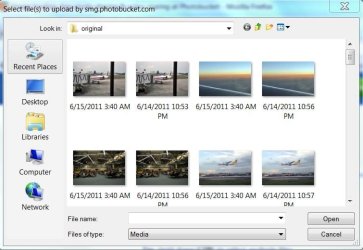
Windows 7 Explorer Showing Dates???

Beaureguard99

New member
Local time
6:57 PM
Messages
1
Please Help!!

When I Look Into My Explorer Instead of a Name for the the File it Shows a Date, It's Really Confusing

Untitled-1.jpg

Is Their A Way To Fix This? I Doesnt Always Happen, Just Usually in Photoshop and Some Other Programs
 

My Computer

OS
Windows 7 Home Premium 64bit
Please Help!!

When I Look Into My Explorer Instead of a Name for the the File it Shows a Date, It's Really Confusing

View attachment 139894

Is Their A Way To Fix This? I Doesnt Always Happen, Just Usually in Photoshop and Some Other Programs

Could we get your system specs?

Have you done any resource.dll mods, or modded any other aspect of the OS? Which OS?
 

My Computer

Computer Manufacturer/Model Number
HP Pavillion dv-7 1005 Tx
OS
Win 8 Release candidate 8400
CPU
[email protected]
Memory
4 gigs
Graphics Card(s)
Nvidia 9600M
Sound Card
HD built-in
Monitor(s) Displays
17" Wxga
Screen Resolution
1440x900
Cooling
none
Internet Speed
45Mb down 5Mb up
Same problem here

Sorry for the thread from the dead, but I'm experiencing the same problem. Windows 7 ultimate 64 unmodified. I see dates instead of names in some dialogs but not all of them, and when you click on a file, the name shows correctly in the file name box. Any ideas?
 

Attachments

  • weird dates.jpg
    weird dates.jpg
    54.5 KB · Views: 5

My Computer

OS
Windows 7 Ultimate 64
I have found the solution to this problem. Right click inside the folder, go to properties. In there, go to customize. In there it says something about optimize this folder for blah blah Set that to general. Mine was set to pictures. For some reason having it set to pictures screws up the way files are displayed.
 

My Computer

OS
Windows 7 Ultimate 64
Back
Top