Windows 7 Extended Display Question

hostelo

New member
Member
Local time
3:40 PM
Messages
80
Location
Dominican Republic
Hi.

I'm using my Plasma TV as an extended display so I can watch movies.

For me to get the mouse to the TV side I have to drag it all the way to the right in my pc monitor.

My question is, can I switch what side I have to drag my mouse to, to get it to the extended display (My Plasma TV). Like on the left, top or down?

Because I'ts very annoying for me when I close a window or hit the show desktop button on the down right corner (which I do alot) and my mouse disappearing on me to the other side instead of not being able to go any further.

Please Help a newb here!!
Thanks
 

My Computer

OS
Windows 7 Ultimate 64-bit
CPU
Intel Core i5 Processor 2.66 GHz 8 MB LGA1156 CPU I5-750BOX
Motherboard
ASUS P7P55D
Memory
8GB Corsair DDR3
Graphics Card(s)
ATI HD 5770
Sound Card
Graphic Card
Monitor(s) Displays
Dell 22" Monitor and Extended to a 52" Plasma
Hard Drives
1 x 120 GB SSD
1 x 1 TB SATA
1 x 1.5 TB SATA
3 x 2TB SATA
Case
Cooler Master HAF 932
You can decide where you want to drag the mouse, I don't remember exactly though I know the nvidia control panel has some pretty verse options. You should be able to set it up in personalize. =)
 

My Computer

Computer Manufacturer/Model Number
Custom
OS
Windows 7, Linux
CPU
AMD Phemon II x2 3@3750
Motherboard
ASRock M3A770DE
Memory
1G Crucial 1666
Graphics Card(s)
8800GT OC (custom OC)
Sound Card
Sound Blaster Live! (never changes!)
Monitor(s) Displays
Vivitron 22"
Screen Resolution
1600x1200
Hard Drives
Western Digital 120G/160G SATA
Maxtor 80G IDE
PSU
450w
Case
Unknown
Cooling
Custom Air cooled
Keyboard
Logitech
Mouse
Logitech M-BZ15A Laser
Internet Speed
Cable 10mbit
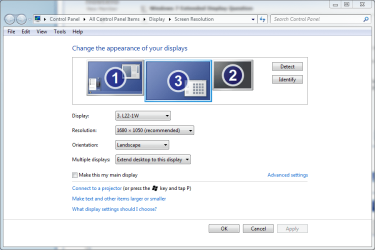
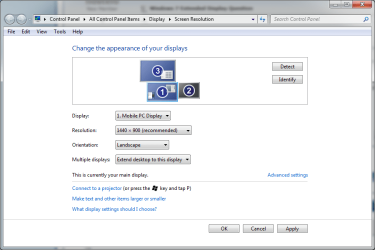
Right click desktop, choose Screen Resolution. Drag and drop displays as you want. For example, if you put display 2 on top of display 1, you have to move the mouse pointer over the top of the display 1 to enter display 2.

Kari
 

Attachments

  • display_1.PNG
    display_1.PNG
    34.2 KB · Views: 597
  • display_2.PNG
    display_2.PNG
    27.6 KB · Views: 325
  • display_3.PNG
    display_3.PNG
    28.2 KB · Views: 281

My Computer

Computer type
Laptop
Computer Manufacturer/Model Number
HP ENVY 17-1150eg
OS
Windows 10 Pro x64 EN-GB
CPU
1.6 GHz Intel Core i7-720QM Processor
Memory
6 GB
Graphics Card(s)
ATI Mobility Radeon HD 5850 Graphics
Sound Card
Beats sound system with integrated subwoofer
Monitor(s) Displays
17" laptop display, 22" LED and 32" Full HD TV through HDMI
Screen Resolution
1600*900 (1), 1920*1080 (2&3)
Hard Drives
Internal: 2 x 500 GB SATA Hard Disk Drive 7200 rpm
External: 2TB for backups, 3TB USB3 network drive for media
Cooling
As Envy runs a bit warm, I have it on a Cooler Master pad
Keyboard
Logitech diNovo Media Desktop Laser (bluetooth)
Mouse
Logitech Performance Mouse MX
Internet Speed
50/10 Mbps VDSL
Antivirus
Windows Defender 4.3.9431.0
Browser
Maxthon 3.5.2., IE11
That was so easy!

Thanks a lot Kari!

Can I ask another question while I'm at it?
 

My Computer

OS
Windows 7 Ultimate 64-bit
CPU
Intel Core i5 Processor 2.66 GHz 8 MB LGA1156 CPU I5-750BOX
Motherboard
ASUS P7P55D
Memory
8GB Corsair DDR3
Graphics Card(s)
ATI HD 5770
Sound Card
Graphic Card
Monitor(s) Displays
Dell 22" Monitor and Extended to a 52" Plasma
Hard Drives
1 x 120 GB SSD
1 x 1 TB SATA
1 x 1.5 TB SATA
3 x 2TB SATA
Case
Cooler Master HAF 932

My Computer

Computer type
Laptop
Computer Manufacturer/Model Number
HP ENVY 17-1150eg
OS
Windows 10 Pro x64 EN-GB
CPU
1.6 GHz Intel Core i7-720QM Processor
Memory
6 GB
Graphics Card(s)
ATI Mobility Radeon HD 5850 Graphics
Sound Card
Beats sound system with integrated subwoofer
Monitor(s) Displays
17" laptop display, 22" LED and 32" Full HD TV through HDMI
Screen Resolution
1600*900 (1), 1920*1080 (2&3)
Hard Drives
Internal: 2 x 500 GB SATA Hard Disk Drive 7200 rpm
External: 2TB for backups, 3TB USB3 network drive for media
Cooling
As Envy runs a bit warm, I have it on a Cooler Master pad
Keyboard
Logitech diNovo Media Desktop Laser (bluetooth)
Mouse
Logitech Performance Mouse MX
Internet Speed
50/10 Mbps VDSL
Antivirus
Windows Defender 4.3.9431.0
Browser
Maxthon 3.5.2., IE11
Why when I open my Windows Media Center and try to use Media Broswer on the extended display it does not show completely

What I mean is when I maximize it in the Plasma TV the corners are like if it was too big for the screen, if I try to fix the resolution to make it smaller so the whole window can fit, media broswer then does not open.

Why is this?

Thanks
 

My Computer

OS
Windows 7 Ultimate 64-bit
CPU
Intel Core i5 Processor 2.66 GHz 8 MB LGA1156 CPU I5-750BOX
Motherboard
ASUS P7P55D
Memory
8GB Corsair DDR3
Graphics Card(s)
ATI HD 5770
Sound Card
Graphic Card
Monitor(s) Displays
Dell 22" Monitor and Extended to a 52" Plasma
Hard Drives
1 x 120 GB SSD
1 x 1 TB SATA
1 x 1.5 TB SATA
3 x 2TB SATA
Case
Cooler Master HAF 932
That is a question I don't know the answer. We have a whole sub forum for Media Center related issues. Check it here, I'm sure some of the MC gurus can help you.

Kari
 

My Computer

Computer type
Laptop
Computer Manufacturer/Model Number
HP ENVY 17-1150eg
OS
Windows 10 Pro x64 EN-GB
CPU
1.6 GHz Intel Core i7-720QM Processor
Memory
6 GB
Graphics Card(s)
ATI Mobility Radeon HD 5850 Graphics
Sound Card
Beats sound system with integrated subwoofer
Monitor(s) Displays
17" laptop display, 22" LED and 32" Full HD TV through HDMI
Screen Resolution
1600*900 (1), 1920*1080 (2&3)
Hard Drives
Internal: 2 x 500 GB SATA Hard Disk Drive 7200 rpm
External: 2TB for backups, 3TB USB3 network drive for media
Cooling
As Envy runs a bit warm, I have it on a Cooler Master pad
Keyboard
Logitech diNovo Media Desktop Laser (bluetooth)
Mouse
Logitech Performance Mouse MX
Internet Speed
50/10 Mbps VDSL
Antivirus
Windows Defender 4.3.9431.0
Browser
Maxthon 3.5.2., IE11
thanks
 

My Computer

OS
Windows 7 Ultimate 64-bit
CPU
Intel Core i5 Processor 2.66 GHz 8 MB LGA1156 CPU I5-750BOX
Motherboard
ASUS P7P55D
Memory
8GB Corsair DDR3
Graphics Card(s)
ATI HD 5770
Sound Card
Graphic Card
Monitor(s) Displays
Dell 22" Monitor and Extended to a 52" Plasma
Hard Drives
1 x 120 GB SSD
1 x 1 TB SATA
1 x 1.5 TB SATA
3 x 2TB SATA
Case
Cooler Master HAF 932
Why when I open my Windows Media Center and try to use Media Broswer on the extended display it does not show completely

What I mean is when I maximize it in the Plasma TV the corners are like if it was too big for the screen, if I try to fix the resolution to make it smaller so the whole window can fit, media broswer then does not open.

Why is this?

Thanks

Sounds like a resolution conflict. Do you have HDMI cables running to the plasma? I'd try setting the resolutions for the monitor and the TV the same? I haven't actually done this since the last time we used a big TV we used it as the main monitor =P
 

My Computer

Computer Manufacturer/Model Number
Custom
OS
Windows 7, Linux
CPU
AMD Phemon II x2 3@3750
Motherboard
ASRock M3A770DE
Memory
1G Crucial 1666
Graphics Card(s)
8800GT OC (custom OC)
Sound Card
Sound Blaster Live! (never changes!)
Monitor(s) Displays
Vivitron 22"
Screen Resolution
1600x1200
Hard Drives
Western Digital 120G/160G SATA
Maxtor 80G IDE
PSU
450w
Case
Unknown
Cooling
Custom Air cooled
Keyboard
Logitech
Mouse
Logitech M-BZ15A Laser
Internet Speed
Cable 10mbit
Right click desktop, choose Screen Resolution. Drag and drop displays as you want. For example, if you put display 2 on top of display 1, you have to move the mouse pointer over the top of the display 1 to enter display 2.

Kari

Never realised you could drag them around, makes my life far easier on a dual-screen vertical mount - many thanks... :D

+1 rep 4u
 

My Computer

Computer Manufacturer/Model Number
Custom built machine
OS
W7 x64
CPU
Intel Q9300 2.5Ghz Quad LGA775 (Would like Q9650)
Motherboard
Gigabyte GA-EP45T-UD3R (F6 Bios)
Memory
4Gb OCZ Gold 1,333Mhz
Graphics Card(s)
Palit HD4850 O/C Sonic 512Mb DDR3, Dual DViD's
Sound Card
Azalia to twin Samson 50w Studio Monitors
Monitor(s) Displays
Twin Dell (E-IPS) U2311H 23.6" Screens
Screen Resolution
1920 x 1080 @ 60Hz
Hard Drives
Crucial M4 SSD, archives on twin Western Digital Caviar Black WD2002FAEX, 2TB, 7200rpm HDD's, Samsung Ritemaster CD/DVD Burner...
PSU
OCZ 600w
Case
Lian-Li PC8 acoustifoamed' aluminium tower
Cooling
Scythe 140mm Zipang
Keyboard
Cherry PS/2 custom model
Mouse
Lenovo USB laser "Thinkpad" Mouse
Internet Speed
ADSL2+ @14Mbps downstream & Cat6 Gigabit Ethernet
Antivirus
NOD32
Browser
Opera
Other Info
Silicon Dust HD Homerun Dual FTA (Ethernet) TV Tuners, Dray Tek Vigor 2850Vn router and 8x HP Gigabit Switch. Lian-Li CR26 Card Reader, Canon MF4430 iSensys laser printer/scanner.
Thanks, Qdos :)
 

My Computer

Computer type
Laptop
Computer Manufacturer/Model Number
HP ENVY 17-1150eg
OS
Windows 10 Pro x64 EN-GB
CPU
1.6 GHz Intel Core i7-720QM Processor
Memory
6 GB
Graphics Card(s)
ATI Mobility Radeon HD 5850 Graphics
Sound Card
Beats sound system with integrated subwoofer
Monitor(s) Displays
17" laptop display, 22" LED and 32" Full HD TV through HDMI
Screen Resolution
1600*900 (1), 1920*1080 (2&3)
Hard Drives
Internal: 2 x 500 GB SATA Hard Disk Drive 7200 rpm
External: 2TB for backups, 3TB USB3 network drive for media
Cooling
As Envy runs a bit warm, I have it on a Cooler Master pad
Keyboard
Logitech diNovo Media Desktop Laser (bluetooth)
Mouse
Logitech Performance Mouse MX
Internet Speed
50/10 Mbps VDSL
Antivirus
Windows Defender 4.3.9431.0
Browser
Maxthon 3.5.2., IE11
Back
Top