
Windows 7 - Extending Partition

AJAB

New member
Local time
1:10 PM
Messages
2
I have been trying to free up some room to make a dual boot of Windows 7 and Windows 8. However, I have a bit of a problem, and while I doubt there is a fix that would suit what I want I thought it was worth a try.

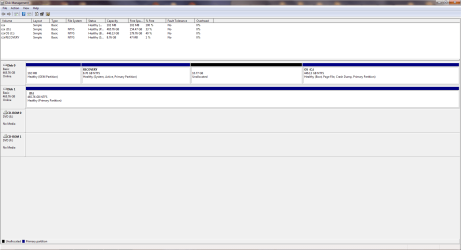
I have the default RECOVERY partition, which was shrinkable by 10GB, so I shrunk it in the hope to extend it to the C drive, giving me more space. However, once I shrunk it I can't extend it to the C drive and the only option to extend this now unallocated free space is to the recovery partition again.

Is there any way to extend the C drive to this free space?

Thanks.
Partition.png
 

My Computer My Computer

At a glance

Windows 7 Home Premium - 64bitIntel Core i7-2630QM @ 2.00GHz (8 Cores)8.00 GBNvidia GeForce GT 555M
Computer type
Laptop
Computer Manufacturer/Model Number
Dell XPS 17 (L702x)
OS
Windows 7 Home Premium - 64bit
CPU
Intel Core i7-2630QM @ 2.00GHz (8 Cores)
Memory
8.00 GB
Graphics Card(s)
Nvidia GeForce GT 555M
Hard Drives
ST9500423AS(500GB) x2
Antivirus
Symantec Endpoint Protection
Browser
Google Chrome
I would not shrink a Recovery partition that you intend to keep bootable.

However the presence of a Recovery partition means you are using and intend to keep using the factory preinstall which is a corrupted version of Win7. That's why most tech enthusiasts prefer to Clean Reinstall - Factory OEM Windows 7 to get Win7 native perfect performance without the bloatware and useless duplicate utilities smothering it.

If you use this preferred method you can save your Recovery disks in advance and no longer need the Recovery partition, so can delete all partitions to create New during reinstall.

If you wish to keep it as it is then I would not shrink Recovery as it may not run from boot. If you insist then the tool you want is Partition Wizard Resize Partition Video Help.
 
Firstly, never mess with the recovery partition. In doing so, it can have dire ramifications.

If this were mine, I would re-allocate the newly created partition back to the recovery drive. Then partition the C driver to about 100 gigs. Then install your 2nd OS on that partition.
 

My Computer My Computer

At a glance

Windows 7 Ultimate 64 bitAMD Phenom II X4 965 Black EditionGSkill 4 X 2 GB PC 8500XFX Radeon HD 6790 D
Computer Manufacturer/Model Number
Custom built
OS
Windows 7 Ultimate 64 bit
CPU
AMD Phenom II X4 965 Black Edition
Motherboard
Gigabyte GA-MA790X-DS4
Memory
GSkill 4 X 2 GB PC 8500
Graphics Card(s)
XFX Radeon HD 6790 D
Sound Card
On board RealTek HD
Monitor(s) Displays
Dual monitors:Samsung SyncMaster S20B300
Screen Resolution
1600 X 900
Hard Drives
Seagate Barracuda 1TB (primary)
Seagate Barracuda 2 X 320 GB
PSU
Ultra X4 750 watt fully modular
Case
Thermaltake Overseer RX 1 full tower
Cooling
Core-Contact 92 mm CPU Cooler
Keyboard
Logitech G510
Mouse
Razor DeathAdder
Internet Speed
50/5 Mbps UL/DL
Other Info
Optical: Super Muliti DVD burner w/lightscribe, Hauppauge WinTV HVR-1800
Thanks for your reply.

That's a good point, I mean the recovery partition has always been on the drive since I got the laptop since I got it, but I disabled most of the backup functions as I never really need them. (I know if something goes wrong... but I keep important documents backed up and I'm not that fussed about save games or programs.)

But anyway, thanks for your help, think I'll just partition it back, move the D drive files to C and partition some of the D drive for Windows 8.

Thanks.
 

My Computer My Computer

At a glance

Windows 7 Home Premium - 64bitIntel Core i7-2630QM @ 2.00GHz (8 Cores)8.00 GBNvidia GeForce GT 555M
Computer type
Laptop
Computer Manufacturer/Model Number
Dell XPS 17 (L702x)
OS
Windows 7 Home Premium - 64bit
CPU
Intel Core i7-2630QM @ 2.00GHz (8 Cores)
Memory
8.00 GB
Graphics Card(s)
Nvidia GeForce GT 555M
Hard Drives
ST9500423AS(500GB) x2
Antivirus
Symantec Endpoint Protection
Browser
Google Chrome
I'd unplug the WIn7 HD when installing Win8 to D HD. Then after install boot your choice using the BIOS Boot menu key at boot. This will keep the two independent to come and go as you please.

However if you want the Win8 Metro GUI Dual Boot menu then leave the 7 HD plugged in.

There is nothing comparable to a Win7 Clean Install, so if I were you I would do that first so you have the best possible install instead of the worst one. By comparison with Win7 perfect Clean Install, Win8 is a phone app with buttons you can't press.
 
Back
Top