Windows 7 file sharing issue

The King Arthur

New member
Local time
4:34 PM
Messages
1
First of all, hi everyone, i´m new to the forums...

I have a very strange problem with networking betweem VISTA and 7.
I have a laptop with wireless connection running Vista SP1 X32 (HP) and a desktop (wired) running Windows 7 X32 RTM. I have disabled the password network feature, enabled file and printer sharing and enabled the sharing for the drives individually (for both pcs).

My laptop has 2 drives, one is the C (system) which i canno´t access via network from my desktop and the D (HP recovery) which i can.
The errors its says, when i try to access a shared drive, is the "permission problem thing", but the permission is set; total control to everyone.

On the 7 side, i´m incapable of entering any unit (C,D,J system or not..) from my laptop (error 0x80070005).

The internet connection works fine for both and i also can print things from the laptop to the desktop, where the printer is installed (weird!). Other important information is that the public folders works fine for both.

I don´t know where is the problem, but i´m thinking is coming from the 7 side.

Anybody has a clue about this?

Regards,
 

My Computer

Computer Manufacturer/Model Number
ASUS
OS
Windows 7 Ultimate RTM FINAL
CPU
Intel Core 2 Duo @3.2Ghz
Motherboard
ASUS P5KC
Memory
2x1GB Kingston dual channel
Graphics Card(s)
Geforce 9600GT
Monitor(s) Displays
LCD 19' Samsung SyncMaster
Hard Drives
SAMSUNG 320GB
SEAGATE 250GB
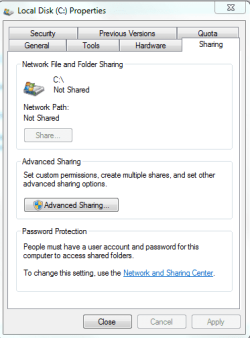
To share the C drive on the Win 7 machine you need to right click on the C drive then scroll down to where it says "share with" then choose advanced sharing and check to enable sharing the C drive, then hit "apply". To share the C drive on the Vista lap top you can probably do the same thing by using the advance sharing feature.
 

Attachments

  • advanced sharing.PNG
    advanced sharing.PNG
    12.3 KB · Views: 85
  • share this folder.PNG
    share this folder.PNG
    12.9 KB · Views: 8,597

My Computer

Computer type
PC/Desktop
Computer Manufacturer/Model Number
Home built
OS
Windows 7 Ult, Windows 8.1 Pro,
CPU
Q9650-4.275GHz, E8600 4.5GHz, E6750-3.8GHz
Motherboard
Evga 780i FTW
Memory
G.Skill PC2 9600 1200Mhz 5 5 5 15 2T
Graphics Card(s)
GTX480
Sound Card
Asus Xonar D2
Monitor(s) Displays
HannsG
Screen Resolution
1680X1050
Hard Drives
GSkill Phoenix Pro 120GB SSD
PSU
ThermalTake Toughpower 1000Watt modular
Case
ThermalTake XaserV
Cooling
Xigmatek S1283
Keyboard
Logitech G15
Mouse
Logitech G9
Internet Speed
T1
Hi, I'm having a similar problem. I have Windows 7 Ultimate on one of my desktops. I also have Ubuntu 9.04 on my other desktop. I'm trying to set up the Ubuntu computer as a file server. My Win7 computer also has a drive with Windows XP Media Center Edition on it. I'm able to connect to my ubuntu one with XP, no problem. But Windows 7 doesn't seem to want to connect to my Ubuntu file server. I know the issue is not with Ubuntu, I have that one set up perfectly. It lies somewhere with Windows 7.

Any help would be great.

Thanks
 

My Computer

Computer Manufacturer/Model Number
eMachines
OS
Windows 7 Ultimate
CPU
Pentium 4 3.07 Ghz
Motherboard
Intel
Memory
2GB
Graphics Card(s)
ATI Radeon HD 4350
Sound Card
Creative Sound Blaster Live! 5.1
Monitor(s) Displays
Asus VK193D
Screen Resolution
1440 x 900
Hard Drives
80GB Samsung laptop drive used as a desktop drive, 120GB Seagate Barracuda
go to local security policy -> local policies -> security options

try to lower the security level of the Network security: LAN Manager authentication level

The key is allowing NTLM response.

you may need to reboot for the setting to take effect.
 
Last edited:

My Computer

Computer Manufacturer/Model Number
Too many to list.
OS
XP, Seven, 2008R2
CPU
AMD, Intel, VIA
Motherboard
Various
Memory
Corsair, Kingston, etc.
Graphics Card(s)
ATI, NVIDIA
Monitor(s) Displays
Samsung
Hard Drives
Maxtor, Western Digital
Keyboard
qwerty
Internet Speed
22 Mb/s @ home, 1 Gb/s @ server
Other Info
All of my systems still run fastest on XP 32-bit for the most part. Win7 is fun to play with, but I still prefer XP for raw speed, security, and functionality.
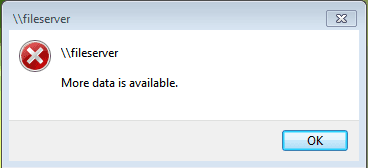
That didn't work. I was able to do it, but it didn't work. I included a pic of the message that pops up when I try to connect to my file server through the run command. It makes no sense to me.
 

Attachments

  • Error.PNG
    Error.PNG
    2.5 KB · Views: 12

My Computer

Computer Manufacturer/Model Number
eMachines
OS
Windows 7 Ultimate
CPU
Pentium 4 3.07 Ghz
Motherboard
Intel
Memory
2GB
Graphics Card(s)
ATI Radeon HD 4350
Sound Card
Creative Sound Blaster Live! 5.1
Monitor(s) Displays
Asus VK193D
Screen Resolution
1440 x 900
Hard Drives
80GB Samsung laptop drive used as a desktop drive, 120GB Seagate Barracuda
The name of the computer is fileserver?
 

My Computer

Computer type
PC/Desktop
Computer Manufacturer/Model Number
DELL VOSTRO 3650
OS
Windows 8.1 PRO
CPU
3rd Generation Intel Core i7‐3612QM CPU @ 2.10GHZ
Memory
8GB DDR3
Graphics Card(s)
NVIDIA GeForce GT 525M (128 bit), 1GB Grpahics
Screen Resolution
1920X1080
Hard Drives
750GB 5400RPM
Yea. It's Ubuntu 9.04, I wanted to make it something easy to remember.
 

My Computer

Computer Manufacturer/Model Number
eMachines
OS
Windows 7 Ultimate
CPU
Pentium 4 3.07 Ghz
Motherboard
Intel
Memory
2GB
Graphics Card(s)
ATI Radeon HD 4350
Sound Card
Creative Sound Blaster Live! 5.1
Monitor(s) Displays
Asus VK193D
Screen Resolution
1440 x 900
Hard Drives
80GB Samsung laptop drive used as a desktop drive, 120GB Seagate Barracuda
Back
Top