Windows 7 Flyout Menus Not working for Office 2010 Pinned Taskbar Shor

riggs614

New member
Member
Local time
6:52 AM
Messages
46
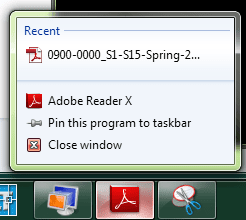
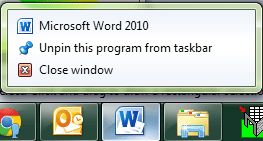
So I've read a number of articles regarding the issue of having your recent documents, spreadsheets, whatever file type not showing in the Jump List on pinned Office shortcuts on the taskbar. The expected behavior is shown in the image for the Adobe Shortcut below and the behavior that I am receiving is shown in the image for the Word Shortcut.

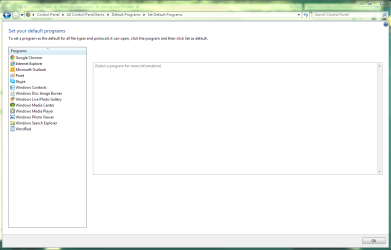
I believe its related to how the program is registered with Windows. As all Office programs, except Outlook, are not present in the Default Programs location as shown in the attached image.

They do show correctly in the Associate File Type dialog and open their respective file types correctly. How can I modify the registry to get Windows to properly aknowledge their installation without uninstalling, clearing registry and reinstalling.

Any ideas?
 

Attachments
  • Word.png
    Word.png
    8.5 KB · Views: 213
  • Adobe.png
    Adobe.png
    7.9 KB · Views: 219
  • Capture.PNG
    Capture.PNG
    40.4 KB · Views: 13

My Computer My Computer

At a glance

Windows 7 x64AMD ATHLON II X4 620 - WEI 7.28GB Patriot Sector 5 DDR3 1600MHZ 9-9-9-24-38...Built in ATI HD4200 - WEI 4.6 and 5.5
Computer Manufacturer/Model Number
Custom Built
OS
Windows 7 x64
CPU
AMD ATHLON II X4 620 - WEI 7.2
Motherboard
ASUS MA4785TD-M EVO BIOS 0904
Memory
8GB Patriot Sector 5 DDR3 1600MHZ 9-9-9-24-38-1T 1.65V
Graphics Card(s)
Built in ATI HD4200 - WEI 4.6 and 5.5
Sound Card
Onboard
Monitor(s) Displays
Asus 23" LCD, Panasonic 32" LCD HDTV
Screen Resolution
1920x1080
Hard Drives
WD 500 GB HDD (OS)
WD Green Caviar 2 TB (Data)
WEI 5.6
PSU
OCZ 550 WATT MODULAR
Cooling
5 80 MM CASE FANS
Keyboard
LOGITECH WIRELESS COMBO
Mouse
LOGITECH WIRELESS COMBO
Internet Speed
12MB/1024KB
Other Info
MyBook 500 GB External USB2.0 drive

My Computer My Computer

At a glance

Microsoft Windows 10 Pro Insider Preview 64-bitIntel(R) Core(TM) i3-4130 CPU @ 3.40GHzCorsair Vengence 4GB x2 (8.00GB Dual-Channel ...2047MB GeForce GTS 450 (ZOTAC International)
Computer type
PC/Desktop
Computer Manufacturer/Model Number
Self Assembled
OS
Microsoft Windows 10 Pro Insider Preview 64-bit
CPU
Intel(R) Core(TM) i3-4130 CPU @ 3.40GHz
Motherboard
Gigabyte Technology Co., Ltd. B85M-D3H
Memory
Corsair Vengence 4GB x2 (8.00GB Dual-Channel DDR3 @ 798MHz)
Graphics Card(s)
2047MB GeForce GTS 450 (ZOTAC International)
Sound Card
Onboard (Realtek High Definition Audio)
Monitor(s) Displays
LG Flatron E2040T
Screen Resolution
1600x900
Hard Drives
Western Digital 1 TB
Seagate 500 GB
PSU
Corsair VS550
Case
Cooler Master K380
Cooling
Cooler Master Seidon 120V Plus
Keyboard
Logitech MK260r
Mouse
Logitech MK260r
Internet Speed
PMPL Broadband
Antivirus
Windows Defender + MBAM
Browser
Firefox
Other Info
Dell Studio 15" Laptop
Not sure if it is the solution wanted by you, but you can try it manually, following the tutorial http://www.sevenforums.com/tutorials/210794-jump-lists-pin-unpin-items.html to add items in Jump lists, and them, if needed, you can back it up, too. http://www.sevenforums.com/tutorials/213161-jump-lists-backup-restore-windows-7-a.html .

Appreciate the link but that does not resolve the problem. I've deleted the lists, scanned SFC, and repair installed Office 2010. I'm not sure why this got moved as I believe it is related to Windows and NOT Office. It is how Windows is seeing the installation.

Interestingly enough, we have a file type, .out, that is output from a program we use at work and when I use Word to open those files, they show up in the recent list/jump list on the pinned programs.
 

My Computer My Computer

At a glance

Windows 7 x64AMD ATHLON II X4 620 - WEI 7.28GB Patriot Sector 5 DDR3 1600MHZ 9-9-9-24-38...Built in ATI HD4200 - WEI 4.6 and 5.5
Computer Manufacturer/Model Number
Custom Built
OS
Windows 7 x64
CPU
AMD ATHLON II X4 620 - WEI 7.2
Motherboard
ASUS MA4785TD-M EVO BIOS 0904
Memory
8GB Patriot Sector 5 DDR3 1600MHZ 9-9-9-24-38-1T 1.65V
Graphics Card(s)
Built in ATI HD4200 - WEI 4.6 and 5.5
Sound Card
Onboard
Monitor(s) Displays
Asus 23" LCD, Panasonic 32" LCD HDTV
Screen Resolution
1920x1080
Hard Drives
WD 500 GB HDD (OS)
WD Green Caviar 2 TB (Data)
WEI 5.6
PSU
OCZ 550 WATT MODULAR
Cooling
5 80 MM CASE FANS
Keyboard
LOGITECH WIRELESS COMBO
Mouse
LOGITECH WIRELESS COMBO
Internet Speed
12MB/1024KB
Other Info
MyBook 500 GB External USB2.0 drive
Back
Top