Windows 7 - Folder icons appear blank (part 2)

Dorian Hendrie

New member
Local time
4:00 PM
Messages
3
Hi all,

I know this issue has kind of been brought up, but I had no luck fixing it with the suggested soloutions.

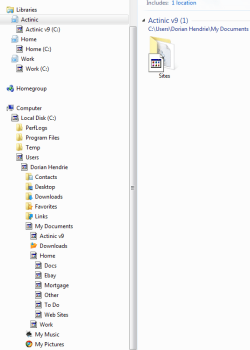
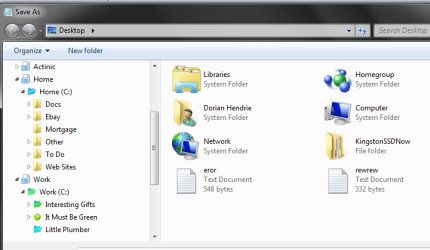
When I create new folders they look fine, as they do when I insert a file or folder as an attachment in an email, but original folders all appear blank when I am in Explorer.

The weird thing is that it wasn't constant but every now and then - but now it has become a permanent issue.

The enclosed screenshots explain more precisely what I mean. Pic 1 is what they used to look like and Pic 2 is what they now look like. Any ideas anyone?
Dorian.

I've tried the following fixes with no luck:

How to Change the Windows 7 Default Folder Icon: http://www.sevenforums.com/tutorials/23825-folder-icon-change-windows-7-default-folder-icon.html
Default File Type Associations - Restore - http://www.sevenforums.com/tutorials/19449-default-file-type-associations-restore.html
How to Reset All Folder View Settings to Default in Windows 7 - http://www.sevenforums.com/tutorials/15699-folder-template-default.html
 

Attachments
  • Win 7 - 1.PNG
    Win 7 - 1.PNG
    23.9 KB · Views: 750
  • Win 7 - 2.PNG
    Win 7 - 2.PNG
    14.9 KB · Views: 218

My Computer My Computer

Computer Manufacturer/Model Number
Home Made
OS
Windows 7 32 bit
CPU
E6300
Motherboard
AsRock
Memory
2 Gig
Graphics Card(s)
Intel 945
Hard Drives
Kingston 128 Gig SSD
PSU
Seasonic S430
Case
Thermaltake Mozart Tx
Cooling
Skythe Heatsinks
Hello Dorian,

Welcome to 7 Forums.

Might give this a try. C:\Users\username\AppData\Local. Delete 'iconcache.db'. Reboot. That will rebuild the icon cache.

Hope this helps.

Gary
 

My Computer My Computer

Computer Manufacturer/Model Number
Dell XPS420
OS
Vista Ult 64 bit Seven Ult RTM x64
CPU
Intel Core2 Quad Q6600 2.40 gigahertz
Memory
Crucial Ballistix 4x2GB PC2 6400
Graphics Card(s)
NVIDIA GeForce 8600 GTS 256 MB
Sound Card
Creative SB X-Fi audio
Monitor(s) Displays
HP w2207 + HPvs15
Screen Resolution
1680x1050 + 1024x768
Hard Drives
2-WD5000AAKS-500 GB
WD5000AAV-500 GB external
Keyboard
Microsoft Comfort Curve
Mouse
MX Revolution
Other Info
Wacom Intuos 2 Graphics Tablet
Experience Index=5.5
Thanks Gary,

I've tried this - fingers crossed that it would work.

Unfortunately, it hasn't.

I've tried twice to make sure and the IconCache file is the same size when I delete it, reboot and it appears again (9,607 kb).

Not sure what else I can do apart from a fresh install of Windows 7!

Dorian.
 

My Computer My Computer

Computer Manufacturer/Model Number
Home Made
OS
Windows 7 32 bit
CPU
E6300
Motherboard
AsRock
Memory
2 Gig
Graphics Card(s)
Intel 945
Hard Drives
Kingston 128 Gig SSD
PSU
Seasonic S430
Case
Thermaltake Mozart Tx
Cooling
Skythe Heatsinks

My Computer My Computer

Computer Manufacturer/Model Number
Dell XPS420
OS
Vista Ult 64 bit Seven Ult RTM x64
CPU
Intel Core2 Quad Q6600 2.40 gigahertz
Memory
Crucial Ballistix 4x2GB PC2 6400
Graphics Card(s)
NVIDIA GeForce 8600 GTS 256 MB
Sound Card
Creative SB X-Fi audio
Monitor(s) Displays
HP w2207 + HPvs15
Screen Resolution
1680x1050 + 1024x768
Hard Drives
2-WD5000AAKS-500 GB
WD5000AAV-500 GB external
Keyboard
Microsoft Comfort Curve
Mouse
MX Revolution
Other Info
Wacom Intuos 2 Graphics Tablet
Experience Index=5.5
Thanks Gary,

Yes, I just came across that system reinstall post last night. From previous searches I had thought it not possible to 'fix' Win 7 without a complete reinstall, as when you put the disc back in it certainly doesn't offer you the option like I remember it doing with XP (never had Vista).

So if I follow those instructions it will not lose my files, settings, Windows Live Mail accounts and emails etc.? but just reinstall Win 7?

I will of course take a copy of the HD first just in case.

Dorian.
 

My Computer My Computer

Computer Manufacturer/Model Number
Home Made
OS
Windows 7 32 bit
CPU
E6300
Motherboard
AsRock
Memory
2 Gig
Graphics Card(s)
Intel 945
Hard Drives
Kingston 128 Gig SSD
PSU
Seasonic S430
Case
Thermaltake Mozart Tx
Cooling
Skythe Heatsinks
Some settings might change to default, not sure about that. Any hacks will be history. Files should be fine. Good backups are very comforting. ;)
 

My Computer My Computer

Computer Manufacturer/Model Number
Dell XPS420
OS
Vista Ult 64 bit Seven Ult RTM x64
CPU
Intel Core2 Quad Q6600 2.40 gigahertz
Memory
Crucial Ballistix 4x2GB PC2 6400
Graphics Card(s)
NVIDIA GeForce 8600 GTS 256 MB
Sound Card
Creative SB X-Fi audio
Monitor(s) Displays
HP w2207 + HPvs15
Screen Resolution
1680x1050 + 1024x768
Hard Drives
2-WD5000AAKS-500 GB
WD5000AAV-500 GB external
Keyboard
Microsoft Comfort Curve
Mouse
MX Revolution
Other Info
Wacom Intuos 2 Graphics Tablet
Experience Index=5.5
Incorrect Windows 7 icons on desktop.

Hi folks

I guess I have similar problems, some of the icons on my desk top do not reflect the actual website. ie my Google shortcut icon shows as a Yahoo icon. Any help appreciated.

John
 

My Computer My Computer

OS
widows 7 home premium
Hello 5645hx,

Welcome to 7 Froums.

Can I assume you have tried everything in this thread so far?

Gary
 

My Computer My Computer

Computer Manufacturer/Model Number
Dell XPS420
OS
Vista Ult 64 bit Seven Ult RTM x64
CPU
Intel Core2 Quad Q6600 2.40 gigahertz
Memory
Crucial Ballistix 4x2GB PC2 6400
Graphics Card(s)
NVIDIA GeForce 8600 GTS 256 MB
Sound Card
Creative SB X-Fi audio
Monitor(s) Displays
HP w2207 + HPvs15
Screen Resolution
1680x1050 + 1024x768
Hard Drives
2-WD5000AAKS-500 GB
WD5000AAV-500 GB external
Keyboard
Microsoft Comfort Curve
Mouse
MX Revolution
Other Info
Wacom Intuos 2 Graphics Tablet
Experience Index=5.5
Incorrect Website Icons Sorted!

Hello Dorian,

Welcome to 7 Forums.

Might give this a try. C:\Users\username\AppData\Local. Delete 'iconcache.db'. Reboot. That will rebuild the icon cache.

Hope this helps.

Gary

Together with clearing out cookies, this answer worked for me (thanks, Gary), but it was a bit tiresome and I'd like to know if a recurrence might be prevented.

Some of the icons in my Favorites, and the respective IE tabs, suddenly became all jumbled up. All worked OK, but the spurious icons were visually off-putting. There was no pattern, except that I noted that the sites involved all seemed to be included in sub-folders on my Favorites Bar.

Any ideas as to what may have caused this?
 

My Computer My Computer

Computer Manufacturer/Model Number
Sony Vaio NW-20SF - all following items as manufacturer installed
OS
Windows 7 Home Premium 64-bit, Version 6.1, Build 7600
Mouse
Logitech V450 Laser
Internet Speed
6 Mbps
Other Info
Samsung N150 Plus netbook (2Gb RAM upgrade) for travelling
Back
Top