windows 7 for xmas. now what do I do????

sorry for being a noob. if im going to free up one hard drive, then start from scratch with the larger master drive. why install vista 1st then overwrite it with 7?
 

My Computer My Computer

At a glance

Windows 7 64 bit
OS
Windows 7 64 bit
No need to reinstall if you are happy with Win7. But we need the screenshot to advise you specific steps how to extricate Vista and recover the MBR to WIn7.

We help do these here every day.

Normally you'd mark Win7 active, remove Vista drive, change cable to Win7 HD or boot into BIOS setup to set Win7 HD first to boot (after DVD), boot into Win7 DVD and run Startup Repair 3 separate times as it will attempt to repair before finally rewriting the MBR to Win7.

But there may be some flies in the ointment so post back the screen snip using Snipping tool in Start Menu, attaching file using paper clip in reply box.
 
Vista holds the boot critical files which need to be moved to Win7 first.

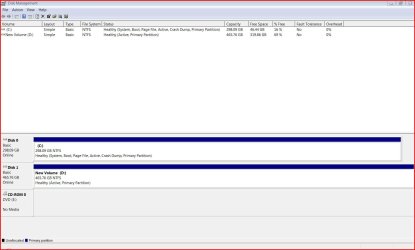
Please post back a screenshot of your full Disk Management map so we can advise you of the specific steps to achieve what you want. Use Snipping Tool in Start Menu, attach file using paper clip in reply box.

Study the files in your Win7 root with file view set to Details to see what is there. Look for windows.old, which is the entire previous OS files if you clean installed from Vista? You can delete it using Disk Cleanup after retrieving all needed files.

ok. am i right in thinking you need a screenshot of the main disk management screen? like this? (file attached) *this is a shot before installation*
 

Attachments

My Computer My Computer

At a glance

Windows 7 64 bit
OS
Windows 7 64 bit
so does that mean its a shared file? if i remove vista 7 wont function properly?

ive got everything important on an external hd. i wouldnt mind removing vista and seven, then installing from scratch. if thats possible?

should you decide to do that, install vista first then seven


Ken J+

thinking about it surely this wont work. if i install vista then 7 as an upgrade i'll hit the earlier problem of moving from 32bit vista to 64bit 7. which isnt possible??


this surely must be idiot proof. am i missing something really simple?
 

My Computer My Computer

At a glance

Windows 7 64 bit
OS
Windows 7 64 bit
this is now with windows 7 installed to secondary hard drive.

Capture.JPG
 

My Computer My Computer

At a glance

Windows 7 64 bit
OS
Windows 7 64 bit
First swap drives, making sure D:Win7 HD remains first HD in BIOS boot order when swapped into DISK0 position.

Next mark C:Vista drive inactive so it can be used as a data drive until you repartition and format logical in Disk Management.

To do this boot into the Win7 DVD, select "Repair My Computer" on second screen, click through to Recovery Tools list to open a Command Line and type:

DISKPART
LIST DISK
SELECT DISK 1 (for C:Vista HD)
INACTIVE
EXIT

Now return to DVD Recovery Tools list and run Startup Repair 3 separate times to rewrite the MBR to Win7.
 
Back
Top