Windows 7 Format Problem

FaresAT

New member
Local time
12:53 AM
Messages
3
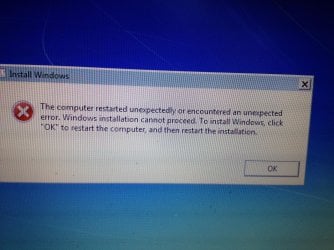
I tried formating my Laptop and the electricity cut at the last stage (Which it was stuck at for an hour) so the laptop turned off, now i try to turn it on it only shows me this:

"The computer restarted unexpectedly or encountered an unexpected error. Windows installation cannot proceed. To install windows, click "OK" to restart the computer, and then restart the Installation.

If i press OK it does the same thing all over again, i can only press ESC while booting, but it keeps going to the same problem.

I have a HP Pavilion DV6 if it matters.
 

My Computer

Computer type
Laptop
Computer Manufacturer/Model Number
HP
OS
Windows 7 x64
Boot into the installation media (as you should be doing anyway) to start over Clean Reinstall Windows 7.

Read the Special Note to HP Owners at the end for how to decide which partitions to keep if bootable hardware diagnostics will still boot and run from F12 and Recovery offers Minimal Recovery.

However if you were running Recovery when power was cut, this partition may not function any longer so can be deleted.
 
Last edited:
I actually am rebooting while the Win7 CD is inside, but what happens after it starts the format that this pop up comes and takes me back to restart and so on (Except if this is the wrong way to do the Format i have no idea where to start it)
IMG_2138.jpg
 

My Computer

Computer type
Laptop
Computer Manufacturer/Model Number
HP
OS
Windows 7 x64
Windows 7 is on a DVD not a CD, and it should not behave this way if you are using a valid Win7 DVD which can always start over when booted to do a Clean Reinstall Windows 7

Instead I am surmising you're running HP System Recovery which is the worst possible install of Win7, so I would switch immediately to doing a Clean Reinstall Windows 7 using the media provided for your licensed version to get the best possible install of Win7 instead of the worst. When you boot that media you can always start over and not get caught in a failure loop as happens with Factory Recovery trying to install all of its badly-written bloatware that it lards on to smother Win7.

If you want the grossly inferior Factory Recovery there is a fix here you can attempt to get it to complete Recovery from disks: Error message "The Computer Restarted unexpectedly or encountered - Microsoft Community

Please fill in your System SPecs in bottom left corner of post with at least your full PC make and model number..
 
Last edited:
Ok, thank you for your help !
 

My Computer

Computer type
Laptop
Computer Manufacturer/Model Number
HP
OS
Windows 7 x64
Back
Top