Windows 7 freeze

wietmie

New member
Local time
10:49 AM
Messages
6
Hai, i'm new here, and new in windows 7, well i got this problem, i install windows 7 for the 1st time and it runs well, but after several time, its freeze. And then i restart it and after several period it freeze again, i got fed up and format it to windows xp and nothings happen. But then i love windows 7 much so i format it back, and here goes the same problem. i have read someone thread about the freeze when in idle. but the problem is, i'm in the pc using it not in the idle status and suddenly it freeze. So, is there any solution to overcome this pls?

thanks in advance
 

My Computer

OS
windows 7
CPU
AMD 64 dual core 5200+ 2.70ghz
Motherboard
gigabyte
Memory
2 gig 800mhz
Graphics Card(s)
nvidia geforce 8500GT
Sound Card
High definition audio device
Welcome!

Try testing your RAM with Memtest86. Burn it to a CD using the built-in ISO burner (right-click on the file). Then boot from the CD and run it at least 5 passes.

Also test your hard drive. Go to the drive manufacturer's site, and look for their advanced diagnostic tools and run an advanced scan.

That's a start, if it doesn't work we can go on.

~JK
 

My Computer

Computer Manufacturer/Model Number
Custom
OS
Windows 7 Professional x64
CPU
Intel i7 2600K OC'd @ 4620 MHz
Motherboard
Asus P8Z68-V Pro
Memory
16GB GSkill Sniper 2133 Mhz (4x4GB)
Graphics Card(s)
EVGA GeForce GTX 480 SuperClocked+
Sound Card
Realtek High Definition Audio
Monitor(s) Displays
2x Acer S273HLbmii 27"
Screen Resolution
2 x 1920x1080
Hard Drives
64GB Crucial M4 SSD

Storage: Hitachi 1TB 5400RPM, Samsung 1.5TB 5400RPM
PSU
Corsair HW Series 750w (modular)
Case
Cooler Master HAF 932 Advanced Blue Edition
Cooling
CM Hyper 212+ CPU cooler, 3x 230mm + 1x 140mm case fans
Keyboard
Logitech MK320 (wireless)
Mouse
Logitech MK320 (wireless)
Internet Speed
30 Mb/s : 2 Mb/s
Check the Action Center in Windows 7 and see if you have any error messages.
 

My Computer

Computer Manufacturer/Model Number
Home built
OS
Windows 7 Ultimate 32 bit
CPU
Intel(R) Pentium(R) 4 CPU 3.00GHz
Motherboard
ASUS P4P800-VM Motherboard Chipset: Intel 865G + ICH5
Memory
2.50 GB RAM
Graphics Card(s)
NVIDIA GeForce 7600 GS
Sound Card
SoundMax Integrated Digital Audio (Chip)
Monitor(s) Displays
ViewSonic VX 1962 wm
Screen Resolution
1680 X 1050
Hard Drives
Seagate Barracuda 7200.10 80 GB
ST380215A ATA Device 18.6 GB
Western Digital "My Book" external hard drive 750 GB
Cooling
Fan based
Keyboard
Microsoft Comfort Curve Keyboard 2000 v10 USB
Mouse
Logitec optic USB
Internet Speed
3.01 Mb/s download 0.64 Mb/s upload
thanks for the reply.. Jonathan.. so u mean thats my RAM or hard disk have problem? i will check it.. but.. windows xp i use before this does not occur any problem. Carl.. anyway it just freeze.. does not give me any clue what is going on.. :(
 

My Computer

OS
windows 7
CPU
AMD 64 dual core 5200+ 2.70ghz
Motherboard
gigabyte
Memory
2 gig 800mhz
Graphics Card(s)
nvidia geforce 8500GT
Sound Card
High definition audio device
Could you check your Event Viewer in Application logs to see if anything could be informative?
 

My Computer

Computer Manufacturer/Model Number
Custom
OS
Windows 7 Professional x64
CPU
Intel i7 2600K OC'd @ 4620 MHz
Motherboard
Asus P8Z68-V Pro
Memory
16GB GSkill Sniper 2133 Mhz (4x4GB)
Graphics Card(s)
EVGA GeForce GTX 480 SuperClocked+
Sound Card
Realtek High Definition Audio
Monitor(s) Displays
2x Acer S273HLbmii 27"
Screen Resolution
2 x 1920x1080
Hard Drives
64GB Crucial M4 SSD

Storage: Hitachi 1TB 5400RPM, Samsung 1.5TB 5400RPM
PSU
Corsair HW Series 750w (modular)
Case
Cooler Master HAF 932 Advanced Blue Edition
Cooling
CM Hyper 212+ CPU cooler, 3x 230mm + 1x 140mm case fans
Keyboard
Logitech MK320 (wireless)
Mouse
Logitech MK320 (wireless)
Internet Speed
30 Mb/s : 2 Mb/s
Hai, i'm new here, and new in windows 7, well i got this problem, i install windows 7 for the 1st time and it runs well, but after several time, its freeze. And then i restart it and after several period it freeze again, i got fed up and format it to windows xp and nothings happen. But then i love windows 7 much so i format it back, and here goes the same problem. i have read someone thread about the freeze when in idle. but the problem is, i'm in the pc using it not in the idle status and suddenly it freeze. So, is there any solution to overcome this pls?

thanks in advance

check whether your chipset driver is installed or not.....

it can be one of the problem of freezing..!!!!
 

My Computer

Computer Manufacturer/Model Number
Custom Built (by me)
OS
Windows 8 CP x64
CPU
Intel(R) Core(TM) i7 CPU 920 @ 2.97GHz
Motherboard
DX58SO
Memory
Corsair 6GB DDR3 (1333Mhz)
Graphics Card(s)
Nvidia GeForce 9800GT (1GB)
Sound Card
Creative Sound Blaster Audigy Value (24bit internal)
Monitor(s) Displays
22" Samsung SyncMaster B2230 (1920*1080)
Screen Resolution
1920*1080
Hard Drives
Seagate Barracuda 500gb
PSU
i ball 450W
Case
i ball (Work Horse)
Keyboard
Microsoft Wireless Keyboard 700 v2.0
Mouse
Microsoft Wireless Mouse 700 v2.0
Internet Speed
1MB
i view the event viewer and found so many error.. on of it related to the network adapter.. and other things that i'm not really understand.. chipset? hurm.. windows 7 does not have default chipset? well will looking for that.. thank u so much..
 

My Computer

OS
windows 7
CPU
AMD 64 dual core 5200+ 2.70ghz
Motherboard
gigabyte
Memory
2 gig 800mhz
Graphics Card(s)
nvidia geforce 8500GT
Sound Card
High definition audio device
The chip set is part of your motherboard. Can you post a screen shot of your event viewer log showing the errors? You can do this using the Snipping Tool that is part of windows.
 

My Computer

Computer Manufacturer/Model Number
Home built
OS
Windows 7 Ultimate 32 bit
CPU
Intel(R) Pentium(R) 4 CPU 3.00GHz
Motherboard
ASUS P4P800-VM Motherboard Chipset: Intel 865G + ICH5
Memory
2.50 GB RAM
Graphics Card(s)
NVIDIA GeForce 7600 GS
Sound Card
SoundMax Integrated Digital Audio (Chip)
Monitor(s) Displays
ViewSonic VX 1962 wm
Screen Resolution
1680 X 1050
Hard Drives
Seagate Barracuda 7200.10 80 GB
ST380215A ATA Device 18.6 GB
Western Digital "My Book" external hard drive 750 GB
Cooling
Fan based
Keyboard
Microsoft Comfort Curve Keyboard 2000 v10 USB
Mouse
Logitec optic USB
Internet Speed
3.01 Mb/s download 0.64 Mb/s upload
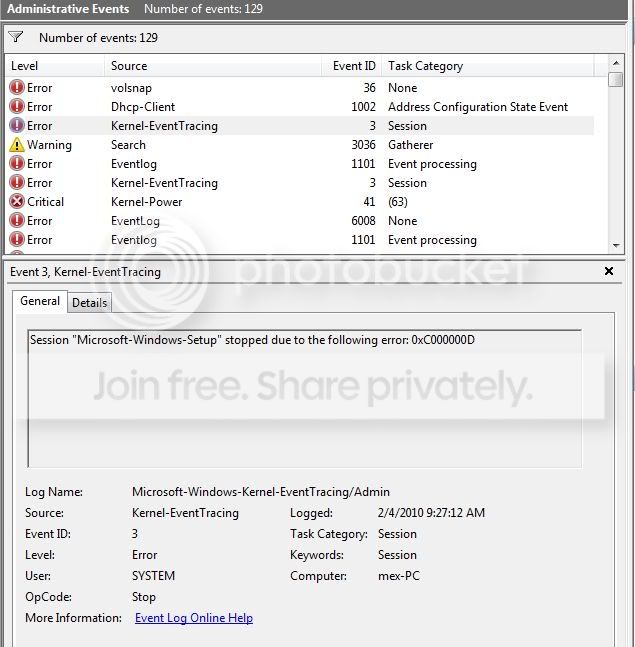
If u see this image, so many error event occur, is it normal?

Capture.jpg


And one more things, i cannot find my motherboard chipset, i already go to the vendor site, and it doesnt have the chipset driver. and i have google everywhere, still cant find one..
 
Last edited:

My Computer

OS
windows 7
CPU
AMD 64 dual core 5200+ 2.70ghz
Motherboard
gigabyte
Memory
2 gig 800mhz
Graphics Card(s)
nvidia geforce 8500GT
Sound Card
High definition audio device
try installing the latest drivers for your graphics card (win 7 version) maybe you just need the proper drivers as i had this problem with the ones windows installs but once i put the latest drivers in it stopped (you might still get it occasionally at start up but that's just a quirk of win 7) just go to nvidia or amd website depending what card you have & download the latest windows 7 drivers for your card - hope this helps
 
Wah.. i already download and install the latest driver for my card.. and today.. no freeze anymore.. but i'm not sure it is solve or not.. hope no freeze again.. :D ... Thanks for everybody that help me.. :o
 

My Computer

OS
windows 7
CPU
AMD 64 dual core 5200+ 2.70ghz
Motherboard
gigabyte
Memory
2 gig 800mhz
Graphics Card(s)
nvidia geforce 8500GT
Sound Card
High definition audio device
Glad to hear it is working for you. Very good.
 

My Computer

Computer Manufacturer/Model Number
Home built
OS
Windows 7 Ultimate 32 bit
CPU
Intel(R) Pentium(R) 4 CPU 3.00GHz
Motherboard
ASUS P4P800-VM Motherboard Chipset: Intel 865G + ICH5
Memory
2.50 GB RAM
Graphics Card(s)
NVIDIA GeForce 7600 GS
Sound Card
SoundMax Integrated Digital Audio (Chip)
Monitor(s) Displays
ViewSonic VX 1962 wm
Screen Resolution
1680 X 1050
Hard Drives
Seagate Barracuda 7200.10 80 GB
ST380215A ATA Device 18.6 GB
Western Digital "My Book" external hard drive 750 GB
Cooling
Fan based
Keyboard
Microsoft Comfort Curve Keyboard 2000 v10 USB
Mouse
Logitec optic USB
Internet Speed
3.01 Mb/s download 0.64 Mb/s upload
Back
Top