Windows 7 freezing (semi randomly)

haison

New member
Local time
8:29 AM
Messages
14
Windows 7 freezing (semi randomly) UPDATE!!!

I use to have Vista 64 on my desktop and upgraded to Windows 7. It started freezing and to the advice I've read online, I did a clean install. It froze up after i signed in when the gadgets were popping up. I restarted and it worked fine for a bit. I installed all the missing drivers and did Windows Update. Everytime the computer is checking for an update, it freezes and when I restart, the updates appear that need to be installed. It happens each time I click Check for Updates. The computer still freezes randomly but that's when it happens the most.

I will provide all the information I can to you guys to help fix my problem.
 
Last edited:

My Computer

OS
Windows 7 Professional
CPU
Intel Core2Quad Q9550
Motherboard
Asus Rampage Formula
Memory
Corsair 1066MHz DDR2 Dominator
Graphics Card(s)
Nvidia 9800GTX+
Monitor(s) Displays
Samsung SyncMaster 2053BW
Hard Drives
150GB Velociraptor
500GB Western Digital RE2
640GB x 2 Western Digital Caviar Black
PSU
Corsair TX750
Case
Cooler Master HAF 932
I use to have Vista 64 on my desktop and upgraded to Windows 7. It started freezing and to the advice I've read online, I did a clean install. It froze up after i signed in when the gadgets were popping up. I restarted and it worked fine for a bit. I installed all the missing drivers and did Windows Update. Everytime the computer is checking for an update, it freezes and when I restart, the updates appear that need to be installed. It happens each time I click Check for Updates. The computer still freezes randomly but that's when it happens the most.

I will provide all the information I can to you guys to help fix my problem.

Ok, I'll start by asking some info.

1. What windows 7 build do you run?
2. Any overclocking done?
3. How much ram do you have installed? How many strips?
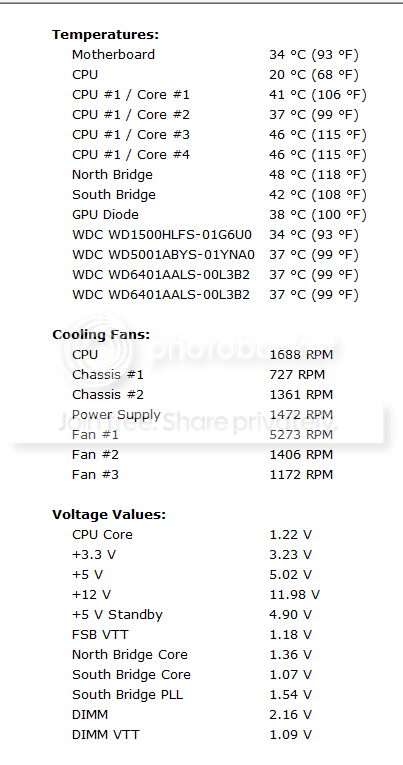
4. Do you have any idea about the temperatures of the system?
(you can download everest ultimate to get an insight of the temps)
5. What kind of connection wireless of NIC?
6. Do you have many apps installed?
7. Which AV/firewall installed?
8. You said it was fine for a while, any idea what apps were installed right before it started happening?

Greetz
 

My Computer

OS
Win7 Build 7600 x86
CPU
Pentium II 300MHz
Motherboard
Asus
Memory
32mb EDO RAM
Graphics Card(s)
Diamond Viper
Sound Card
Soundblaster 16
Monitor(s) Displays
14" AOC CRT 16K color
Screen Resolution
800x600
Hard Drives
300mb Quantum fireball
PSU
110 Watts
Cooling
Passive
Keyboard
Trust Ergonomic
Mouse
Generic
Internet Speed
256K u 128K d
1. Running Window 7 x64 Ultimate that I received from MSDNAA
2. No overclocking
3. 8GB (4x2GB Corsair Dominator 1066MHz DDR2) Ran MemTest for 8 hours with no errors yesterday
4. All temps look normal.
5. I am using a Linksys Wireless G that is using the default driver.
6. Not many apps. Fresh install about two days ago.
7. I am using AVG antivirus
8. This started within the first five seconds of logging in for the first time and everytime I check for updates. It occasionally freezes when I close out of my browser too.
 

My Computer

OS
Windows 7 Professional
CPU
Intel Core2Quad Q9550
Motherboard
Asus Rampage Formula
Memory
Corsair 1066MHz DDR2 Dominator
Graphics Card(s)
Nvidia 9800GTX+
Monitor(s) Displays
Samsung SyncMaster 2053BW
Hard Drives
150GB Velociraptor
500GB Western Digital RE2
640GB x 2 Western Digital Caviar Black
PSU
Corsair TX750
Case
Cooler Master HAF 932
1. Running Window 7 x64 Ultimate that I received from MSDNAA
2. No overclocking
3. 8GB (4x2GB Corsair Dominator 1066MHz DDR2) Ran MemTest for 8 hours with no errors yesterday
4. All temps look normal.
5. I am using a Linksys Wireless G that is using the default driver.
6. Not many apps. Fresh install about two days ago.
7. I am using AVG antivirus
8. This started within the first five seconds of logging in for the first time and everytime I check for updates. It occasionally freezes when I close out of my browser too.

We have to try to rule out as much as possible.

Can you try cabled network? And see how that works? Seen some problems with USB wireless.
Can you temporarily uninstall AVG? Seen some problems with it before too.
Do you have other usb stuff attached? Maybe USB hub?

Seems like the early xp/vista days all over again.
Don't know why they had to change the driver model again, but man I see so many similar problems it's scary.

I praise myself lucky, four system without any problem.
Only thing that really sucks is the horrible USB2 performance, but that is a leftover from Vista.
My 45mb/s usb stick does 2mb/s, my usb harddisk does 4mb/s, and that is on any of the four systems.
MS really screwed up USB drivers.
 

My Computer

OS
Win7 Build 7600 x86
CPU
Pentium II 300MHz
Motherboard
Asus
Memory
32mb EDO RAM
Graphics Card(s)
Diamond Viper
Sound Card
Soundblaster 16
Monitor(s) Displays
14" AOC CRT 16K color
Screen Resolution
800x600
Hard Drives
300mb Quantum fireball
PSU
110 Watts
Cooling
Passive
Keyboard
Trust Ergonomic
Mouse
Generic
Internet Speed
256K u 128K d
Well Haison,

I have to go to bed. 3:17 am here.

But keep the info coming, I'll check back tomorrow.

Greetz
 

My Computer

OS
Win7 Build 7600 x86
CPU
Pentium II 300MHz
Motherboard
Asus
Memory
32mb EDO RAM
Graphics Card(s)
Diamond Viper
Sound Card
Soundblaster 16
Monitor(s) Displays
14" AOC CRT 16K color
Screen Resolution
800x600
Hard Drives
300mb Quantum fireball
PSU
110 Watts
Cooling
Passive
Keyboard
Trust Ergonomic
Mouse
Generic
Internet Speed
256K u 128K d
Somehow I overlooked this, but the motherboard temperature is 80C. I do not know when the motherboard temperature started getting that hot, but surprised Vista never picked it up but 7 did. It is an Asus P5Q and I have submitted Newegg about the warranty info.

Thank you very much squonksc. I would have probably be on another wild goose chase trying to figure it out if I wouldn't have looked over that list you told me to do again. So does anybody know why the motherboard would have a temperature like that after a year of use?
 

My Computer

OS
Windows 7 Professional
CPU
Intel Core2Quad Q9550
Motherboard
Asus Rampage Formula
Memory
Corsair 1066MHz DDR2 Dominator
Graphics Card(s)
Nvidia 9800GTX+
Monitor(s) Displays
Samsung SyncMaster 2053BW
Hard Drives
150GB Velociraptor
500GB Western Digital RE2
640GB x 2 Western Digital Caviar Black
PSU
Corsair TX750
Case
Cooler Master HAF 932
Somehow I overlooked this, but the motherboard temperature is 80C. I do not know when the motherboard temperature started getting that hot, but surprised Vista never picked it up but 7 did. It is an Asus P5Q and I have submitted Newegg about the warranty info.

Thank you very much squonksc. I would have probably be on another wild goose chase trying to figure it out if I wouldn't have looked over that list you told me to do again. So does anybody know why the motherboard would have a temperature like that after a year of use?

Hi Haison,

I can hardly imagine the motherboard temp being that high and the rest being normal.
The motherboard it's self doesn't create that kind of temps.
The temperature in the case must be causing this.
And the heat inside the case is mainly generated by other peripherals, like harddisks, CPU, GPU.

Airflow is essential, and not just blowing air around like I see in many cases, but getting air in, and getting air out as quick as possible.

But first we have to find out exactly what temperatures all the peripherals have.
Everest can do that, but only the full version and you would need to buy it.


If you send me a personal message with your email address, I will send you a free tool that can pick up temperatures of everything, including RAM temperatures.

Greetz

.
 

My Computer

OS
Win7 Build 7600 x86
CPU
Pentium II 300MHz
Motherboard
Asus
Memory
32mb EDO RAM
Graphics Card(s)
Diamond Viper
Sound Card
Soundblaster 16
Monitor(s) Displays
14" AOC CRT 16K color
Screen Resolution
800x600
Hard Drives
300mb Quantum fireball
PSU
110 Watts
Cooling
Passive
Keyboard
Trust Ergonomic
Mouse
Generic
Internet Speed
256K u 128K d
UPDATE!!!!!!!!!!!!!!!

Well guys, the Asus P5Q is still getting RMA'd and I got tired of waiting and got the Asus Rampage Formula. I have narrowed the problem down to not be hardware (I think at least). Whenever I perform a Windows Update, it will freeze. I have disabled it and have ran it for 24 hours without it freezing up. I manually did a Windows Update and it froze again. I have ran AVG anti-virus on all my hard drives and this is all I could muster up.
 

My Computer

OS
Windows 7 Professional
CPU
Intel Core2Quad Q9550
Motherboard
Asus Rampage Formula
Memory
Corsair 1066MHz DDR2 Dominator
Graphics Card(s)
Nvidia 9800GTX+
Monitor(s) Displays
Samsung SyncMaster 2053BW
Hard Drives
150GB Velociraptor
500GB Western Digital RE2
640GB x 2 Western Digital Caviar Black
PSU
Corsair TX750
Case
Cooler Master HAF 932
What do you have for fans in your case? What do you have IN the case that is generating so much heat?
 

My Computer

OS
Ubuntu 10.10 64bit, Windows 7 Ultimate 64bit
CPU
AMD Phenom II X6 1090T
Motherboard
ASUS M3A79-T Deluxe
Memory
OCZ 4GB
Graphics Card(s)
GTX 275 OC
Sound Card
SoundMax
Monitor(s) Displays
Asus 23"
PSU
CM RS-650
Case
CM Storm Scout
Cooling
CM GeminII S
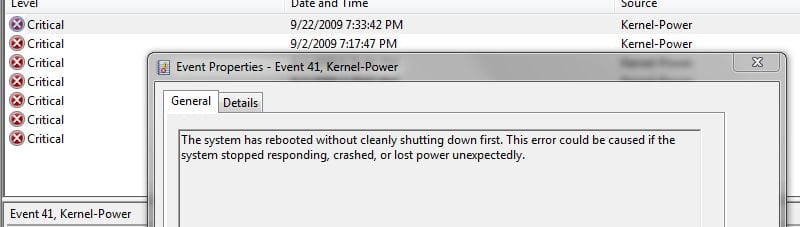
check system messages under event viewer in administrative tools and see what the red critical error messages are saying at the exact times the freezes are happening.
 

My Computer

OS
Win 7 Ultimate x64
CPU
Intel i7 950 OC'd @ 4.0Ghz (SpeedStep ON)
Motherboard
ASUS P6X58D-E BIOS 0303
Memory
3x2GB Patriot Extreme Viper II Sector 7 DDR3 @ 1600mhz
Graphics Card(s)
ATI MSI 5870 900mhz/1300mhz
Sound Card
Onboard Realtek ALC889
Monitor(s) Displays
2 X 24" BenQ G2412HD
Screen Resolution
1920x1080p
Hard Drives
Intel X25-M 80 GB (SSD)
W.D. Caviar Black 1TB (SATA)
Seagate Barricuda 1TB (SATA)
Seagate Barricuda 80GB (SATA)
PSU
Corsair AX850
Case
Antec 1200
Cooling
Lots and Lots of Air!
Keyboard
Razer Lycosa
Mouse
Microsoft Sidewinder
Internet Speed
25Mbps/1Mbps
Just throwing this out there... it was a pain for me to get used to the new looks. I still am not used to it from Vista, figured it might help :D

Control panel > System and Security > View Event Logs

When that loads... under "Event Viewer (local)" See first pic.

Double click one of the "critical" events to see details... pic 2
 

Attachments

  • letsgetcritical.jpg
    letsgetcritical.jpg
    26.6 KB · Views: 24
  • details.JPG
    details.JPG
    29.3 KB · Views: 30

My Computer

OS
Ubuntu 10.10 64bit, Windows 7 Ultimate 64bit
CPU
AMD Phenom II X6 1090T
Motherboard
ASUS M3A79-T Deluxe
Memory
OCZ 4GB
Graphics Card(s)
GTX 275 OC
Sound Card
SoundMax
Monitor(s) Displays
Asus 23"
PSU
CM RS-650
Case
CM Storm Scout
Cooling
CM GeminII S
Here are the temperatures in the case now and everything looks good.

Capture.png
 

My Computer

OS
Windows 7 Professional
CPU
Intel Core2Quad Q9550
Motherboard
Asus Rampage Formula
Memory
Corsair 1066MHz DDR2 Dominator
Graphics Card(s)
Nvidia 9800GTX+
Monitor(s) Displays
Samsung SyncMaster 2053BW
Hard Drives
150GB Velociraptor
500GB Western Digital RE2
640GB x 2 Western Digital Caviar Black
PSU
Corsair TX750
Case
Cooler Master HAF 932
Not showing critical errors showing. It freezes a couple seconds into Windows Update.

Capture2.png
 

My Computer

OS
Windows 7 Professional
CPU
Intel Core2Quad Q9550
Motherboard
Asus Rampage Formula
Memory
Corsair 1066MHz DDR2 Dominator
Graphics Card(s)
Nvidia 9800GTX+
Monitor(s) Displays
Samsung SyncMaster 2053BW
Hard Drives
150GB Velociraptor
500GB Western Digital RE2
640GB x 2 Western Digital Caviar Black
PSU
Corsair TX750
Case
Cooler Master HAF 932
check you 4 regular errors then
 

My Computer

OS
Win 7 Ultimate x64
CPU
Intel i7 950 OC'd @ 4.0Ghz (SpeedStep ON)
Motherboard
ASUS P6X58D-E BIOS 0303
Memory
3x2GB Patriot Extreme Viper II Sector 7 DDR3 @ 1600mhz
Graphics Card(s)
ATI MSI 5870 900mhz/1300mhz
Sound Card
Onboard Realtek ALC889
Monitor(s) Displays
2 X 24" BenQ G2412HD
Screen Resolution
1920x1080p
Hard Drives
Intel X25-M 80 GB (SSD)
W.D. Caviar Black 1TB (SATA)
Seagate Barricuda 1TB (SATA)
Seagate Barricuda 80GB (SATA)
PSU
Corsair AX850
Case
Antec 1200
Cooling
Lots and Lots of Air!
Keyboard
Razer Lycosa
Mouse
Microsoft Sidewinder
Internet Speed
25Mbps/1Mbps
the 4 errors said that i needed to reactivate Windows 7 because the Product Number did not match the Hardware (after I changed the motherboard).
 

My Computer

OS
Windows 7 Professional
CPU
Intel Core2Quad Q9550
Motherboard
Asus Rampage Formula
Memory
Corsair 1066MHz DDR2 Dominator
Graphics Card(s)
Nvidia 9800GTX+
Monitor(s) Displays
Samsung SyncMaster 2053BW
Hard Drives
150GB Velociraptor
500GB Western Digital RE2
640GB x 2 Western Digital Caviar Black
PSU
Corsair TX750
Case
Cooler Master HAF 932
:confused:
 

My Computer

OS
Win 7 Ultimate x64
CPU
Intel i7 950 OC'd @ 4.0Ghz (SpeedStep ON)
Motherboard
ASUS P6X58D-E BIOS 0303
Memory
3x2GB Patriot Extreme Viper II Sector 7 DDR3 @ 1600mhz
Graphics Card(s)
ATI MSI 5870 900mhz/1300mhz
Sound Card
Onboard Realtek ALC889
Monitor(s) Displays
2 X 24" BenQ G2412HD
Screen Resolution
1920x1080p
Hard Drives
Intel X25-M 80 GB (SSD)
W.D. Caviar Black 1TB (SATA)
Seagate Barricuda 1TB (SATA)
Seagate Barricuda 80GB (SATA)
PSU
Corsair AX850
Case
Antec 1200
Cooling
Lots and Lots of Air!
Keyboard
Razer Lycosa
Mouse
Microsoft Sidewinder
Internet Speed
25Mbps/1Mbps
So is 7 always going to be this uptight? It's essentially the same model motherboard.
 

My Computer

OS
Ubuntu 10.10 64bit, Windows 7 Ultimate 64bit
CPU
AMD Phenom II X6 1090T
Motherboard
ASUS M3A79-T Deluxe
Memory
OCZ 4GB
Graphics Card(s)
GTX 275 OC
Sound Card
SoundMax
Monitor(s) Displays
Asus 23"
PSU
CM RS-650
Case
CM Storm Scout
Cooling
CM GeminII S
So is 7 always going to be this uptight? It's essentially the same model motherboard.

It was even worse when Vista came out.
Changing one piece of hardware would require reactivation.
MS made it less strict after many complaints.

The activation is based on the hash code the mainboard and the hardware provides.
So it being the same model has little to do with it.

And to answer your first question.

Yes, as long as Os's and software are being pirated by the millions, the security measures will be necessary.

Not that it will matter much, because Win7, like Vista will be cracked the day it hits the streets.
The cracks are all ready done, only thing missing is valid keys to use them.

In the end, the honest consumers who always buy their software, movies and music are the real losers.
Because they are the ones being restricted.

The pirates get away with installing a simple crack and are done with it.

If you want to blame someone, blame people you know who use pirated stuff.

Greetz
 

My Computer

OS
Win7 Build 7600 x86
CPU
Pentium II 300MHz
Motherboard
Asus
Memory
32mb EDO RAM
Graphics Card(s)
Diamond Viper
Sound Card
Soundblaster 16
Monitor(s) Displays
14" AOC CRT 16K color
Screen Resolution
800x600
Hard Drives
300mb Quantum fireball
PSU
110 Watts
Cooling
Passive
Keyboard
Trust Ergonomic
Mouse
Generic
Internet Speed
256K u 128K d
Back
Top