Windows 7 from home basic to home premium

talkativetaurus

New member
Local time
9:04 PM
Messages
12
hello all,

i m using a dell inspiron m101z notebook which has windows 7 home basic prebuilt. now i got a very new win7 home premium dvd. and since yes i m not very good in all this computer stuff i have opened my own topic so that things bcom clearer to me.

i want to install home premium so how can i do it if i dont want to lose my files on the laptop. specially some dell softwares like webcam and all.

i went thru this tutorial. does this do the needful. it is ok i dont need to format my HD. but do i need to backup? also the notebook i use has only C drive n no other drive.

http://www.sevenforums.com/tutorials/170567-clean-install-windows-7-windows-7-desktop.html
 

My Computer My Computer

OS
Windows 7 Home Basic 64 bit
but i m not upgrading it thru anytime upgrade in windows. i have a complete new DVD.
 

My Computer My Computer

OS
Windows 7 Home Basic 64 bit
If you wont to reinstall all the software, you can clean install with the DVD.
 

My Computer My Computer

OS
ME/XP/Vista/Win7
I did not think

ther was much difference between Home Basic & Home Premium on a low end computer.
 

My Computer My Computer

Computer type
PC/Desktop
Computer Manufacturer/Model Number
Built them myself, Science Experiments !
OS
Win7 Enterprise, Win7 x86 (Ult 7600), Win7 x64 Ult 7600, TechNet RTM on AMD x64 (2.8Ghz)
CPU
AMD fx8350 4ghz, AMD-32 2400mhz, AMD-64 3200mhz, AMDx64 2.8G
Motherboard
SIS 755, ECS-K8M890M-M (Ult 7600), GigaByte & others
Memory
2gb, 4gb on the Ult 7600, 4gb on Technet RTM, 32gb on FX8350
Graphics Card(s)
Draw my own Graphics, several nVidia cards
Sound Card
on motherboard
Monitor(s) Displays
19" flat scr, 28" I-Inc widescr,22" Emprex Widescr, 23" Acer
Screen Resolution
1280 x 1024, 1440 x 900, 1920 x 1080
Hard Drives
6 pata Ide HD's & 2 Sata HD's
added 80gb external on Ult 7600 computer,
numerous extra 1tb, 2TB, 3Tb SATA HD's
A collection of ext HD Docks w/ HDs
PSU
430w, 550w, 600w, 700, 800, etc
Case
All Generic Full Towers
Cooling
Open Air & a few fans, some w/ colored LEDs
Keyboard
Compaq & Dell recycled from GoodWill
Mouse
Made in China Optical Wired Mouse
Internet Speed
Fast Cable InterNet
Antivirus
AVG Free on 24 different Desktops, NO Problems!
Browser
IE 8 is preferred, but use FireFox sometimes
Other Info
Linksys Routers, switches, & Hubs
Too Many USB Flash Drives to count, Biggest is 64GB !
Eight computers in my home network.
Sixteen computers at my business network.
Linked via TeamViewer !
Lots of old used spare computer parts everywhere!
If you wont to reinstall all the software, you can clean install with the DVD.

no i just want to turn home basic to home premium , thats it. will the dvd key work in anytime uograde.
 

My Computer My Computer

OS
Windows 7 Home Basic 64 bit

My Computer My Computer

OS
Windows 7 Home Basic 64 bit
I wrote the tutorial using a full key.
 

My Computer My Computer

OS
ME/XP/Vista/Win7
I wrote the tutorial using a full key.

well thats nice then can i have it

edit:

its no use. i tried, the upgrade fails.

can someone make it easy for me to do it using the dvd.
 

My Computer My Computer

OS
Windows 7 Home Basic 64 bit
^ i did check that but it does not works for me. can u explain the other way around.
 

My Computer My Computer

OS
Windows 7 Home Basic 64 bit
well i will advice you to download window upgrade adviser and check your compatibility .Upgrading window is easier than installing afresh . Do your pc has windows anytime upgrade option? If yes than try these keys or window loader . you can also try windows key generator . reply here for more
Thanks

Dude posts like that will get you banned in a hurry! :shock:

EDIT: Ops, probabaly shouldn't have qouted him. Mods can delete this post too if you like. :o
 

My Computer My Computer

Computer type
PC/Desktop
Computer Manufacturer/Model Number
Home Built
OS
Windows 10 Education 64 bit
CPU
AMD Phenom II X4 980 Black Edition Deneb 3.7GHz
Motherboard
Asus M4N68T-M V2 µATX Motherboard
Memory
8GB 4GBx2 Kingston PC10600 DDR3 1333 Memory
Graphics Card(s)
Zotac NVIDIA Geforce GT640 2 Gig DDR3 PCIe
Sound Card
VIA VT1708s High Definition Audio 8-channel Onboard
Monitor(s) Displays
22" LG E2242 1080p and 2 19" I-INC AG191D
Screen Resolution
1280x1024 - 1920x1080 - 1280x1024
Hard Drives
Crucial M100 256 GB SSD and 500 GB WD Blue SATA
PSU
Thermaltake TR 620
Case
Power Up Black ATX Mid-Tower Case
Cooling
Stock heatsink and fan
Keyboard
Logitech Wireless K350 Wave
Mouse
Logitech Wireless M570 Trackman Wheel
Internet Speed
80 Mbps Down 30 Mbps Up
Antivirus
Windows Defender
Browser
Internet Explorer 11
Other Info
HP DVD1040e Lightscribe - External USB2
As Basic>Home Premium is an acceptable Anytime Upgrade path, the Home Premium key should work when installed in Anytime Upgrade. Try again.

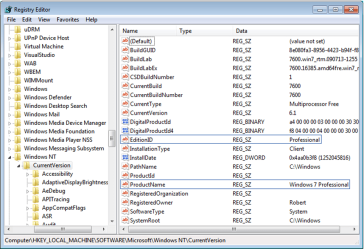
If not, you can use the popular workaround to trick the Home Premium DVD into thinking it's doing an always-allowed same-version Repair Install.

First set a System Restore Point - Create, then run Regedit to change the keys shown below to HOMEPREMIUM for the EditionID, and Windows 7 HOMEPREMIUM for the ProductName:

regkeys.PNG

If you have SP1 installed and your Home Premium installer is not SP1 you may have to uninstall SP1 first: uninstall Windows 7 Service Pack 1 (SP1). Try it first to see.
 
Last edited:
hey ok ok guys. everything worked out. the anytime upgrade thing worked and i m surprise tht i m having it live on my lappie!

plus i wanted to say a big thanks to all of u. this community is really great with prompt support and answers even to my dumb questions just trying to solve my problem in one way or the other! hatts off!
 

My Computer My Computer

OS
Windows 7 Home Basic 64 bit
Back
Top