As a side note, out of curiosity based on these hard links I set up a Windows 7 RTM virtual machine and gave that virtual machine a 12GB hard drive. I installed just Win7 RTM, logged in, loaded TreeSizeFree and analyzed what my disk space looked like.
Windows explorer shows 7.14GB used, 4.75GB free and 11.8GB in total.
But a quick scan of my hard drive with TreeSizePro shows that my drive has used 9,788.7MB of space in the following areas;
--7,502.3MB Windows (of which WinSXS folder is 3,989.0MB)
--1,791.7MB [Files] Hiberyfil.sys and pagefile
--395.3MB Program Files
--90.2MB Users
--9.2MB Program Data.
So, the tools like Windows Explorer and TreeSizeFree are reporting nearly 10GB of stuff on my hard drive...however the free space showing up on my hard drive under the Properties of the C drive is actually 4.75. If I truly had 10GB of stuff on the machine, I would only have 2GB of free space...rather than 4.75GB. Therefore, it's not possible for my C:\windows folder to actually be 7,502.3MB...it must be smaller. (basic math says around 5.3GB)
Point of my post: You cannot effectively judge/clean-up your C:\windows directory using these tools as it's inaccurate regarding the amount of space actually being consumed. It's actually possible that you could have a 30GB hard drive, and a 40GB Windows directory on that drive.
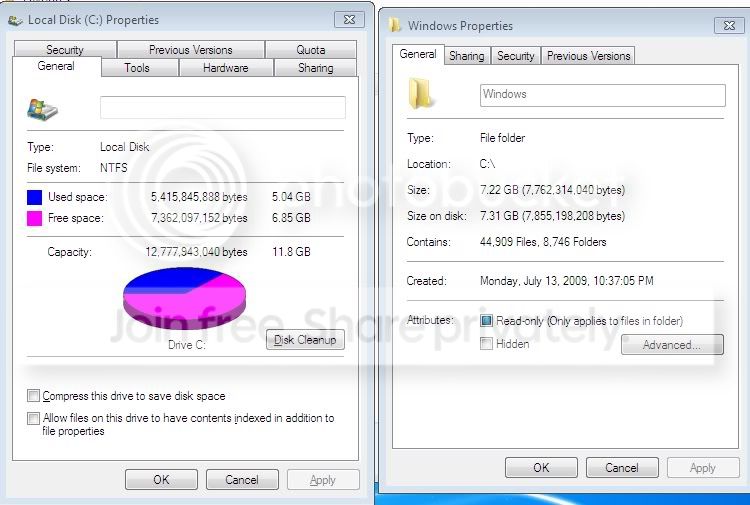
Edit: I took my VM and shut off system restore, hibernation and moved the page file to another drive. Look at the screenshot below......on the left you can see that I'm only using up 5.4GB of disk space, but yet on the right it says my C:\Windows folder is 7.22GB. Proof that Windows doesn't use at much space as it appears that it does.