Windows 7 has a ring of unused pixels

Jpsousa4

New member
Local time
6:42 PM
Messages
4
I just installed windows 7 yesterday. It feels great -- but there are a few problems I'm having. One of those is this odd little ring of unused pixels surrounding my screen.

I use a CRT monitor. Because of this, i can see the area where there are pixels and where there's just "the darkness of space." (I'm using layman's terms, i know, but i don't know how else to describe it.) Between "the darkness of space" and my windows 7 desktop, there's a darkened ring of about twenty pixels.

Now, i would resize my monitor, but two things are preventing me from doing that.
1. The general pixels size on my monitor would become larger from moving unused pixels off of the screen.
2. My windows XP installation uses all the available pixels on my screen, and resizing it would (probably) screw up my windows XP screen.

Is there a tweak of some sort to get windows 7 to use all the pixels available to it, or is this a problem what lies in my graphics card or drivers?

Intel Pentium 4, 2.66ghz
Nvidia 7300GT
CRT monitor, hp Pavilion mx70
1024 x 768 resolution
 

My Computer My Computer

At a glance

Windows XP/7
OS
Windows XP/7
Did you install nVidia's up-to-date graphic drivers? It would be my first bet.
 

My Computer My Computer

At a glance

Windows 10 Professional 64-bitRyzen 9 5900XG.Skill 3600Mhz CL16 16GB × 4EVGA GeForce RTX 3070 Ti FTW3 Ultra Gaming
Computer type
PC/Desktop
Computer Manufacturer/Model Number
Custom build
OS
Windows 10 Professional 64-bit
CPU
Ryzen 9 5900X
Motherboard
Gigabyte X570 Aorus Master
Memory
G.Skill 3600Mhz CL16 16GB × 4
Graphics Card(s)
EVGA GeForce RTX 3070 Ti FTW3 Ultra Gaming
Sound Card
On-board
Monitor(s) Displays
Dell Alienware AW3418DW
Screen Resolution
3440x1440
Hard Drives
1×Sabrent Rocket 4 Plus 2TB nvme SSD (System, internal)
2x4TB Western Digital Blue (Internal)
1x4TB HDST 7200RPM (Internal)
PSU
Seasonic Focus Plus 850W Platinum
Case
Corsair 680X
Cooling
Stock fans + 3× Corsair QL120, Corsair H100i Platinum
Keyboard
Logitech K350
Mouse
Logitech M510
Internet Speed
120Mbits dl - 20Mbits up
Antivirus
ESET NOD32 Antivirus
Browser
Firefox (latest version)
Other Info
Headphones : Audio-Technica ATH-M50x
Scanner : Canon Canoscan LiDE 220 + Plustek OptiBook 4800
Actually, the problem occurred specifically with the new drivers. I found a solution, though. I fumbled around for an hour until i found that if i resett the refresh rate on my monitor, it fixes the problem.
 

My Computer My Computer

At a glance

Windows XP/7
OS
Windows XP/7
My guess is you've got your XP and 7 refresh rates different (say 60hz and 72)

Whatever you choose to make them, just keep them the same and you shouldn't have any problems. Just don't exceed the refresh limits of your monitor.
 

My Computer My Computer

At a glance

Windows 7 7201Intel Core i7 94012GB DDR3ATI Radeon 4850
OS
Windows 7 7201
CPU
Intel Core i7 940
Motherboard
Asus P6T Deluxe
Memory
12GB DDR3
Graphics Card(s)
ATI Radeon 4850
Sound Card
Asus Xonar D2X
Monitor(s) Displays
24" Samsung
Screen Resolution
1920x1200
Hard Drives
2 x 500GB Seagate in Raid 0 and 2 x 1TB Seagate
Case
Antec P182
Keyboard
Logitech diNovo Cordless Desktop
Mouse
Logitech MX Air
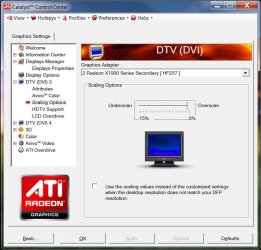
It's the image scaling options in your video card's control panel.

At least it is for AMD/ATi cards.
See attachment.

0% is full screen scaling (no ring of unused pixels).
 

Attachments

  • scalingoptions.JPG
    scalingoptions.JPG
    75.9 KB · Views: 156

My Computer My Computer

At a glance

Win 7 7264 x64Athlon X2 3800+2GB G.Skill PC3200 Dual channelATI Radeon X1900XT
Computer Manufacturer/Model Number
Made by myself.
OS
Win 7 7264 x64
CPU
Athlon X2 3800+
Motherboard
Asus A8N-E
Memory
2GB G.Skill PC3200 Dual channel
Graphics Card(s)
ATI Radeon X1900XT
Sound Card
SoundBlaster Audigy2
Monitor(s) Displays
2x HANNspree HF237 23"
Screen Resolution
1920x1080 | 1920x1080
Hard Drives
1TB WesternDigital Caviar Black
320GB Western Digital Caviar
PSU
Antec TRUPower 550w
Case
CoolerMaster WaveMaster
Cooling
Stock
Keyboard
Logitec Elite
Mouse
Logitec MX518
Internet Speed
20Mbps down, 3Mbps up
Back
Top