
Solved Windows 7 HDD won't boot but I'm able to access through W8 SSD

civiltribe

New member
Local time
5:56 AM
Messages
10
After some messing with boot priority, I am able to detect my HDD in the bios but even after disabling every other device and trying to boot to it specifically, I get an error that there is nothing found. I'd figure it's a loose cable but I'm able to access everything on the drive fine through my Windows 8 SSD installation.

Can anyone throw out any suggestions, I know this sounds pretty vague but please help me and feel free to ask any questions.

I've tried clearing CMOS and restoring windows to an earlier point when things were fine and dandy, no luck so far

One thing I can think of is I removed 2 100mg partitions of my current drive? Not quite able to pinpoint something specific I did but I was able to boot to either drive earlier this evening.. upgrading my bios firmware actually resolved a BSOD issue I was having earlier so I've already attempted that
 
Last edited:

My Computer My Computer

At a glance

Windows 7 64bit (with Windows 8 64bit on SSD)
OS
Windows 7 64bit (with Windows 8 64bit on SSD)
Please complete/update your pc specs, so we can help you.
 

My Computer My Computer

At a glance

Dual-boot: Windows 7 HP 32-bit SP1 & Windows ...AMD Phenom X4 9550 2.8Ghz4.0GB RAM256MB On-board ATI Radeon X1200 Series
Computer Manufacturer/Model Number
Advent
OS
Dual-boot: Windows 7 HP 32-bit SP1 & Windows XP Pro 32-bit SP2.
CPU
AMD Phenom X4 9550 2.8Ghz
Motherboard
FOXCONN A6VMX (Socket 940)
Memory
4.0GB RAM
Graphics Card(s)
256MB On-board ATI Radeon X1200 Series
Sound Card
UnKnown
Monitor(s) Displays
19" TFT Mointor
Screen Resolution
1400 by 900
Hard Drives
500GB Western Digital WDC
Keyboard
HP Keyboard
Internet Speed
Dial-up via Mobile phone (Three)
Other Info
80GB External Hard-drive.

Also I have an old Windows XP Laptop for backup/occasional use etc.
exact boot error please
 

My Computer My Computer

At a glance

Microsoft Windows 7 Home Premium 64-bits 7601...Intel(R) Core(TM) i3 CPU M 370 @ 2.40GHz4,00 GBATI Mobility Radeon HD 5400 Series
Computer type
Laptop
Computer Manufacturer/Model Number
ACER ASPIRE 5742G
OS
Microsoft Windows 7 Home Premium 64-bits 7601 Multiprocessor Free Service Pack 1
CPU
Intel(R) Core(TM) i3 CPU M 370 @ 2.40GHz
Motherboard
Acer Aspire 5742G
Memory
4,00 GB
Graphics Card(s)
ATI Mobility Radeon HD 5400 Series
Sound Card
(1) AMD High Definition Audio Device (2) Realtek High Defi
Screen Resolution
1366 x 768 x 32 bits (4294967296 colors) @ 60 Hz
Hard Drives
WDC WD5000BEVT-22ZAT0
Intel i5-3570 CPU @ 3.40GHz (4 CPUs) 3.80GHz
Gigabyte-z77x-ud3h Mobo
500gb HDD Windows 7 64bit
128gb SSD Windows 8 64bit
8 GB Ram
GTX 670

When I disable all drives but my 500gb W7 one, I get this message when I attempt to boot
"Reboot and Select proper Boot device or insert Boot Media in selected Boot device or press a key"
 

My Computer My Computer

At a glance

Windows 7 64bit (with Windows 8 64bit on SSD)
OS
Windows 7 64bit (with Windows 8 64bit on SSD)
Intel i5-3570 CPU @ 3.40GHz (4 CPUs) 3.80GHz
Gigabyte-z77x-ud3h Mobo
500gb HDD Windows 7 64bit
128gb SSD Windows 8 64bit
8 GB Ram
GTX 670

When I disable all drives but my 500gb W7 one, I get this message when I attempt to boot
"Reboot and Select proper Boot device or insert Boot Media in selected Boot device or press a key"
Change boot device order to DVD then 500GB disk
Boot into win7 recovery environment http://www.sevenforums.com/tutorials/668-system-recovery-options.html

Does it see your win7? If so select it. Then enter command prompt
then:
Code:
bootrec  /fixmbr
bootrec  /fixboot
Both commands succesfull? Now try boot normally again
 

My Computer My Computer

At a glance

Microsoft Windows 7 Home Premium 64-bits 7601...Intel(R) Core(TM) i3 CPU M 370 @ 2.40GHz4,00 GBATI Mobility Radeon HD 5400 Series
Computer type
Laptop
Computer Manufacturer/Model Number
ACER ASPIRE 5742G
OS
Microsoft Windows 7 Home Premium 64-bits 7601 Multiprocessor Free Service Pack 1
CPU
Intel(R) Core(TM) i3 CPU M 370 @ 2.40GHz
Motherboard
Acer Aspire 5742G
Memory
4,00 GB
Graphics Card(s)
ATI Mobility Radeon HD 5400 Series
Sound Card
(1) AMD High Definition Audio Device (2) Realtek High Defi
Screen Resolution
1366 x 768 x 32 bits (4294967296 colors) @ 60 Hz
Hard Drives
WDC WD5000BEVT-22ZAT0
... One thing I can think of is I removed 2 100mg partitions of my current drive?

If that is the drive you are using to boot -- your removed the partition containing the boot loader files -- so, of course, it will not boot.

You shouldn't just blindly remove partitions without first determining what's in them and their usage.
 

My Computer My Computer

At a glance

Win7 Pro 32-bit, Win8 Pro 32-bitAMD Phenom II X6 1090T4GB ddr3 1300AMD HD 4290 onboard
Computer type
PC/Desktop
Computer Manufacturer/Model Number
Custom
OS
Win7 Pro 32-bit, Win8 Pro 32-bit
CPU
AMD Phenom II X6 1090T
Motherboard
Gigabyte
Memory
4GB ddr3 1300
Graphics Card(s)
AMD HD 4290 onboard
Sound Card
Builtin Realtek HD Audio
Monitor(s) Displays
Samsung 24" widescreen, LG 23" widescreen
Screen Resolution
1920x1200/1920x1080
Hard Drives
Kingston 256GB SSD
Keyboard
Logitech Illuminated Keyboard
Mouse
Logitech M705 wireless mouse
Antivirus
Norton Av 2013
Browser
IE v10
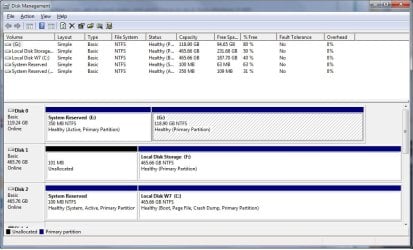
please post full blown screenshot of disk management. Can be taken from within win8
 

My Computer My Computer

At a glance

Microsoft Windows 7 Home Premium 64-bits 7601...Intel(R) Core(TM) i3 CPU M 370 @ 2.40GHz4,00 GBATI Mobility Radeon HD 5400 Series
Computer type
Laptop
Computer Manufacturer/Model Number
ACER ASPIRE 5742G
OS
Microsoft Windows 7 Home Premium 64-bits 7601 Multiprocessor Free Service Pack 1
CPU
Intel(R) Core(TM) i3 CPU M 370 @ 2.40GHz
Motherboard
Acer Aspire 5742G
Memory
4,00 GB
Graphics Card(s)
ATI Mobility Radeon HD 5400 Series
Sound Card
(1) AMD High Definition Audio Device (2) Realtek High Defi
Screen Resolution
1366 x 768 x 32 bits (4294967296 colors) @ 60 Hz
Hard Drives
WDC WD5000BEVT-22ZAT0
!

Intel i5-3570 CPU @ 3.40GHz (4 CPUs) 3.80GHz
Gigabyte-z77x-ud3h Mobo
500gb HDD Windows 7 64bit
128gb SSD Windows 8 64bit
8 GB Ram
GTX 670

When I disable all drives but my 500gb W7 one, I get this message when I attempt to boot
"Reboot and Select proper Boot device or insert Boot Media in selected Boot device or press a key"
Change boot device order to DVD then 500GB disk
Boot into win7 recovery environment http://www.sevenforums.com/tutorials/668-system-recovery-options.html

Does it see your win7? If so select it. Then enter command prompt
then:
Code:
bootrec  /fixmbr
bootrec  /fixboot
Both commands succesfull? Now try boot normally again


I love you

Windows 7 HDD working again.. it wasn't detecting Windows 7 in the Startup repair and the bootrec /fixboot command didn't work (bootrec /fixmbr did) but whatever else I did managed to recover my primary operating system so I appreciate your assistance very much.

Now I can get to work today and won't have to do it from Windows 8 SSD

Thank you so much! Surprised how fast and simple it was, I had the W7 startup repair in my list of options to try but you helped guide me in the right direction :)

Disk management on my W7 shows 2 small partitions, I must have just hid them on this drive somehow but the other one I full blown deleted them when I just wanted to hide them, I need to look into howto do that
 

My Computer My Computer

At a glance

Windows 7 64bit (with Windows 8 64bit on SSD)
OS
Windows 7 64bit (with Windows 8 64bit on SSD)
I love you

Windows 7 HDD working again.. it wasn't detecting Windows 7 in the Startup repair and the bootrec /fixboot command didn't work (bootrec /fixmbr did) but whatever else I did managed to recover my primary operating system so I appreciate your assistance very much.

Now I can get to work today and won't have to do it from Windows 8 SSD

Thank you so much! Surprised how fast and simple it was, I had the W7 startup repair in my list of options to try but you helped guide me in the right direction :)

Disk management on my W7 shows 2 small partitions, I must have just hid them on this drive somehow but the other one I full blown deleted them when I just wanted to hide them, I need to look into howto do that
bootrec/fixboot didn't work because win7 wasn't detected (don't know why) so recovery doesn't know what to fix!

bootrec/fixmbr works because he knows what drive you selected to boot from. Did you do more to solve the issue, for example startup repair?

Post screenshot of disk management please
 

My Computer My Computer

At a glance

Microsoft Windows 7 Home Premium 64-bits 7601...Intel(R) Core(TM) i3 CPU M 370 @ 2.40GHz4,00 GBATI Mobility Radeon HD 5400 Series
Computer type
Laptop
Computer Manufacturer/Model Number
ACER ASPIRE 5742G
OS
Microsoft Windows 7 Home Premium 64-bits 7601 Multiprocessor Free Service Pack 1
CPU
Intel(R) Core(TM) i3 CPU M 370 @ 2.40GHz
Motherboard
Acer Aspire 5742G
Memory
4,00 GB
Graphics Card(s)
ATI Mobility Radeon HD 5400 Series
Sound Card
(1) AMD High Definition Audio Device (2) Realtek High Defi
Screen Resolution
1366 x 768 x 32 bits (4294967296 colors) @ 60 Hz
Hard Drives
WDC WD5000BEVT-22ZAT0

My Computer My Computer

At a glance

Microsoft Windows 7 Home Premium 64-bits 7601...Intel(R) Core(TM) i3 CPU M 370 @ 2.40GHz4,00 GBATI Mobility Radeon HD 5400 Series
Computer type
Laptop
Computer Manufacturer/Model Number
ACER ASPIRE 5742G
OS
Microsoft Windows 7 Home Premium 64-bits 7601 Multiprocessor Free Service Pack 1
CPU
Intel(R) Core(TM) i3 CPU M 370 @ 2.40GHz
Motherboard
Acer Aspire 5742G
Memory
4,00 GB
Graphics Card(s)
ATI Mobility Radeon HD 5400 Series
Sound Card
(1) AMD High Definition Audio Device (2) Realtek High Defi
Screen Resolution
1366 x 768 x 32 bits (4294967296 colors) @ 60 Hz
Hard Drives
WDC WD5000BEVT-22ZAT0
Yea, I believe it was just start up repair and then it asked me if I wanted to boot to Windows 7 or Windows 8.

Microsoft Windows [Version 6.1.7601]
Copyright (c) 2009 Microsoft Corporation. All rights reserved.

C:\Windows\system32>bcdedit/enum all

Windows Boot Manager
--------------------
identifier {bootmgr}
device partition=\Device\HarddiskVolume1
path \bootmgr
description Windows Boot Manager
locale en-US
inherit {globalsettings}
default {current}
resumeobject {ae4c7bcf-dda1-11e1-9fe7-ee660779f48a}
displayorder {current}
{ae4c7bd5-dda1-11e1-9fe7-ee660779f48a}
toolsdisplayorder {memdiag}
timeout 30

Windows Boot Loader
-------------------
identifier {current}
device partition=C:
path \Windows\system32\winload.exe
description Windows 7
locale en-US
inherit {bootloadersettings}
recoverysequence {ae4c7bd1-dda1-11e1-9fe7-ee660779f48a}
recoveryenabled Yes
osdevice partition=C:
systemroot \Windows
resumeobject {ae4c7bcf-dda1-11e1-9fe7-ee660779f48a}
nx OptIn

Windows Boot Loader
-------------------
identifier {ae4c7bd1-dda1-11e1-9fe7-ee660779f48a}
device ramdisk=[C:]\Recovery\ae4c7bd1-dda1-11e1-9fe7-ee660779f4
8a\Winre.wim,{ae4c7bd2-dda1-11e1-9fe7-ee660779f48a}
path \windows\system32\winload.exe
description Windows Recovery Environment
inherit {bootloadersettings}
osdevice ramdisk=[C:]\Recovery\ae4c7bd1-dda1-11e1-9fe7-ee660779f4
8a\Winre.wim,{ae4c7bd2-dda1-11e1-9fe7-ee660779f48a}
systemroot \windows
nx OptIn
winpe Yes

Windows Boot Loader
-------------------
identifier {ae4c7bd5-dda1-11e1-9fe7-ee660779f48a}
device partition=G:
path \Windows\system32\winload.exe
description Windows 8 (recovered)
locale en-GB
osdevice partition=G:
systemroot \Windows

Windows Boot Loader
-------------------
identifier {ae4c7bd6-dda1-11e1-9fe7-ee660779f48a}
device ramdisk=[E:]\Recovery\d8a70743-3e47-11e2-889c-ca2bca03a3
3e\Winre.wim,{ae4c7bd7-dda1-11e1-9fe7-ee660779f48a}
path \windows\system32\winload.exe
description Windows Recovery Environment (recovered)
locale
osdevice ramdisk=[E:]\Recovery\d8a70743-3e47-11e2-889c-ca2bca03a3
3e\Winre.wim,{ae4c7bd7-dda1-11e1-9fe7-ee660779f48a}
systemroot \windows
winpe Yes

Resume from Hibernate
---------------------
identifier {ae4c7bcf-dda1-11e1-9fe7-ee660779f48a}
device partition=C:
path \Windows\system32\winresume.exe
description Windows Resume Application
locale en-US
inherit {resumeloadersettings}
filedevice partition=C:
filepath \hiberfil.sys
debugoptionenabled No

Windows Memory Tester
---------------------
identifier {memdiag}
device partition=\Device\HarddiskVolume1
path \boot\memtest.exe
description Windows Memory Diagnostic
locale en-US
inherit {globalsettings}
badmemoryaccess Yes

EMS Settings
------------
identifier {emssettings}
bootems Yes

Debugger Settings
-----------------
identifier {dbgsettings}
debugtype Serial
debugport 1
baudrate 115200

RAM Defects
-----------
identifier {badmemory}

Global Settings
---------------
identifier {globalsettings}
inherit {dbgsettings}
{emssettings}
{badmemory}

Boot Loader Settings
--------------------
identifier {bootloadersettings}
inherit {globalsettings}
{hypervisorsettings}

Hypervisor Settings
-------------------
identifier {hypervisorsettings}
hypervisordebugtype Serial
hypervisordebugport 1
hypervisorbaudrate 115200

Resume Loader Settings
----------------------
identifier {resumeloadersettings}
inherit {globalsettings}

Device options
--------------
identifier {ae4c7bd2-dda1-11e1-9fe7-ee660779f48a}
description Ramdisk Options
ramdisksdidevice partition=C:
ramdisksdipath \Recovery\ae4c7bd1-dda1-11e1-9fe7-ee660779f48a\boot.sdi

Device options
--------------
identifier {ae4c7bd7-dda1-11e1-9fe7-ee660779f48a}
ramdisksdidevice partition=E:
ramdisksdipath \Recovery\d8a70743-3e47-11e2-889c-ca2bca03a33e\boot.sdi

C:\Windows\system32>
 

Attachments

  • diskman.jpg
    diskman.jpg
    91.9 KB · Views: 9

My Computer My Computer

At a glance

Windows 7 64bit (with Windows 8 64bit on SSD)
OS
Windows 7 64bit (with Windows 8 64bit on SSD)
Was disk 2 system reserved already present when you had the problem? Was is marked active (I don't think so)?
Startup repair marked it active and then it can boot from it
 

My Computer My Computer

At a glance

Microsoft Windows 7 Home Premium 64-bits 7601...Intel(R) Core(TM) i3 CPU M 370 @ 2.40GHz4,00 GBATI Mobility Radeon HD 5400 Series
Computer type
Laptop
Computer Manufacturer/Model Number
ACER ASPIRE 5742G
OS
Microsoft Windows 7 Home Premium 64-bits 7601 Multiprocessor Free Service Pack 1
CPU
Intel(R) Core(TM) i3 CPU M 370 @ 2.40GHz
Motherboard
Acer Aspire 5742G
Memory
4,00 GB
Graphics Card(s)
ATI Mobility Radeon HD 5400 Series
Sound Card
(1) AMD High Definition Audio Device (2) Realtek High Defi
Screen Resolution
1366 x 768 x 32 bits (4294967296 colors) @ 60 Hz
Hard Drives
WDC WD5000BEVT-22ZAT0
In bcdedit output I see:
identifier {ae4c7bd6-dda1-11e1-9fe7-ee660779f48a}
and
identifier {ae4c7bd7-dda1-11e1-9fe7-ee660779f48a}

Have references to E!! I think it's the recovery environment for win8(?) Leave it the way it's now.
 

My Computer My Computer

At a glance

Microsoft Windows 7 Home Premium 64-bits 7601...Intel(R) Core(TM) i3 CPU M 370 @ 2.40GHz4,00 GBATI Mobility Radeon HD 5400 Series
Computer type
Laptop
Computer Manufacturer/Model Number
ACER ASPIRE 5742G
OS
Microsoft Windows 7 Home Premium 64-bits 7601 Multiprocessor Free Service Pack 1
CPU
Intel(R) Core(TM) i3 CPU M 370 @ 2.40GHz
Motherboard
Acer Aspire 5742G
Memory
4,00 GB
Graphics Card(s)
ATI Mobility Radeon HD 5400 Series
Sound Card
(1) AMD High Definition Audio Device (2) Realtek High Defi
Screen Resolution
1366 x 768 x 32 bits (4294967296 colors) @ 60 Hz
Hard Drives
WDC WD5000BEVT-22ZAT0
Probably not, I possibly had both the system reserves but they were hidden on W7... when they weren't hidden on W8 I foolishly deleted them and that's around when the problem started .. won't be messing with deleting them again
God bless startup repair and your effort to assist me either way, thanks
 

My Computer My Computer

At a glance

Windows 7 64bit (with Windows 8 64bit on SSD)
OS
Windows 7 64bit (with Windows 8 64bit on SSD)
Probably not, I possibly had both the system reserves but they were hidden on W7... when they weren't hidden on W8 I foolishly deleted them and that's around when the problem started .. won't be messing with deleting them again
God bless startup repair and your effort to assist me either way, thanks
You didn't delete them!! They are still there as you can see on disk management screenshot
 

My Computer My Computer

At a glance

Microsoft Windows 7 Home Premium 64-bits 7601...Intel(R) Core(TM) i3 CPU M 370 @ 2.40GHz4,00 GBATI Mobility Radeon HD 5400 Series
Computer type
Laptop
Computer Manufacturer/Model Number
ACER ASPIRE 5742G
OS
Microsoft Windows 7 Home Premium 64-bits 7601 Multiprocessor Free Service Pack 1
CPU
Intel(R) Core(TM) i3 CPU M 370 @ 2.40GHz
Motherboard
Acer Aspire 5742G
Memory
4,00 GB
Graphics Card(s)
ATI Mobility Radeon HD 5400 Series
Sound Card
(1) AMD High Definition Audio Device (2) Realtek High Defi
Screen Resolution
1366 x 768 x 32 bits (4294967296 colors) @ 60 Hz
Hard Drives
WDC WD5000BEVT-22ZAT0
You didn't delete them!! They are still there as you can see on disk management screenshot

They didn't just recover? I did delete them on W8 SSD but maybe not permanently? and then I'm wondering what caused the issue.. I thought they were just there for containing error information but it seems they're boot related
 

My Computer My Computer

At a glance

Windows 7 64bit (with Windows 8 64bit on SSD)
OS
Windows 7 64bit (with Windows 8 64bit on SSD)
You didn't delete them!! They are still there as you can see on disk management screenshot

They didn't just recover? I did delete them on W8 SSD but maybe not permanently? and then I'm wondering what caused the issue.. I thought they were just there for containing error information but it seems they're boot related
I didn't make them! win7 startup repair didn't make them!

On which partition did you delete them?
 

My Computer My Computer

At a glance

Microsoft Windows 7 Home Premium 64-bits 7601...Intel(R) Core(TM) i3 CPU M 370 @ 2.40GHz4,00 GBATI Mobility Radeon HD 5400 Series
Computer type
Laptop
Computer Manufacturer/Model Number
ACER ASPIRE 5742G
OS
Microsoft Windows 7 Home Premium 64-bits 7601 Multiprocessor Free Service Pack 1
CPU
Intel(R) Core(TM) i3 CPU M 370 @ 2.40GHz
Motherboard
Acer Aspire 5742G
Memory
4,00 GB
Graphics Card(s)
ATI Mobility Radeon HD 5400 Series
Sound Card
(1) AMD High Definition Audio Device (2) Realtek High Defi
Screen Resolution
1366 x 768 x 32 bits (4294967296 colors) @ 60 Hz
Hard Drives
WDC WD5000BEVT-22ZAT0
I deleted them on Windows 8 SSD partition, that disk management is my Windows 7 HDD if it makes any difference
Perhaps it got reset when I restored Windows 8 to an earlier time last night though things still weren't working then.. I tried restoring Windows 7 from start up repair to an earlier date but it didn't seem like it found anything to restore it to.
 

My Computer My Computer

At a glance

Windows 7 64bit (with Windows 8 64bit on SSD)
OS
Windows 7 64bit (with Windows 8 64bit on SSD)
I'm starting to wonder if when I messed with EasyBCD that might've caused this conflict. I tried added Windows 8 to it but couldn't get it to load it from the boot menu so I removed the Windows 8 entry and uninstalled the program.

Now that I'm done with work, I tried to boot into Windows 8 and it brought me to a boot menu (this seems to happen every time I load the Windows 7 drive now.. any idea howto disable?) I tried to load Windows 8 from it (it was titled Windows 8 (recovered)) and I received a message about a problem with system32\winload.exe status 0xc0000428
"Windows cannot verify the digital signature for this file"

In my Bios Boot Option Priorities I did not see the Windows 8 drive, so I went under HD BBS priorities, set it as the primary and then I was able to see it under Boot Option Priorities (though now I don't see the Windows 7 drive under that list)

So I'm able to boot to both Windows 8 and Windows 7 drives now but the Windows 7 drive gives me that bootloader menu (where the Windows 8 choice in it does not work) mainly I just want to resolve removing this screen
 

My Computer My Computer

At a glance

Windows 7 64bit (with Windows 8 64bit on SSD)
OS
Windows 7 64bit (with Windows 8 64bit on SSD)
win7 boot disk has a bootmenu. It has win7 and win8 in it. win8's winload.exe has not the expected signature because it's newer. I'll tell you how to remove that entry later
 

My Computer My Computer

At a glance

Microsoft Windows 7 Home Premium 64-bits 7601...Intel(R) Core(TM) i3 CPU M 370 @ 2.40GHz4,00 GBATI Mobility Radeon HD 5400 Series
Computer type
Laptop
Computer Manufacturer/Model Number
ACER ASPIRE 5742G
OS
Microsoft Windows 7 Home Premium 64-bits 7601 Multiprocessor Free Service Pack 1
CPU
Intel(R) Core(TM) i3 CPU M 370 @ 2.40GHz
Motherboard
Acer Aspire 5742G
Memory
4,00 GB
Graphics Card(s)
ATI Mobility Radeon HD 5400 Series
Sound Card
(1) AMD High Definition Audio Device (2) Realtek High Defi
Screen Resolution
1366 x 768 x 32 bits (4294967296 colors) @ 60 Hz
Hard Drives
WDC WD5000BEVT-22ZAT0
Back
Top