Windows 7 Help

chaoticlegend71

New member
Local time
3:50 AM
Messages
11
hi all just wondering if someone could help me.
i installed 2 critical updates for windows 7 and 1 optional for windows 7 but now when i start my computer up it says there is an error and i have a choice either start windows normally or windows start up repair (reccommended).
now if i choose first option it tries to start up but then goes to the option screen again.
but if i choose option 2 it does a scan then looks like its going to start up but the screen goes blank and all i can see is the mouse pointer which has gotten a bit bigger but thats all.

thanks in advance
 

My Computer

OS
windows 7 home premium 32bit

My Computer

Computer type
PC/Desktop
Computer Manufacturer/Model Number
Dell XPS 420
OS
Windows 10, Home Clean Install
CPU
Intel Core2 processsor Q8200(2.33Ghz 1333FSB) Quad Core Tech
Motherboard
Dell
Memory
6 gb
Graphics Card(s)
ATI Radeon 256MB HD3650
Sound Card
Intergrated 7.1 Channel Audio
Monitor(s) Displays
Dell SP2009W 20"
Hard Drives
640 GB Serial ATA Hard drive
Cooling
Fan
Keyboard
Dell USB Keyboard
Mouse
Dell Premium Optical USB
Internet Speed
DSL 2.85
how would i do that when i cannot see the screen.
 

My Computer

OS
windows 7 home premium 32bit
Foolow rich's link....you would probably have to use Option 1
 

My Computer

Computer type
PC/Desktop
Computer Manufacturer/Model Number
Golden Mk. I.4
OS
Windows 10 Pro x64 ; Xubuntu x64
CPU
Intel i7 860 @ 2.80 GHz O/C'ed to 4.0GHz
Motherboard
Gigabyte P55A-UD3R Rev.1. Award BIOS F13
Memory
16GB Corsair Vengance DDR3 @ 661 MHz Dual Channel (9-9-9-24)
Graphics Card(s)
EVGA NVidia GTX 560 1024MB
Sound Card
Realtek Integrated
Monitor(s) Displays
Dual Samsung SyncMaster 2494HS
Screen Resolution
1920*1080 and 1920*1080
Hard Drives
1*Samsung 840 EVO 120GB SSD;
1*OCZ Vertex 2 60GB SSD;
2*Samsung F3 SpinPoint 1TB in RAID0;
1*Samsung F1 SpinPoint 1TB;
2*Western Digital 1TB External USB 3.0
1*Western Digital 500GB External USB 3.0
1*Seagate 500GB External USB 2.0
PSU
Thermaltake ToughPower QFan 750W
Case
Thermaltake Element S VK60001W2Z
Cooling
Corsair H60 Water Cooling, 2*230mm and 2*80mm case fans
Keyboard
Logitech G110
Mouse
Logitech MX518
Follow the procedure for Safe Mode and lets see if you can see the screen
 

My Computer

Computer type
PC/Desktop
Computer Manufacturer/Model Number
Dell XPS 420
OS
Windows 10, Home Clean Install
CPU
Intel Core2 processsor Q8200(2.33Ghz 1333FSB) Quad Core Tech
Motherboard
Dell
Memory
6 gb
Graphics Card(s)
ATI Radeon 256MB HD3650
Sound Card
Intergrated 7.1 Channel Audio
Monitor(s) Displays
Dell SP2009W 20"
Hard Drives
640 GB Serial ATA Hard drive
Cooling
Fan
Keyboard
Dell USB Keyboard
Mouse
Dell Premium Optical USB
Internet Speed
DSL 2.85
ok before i do that i'll let you know what it exactly says on the screen.

Windows Error Recovery.
windows failed to start. A recent hardware or software change might be the cause.

If windows files have been damaged or configured incorrectly, startup repair can help diagnose and fix the problem. if power was interrupted during startup, choose windows normally.

Launch Startup Repair (recommended)
Start Windows Normally.
 

My Computer

OS
windows 7 home premium 32bit
ok before i do that i'll let you know what it exactly says on the screen.

Windows Error Recovery.
windows failed to start. A recent hardware or software change might be the cause.

If windows files have been damaged or configured incorrectly, startup repair can help diagnose and fix the problem. if power was interrupted during startup, choose windows normally.

Launch Startup Repair (recommended)
Start Windows Normally.

At that point, pressing F8 should bring up an advanced menu from which you can select safe mode...
 

My Computer

Computer type
PC/Desktop
Computer Manufacturer/Model Number
Virtual Machine
OS
Windows 7 Professional 32-bit SP1
CPU
AMD A4/A6
Motherboard
Intel Corporation 440BX Desktop Reference Platform
Memory
3.00GB EDO
Graphics Card(s)
VMware SVGA 3D
Sound Card
High Definition Audio Device
Monitor(s) Displays
Generic Non-PnP Monitor on VMware SVGA 3D
Screen Resolution
1440x900
Hard Drives
1 x 60GB VMware Virtual SATA Hard Drive ATA Device
Antivirus
Kaspersky Total Security
i went through safe mode it loaded all these files then it just went straight back to that windows error recovery screen i just typed up before.
 

My Computer

OS
windows 7 home premium 32bit
i went through safe mode it loaded all these files then it just went straight back to that windows error recovery screen i just typed up before.

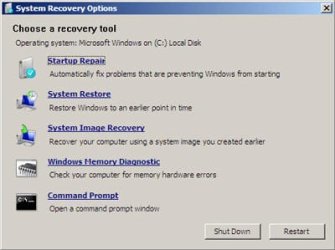
Ok, then try the Launch Startup Repair solution. I'm unable to check right now, but at some point in the process after selecting "Launch Startup Repair (Recommended), you should get a choice to try other options:
Image1.jpg

It is at this point you should try System Restore, and then restore back to a point before you installed the updates...

You want also want to look at "Repair Your Computer" on the article Advanced startup options (including safe mode) from Microsoft.
 

My Computer

Computer type
PC/Desktop
Computer Manufacturer/Model Number
Virtual Machine
OS
Windows 7 Professional 32-bit SP1
CPU
AMD A4/A6
Motherboard
Intel Corporation 440BX Desktop Reference Platform
Memory
3.00GB EDO
Graphics Card(s)
VMware SVGA 3D
Sound Card
High Definition Audio Device
Monitor(s) Displays
Generic Non-PnP Monitor on VMware SVGA 3D
Screen Resolution
1440x900
Hard Drives
1 x 60GB VMware Virtual SATA Hard Drive ATA Device
Antivirus
Kaspersky Total Security
i went through safe mode it loaded all these files then it just went straight back to that windows error recovery screen i just typed up before.

Ok, then try the Launch Startup Repair solution. I'm unable to check right now, but at some point in the process after selecting "Launch Startup Repair (Recommended), you should get a choice to try other options:
View attachment 117232

It is at this point you should try System Restore, and then restore back to a point before you installed the updates...

when i do try that option screen is blank and only thing i can see is a mouse pointer.
 

My Computer

OS
windows 7 home premium 32bit
i went through safe mode it loaded all these files then it just went straight back to that windows error recovery screen i just typed up before.

Ok, then try the Launch Startup Repair solution. I'm unable to check right now, but at some point in the process after selecting "Launch Startup Repair (Recommended), you should get a choice to try other options:
View attachment 117232

It is at this point you should try System Restore, and then restore back to a point before you installed the updates...

when i do try that option screen is blank and only thing i can see is a mouse pointer.

Can you move the mouse around, and does it stay that way (mouse, black screen) for long? Perhaps it's just busy loading something and you need to wait a bit?
 

My Computer

Computer type
PC/Desktop
Computer Manufacturer/Model Number
Virtual Machine
OS
Windows 7 Professional 32-bit SP1
CPU
AMD A4/A6
Motherboard
Intel Corporation 440BX Desktop Reference Platform
Memory
3.00GB EDO
Graphics Card(s)
VMware SVGA 3D
Sound Card
High Definition Audio Device
Monitor(s) Displays
Generic Non-PnP Monitor on VMware SVGA 3D
Screen Resolution
1440x900
Hard Drives
1 x 60GB VMware Virtual SATA Hard Drive ATA Device
Antivirus
Kaspersky Total Security
Ok, then try the Launch Startup Repair solution. I'm unable to check right now, but at some point in the process after selecting "Launch Startup Repair (Recommended), you should get a choice to try other options:
View attachment 117232

It is at this point you should try System Restore, and then restore back to a point before you installed the updates...

when i do try that option screen is blank and only thing i can see is a mouse pointer.

Can you move the mouse around, and does it stay that way (mouse, black screen) for long? Perhaps it's just busy loading something and you need to wait a bit?
i can move the mouse but that is all and the screen is still blank and harddrive is not busy as in to say its loading or trying to load a program.
 

My Computer

OS
windows 7 home premium 32bit
Can you then boot from your Windows DVD and try to launch Startup Repair from there? Maybe accessing System Restore then will work...

I'll get back to you in a couple hours, I've an appointment I need to get to, sorry
 

My Computer

Computer type
PC/Desktop
Computer Manufacturer/Model Number
Virtual Machine
OS
Windows 7 Professional 32-bit SP1
CPU
AMD A4/A6
Motherboard
Intel Corporation 440BX Desktop Reference Platform
Memory
3.00GB EDO
Graphics Card(s)
VMware SVGA 3D
Sound Card
High Definition Audio Device
Monitor(s) Displays
Generic Non-PnP Monitor on VMware SVGA 3D
Screen Resolution
1440x900
Hard Drives
1 x 60GB VMware Virtual SATA Hard Drive ATA Device
Antivirus
Kaspersky Total Security
Can you then boot from your Windows DVD and try to launch Startup Repair from there? Maybe accessing System Restore then will work...

I'll get back to you in a couple hours, I've an appointment I need to get to, sorry

i tried that earlier and does not work.
 

My Computer

OS
windows 7 home premium 32bit
hey all was just wondering if i can get some more help with this issue.

thank you.
 

My Computer

OS
windows 7 home premium 32bit
I think at this point , we may need all your hardware specs listed !
 

My Computer

Computer type
PC/Desktop
Computer Manufacturer/Model Number
Built them myself, Science Experiments !
OS
Win7 Enterprise, Win7 x86 (Ult 7600), Win7 x64 Ult 7600, TechNet RTM on AMD x64 (2.8Ghz)
CPU
AMD fx8350 4ghz, AMD-32 2400mhz, AMD-64 3200mhz, AMDx64 2.8G
Motherboard
SIS 755, ECS-K8M890M-M (Ult 7600), GigaByte & others
Memory
2gb, 4gb on the Ult 7600, 4gb on Technet RTM, 32gb on FX8350
Graphics Card(s)
Draw my own Graphics, several nVidia cards
Sound Card
on motherboard
Monitor(s) Displays
19" flat scr, 28" I-Inc widescr,22" Emprex Widescr, 23" Acer
Screen Resolution
1280 x 1024, 1440 x 900, 1920 x 1080
Hard Drives
6 pata Ide HD's & 2 Sata HD's
added 80gb external on Ult 7600 computer,
numerous extra 1tb, 2TB, 3Tb SATA HD's
A collection of ext HD Docks w/ HDs
PSU
430w, 550w, 600w, 700, 800, etc
Case
All Generic Full Towers
Cooling
Open Air & a few fans, some w/ colored LEDs
Keyboard
Compaq & Dell recycled from GoodWill
Mouse
Made in China Optical Wired Mouse
Internet Speed
Fast Cable InterNet
Antivirus
AVG Free on 24 different Desktops, NO Problems!
Browser
IE 8 is preferred, but use FireFox sometimes
Other Info
Linksys Routers, switches, & Hubs
Too Many USB Flash Drives to count, Biggest is 64GB !
Eight computers in my home network.
Sixteen computers at my business network.
Linked via TeamViewer !
Lots of old used spare computer parts everywhere!
What happens when you try to boot your Win7 DVD or Repair CD to run Startup Repair?

You need to boot the DVD, select Repair my Computer on second screen, accept any repair offered, but if it doesn't start boot back in, click through to Recovery Tools list to run Startup Repair up to 3 separate times in case the System MBR needs repair. http://www.sevenforums.com/tutorials/105541-startup-repair-run-3-separate-times.html

Startup Repair should offer to run System Restore as one of its many tests, however if it continues to fail I'd try to run System Restore from the Recov Tools list.

If this fails, you can copy out your files using the DVD: http://www.sevenforums.com/tutorials/93347-copy-paste-windows-recovery-console.html

From that point, you can either wipe the HD to reinstall or use free Partition Wizard bootable CD to post back a camera snap of your Disk Management drive map and listings. We need to see that either the 100mb System Reserved or Win7 partition are marked Active as Startup Repair will fail otherwise.

http://www.partitionwizard.com/download.html
http://www.sevenforums.com/tutorials/91339-ssd-hdd-optimize-windows-reinstallation.html
http://www.sevenforums.com/tutorials/1649-clean-install-windows-7-a.html
 
Back
Top