Solved windows 7 hiding old desktop icons - cannot access files

bash64

Banned
Local time
6:32 AM
Messages
9
I am a desktop junkie and I can't get my crack.
Windows 7 is systematically hiding any icons and folders on my desktop that have gone unused for , I am guessing, 1 week or longer. Some files I use once a month to pay bills.

The only way I have found to get to them is to browse the C: drive until I get to the desktop folder in my user account and there they are. Please help me before I loose my mind.

:banghead:


SKYRIM HINT: To stop the non stop crashing download the 4gb patch. Ta duh.
 
Last edited:

My Computer My Computer

Computer Manufacturer/Model Number
msi gt660
OS
windows 7 64bit home premium
CPU
i7
Motherboard
msi laptop
Memory
6gb
Graphics Card(s)
gtx 285m 1gb
Sound Card
onboard audio realtek hd
Monitor(s) Displays
21.5" external 1368x768 internal
Hard Drives
2 500gb sata
PSU
none
Case
msi laptop
Cooling
mis
Are you saying that not all, but just some are missing?
 

My Computer My Computer

Computer Manufacturer/Model Number
Toshiba Satellite L455D
OS
Windows 7 Home Premium
CPU
Amd Semperon 2.10GHz
Memory
2 Gig
Graphics Card(s)
ATI Radeon 3100
Sound Card
Realtek
Monitor(s) Displays
15.6 inch
Screen Resolution
1366x768
Hard Drives
250gig
Mouse
Logitech Wireless
Internet Speed
16/2 cable
Are you saying that not all, but just some are missing?

yes.

The ones least clicked on.
Drives me nuts.
Can't get them to show on the desktop anymore.

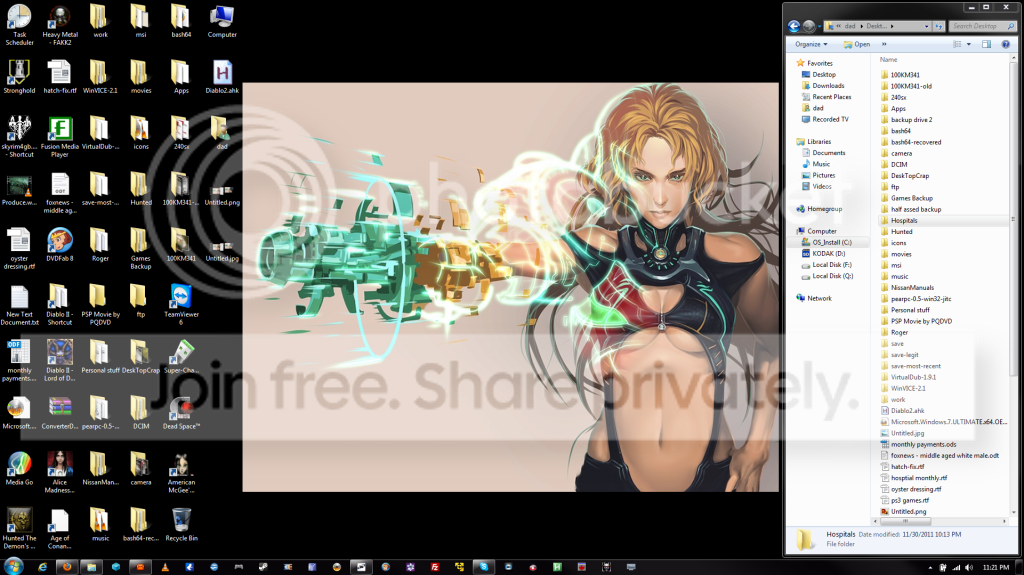
grab.png


There is a hospital folder on the right.
The icon for it is nowhere on the desktop.
The icons have been auto arranged.
There are quite a few folders/files on the right window which is a browse of the desktop folder) that are not showing.

Please help.
:grouphug:
 
Last edited by a moderator:

My Computer My Computer

Computer Manufacturer/Model Number
msi gt660
OS
windows 7 64bit home premium
CPU
i7
Motherboard
msi laptop
Memory
6gb
Graphics Card(s)
gtx 285m 1gb
Sound Card
onboard audio realtek hd
Monitor(s) Displays
21.5" external 1368x768 internal
Hard Drives
2 500gb sata
PSU
none
Case
msi laptop
Cooling
mis

My Computer My Computer

Computer type
PC/Desktop
Computer Manufacturer/Model Number
Self built custom
OS
64-bit Windows 11 Pro for Workstations
CPU
Intel i7-8700K OC'd to 5 GHz
Motherboard
ASUS ROG Maximus XI Formula Z390
Memory
64 GB (4x16GB) G.SKILL TridentZ RGB DDR4 3600 MHz
Graphics Card(s)
ASUS ROG-STRIX-GTX1080TI-O11G-GAMING
Sound Card
Integrated
Monitor(s) Displays
2 x Samsung Odyssey G7 27"
Screen Resolution
2560x1440
Hard Drives
1TB Samsung 990 PRO M.2,
4TB Samsung 990 PRO PRO M.2,
TerraMaster F8 SSD Plus NAS
PSU
Seasonic Prime Titanium 850W
Case
Thermaltake Core P3
Cooling
Corsair Hydro H115i
Keyboard
Logitech wireless K800
Mouse
Logitech MX Master 4
Internet Speed
2 Gb/s Download and 100 Mb/s Upload
Antivirus
Malwarebyte Anti-Malware Premium
Browser
Google Chrome
Other Info
Logitech Z625 speaker system,
Logitech BRIO 4K Pro webcam,
HP Color LaserJet Pro MFP M477fdn,
APC SMART-UPS RT 1000 XL - SURT1000XLI,
Galaxy S23 Plus phone
Thanks strange alien man from outer space.
Yeah, that might stop the issue.
Now, how do I get the files folders to come back?

Signed, Desktop Junkie.
 

My Computer My Computer

Computer Manufacturer/Model Number
msi gt660
OS
windows 7 64bit home premium
CPU
i7
Motherboard
msi laptop
Memory
6gb
Graphics Card(s)
gtx 285m 1gb
Sound Card
onboard audio realtek hd
Monitor(s) Displays
21.5" external 1368x768 internal
Hard Drives
2 500gb sata
PSU
none
Case
msi laptop
Cooling
mis
Fixed!!!

I did the following:
controlpanel->troubleshooting->change settings->turn off

After refreshing my desktop using autoarrange all of my missing icons are back!

:what:

Whooop!

Once again thanks strange alien guy.
 

My Computer My Computer

Computer Manufacturer/Model Number
msi gt660
OS
windows 7 64bit home premium
CPU
i7
Motherboard
msi laptop
Memory
6gb
Graphics Card(s)
gtx 285m 1gb
Sound Card
onboard audio realtek hd
Monitor(s) Displays
21.5" external 1368x768 internal
Hard Drives
2 500gb sata
PSU
none
Case
msi laptop
Cooling
mis
You're most welcome. I'm happy to hear that they returned as well. :)
 

My Computer My Computer

Computer type
PC/Desktop
Computer Manufacturer/Model Number
Self built custom
OS
64-bit Windows 11 Pro for Workstations
CPU
Intel i7-8700K OC'd to 5 GHz
Motherboard
ASUS ROG Maximus XI Formula Z390
Memory
64 GB (4x16GB) G.SKILL TridentZ RGB DDR4 3600 MHz
Graphics Card(s)
ASUS ROG-STRIX-GTX1080TI-O11G-GAMING
Sound Card
Integrated
Monitor(s) Displays
2 x Samsung Odyssey G7 27"
Screen Resolution
2560x1440
Hard Drives
1TB Samsung 990 PRO M.2,
4TB Samsung 990 PRO PRO M.2,
TerraMaster F8 SSD Plus NAS
PSU
Seasonic Prime Titanium 850W
Case
Thermaltake Core P3
Cooling
Corsair Hydro H115i
Keyboard
Logitech wireless K800
Mouse
Logitech MX Master 4
Internet Speed
2 Gb/s Download and 100 Mb/s Upload
Antivirus
Malwarebyte Anti-Malware Premium
Browser
Google Chrome
Other Info
Logitech Z625 speaker system,
Logitech BRIO 4K Pro webcam,
HP Color LaserJet Pro MFP M477fdn,
APC SMART-UPS RT 1000 XL - SURT1000XLI,
Galaxy S23 Plus phone
Not fixed!!!

spoke too soon.

What came back where the shortcuts. :-D
What did not come back was the hospital folder and some files. :-(

Why must you make my life hard Bill Gates?

:doh:
 

My Computer My Computer

Computer Manufacturer/Model Number
msi gt660
OS
windows 7 64bit home premium
CPU
i7
Motherboard
msi laptop
Memory
6gb
Graphics Card(s)
gtx 285m 1gb
Sound Card
onboard audio realtek hd
Monitor(s) Displays
21.5" external 1368x768 internal
Hard Drives
2 500gb sata
PSU
none
Case
msi laptop
Cooling
mis
You might see if you may be able to use the Previous Versions feature on your C:\Users\(user-name)\Desktop folder to see if you may have a older copy of the hospital folder and some files available to restore from. :)
 

My Computer My Computer

Computer type
PC/Desktop
Computer Manufacturer/Model Number
Self built custom
OS
64-bit Windows 11 Pro for Workstations
CPU
Intel i7-8700K OC'd to 5 GHz
Motherboard
ASUS ROG Maximus XI Formula Z390
Memory
64 GB (4x16GB) G.SKILL TridentZ RGB DDR4 3600 MHz
Graphics Card(s)
ASUS ROG-STRIX-GTX1080TI-O11G-GAMING
Sound Card
Integrated
Monitor(s) Displays
2 x Samsung Odyssey G7 27"
Screen Resolution
2560x1440
Hard Drives
1TB Samsung 990 PRO M.2,
4TB Samsung 990 PRO PRO M.2,
TerraMaster F8 SSD Plus NAS
PSU
Seasonic Prime Titanium 850W
Case
Thermaltake Core P3
Cooling
Corsair Hydro H115i
Keyboard
Logitech wireless K800
Mouse
Logitech MX Master 4
Internet Speed
2 Gb/s Download and 100 Mb/s Upload
Antivirus
Malwarebyte Anti-Malware Premium
Browser
Google Chrome
Other Info
Logitech Z625 speaker system,
Logitech BRIO 4K Pro webcam,
HP Color LaserJet Pro MFP M477fdn,
APC SMART-UPS RT 1000 XL - SURT1000XLI,
Galaxy S23 Plus phone
It would appear that windows 7 will not display any folder that is older than a certain amount of time.
Is there a reg hack to change this behavior?

I moved the folder to another drive and then back and it is now there.
This is maddening.
 

My Computer My Computer

Computer Manufacturer/Model Number
msi gt660
OS
windows 7 64bit home premium
CPU
i7
Motherboard
msi laptop
Memory
6gb
Graphics Card(s)
gtx 285m 1gb
Sound Card
onboard audio realtek hd
Monitor(s) Displays
21.5" external 1368x768 internal
Hard Drives
2 500gb sata
PSU
none
Case
msi laptop
Cooling
mis
It would appear that windows 7 will not display any folder that is older than a certain amount of time.
Is there a reg hack to change this behavior?

I moved the folder to another drive and then back and it is now there.
This is maddening.

Previous Versions is based on your created restore points and Windows Backups. You will not have anything available before the dates that these were created.
 
Last edited:

My Computer My Computer

Computer type
PC/Desktop
Computer Manufacturer/Model Number
Self built custom
OS
64-bit Windows 11 Pro for Workstations
CPU
Intel i7-8700K OC'd to 5 GHz
Motherboard
ASUS ROG Maximus XI Formula Z390
Memory
64 GB (4x16GB) G.SKILL TridentZ RGB DDR4 3600 MHz
Graphics Card(s)
ASUS ROG-STRIX-GTX1080TI-O11G-GAMING
Sound Card
Integrated
Monitor(s) Displays
2 x Samsung Odyssey G7 27"
Screen Resolution
2560x1440
Hard Drives
1TB Samsung 990 PRO M.2,
4TB Samsung 990 PRO PRO M.2,
TerraMaster F8 SSD Plus NAS
PSU
Seasonic Prime Titanium 850W
Case
Thermaltake Core P3
Cooling
Corsair Hydro H115i
Keyboard
Logitech wireless K800
Mouse
Logitech MX Master 4
Internet Speed
2 Gb/s Download and 100 Mb/s Upload
Antivirus
Malwarebyte Anti-Malware Premium
Browser
Google Chrome
Other Info
Logitech Z625 speaker system,
Logitech BRIO 4K Pro webcam,
HP Color LaserJet Pro MFP M477fdn,
APC SMART-UPS RT 1000 XL - SURT1000XLI,
Galaxy S23 Plus phone
After reading and digging into the Troubleshooter, I think that it's something that I really can't see why MS decided to change the control of icons compared to previous versions. I can imagine a lot of people wouldn't have a clue why their icons are missing because of this automated deal, and they would just end up manually re-adding them again and again after they disappear each time.
I never noticed this issue because I don't keep any icons on my desktop, besides the recycle bin.
 

My Computer My Computer

Computer Manufacturer/Model Number
Toshiba Satellite L455D
OS
Windows 7 Home Premium
CPU
Amd Semperon 2.10GHz
Memory
2 Gig
Graphics Card(s)
ATI Radeon 3100
Sound Card
Realtek
Monitor(s) Displays
15.6 inch
Screen Resolution
1366x768
Hard Drives
250gig
Mouse
Logitech Wireless
Internet Speed
16/2 cable
Yeah, I think it would be best if that option was turned off by default instead.
 

My Computer My Computer

Computer type
PC/Desktop
Computer Manufacturer/Model Number
Self built custom
OS
64-bit Windows 11 Pro for Workstations
CPU
Intel i7-8700K OC'd to 5 GHz
Motherboard
ASUS ROG Maximus XI Formula Z390
Memory
64 GB (4x16GB) G.SKILL TridentZ RGB DDR4 3600 MHz
Graphics Card(s)
ASUS ROG-STRIX-GTX1080TI-O11G-GAMING
Sound Card
Integrated
Monitor(s) Displays
2 x Samsung Odyssey G7 27"
Screen Resolution
2560x1440
Hard Drives
1TB Samsung 990 PRO M.2,
4TB Samsung 990 PRO PRO M.2,
TerraMaster F8 SSD Plus NAS
PSU
Seasonic Prime Titanium 850W
Case
Thermaltake Core P3
Cooling
Corsair Hydro H115i
Keyboard
Logitech wireless K800
Mouse
Logitech MX Master 4
Internet Speed
2 Gb/s Download and 100 Mb/s Upload
Antivirus
Malwarebyte Anti-Malware Premium
Browser
Google Chrome
Other Info
Logitech Z625 speaker system,
Logitech BRIO 4K Pro webcam,
HP Color LaserJet Pro MFP M477fdn,
APC SMART-UPS RT 1000 XL - SURT1000XLI,
Galaxy S23 Plus phone
gets wierder.....

I just moved all of the icons/files/folders that were appearing into a folder called DeskTopCrap and rebooted. Now all of the missing files,etc... have reappeared on the desktop. I guess the windows 7 Desktop has an icon limit?

:banghead:
 

My Computer My Computer

Computer Manufacturer/Model Number
msi gt660
OS
windows 7 64bit home premium
CPU
i7
Motherboard
msi laptop
Memory
6gb
Graphics Card(s)
gtx 285m 1gb
Sound Card
onboard audio realtek hd
Monitor(s) Displays
21.5" external 1368x768 internal
Hard Drives
2 500gb sata
PSU
none
Case
msi laptop
Cooling
mis
Strange, I'm not aware of any limit other than what is able to actually fit on the desktop grid.

I'm happy to hear that you got them all back though.
 

My Computer My Computer

Computer type
PC/Desktop
Computer Manufacturer/Model Number
Self built custom
OS
64-bit Windows 11 Pro for Workstations
CPU
Intel i7-8700K OC'd to 5 GHz
Motherboard
ASUS ROG Maximus XI Formula Z390
Memory
64 GB (4x16GB) G.SKILL TridentZ RGB DDR4 3600 MHz
Graphics Card(s)
ASUS ROG-STRIX-GTX1080TI-O11G-GAMING
Sound Card
Integrated
Monitor(s) Displays
2 x Samsung Odyssey G7 27"
Screen Resolution
2560x1440
Hard Drives
1TB Samsung 990 PRO M.2,
4TB Samsung 990 PRO PRO M.2,
TerraMaster F8 SSD Plus NAS
PSU
Seasonic Prime Titanium 850W
Case
Thermaltake Core P3
Cooling
Corsair Hydro H115i
Keyboard
Logitech wireless K800
Mouse
Logitech MX Master 4
Internet Speed
2 Gb/s Download and 100 Mb/s Upload
Antivirus
Malwarebyte Anti-Malware Premium
Browser
Google Chrome
Other Info
Logitech Z625 speaker system,
Logitech BRIO 4K Pro webcam,
HP Color LaserJet Pro MFP M477fdn,
APC SMART-UPS RT 1000 XL - SURT1000XLI,
Galaxy S23 Plus phone
Back
Top