windows 7 home premium old version

brianbb2

New member
Local time
5:21 PM
Messages
4
Can someone please help. Iam 70 years old and have a computer since i was 68. When i first got it 2 years ago i had windows home pemium since a month ago i have a new version due to the renewal of my hard drive after it broke. they saved a small amount of data and when i restarded it up and entered my product code etc i now have a new version. Can someone help me get the old one back as it is not in memory of my computer. Please forgive me for not beeN able to get this accross properly
Regards,
BB.
 

My Computer My Computer

OS
windowa 7 home premium
Does it look drastically different? I'm wondering if you have Windows 8 installed instead of Windows 7.

If it is still Windows 7, is it that the desktop looks different? Or are installed programs and/or your personal data missing?
 

My Computer My Computer

Computer type
PC/Desktop
Computer Manufacturer/Model Number
Home Built - Jan 2013
OS
Windows 7 64 Bit Home Premium SP1
CPU
i7-3820
Motherboard
Asus P9X79-PRO - Bios 4608
Memory
GSkill F3-14900CL9Q - 16GB
Graphics Card(s)
EVGA GeForce GTX660 - Driver 352.86
Sound Card
On board Realtek ALC898
Monitor(s) Displays
Acer S271HL
Screen Resolution
1920 x 1080
Hard Drives
#1- Samsung 840 Pro Series
#2- Western Digital WD1002FAEX Sata3 Black
#3- Western Digital WD1002FAEX Sata3 Black
PSU
Corsair CMPSU-850TX-V2 - 850 watt (by Seasonic)
Case
Corsair Obsidian 550D
Cooling
Standard 3 120mm case fans, Cooler Master Hyper 212 EVO
Keyboard
MS KC-0405
Mouse
Intellimouse 5-button
Internet Speed
56 Mbits/Sec (on a good day)
Antivirus
Avast & Malwarebytes
Browser
Firefox
Other Info
Asus DVD - DRW-24B1ST 24X
It says it is windows 7 but it is all in colour and it seems far more complicated than my previous version.
 

My Computer My Computer

OS
windowa 7 home premium
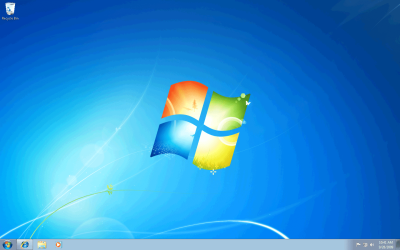
It sounds like your desktop has changed.
Does it look like this?:

Desktop 1.png

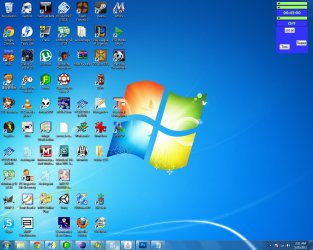
Or cluttered with icons like this?:

Desktop 2.jpg
 

My Computer My Computer

Computer type
PC/Desktop
Computer Manufacturer/Model Number
Home Built - Jan 2013
OS
Windows 7 64 Bit Home Premium SP1
CPU
i7-3820
Motherboard
Asus P9X79-PRO - Bios 4608
Memory
GSkill F3-14900CL9Q - 16GB
Graphics Card(s)
EVGA GeForce GTX660 - Driver 352.86
Sound Card
On board Realtek ALC898
Monitor(s) Displays
Acer S271HL
Screen Resolution
1920 x 1080
Hard Drives
#1- Samsung 840 Pro Series
#2- Western Digital WD1002FAEX Sata3 Black
#3- Western Digital WD1002FAEX Sata3 Black
PSU
Corsair CMPSU-850TX-V2 - 850 watt (by Seasonic)
Case
Corsair Obsidian 550D
Cooling
Standard 3 120mm case fans, Cooler Master Hyper 212 EVO
Keyboard
MS KC-0405
Mouse
Intellimouse 5-button
Internet Speed
56 Mbits/Sec (on a good day)
Antivirus
Avast & Malwarebytes
Browser
Firefox
Other Info
Asus DVD - DRW-24B1ST 24X
It says it is windows 7 but it is all in colour and it seems far more complicated than my previous version.

If you go into the System control panel, what version number does it state? (It's near the top of the window.) It shouldn't matter much, as long as it's Windows 7.

I've used Windows 7 Home Premium, Professional, and Enterprise (at work). They all looked about the same. The only major change in Windows 7 since it was released in October of 2009 was Service Pack 1, but that didn't change the overall appearance and operation of the OS (operating system).

My guess is that your new Win7 installation is configured differently than your old one. If you right-click on the desktop an select Personalize, you'll get a window that allows you to select a variety of "themes". Some of them are more colorful than others. If you don't know how your PC was set up before the repair, you may have to spend some time experimenting to get back to where you were before. It's too bad that the shop was unable to save your settings.

The main point is that if you still have Windows 7, the shop didn't give you a wildly different version, because no such different version exists.
 

My Computer My Computer

Computer Manufacturer/Model Number
homegrown
OS
Windows 7 Pro X64 SP1
CPU
Intel Core I7-3930k
Motherboard
Asus P9X79 Pro
Memory
16 GB Gskill DDR3-2133
Graphics Card(s)
eVGA GTX680
Sound Card
Creative X-Fi Titanium
Monitor(s) Displays
As PA246Q
Screen Resolution
1920 X 1200
Hard Drives
Corsair Force GT, 120 GB
WDC 1.5TB Caviar Black
PSU
PCP&C Silencer 750 Crossfire
Case
Silverstone FT02
Cooling
Noctua NH-D14
Keyboard
cheap Logitech USB
Mouse
Microsoft Intellimouse Explorer (old optical) USB
Internet Speed
6Mb cable
Other Info
Pioneer BDR-205
Samsung SH-203B
Monsoon 5.1 speakers
it looks like the cluttered one
 

My Computer My Computer

OS
windowa 7 home premium
OK. Those are all shortcuts. They are not completely necessary. Every one of those programs will be listed in your Start > Program list, and you can open them from there if you don't want or need a shortcut on the desktop to do so.

Deleting the shortcut does not delete the program.

To delete them, right click on the shortcut > then choose: Delete.

A bigger issue may be that someone set up your computer for you previously and had cleaned all the BLOAT-WARE that manufacturers install on new computers to help increase their profits.
Now, someone else has restored the factory installation and all that system slowing crapola is back. If this is the case then we have other solutions for you.
 

My Computer My Computer

Computer type
PC/Desktop
Computer Manufacturer/Model Number
Home Built - Jan 2013
OS
Windows 7 64 Bit Home Premium SP1
CPU
i7-3820
Motherboard
Asus P9X79-PRO - Bios 4608
Memory
GSkill F3-14900CL9Q - 16GB
Graphics Card(s)
EVGA GeForce GTX660 - Driver 352.86
Sound Card
On board Realtek ALC898
Monitor(s) Displays
Acer S271HL
Screen Resolution
1920 x 1080
Hard Drives
#1- Samsung 840 Pro Series
#2- Western Digital WD1002FAEX Sata3 Black
#3- Western Digital WD1002FAEX Sata3 Black
PSU
Corsair CMPSU-850TX-V2 - 850 watt (by Seasonic)
Case
Corsair Obsidian 550D
Cooling
Standard 3 120mm case fans, Cooler Master Hyper 212 EVO
Keyboard
MS KC-0405
Mouse
Intellimouse 5-button
Internet Speed
56 Mbits/Sec (on a good day)
Antivirus
Avast & Malwarebytes
Browser
Firefox
Other Info
Asus DVD - DRW-24B1ST 24X
I'm not sure I understand. That's all you have on your desktop? Or are you having a problem when you open Outlook 2007?
 

My Computer My Computer

Computer type
PC/Desktop
Computer Manufacturer/Model Number
Home Built - Jan 2013
OS
Windows 7 64 Bit Home Premium SP1
CPU
i7-3820
Motherboard
Asus P9X79-PRO - Bios 4608
Memory
GSkill F3-14900CL9Q - 16GB
Graphics Card(s)
EVGA GeForce GTX660 - Driver 352.86
Sound Card
On board Realtek ALC898
Monitor(s) Displays
Acer S271HL
Screen Resolution
1920 x 1080
Hard Drives
#1- Samsung 840 Pro Series
#2- Western Digital WD1002FAEX Sata3 Black
#3- Western Digital WD1002FAEX Sata3 Black
PSU
Corsair CMPSU-850TX-V2 - 850 watt (by Seasonic)
Case
Corsair Obsidian 550D
Cooling
Standard 3 120mm case fans, Cooler Master Hyper 212 EVO
Keyboard
MS KC-0405
Mouse
Intellimouse 5-button
Internet Speed
56 Mbits/Sec (on a good day)
Antivirus
Avast & Malwarebytes
Browser
Firefox
Other Info
Asus DVD - DRW-24B1ST 24X
If you got a new HD then your OS was either reinstalled or they ran Factory Recovery from disks to set it back to factory condition. These are two different types of install, one loaded with preinstalled bloatware from the PC manufacturer, the other a clean version of only the OS.

Look in your Start>All Programs folder to see if there is a bunch of programs from the computer manufacturer to know which you have.

Whoever restored or reinstalled your OS should have provided you with any data from your old install which was able to be rescued from the failed HD. If not then none of that will be there. It is up to you to set up a backup program so these files are backed up externally or to the cloud - we can help you do this so you won't lose your data in the future.
 
How do you want it to look, cluttered or neat with no icons on the desktop. If you had windows 7 and they reinstalled windows 7 it`s exactly the same so you should have no trouble using it. It may be set up a little different, but that should be it.
 

My Computer My Computer

Computer type
PC/Desktop
Computer Manufacturer/Model Number
Skylake Special #666
OS
Windows 10 Pro x64
CPU
Intel Core i7 6700K
Motherboard
Asus Sabertooth Z170 Mark 1
Memory
GSkill TridentZ RGB 16GB 3600 16-16-16-36
Graphics Card(s)
EVGA GTX 980 Ti SC x2
Sound Card
Realtek High Definition
Monitor(s) Displays
AOC G2460PG
Screen Resolution
1920 x 1080 144Hz
Hard Drives
Samsung 860 Pro 256GB, Seagate Barracuda 4TB x2
PSU
EVGA 1000 P2, EVGA White Custom Braided Cables
Case
Corsair Vengeance C70 Gunmetal Black
Cooling
Corsair H100i v2, Corsair ML120 x2, Thermal Grizzly Kryonaut
Keyboard
Logitech G910 Orion Spectrum
Mouse
Logitech G700s
Internet Speed
Verizon Fios Quantum Gateway 75/75
Antivirus
Windows Defender, Malwarebytes Free 3.8.3
Browser
Chrome
Other Info
Corsair SP120 x4, LG Blu-ray Drive, Durabrand HT-395 100 Watt Dolby Digital Amp, Corsair H2100 Wireless 7.1 Headset
Back
Top