Windows 7 Horror

chakubanga

New member
Local time
9:51 AM
Messages
20
Installed windows 7 on a partition and during setup, I selected tools and clicked Format that partition. Which it did and installed everything No Problems, or so I thought.
It rebooted and all of a sudden my Drives have changed, Win 7 boots on its own without XP option during startup, it garbled my previous C: drive, it made drive I to become drive C.

I wanted to Dual boot, but instead I have lost all my files. In Ctrl Panel I click Control Panel\All Control Panel Items\Administrative Tools\Computer management\Disk management. I see all the drives including XP installation and inside this drive there system files and size has been shrunk to 2.5 Gig used and available space of 146, out of 150 GB.

I ran data recovery and it found more than 450 GB of data residing inside 150 GB Hadrdrive, which made my hed spin, but then I realized, It may have had found Data of the previous installation before XP and combined everything in it's path.

I checked the recovered folder and found a folder with Jpegs, which I thought I was saved, but only to find all my Pictures of the past 8 years have been corrupted and I cant view them. I have tried everything in my witts and it seems like I am ROYALLY screwed by microsoft and now I am thinking maybe my option would be to Dual boot and see if I can run my "Shields Roll BAck and get my Data on Drive D, which was C before Win 7 installtio.

This is my Boot.ini below, which I got it from the supposed D with XP and I was wondering if anyone can help me figure out how to Dual boot XP and Win 7 without Screwing my self further into abyss.
Please help
Boot.ini: for previous XP. cant find boot.ini for WIn 7
[boot loader]
timeout=30
default=multi(0)disk(0)rdisk(0)partition(1)\WINDOWS
[operating systems]
multi(0)disk(0)rdisk(0)partition(1)\WINDOWS="Microsoft Windows XP Professional" /noexecute=optin /fastdetect

It seems like files are there but during installation, Win 7 decided to stick it between my eyes and pulled a freaking trigger. The most important part of the lost files are, My pictures and Documents which my life depends on.

Please Help
 

My Computer

Computer Manufacturer/Model Number
Compal CL51-15
OS
WIN 7
CPU
Intel Centrino
Motherboard
Intel 82852/82855
Memory
2 GB
Graphics Card(s)
Intel Graphics
Sound Card
realtek AC'97
Please install EasyBCD 2.0 and post back screenshots of its listings and your full Disk Management drive map, using Snipping Tool in start menu, attaching file with paper clip in reply box.

Right click each drive first in Disk Management and give it a label at top of Properties box.

Then list problems again in each drive by letter in reply box.
 

My Computers

System One System Two

  • Computer type
    PC/Desktop
    OS
    7 X64
    CPU
    i5 8400
    Motherboard
    gigabyte b365m ds3h
    Memory
    2x8gb 3200mhz
    Hard Drives
    various
    PSU
    pure power 11 400w cm
    Case
    Coolermaster
    Cooling
    cryorig m9i
  • Computer type
    PC/Desktop
    OS
    7x64
    CPU
    g5400
    Motherboard
    ga b365m ds3h
    Memory
    8gb ddr4 2400
    PSU
    xfx pro 450w
Gregrocker forgets the download is for forum members, at least as far as I know. The 2.0 version is better, but if you don't want to join their forum, you can download the previous version:
Download EasyBCD 1.7.2 - NeoSmart Technologies

Anyway, the pictures requested saves a lot of explanation and helps see exactly what is going on. Don't worry, the install problem is probably just a minor bump.
 

My Computer

Computer Manufacturer/Model Number
Homebuilt
OS
Windows 7 x64
CPU
i7-2600K
Motherboard
Asus P8Z77-v Pro
Memory
8 G
Graphics Card(s)
GTX 480
Sound Card
Onboard
Monitor(s) Displays
LG W2753V
Screen Resolution
1920x1080
Hard Drives
Crucial M4 128 G SSD

My Computers

System One System Two

  • Computer type
    PC/Desktop
    OS
    7 X64
    CPU
    i5 8400
    Motherboard
    gigabyte b365m ds3h
    Memory
    2x8gb 3200mhz
    Hard Drives
    various
    PSU
    pure power 11 400w cm
    Case
    Coolermaster
    Cooling
    cryorig m9i
  • Computer type
    PC/Desktop
    OS
    7x64
    CPU
    g5400
    Motherboard
    ga b365m ds3h
    Memory
    8gb ddr4 2400
    PSU
    xfx pro 450w
Gregrocker forgets the download is for forum members, at least as far as I know. The 2.0 version is better, but if you don't want to join their forum, you can download the previous version:
Download EasyBCD 1.7.2 - NeoSmart Technologies


Actually, Si, I remembered.....that you asked me not to post the upload for EasyBCD 2.0 beta but link them to the forum beta page instead.

Do I also need to explain that they must sign up for forum, as it says that on link?

Since you know the guys over there: is there any way we can get a dispensation to upload Easy 2.0 here for those who badly need it (about a dozen times a day) since we are giving guidance for it's use?
 
Anyone who wants to use the beta has to sign up at NST - it's free - just like here.

There's no need to explain as it is all on the linked page.

That way Mahmoud knows everyone has been to the page and read the beta disclaimers.

It only takes a few seconds - it's a non issue.
 

My Computers

System One System Two

  • Computer type
    PC/Desktop
    OS
    7 X64
    CPU
    i5 8400
    Motherboard
    gigabyte b365m ds3h
    Memory
    2x8gb 3200mhz
    Hard Drives
    various
    PSU
    pure power 11 400w cm
    Case
    Coolermaster
    Cooling
    cryorig m9i
  • Computer type
    PC/Desktop
    OS
    7x64
    CPU
    g5400
    Motherboard
    ga b365m ds3h
    Memory
    8gb ddr4 2400
    PSU
    xfx pro 450w
drives.jpg

XP content.jpg

recovered folder size.jpg

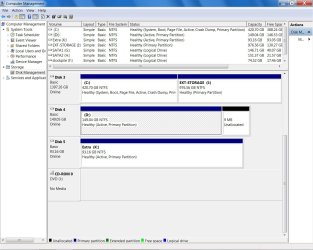
These are the drives. Disk # 4 used to be XP before installation. After Installation it changed to C:
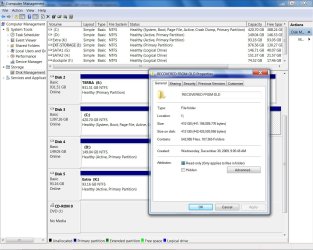
Recovered folder has 410 GB of DATA in it which was recovered from Drive D: Disk # 4 but in the Disk management it shows the capacity as 149.04 GB. which as I said before, it maybe due to all other data recovered. However when it screwed up my XP drive, it left the system files. That prooves I formated the right harddrive for installation. It simply got possessed and did this on its own.
Any othe information needed I will provide
 

My Computer

Computer Manufacturer/Model Number
Compal CL51-15
OS
WIN 7
CPU
Intel Centrino
Motherboard
Intel 82852/82855
Memory
2 GB
Graphics Card(s)
Intel Graphics
Sound Card
realtek AC'97
View attachment 45938

View attachment 45939

View attachment 45940

These are the drives. Disk # 4 used to be XP before installation. After Installation it changed to C:
Recovered folder has 410 GB of DATA in it which was recovered from Drive D: Disk # 4 but in the Disk management it shows the capacity as 149.04 GB. which as I said before, it maybe due to all other data recovered. However when it screwed up my XP drive, it left the system files. That prooves I formated the right harddrive for installation. It simply got possessed and did this on its own.
Any othe information needed I will provide

Cannot follow this . Can you please label the drives? what exists there now?.
 
Last edited:
Link did not work the first time, as you might have noticed, I removed that from my comment.
 

My Computer

Computer Manufacturer/Model Number
Homebuilt
OS
Windows 7 x64
CPU
i7-2600K
Motherboard
Asus P8Z77-v Pro
Memory
8 G
Graphics Card(s)
GTX 480
Sound Card
Onboard
Monitor(s) Displays
LG W2753V
Screen Resolution
1920x1080
Hard Drives
Crucial M4 128 G SSD
May have been a temporary issue with the server.
 

My Computers

System One System Two

  • Computer type
    PC/Desktop
    OS
    7 X64
    CPU
    i5 8400
    Motherboard
    gigabyte b365m ds3h
    Memory
    2x8gb 3200mhz
    Hard Drives
    various
    PSU
    pure power 11 400w cm
    Case
    Coolermaster
    Cooling
    cryorig m9i
  • Computer type
    PC/Desktop
    OS
    7x64
    CPU
    g5400
    Motherboard
    ga b365m ds3h
    Memory
    8gb ddr4 2400
    PSU
    xfx pro 450w
View attachment 45938

View attachment 45939

View attachment 45940

These are the drives. Disk # 4 used to be XP before installation. After Installation it changed to C:
Recovered folder has 410 GB of DATA in it which was recovered from Drive D: Disk # 4 but in the Disk management it shows the capacity as 149.04 GB. which as I said before, it maybe due to all other data recovered. However when it screwed up my XP drive, it left the system files. That prooves I formated the right harddrive for installation. It simply got possessed and did this on its own.
Any othe information needed I will provide

Cannot follow this ramble. Can you please label the drives what exists there now.

Thanks for all the help. Please re-read it again or ask a specific question. "Can you please label the drives what exists there now" does not make any sense to me.

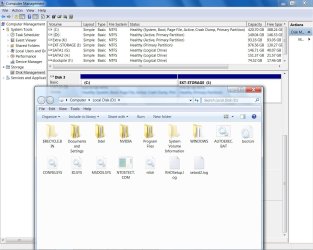
Which drive in specific? I have attached the second jpeg with the content of the drive D: which was previously C: before installation.

I cant think of any other explanation, between the two posts that I have posted.
 

My Computer

Computer Manufacturer/Model Number
Compal CL51-15
OS
WIN 7
CPU
Intel Centrino
Motherboard
Intel 82852/82855
Memory
2 GB
Graphics Card(s)
Intel Graphics
Sound Card
realtek AC'97
Could you please tell us which OS is on which partition?

It is hard to determine from what you have written.

Thank you.
 
Installed windows 7 on a partition and during setup, I selected tools and clicked Format that partition. Which it did and installed everything No Problems, or so I thought.
It rebooted and all of a sudden my Drives have changed, Win 7 boots on its own without XP option during startup, it garbled my previous C: drive, it made drive I to become drive C.

I wanted to Dual boot, but instead I have lost all my files. In Ctrl Panel I click Control Panel\All Control Panel Items\Administrative Tools\Computer management\Disk management. I see all the drives including XP installation and inside this drive there system files and size has been shrunk to 2.5 Gig used and available space of 146, out of 150 GB.

I ran data recovery and it found more than 450 GB of data residing inside 150 GB Hadrdrive, which made my hed spin, but then I realized, It may have had found Data of the previous installation before XP and combined everything in it's path.

I checked the recovered folder and found a folder with Jpegs, which I thought I was saved, but only to find all my Pictures of the past 8 years have been corrupted and I cant view them. I have tried everything in my witts and it seems like I am ROYALLY screwed by microsoft and now I am thinking maybe my option would be to Dual boot and see if I can run my "Shields Roll BAck and get my Data on Drive D, which was C before Win 7 installtio.

This is my Boot.ini below, which I got it from the supposed D with XP and I was wondering if anyone can help me figure out how to Dual boot XP and Win 7 without Screwing my self further into abyss.
Please help
Boot.ini: for previous XP. cant find boot.ini for WIn 7
[boot loader]
timeout=30
default=multi(0)disk(0)rdisk(0)partition(1)\WINDOWS
[operating systems]
multi(0)disk(0)rdisk(0)partition(1)\WINDOWS="Microsoft Windows XP Professional" /noexecute=optin /fastdetect

It seems like files are there but during installation, Win 7 decided to stick it between my eyes and pulled a freaking trigger. The most important part of the lost files are, My pictures and Documents which my life depends on.

Please Help

You need to bear in mind that Microsoft did not do this....you did. You made the choices that led to this during the installation process, either because you mis-clicked or didn't understand the operations taking place. If this were an issue with the software, it would be known and addressed by this time.
 

My Computer

Computer Manufacturer/Model Number
Custom
OS
Windows 7 Ultimate RTM (Technet)
CPU
3.00 gigahertz Intel Core2 Duo E8400
Motherboard
ASUSTeK Computer INC. P5K/EPU Rev 1.xx
Memory
4GB
Graphics Card(s)
ATI Radeon X1950 Pro
Sound Card
Built in HD Audio
Monitor(s) Displays
22" Gateway LCD
Screen Resolution
1920 x 1200
Hard Drives
ST3160023A [Hard drive] (160.04 GB) -- drive 0, rev 8.01, ST3500630AS [Hard drive] (500.11 GB) -- drive 2, rev 3.AAK
ST3500630AS [Hard drive] (500.11 GB) -- drive 1, rev 3.AAK
Keyboard
Logitech G11
Mouse
Microsoft Wireless Laser Mouse 5000
Internet Speed
13.44 Mbps
According to your screen shots, you booted into disk3, partition 1( C: ), which is your system partition and disk 3 is the primary drive with the Win 7 boot files. I will assume this is the Win 7 install. I do not know if it has the XP boot files, which it needs and EasyBCD 2.0 will put them there for you.

Disk 4, partition 1 ( D: ) is your XP install.

If I go back and check, I will loose this post, but if you are trying to do a dual boot, you need to use EasyBCD to set it up.

My question, is there a disk 0,1,2? Which SATA connector do you have the Disk 3 plugged in to?
 
Last edited:

My Computer

Computer Manufacturer/Model Number
Homebuilt
OS
Windows 7 x64
CPU
i7-2600K
Motherboard
Asus P8Z77-v Pro
Memory
8 G
Graphics Card(s)
GTX 480
Sound Card
Onboard
Monitor(s) Displays
LG W2753V
Screen Resolution
1920x1080
Hard Drives
Crucial M4 128 G SSD
You need to bear in mind that Microsoft did not do this....you did. You made the choices that led to this during the installation process, either because you mis-clicked or didn't understand the operations taking place. If this were an issue with the software, it would be known and addressed by this time.

You need to understand that, just because I have logged here and ask for solution to something that is simply unexplainable, it means that I simply clicked not knowing where was I clicking. IN other word please dont insult.

Look at the screens and in this case the only two drives in question are DISk #3 and Disk #4.

Disk #3 Indicates drive C: and I:
Disk#4 Indicates drive D:

When I booted using win 7 setup DVD, I had the choice of where I wanted WIn 7 to be installed. It installed in the directory where I wanted it to be installed (Imagine someone speaking very slowly as you read this).

Before doing the installation, I had Win XP on disk 4, bootable and working without any problems. When it Win7 installation querried where I wanted to install my Win 7? I clicked on the Drive selected. I clicked on tools and selected format before installation. Which it executed promptly. Setup ended without a glitch and Windows 7 started the system. Only this time it did not ask for the O/S choice. Which seemed odd. I clicked on my computer and I saw the changes to drive letters.
I clicked on each drive to see where has my XP gone to? I found out it has gone to D. I clicked to see if my files are intact. NO theywere not. Please read he rest of the upper posts. Besides If I would have clicked format wrongly to XP drive all files would have been deleted and Win & would have been installed there. JUST think before you become an annoyance.

AND EVERYONE ELSE WHO WANTS TO HELP.
comprehension, or understanding what I requested is the problem, I will be glad to furnish further information. If you dont understand, but start attacking, please dont contribute, leave while your sanity is intact.
 

My Computer

Computer Manufacturer/Model Number
Compal CL51-15
OS
WIN 7
CPU
Intel Centrino
Motherboard
Intel 82852/82855
Memory
2 GB
Graphics Card(s)
Intel Graphics
Sound Card
realtek AC'97
Thank you for all the help. Please admin close this thread
 

My Computer

Computer Manufacturer/Model Number
Compal CL51-15
OS
WIN 7
CPU
Intel Centrino
Motherboard
Intel 82852/82855
Memory
2 GB
Graphics Card(s)
Intel Graphics
Sound Card
realtek AC'97
Back
Top