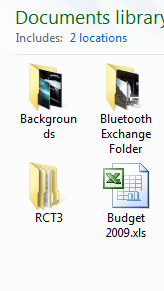
Windows 7 Icon word wrap problem

bombinxile

New member
Local time
7:20 PM
Messages
4
Hi,
I've noticed an irritating thing about icons with labels too long to fit into one line, they end up looking like this (see Backgrounds folder). Is there anyway to prevent them wrapping the text this way?

Thanks.
 

Attachments

  • Capture.PNG
    Capture.PNG
    7.5 KB · Views: 1,599

My Computer

OS
Windows 7 Ultimate
Right click your desktop, choose Personalize > Windows Color > Advanced Appearance Settings. From here you can do one of two things, either change the icon font to a smaller size or increase the vertical spacing of the icons
 

My Computer

Computer Manufacturer/Model Number
Gateway GM56654
OS
Windows 7 Ultimate_x64
CPU
AMD Phenom 9600 Quad Core
Memory
3GB
Graphics Card(s)
nVidia GeForce 9600 GT
Sound Card
Envy 24 Family Audio HiDef
Monitor(s) Displays
24" Gateway Widescreen LCD
Hard Drives
2 x 500GB SATA HDD
I have the exact same problem, and it is rather annoying. It works fine if you use Large Icons, but if you're like me, they're too clunky.

Right click your desktop, choose Personalize > Windows Color > Advanced Appearance Settings. From here you can do one of two things, either change the icon font to a smaller size or increase the vertical spacing of the icons

This does not work for all icons, only Desktop Icons.

If anyone can solve this mystery, I and many others would be extremely appreciative. Funny how such a little thing can be so annoying? :P
 

My Computer

OS
Windows 7
request to change this thread to general chat, i put it in the wrong forum. thanx
 

My Computer

OS
Windows 7 Ultimate
Back
Top