Windows 7 image restore

D1390

New member
Local time
1:24 AM
Messages
4
hey guys

i have created an image of my PC and stored it on my external HDD a couple weeks ago and i want to restore using that image. The thing is when i get up to the restore stage after i click the "restore a different backup" on the wizard my HDD dosnt show up, and a window shows up saying somthing about installing drives when my external HD didnt come with one. Am i doing somthing wrong? is there a way to restore with an image on my external? thanks
 

My Computer

OS
Windows 7
if you can see the image file, try and copy it to your c drive, restore it, then delete it....
 

My Computer

Computer type
PC/Desktop
Computer Manufacturer/Model Number
LENOVO K450 @3.0GHZ
OS
64-bit Windows 8.1 Pro
CPU
Core(TM) i5 CPU 4330 Haswell @ 3.20GHz
Motherboard
LENOVO
Memory
12.00 GB
Graphics Card(s)
Intel(R) HD Graphics
Sound Card
Intel HD integtrated
Monitor(s) Displays
HP 25' ISP Monitor
Screen Resolution
1900/1020
Hard Drives
(1) ST1000DM003-1CH162 (2) Generic STORAGE DEVICE USB Device (3) Generic STORAGE DEVICE USB Device
Internet Speed
100mb down/10mb up
thanks for your reply tews. which file is this because i got a folder with all these different files and theres a VHD file but im not not sure if that would work byitself without the other files
 

My Computer

OS
Windows 7
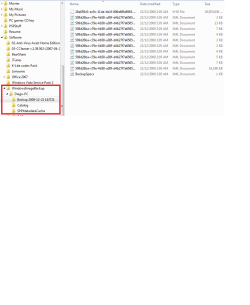
post a screenshot of the directory so we can see.... what did you use to make the image file with...
 

My Computer

Computer type
PC/Desktop
Computer Manufacturer/Model Number
LENOVO K450 @3.0GHZ
OS
64-bit Windows 8.1 Pro
CPU
Core(TM) i5 CPU 4330 Haswell @ 3.20GHz
Motherboard
LENOVO
Memory
12.00 GB
Graphics Card(s)
Intel(R) HD Graphics
Sound Card
Intel HD integtrated
Monitor(s) Displays
HP 25' ISP Monitor
Screen Resolution
1900/1020
Hard Drives
(1) ST1000DM003-1CH162 (2) Generic STORAGE DEVICE USB Device (3) Generic STORAGE DEVICE USB Device
Internet Speed
100mb down/10mb up
hi heres a screen shot i used Windows backup and restore to create the image and saved it on my external HD
 

Attachments

  • Untitled.png
    Untitled.png
    15.7 KB · Views: 43

My Computer

OS
Windows 7
Did you boot from the Win7 DVD, select Repair My Computer then Recover Using a System Image?

It should auto-detect the image in your external, since you have kept it named the same and in the root.

Try making a primary formatted partition on your HD to copy the image into. The imaging app may not be detecting your external but will detect a primary partition as a drive. I keep an image in both places for all my computers.
 
yea i used the windows 7 DVD, so when i get to the recover stage, which file do i select to start the restore?
 
Last edited:

My Computer

OS
Windows 7
Back
Top