Windows 7 install error 0xc0000428

darshan1308

New member
Local time
6:15 AM
Messages
12
Hi,
I have a branded HP Pavilion t860i which has been upgraded with a new graphics card,RAM etc.Anyway i had installed windows 7 a couple of months back and used it for 2 or 3 months with no problem. Then my SMPS got shot which also destroyed my motherboard, so I got both both of them replaced.
I bought a new gigabyte G31M-ES2L and an SMPS.Since the motherborad was shot ,i had to install the OS and installed XP SP3 with no problems.But when i try to install Windows 7 OR Vista an error shows up either during installation or at beginning or even after completing(since i had done the installation numerous times)


" Due to recent hardware or software changes..........................................

Error code:0xc0000428

File:(The files are ntkrnpcpl.exe something like that, winload.exe)either one of these shows up

Windows cannot verify the driver signature of this file "

After numerous restarts because of this message appearing the setup automatically rollbacks.

I have 2 HDD.One is a 160 GB Maxtor HD the other a 250 Seagate HD. In the Maxtor there is windows XP SP3 it is used by my dad and the seagate is used by me which also has XP SP3.I am trying to install it my 250GB HD replacing my XP.I have even tried to install it in the maxtor HD but same thing happens.I don't think there are any problems with the harddisks or even the DVD drives.

So is this because of the motherboard? Won't it even support 7 or Vista even though it says it does?

And i have tried installing it numerous ways possible from my Harddisks,from my two DVD writer drives: one is LG and the other is HP and every single time the same error pops up.

What am I supposed to do here?Please help:cry:
 

My Computer

Computer Manufacturer/Model Number
HP Pavilion t860i
OS
Windows 7 Ultimate x86,Windows Vista Business x86
CPU
Intel Pentium 4 HT(3.2 Ghz)
Motherboard
Gigabyte G31M-ES2L
Memory
2 GB DDR2
Graphics Card(s)
Nvidia Geforce 9400GT (1GB Video Memory)
Sound Card
Onboard(Realtek)
Monitor(s) Displays
Samsung SyncMaster SA300N
Screen Resolution
1600x900
Hard Drives
Maxtor 160GB
Seagate 250 GB
Case
HP Pavilion t860i case
Keyboard
HP Wireless Keyboard
Mouse
Samsung Optical Mouse
Internet Speed
512Kbps

My Computers

System One System Two

  • Computer type
    PC/Desktop
    OS
    7 X64
    CPU
    i5 8400
    Motherboard
    gigabyte b365m ds3h
    Memory
    2x8gb 3200mhz
    Hard Drives
    various
    PSU
    pure power 11 400w cm
    Case
    Coolermaster
    Cooling
    cryorig m9i
  • Computer type
    PC/Desktop
    OS
    7x64
    CPU
    g5400
    Motherboard
    ga b365m ds3h
    Memory
    8gb ddr4 2400
    PSU
    xfx pro 450w
The above given link actually has two solutions..........one is for people who have already installed 7 or Vista and they have this error showing up for which they can press F8 during booting and choose the "disable force driver signing" option or that readydriver plus fix. But I haven't even installed windows 7 and started using it,instead right after installation of windows 7 or vista and even before using it for the first time this error message shows up and it keeps on coming for a couple of restarts and finally it rollbacks the setup.

I also made a memory check and it didn't show me any errors..........what am I supposed to do??????:confused:
 

My Computer

Computer Manufacturer/Model Number
HP Pavilion t860i
OS
Windows 7 Ultimate x86,Windows Vista Business x86
CPU
Intel Pentium 4 HT(3.2 Ghz)
Motherboard
Gigabyte G31M-ES2L
Memory
2 GB DDR2
Graphics Card(s)
Nvidia Geforce 9400GT (1GB Video Memory)
Sound Card
Onboard(Realtek)
Monitor(s) Displays
Samsung SyncMaster SA300N
Screen Resolution
1600x900
Hard Drives
Maxtor 160GB
Seagate 250 GB
Case
HP Pavilion t860i case
Keyboard
HP Wireless Keyboard
Mouse
Samsung Optical Mouse
Internet Speed
512Kbps
So basically i cant even install Windows 7 or Vista because of the error i mentioned in the my first post popping up sometimes during the beginning,middle or end of the installation and FYI i have Windows XP SP3 installed........someone please help....i am begging you.....i have been having this problem for months now and i have been using windows xp with no choice:cry:
 

My Computer

Computer Manufacturer/Model Number
HP Pavilion t860i
OS
Windows 7 Ultimate x86,Windows Vista Business x86
CPU
Intel Pentium 4 HT(3.2 Ghz)
Motherboard
Gigabyte G31M-ES2L
Memory
2 GB DDR2
Graphics Card(s)
Nvidia Geforce 9400GT (1GB Video Memory)
Sound Card
Onboard(Realtek)
Monitor(s) Displays
Samsung SyncMaster SA300N
Screen Resolution
1600x900
Hard Drives
Maxtor 160GB
Seagate 250 GB
Case
HP Pavilion t860i case
Keyboard
HP Wireless Keyboard
Mouse
Samsung Optical Mouse
Internet Speed
512Kbps
The above given link actually has two solutions..........one is for people who have already installed 7 or Vista and they have this error showing up for which they can press F8 during booting and choose the "disable force driver signing" option or that readydriver plus fix. But I haven't even installed windows 7 and started using it,instead right after installation of windows 7 or vista and even before using it for the first time this error message shows up and it keeps on coming for a couple of restarts and finally it rollbacks the setup.

I also made a memory check and it didn't show me any errors..........what am I supposed to do??????:confused:

Try removing the graphics card, & use the the onboard graphics until Win 7 is booting OK.
 

My Computer

OS
ME/XP/Vista/Win7
Removing the graphics card and enabling the onboard has not helped since the error keeps on showing up...........however i was able to install windows 7 by just pressing continue again and again as the computer restarted 4 or 5 times with the "0xc0000428" error and finally the windows 7 boot screen showed up and i pressed F8 and chose "disable driver signature enforcement" and continued installing but now there is a new problem. After finishing installation right after finalizing installation part a small dialog box with this message came up:

There is no disk in the drive
"Device/Harddisk/Dr1" after pressing cancel or continue it would be "Dr2" then "Dr3" till "Dr5"

Then the computer would restart and get stuck at the verifying dmi pool data screen and i am not even able to use my dad's XP
Now i have installed XP again in my hard disk so that i can change the boot.ini file so that atleast my dad could use the computer.

I tried installing windows 7 twice through all the drive signature errors an now i get this "No disk in the drive" error right before being able to use windows 7. Anyone has a gun because i need to kill myself very badly.
Anyone solutions for my problem???:confused:
 

My Computer

Computer Manufacturer/Model Number
HP Pavilion t860i
OS
Windows 7 Ultimate x86,Windows Vista Business x86
CPU
Intel Pentium 4 HT(3.2 Ghz)
Motherboard
Gigabyte G31M-ES2L
Memory
2 GB DDR2
Graphics Card(s)
Nvidia Geforce 9400GT (1GB Video Memory)
Sound Card
Onboard(Realtek)
Monitor(s) Displays
Samsung SyncMaster SA300N
Screen Resolution
1600x900
Hard Drives
Maxtor 160GB
Seagate 250 GB
Case
HP Pavilion t860i case
Keyboard
HP Wireless Keyboard
Mouse
Samsung Optical Mouse
Internet Speed
512Kbps
and I also tried to repair it using Windows 7 boot dvd but it said that it cannot be repaired automatically and it also said something being wrong with the OS loader
 

My Computer

Computer Manufacturer/Model Number
HP Pavilion t860i
OS
Windows 7 Ultimate x86,Windows Vista Business x86
CPU
Intel Pentium 4 HT(3.2 Ghz)
Motherboard
Gigabyte G31M-ES2L
Memory
2 GB DDR2
Graphics Card(s)
Nvidia Geforce 9400GT (1GB Video Memory)
Sound Card
Onboard(Realtek)
Monitor(s) Displays
Samsung SyncMaster SA300N
Screen Resolution
1600x900
Hard Drives
Maxtor 160GB
Seagate 250 GB
Case
HP Pavilion t860i case
Keyboard
HP Wireless Keyboard
Mouse
Samsung Optical Mouse
Internet Speed
512Kbps
Check your mobo site and see if there is Bios update available.
 

My Computers

System One System Two

  • Computer type
    PC/Desktop
    OS
    7 X64
    CPU
    i5 8400
    Motherboard
    gigabyte b365m ds3h
    Memory
    2x8gb 3200mhz
    Hard Drives
    various
    PSU
    pure power 11 400w cm
    Case
    Coolermaster
    Cooling
    cryorig m9i
  • Computer type
    PC/Desktop
    OS
    7x64
    CPU
    g5400
    Motherboard
    ga b365m ds3h
    Memory
    8gb ddr4 2400
    PSU
    xfx pro 450w
I can't flash my bios......my floppy drive is not working,i don't have a usb and even though i have a FAT32 partition for qflash the drive is not appearing in the qflash console......in short i cant flash my bios
 

My Computer

Computer Manufacturer/Model Number
HP Pavilion t860i
OS
Windows 7 Ultimate x86,Windows Vista Business x86
CPU
Intel Pentium 4 HT(3.2 Ghz)
Motherboard
Gigabyte G31M-ES2L
Memory
2 GB DDR2
Graphics Card(s)
Nvidia Geforce 9400GT (1GB Video Memory)
Sound Card
Onboard(Realtek)
Monitor(s) Displays
Samsung SyncMaster SA300N
Screen Resolution
1600x900
Hard Drives
Maxtor 160GB
Seagate 250 GB
Case
HP Pavilion t860i case
Keyboard
HP Wireless Keyboard
Mouse
Samsung Optical Mouse
Internet Speed
512Kbps
I flashed the bios with the latest bios available but still no change......someone please help me,i am dying here
 

My Computer

Computer Manufacturer/Model Number
HP Pavilion t860i
OS
Windows 7 Ultimate x86,Windows Vista Business x86
CPU
Intel Pentium 4 HT(3.2 Ghz)
Motherboard
Gigabyte G31M-ES2L
Memory
2 GB DDR2
Graphics Card(s)
Nvidia Geforce 9400GT (1GB Video Memory)
Sound Card
Onboard(Realtek)
Monitor(s) Displays
Samsung SyncMaster SA300N
Screen Resolution
1600x900
Hard Drives
Maxtor 160GB
Seagate 250 GB
Case
HP Pavilion t860i case
Keyboard
HP Wireless Keyboard
Mouse
Samsung Optical Mouse
Internet Speed
512Kbps
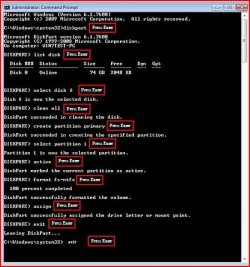
nope not helping......i guess i am not meant to use windows 7:cry:
 

My Computer

Computer Manufacturer/Model Number
HP Pavilion t860i
OS
Windows 7 Ultimate x86,Windows Vista Business x86
CPU
Intel Pentium 4 HT(3.2 Ghz)
Motherboard
Gigabyte G31M-ES2L
Memory
2 GB DDR2
Graphics Card(s)
Nvidia Geforce 9400GT (1GB Video Memory)
Sound Card
Onboard(Realtek)
Monitor(s) Displays
Samsung SyncMaster SA300N
Screen Resolution
1600x900
Hard Drives
Maxtor 160GB
Seagate 250 GB
Case
HP Pavilion t860i case
Keyboard
HP Wireless Keyboard
Mouse
Samsung Optical Mouse
Internet Speed
512Kbps

Attachments

  • Capture5.JPG
    Capture5.JPG
    45.3 KB · Views: 1,777

My Computer

OS
ME/XP/Vista/Win7
i know it has been months since my last post but i got a 1TB external HD........so after copying all the data i will try to install windows 7 with above mentioned method.....even if it doesn't work i thank u guys for helping me so much:)
 

My Computer

Computer Manufacturer/Model Number
HP Pavilion t860i
OS
Windows 7 Ultimate x86,Windows Vista Business x86
CPU
Intel Pentium 4 HT(3.2 Ghz)
Motherboard
Gigabyte G31M-ES2L
Memory
2 GB DDR2
Graphics Card(s)
Nvidia Geforce 9400GT (1GB Video Memory)
Sound Card
Onboard(Realtek)
Monitor(s) Displays
Samsung SyncMaster SA300N
Screen Resolution
1600x900
Hard Drives
Maxtor 160GB
Seagate 250 GB
Case
HP Pavilion t860i case
Keyboard
HP Wireless Keyboard
Mouse
Samsung Optical Mouse
Internet Speed
512Kbps
Back
Top