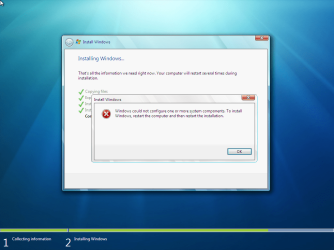
Windows 7 Install Error

Sil3nc3

New member
Local time
5:05 PM
Messages
6
I was attempting to reinstall Windows 7 because it was getting slow, and I was almost finished and was on Completing Installation... phase I get an error saying that "Windows could not configure one or more system components" and then it started rolling back the system. I'm using Windows 7 Ultimate and I never had this problem before.
 

Attachments

  • win7a.png
    win7a.png
    141.1 KB · Views: 805

My Computer

OS
Windows 7
Clean install by booting to the DVD.
 

My Computer

Computer Manufacturer/Model Number
self built
OS
7600.20510 x86
CPU
P4 550 3.4 GHz HT running at 3.5 GHz
Motherboard
MSI PM8M3-V (MS-7211 v1.x) Micro-ATX mainboard
Memory
OCZ 2 GB(2x1GB) DDR400mHz running @ 414 mHz
Graphics Card(s)
HIS Radeon HD 3850 IceQ 3 Turbo HDMI Dual DL-DVI AGP
Sound Card
MOTU Traveler firewire studio interface 192 kHz 24 bit
Monitor(s) Displays
22" widescreen Acer X223W LCD, 17" Compaq P75 CRT
Screen Resolution
1680x1050 and 1280x1024
Hard Drives
SATA I x2 WD, 400 GB and 120 GB, SATA 2 WD Caviar Black 1 TB
PSU
350W generic
Case
Cybertronpc, it glows blue
Cooling
stock cpu fan, Ice-Q 3 gpu and system, many case fans
Keyboard
Logitch Classical Keyboard 200
Mouse
Logitech Mediaplay cordless
Internet Speed
1792/448 kbits/sec
Other Info
SATA II PCI fake RAID adapter, 1 GB Readyboost, original ATI Remote Wonder (even works with WMC perfectly), Logitech Rumblepad 2 game controller x2
Sorry to bump this but I'm not getting any help from Google and I'm having this exact same problem. I'm doing a clean install from the DVD, nuked all of the partitions and tried installing twice. Same problem.

I'm not sure what is causing it here. I just took the disc out and found it was a little dirty, since that seems to be a common problem in what I can tell from Google (either that or it is a problem loading from an image / upgrade). I guess I'll report on if this worked or not...
 

My Computer

Computer Manufacturer/Model Number
Custom build
OS
Windows 7
CPU
Intel Core 2 Duo
Motherboard
MSI
Memory
4G
Graphics Card(s)
Nvidia 8800GTS v1
Sound Card
Creative Soundblaster Xtreme Audio
Monitor(s) Displays
Dell 2407FPW
Screen Resolution
1920x1200
Hard Drives
2

1 is a 120
2nd is a 250

I map to a network share in-house for back-ups, 1TB of storage there
PSU
1,000
Case
Custom
Cooling
None
Keyboard
Dell regular keyboard
Mouse
Dell regular mouse
Internet Speed
6mb down / 1mb down
Other Info
http://micron.thehhp.net
Update - didn't work. I didn't think it would...

At any rate, for giggles I tried running a repair. It detected my Windows installation as D:\Windows. Strange. So I booted to a Fedora 10 installation disc I have and ran rescue mode to get a shell opened. I ran fdisk and looked at the partition layout - to my surprise it was reporting that the "System" partition Windows creates during installation had a problem (something about the sectors not lining up or something).

I deleted both the "System" partition and the regular partition I created from the Windows install, rebooted and booted back to the Windows 7 installation DVD to give the install another try.

Will report results... I really, *really* wish Windows' installation partitioning utility were actually sort of intuitive and told me *something* useful about the drive.

 

My Computer

Computer Manufacturer/Model Number
Custom build
OS
Windows 7
CPU
Intel Core 2 Duo
Motherboard
MSI
Memory
4G
Graphics Card(s)
Nvidia 8800GTS v1
Sound Card
Creative Soundblaster Xtreme Audio
Monitor(s) Displays
Dell 2407FPW
Screen Resolution
1920x1200
Hard Drives
2

1 is a 120
2nd is a 250

I map to a network share in-house for back-ups, 1TB of storage there
PSU
1,000
Case
Custom
Cooling
None
Keyboard
Dell regular keyboard
Mouse
Dell regular mouse
Internet Speed
6mb down / 1mb down
Other Info
http://micron.thehhp.net
Didn't work either. Something is really screwed up here. I give up, I have no idea.
 

My Computer

Computer Manufacturer/Model Number
Custom build
OS
Windows 7
CPU
Intel Core 2 Duo
Motherboard
MSI
Memory
4G
Graphics Card(s)
Nvidia 8800GTS v1
Sound Card
Creative Soundblaster Xtreme Audio
Monitor(s) Displays
Dell 2407FPW
Screen Resolution
1920x1200
Hard Drives
2

1 is a 120
2nd is a 250

I map to a network share in-house for back-ups, 1TB of storage there
PSU
1,000
Case
Custom
Cooling
None
Keyboard
Dell regular keyboard
Mouse
Dell regular mouse
Internet Speed
6mb down / 1mb down
Other Info
http://micron.thehhp.net
You may have some remnants of GRUB on the disk which are messing up Win7 install. Use DISKPART from the DVD's Repair Console Command Line to "CLEAN ALL" the HD to get the deepest clean.
 
I don't think grub is on there, this is a new laptop that came shipped with Windows 7. All I did was boot to a Fedora DVD to check the partition layout in more detail. The only OS that has been on this laptop is Windows 7.

It is a Qosmio X505 laptop, though I doubt that information is relevant to anything.

I just restored it to the way it was when I bought it and uninstalled all of the extra junk manually, though I know I didn't get it all. I hate having a non-clean installed system but I guess I'll live with it.
 

My Computer

Computer Manufacturer/Model Number
Custom build
OS
Windows 7
CPU
Intel Core 2 Duo
Motherboard
MSI
Memory
4G
Graphics Card(s)
Nvidia 8800GTS v1
Sound Card
Creative Soundblaster Xtreme Audio
Monitor(s) Displays
Dell 2407FPW
Screen Resolution
1920x1200
Hard Drives
2

1 is a 120
2nd is a 250

I map to a network share in-house for back-ups, 1TB of storage there
PSU
1,000
Case
Custom
Cooling
None
Keyboard
Dell regular keyboard
Mouse
Dell regular mouse
Internet Speed
6mb down / 1mb down
Other Info
http://micron.thehhp.net
Run sfc /scannow to see if any System Files were corrupted beyond repair by the bloatware removal, as frequently happens.

There may be a factory boot or utility partition that is interfering with clean reinstall using DVD. Often this can be overcome by cleaning the HD using DISKPART or 3rd party wiping utility like Partition Wizard has. If you have your Recov Disks made already, you might want to wipe the whole HD since Recov partition is often disabled by clean install anyway.
 
That's what I did when I booted to the Fedora disc. I ran fdisk and deleted everything so the drive was completely blank.

You got me thinking, however - one thing I didn't try was rewriting the MBR. Oh well, it is working fine now, though I just wish I had a clean install.
 

My Computer

Computer Manufacturer/Model Number
Custom build
OS
Windows 7
CPU
Intel Core 2 Duo
Motherboard
MSI
Memory
4G
Graphics Card(s)
Nvidia 8800GTS v1
Sound Card
Creative Soundblaster Xtreme Audio
Monitor(s) Displays
Dell 2407FPW
Screen Resolution
1920x1200
Hard Drives
2

1 is a 120
2nd is a 250

I map to a network share in-house for back-ups, 1TB of storage there
PSU
1,000
Case
Custom
Cooling
None
Keyboard
Dell regular keyboard
Mouse
Dell regular mouse
Internet Speed
6mb down / 1mb down
Other Info
http://micron.thehhp.net
Be on the lookout for a Win7 DVD to borrow for clean reinstall. You can unlock all versions by extracting ISO using ImgBurn then google the ei.cfg removal tool. Now you have a path to clean reinstall using the Product Key stickered to your machine.

Use Windows 7-friendly tools like free Partition Wizard bootable CD to wipe or pre-partition, or DISKPART from the DVD Command line.
 
Back
Top