
Solved Windows 7 install problem

gigglekisses

New member
Local time
11:38 PM
Messages
78
I previously had vista installed an upgraded to windows 7 didn't think twice for some reason to check where it was be downloaded and it went to the d: drive (recovery drive) then had to reload microsoft office and it also want to go to this same drive an ultimately ran out of room and now i'm at a loss as to what to do. Should i wipe out everything and start over and do this in the c drive? any help you can give me would be greatly appreciated. thank you.

Also when i boot up my computer its giving me the option to start up in windows 7 or vista. how do i get rid of vista?

I think i figured out what BFK was asking for in the picture you were asking of. Sorry i'm not as aware of things as i thought i was, lol... thank you for walking me through this. My questions are this.
1) Should i leave Windows 7 in the D: Drive (recovery drive)
2) if i shouldn't then how do i get it off there? and onto the c drive?
3) how do i get vista off there after i get windows 7 on the right drive?
4) if i do leave windows 7 in the D drive i saw through looking through others posting a way to re-route the registry for things to be downloaded into the c drive, is this a good idea? I plan to have an external hard drive back up it all up.
5) if i have an external hard drive someone then said i could remove everything but this doesn't make sense to me because don't use need the programs to make things work... or was this statement meant to say you can remove all your files (i.e. your games, music, documents, etc.... which i had to remove already to back up before i downloaded windows 7 because i was gonna lose them) or am i miss understanding something?
6:) is the D: drive being so full gonna slow down the computer any or is really just meant to back up my computer in case it crashes?
7) i will be doing this whole process on my laptop... when i do so which is the appropriate drive i should have windows 7 orginally installed in?
Thanks for any help.
 

Attachments
  • computer.jpg
    computer.jpg
    145.5 KB · Views: 27
Last edited:

My Computer

OS
windows 7
Hello again gigglekisses.


Before we make any specific recommendations will you please post a snip/screen-shot of the entire disk management drive map with a full description as to which drive/partition is which, so we can see what you have going on as there may be a fairly simple way to resolve the situation.

In the Windows start menu right click computer and click manage, in the left pane of the "Computer Management" window that opens click disk management and post a snip of that.

How to Upload and Post a Screenshot and File in Seven Forums


Be sure to post back with any further questions you may have and to keep us informed.
 

My Computer

Computer Manufacturer/Model Number
* BFK Customs *
OS
W 7 64-bit Ultimate
CPU
Intel Q9550 Yorkfield
Motherboard
ASUS P5Q Pro
Memory
8GB Dominator 8500C5D
Graphics Card(s)
ATI : XFX 5870
Sound Card
Realtek HD Audio 7-1
Monitor(s) Displays
1x 47" LCD HDMI & 3x 26" LCD HDMI
Screen Resolution
1920x1080P & 1920x1200
Hard Drives
1x 80GB Intel X25-M G2 SSD : 1x 500GB & 1x 640GB WD Caviar Black(s)
PSU
Corsair 620HX
Case
Cooler Master RC-690
Cooling
Tuniq Tower 120, 2x 140mm and 3x 120mm case fans
Keyboard
Microsoft 500
Mouse
Razer Diamondback 3G
Internet Speed
14 Mb/s
Other Info
1x Koutech 3Gb/s SATA HDD Hot Swap Rack
Hello again gigglekisses.


Before we make any specific recommendations will you please post a snip/screen-shot of the entire disk management drive map with a full description as to which drive/partition is which, so we can see what you have going on as there may be a fairly simple way to resolve the situation.

In the Windows start menu right click computer and click manage, in the left pane of the "Computer Management" window that opens click disk management and post a snip of that.

How to Upload and Post a Screenshot and File in Seven Forums


Be sure to post back with any further questions you may have and to keep us informed.

This is what we need to see, in a new post, not that; thanks!
 

My Computer

Computer Manufacturer/Model Number
* BFK Customs *
OS
W 7 64-bit Ultimate
CPU
Intel Q9550 Yorkfield
Motherboard
ASUS P5Q Pro
Memory
8GB Dominator 8500C5D
Graphics Card(s)
ATI : XFX 5870
Sound Card
Realtek HD Audio 7-1
Monitor(s) Displays
1x 47" LCD HDMI & 3x 26" LCD HDMI
Screen Resolution
1920x1080P & 1920x1200
Hard Drives
1x 80GB Intel X25-M G2 SSD : 1x 500GB & 1x 640GB WD Caviar Black(s)
PSU
Corsair 620HX
Case
Cooler Master RC-690
Cooling
Tuniq Tower 120, 2x 140mm and 3x 120mm case fans
Keyboard
Microsoft 500
Mouse
Razer Diamondback 3G
Internet Speed
14 Mb/s
Other Info
1x Koutech 3Gb/s SATA HDD Hot Swap Rack
hmmmm

is that the right screen shot (hiding face) lol :confused:
 

My Computer

OS
windows 7
Hello.


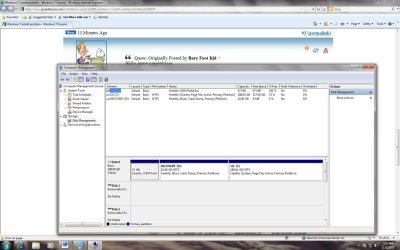
Yes that's the correct one, you're doing good. ;)

You say you have made backups to an external Hard Disk Drive (HDD) of the data you want to save, is this correct?


It seems you have installed Windows 7 to the D: partition that was not created for this purpose, its original intent was to contain the files/data to recover the PC back to factory conditions in case of issues, that is no longer possible because you now have a Windows 7 there.

What is it you want to do; you now have a Windows 7 install that is on a partition that is way too small to contain it and you also have an older install of Windows Vista on the C: partition that you say you want to remove, correct.

It is possible and not too complicated to end up with just Windows 7 installed to the HDD and extra free space to store other things to but you will have to completely start over.

Is there still data of any kind you need to move to the external before you start this process?
 

My Computer

Computer Manufacturer/Model Number
* BFK Customs *
OS
W 7 64-bit Ultimate
CPU
Intel Q9550 Yorkfield
Motherboard
ASUS P5Q Pro
Memory
8GB Dominator 8500C5D
Graphics Card(s)
ATI : XFX 5870
Sound Card
Realtek HD Audio 7-1
Monitor(s) Displays
1x 47" LCD HDMI & 3x 26" LCD HDMI
Screen Resolution
1920x1080P & 1920x1200
Hard Drives
1x 80GB Intel X25-M G2 SSD : 1x 500GB & 1x 640GB WD Caviar Black(s)
PSU
Corsair 620HX
Case
Cooler Master RC-690
Cooling
Tuniq Tower 120, 2x 140mm and 3x 120mm case fans
Keyboard
Microsoft 500
Mouse
Razer Diamondback 3G
Internet Speed
14 Mb/s
Other Info
1x Koutech 3Gb/s SATA HDD Hot Swap Rack
I have not backed up to an external yet because i don't have it, it's been ordered and will be here on the 9th. There isn't anything that i need to back up because i already did that. i guess i want to fix whatever i did to make things run smoother. i want to get rid of vista ultimately so when i boot up i don't have to keep selecting windows 7. and i don't want to keep having to worry about running out of room when wanting to download programs.... so what would that solution being? if i have to start over, i'm okay with that... i just wanna fix it :)
 

My Computer

OS
windows 7
OK, this tutorial at the link below is the best way to go forward, take your time and study what you have to do with it to have just Windows 7 installed to the HDD.

SSD / HDD : Optimize for Windows Reinstallation


First, do the "clean all" as listed in Step One, it'll take just over an hour, just relax and let it complete.

Then create a single partition to install Windows 7 to using the info out-lined in Step Two #2; then run the installation as usual.


Do you have a full version or an update version of Windows 7 to use for the install?
 

My Computer

Computer Manufacturer/Model Number
* BFK Customs *
OS
W 7 64-bit Ultimate
CPU
Intel Q9550 Yorkfield
Motherboard
ASUS P5Q Pro
Memory
8GB Dominator 8500C5D
Graphics Card(s)
ATI : XFX 5870
Sound Card
Realtek HD Audio 7-1
Monitor(s) Displays
1x 47" LCD HDMI & 3x 26" LCD HDMI
Screen Resolution
1920x1080P & 1920x1200
Hard Drives
1x 80GB Intel X25-M G2 SSD : 1x 500GB & 1x 640GB WD Caviar Black(s)
PSU
Corsair 620HX
Case
Cooler Master RC-690
Cooling
Tuniq Tower 120, 2x 140mm and 3x 120mm case fans
Keyboard
Microsoft 500
Mouse
Razer Diamondback 3G
Internet Speed
14 Mb/s
Other Info
1x Koutech 3Gb/s SATA HDD Hot Swap Rack
when i download things in the future on this computer will i download things to the d: (recovery drive) or C: drive?
 

My Computer

OS
windows 7

My Computer

Computer Manufacturer/Model Number
* BFK Customs *
OS
W 7 64-bit Ultimate
CPU
Intel Q9550 Yorkfield
Motherboard
ASUS P5Q Pro
Memory
8GB Dominator 8500C5D
Graphics Card(s)
ATI : XFX 5870
Sound Card
Realtek HD Audio 7-1
Monitor(s) Displays
1x 47" LCD HDMI & 3x 26" LCD HDMI
Screen Resolution
1920x1080P & 1920x1200
Hard Drives
1x 80GB Intel X25-M G2 SSD : 1x 500GB & 1x 640GB WD Caviar Black(s)
PSU
Corsair 620HX
Case
Cooler Master RC-690
Cooling
Tuniq Tower 120, 2x 140mm and 3x 120mm case fans
Keyboard
Microsoft 500
Mouse
Razer Diamondback 3G
Internet Speed
14 Mb/s
Other Info
1x Koutech 3Gb/s SATA HDD Hot Swap Rack
when i download things in the future on this computer will i download things to the d: (recovery drive) or C: drive?


Just be concerned with one issue at a time ok; get the work done first and we'll discuss that later.

;)
 

My Computer

Computer Manufacturer/Model Number
* BFK Customs *
OS
W 7 64-bit Ultimate
CPU
Intel Q9550 Yorkfield
Motherboard
ASUS P5Q Pro
Memory
8GB Dominator 8500C5D
Graphics Card(s)
ATI : XFX 5870
Sound Card
Realtek HD Audio 7-1
Monitor(s) Displays
1x 47" LCD HDMI & 3x 26" LCD HDMI
Screen Resolution
1920x1080P & 1920x1200
Hard Drives
1x 80GB Intel X25-M G2 SSD : 1x 500GB & 1x 640GB WD Caviar Black(s)
PSU
Corsair 620HX
Case
Cooler Master RC-690
Cooling
Tuniq Tower 120, 2x 140mm and 3x 120mm case fans
Keyboard
Microsoft 500
Mouse
Razer Diamondback 3G
Internet Speed
14 Mb/s
Other Info
1x Koutech 3Gb/s SATA HDD Hot Swap Rack
so after step 1 and step 2 as the first link you gave me then i do this... tuterial is that correct?
yes i have my laptop i have next to me...

(would i assume that this tutorial would be the same setup to apply to my laptop upgrade as well)
 

My Computer

OS
windows 7
Yes these tutorials work for desktops and lappys.
 

My Computer

Computer Manufacturer/Model Number
* BFK Customs *
OS
W 7 64-bit Ultimate
CPU
Intel Q9550 Yorkfield
Motherboard
ASUS P5Q Pro
Memory
8GB Dominator 8500C5D
Graphics Card(s)
ATI : XFX 5870
Sound Card
Realtek HD Audio 7-1
Monitor(s) Displays
1x 47" LCD HDMI & 3x 26" LCD HDMI
Screen Resolution
1920x1080P & 1920x1200
Hard Drives
1x 80GB Intel X25-M G2 SSD : 1x 500GB & 1x 640GB WD Caviar Black(s)
PSU
Corsair 620HX
Case
Cooler Master RC-690
Cooling
Tuniq Tower 120, 2x 140mm and 3x 120mm case fans
Keyboard
Microsoft 500
Mouse
Razer Diamondback 3G
Internet Speed
14 Mb/s
Other Info
1x Koutech 3Gb/s SATA HDD Hot Swap Rack
i wouldn't need to do the step one and two though for the laptop since i haven't installed windows 7 or anything ont he laptop right? lol... i'm about to start the process on the desktop now. i'll let you know if i run into any speedbumps... thank you so much for your help!
 

My Computer

OS
windows 7
When i download programs in the future should i save them to the c drive or the d drive?
 

My Computer

OS
windows 7

My Computer

Computer Manufacturer/Model Number
* BFK Customs *
OS
W 7 64-bit Ultimate
CPU
Intel Q9550 Yorkfield
Motherboard
ASUS P5Q Pro
Memory
8GB Dominator 8500C5D
Graphics Card(s)
ATI : XFX 5870
Sound Card
Realtek HD Audio 7-1
Monitor(s) Displays
1x 47" LCD HDMI & 3x 26" LCD HDMI
Screen Resolution
1920x1080P & 1920x1200
Hard Drives
1x 80GB Intel X25-M G2 SSD : 1x 500GB & 1x 640GB WD Caviar Black(s)
PSU
Corsair 620HX
Case
Cooler Master RC-690
Cooling
Tuniq Tower 120, 2x 140mm and 3x 120mm case fans
Keyboard
Microsoft 500
Mouse
Razer Diamondback 3G
Internet Speed
14 Mb/s
Other Info
1x Koutech 3Gb/s SATA HDD Hot Swap Rack
lol i just did hahaha sorry i'm anxious lol...


That's understandable; after you have Windows 7 installed and running good we'll cover that.
 

My Computer

Computer Manufacturer/Model Number
* BFK Customs *
OS
W 7 64-bit Ultimate
CPU
Intel Q9550 Yorkfield
Motherboard
ASUS P5Q Pro
Memory
8GB Dominator 8500C5D
Graphics Card(s)
ATI : XFX 5870
Sound Card
Realtek HD Audio 7-1
Monitor(s) Displays
1x 47" LCD HDMI & 3x 26" LCD HDMI
Screen Resolution
1920x1080P & 1920x1200
Hard Drives
1x 80GB Intel X25-M G2 SSD : 1x 500GB & 1x 640GB WD Caviar Black(s)
PSU
Corsair 620HX
Case
Cooler Master RC-690
Cooling
Tuniq Tower 120, 2x 140mm and 3x 120mm case fans
Keyboard
Microsoft 500
Mouse
Razer Diamondback 3G
Internet Speed
14 Mb/s
Other Info
1x Koutech 3Gb/s SATA HDD Hot Swap Rack
in step two it's talking about a repair disk is this a disk for vista that it's asking for?
 

My Computer

OS
windows 7
You have a Windows 7 installer so don't be concerned with the repair CD.
 

My Computer

Computer Manufacturer/Model Number
* BFK Customs *
OS
W 7 64-bit Ultimate
CPU
Intel Q9550 Yorkfield
Motherboard
ASUS P5Q Pro
Memory
8GB Dominator 8500C5D
Graphics Card(s)
ATI : XFX 5870
Sound Card
Realtek HD Audio 7-1
Monitor(s) Displays
1x 47" LCD HDMI & 3x 26" LCD HDMI
Screen Resolution
1920x1080P & 1920x1200
Hard Drives
1x 80GB Intel X25-M G2 SSD : 1x 500GB & 1x 640GB WD Caviar Black(s)
PSU
Corsair 620HX
Case
Cooler Master RC-690
Cooling
Tuniq Tower 120, 2x 140mm and 3x 120mm case fans
Keyboard
Microsoft 500
Mouse
Razer Diamondback 3G
Internet Speed
14 Mb/s
Other Info
1x Koutech 3Gb/s SATA HDD Hot Swap Rack
Back
Top