Windows 7 Installation can not detect my harddrive

Joriko13

New member
Local time
1:57 PM
Messages
1
Hi there,

I am attempting to install Windows 7(32) onto my computer (currently running Windows Vista32). I have been unable to do so because the setup claims that I have no harddrives in which to install windows. It will not detect them during the installation process.

The compatibility check states that my computer is capable of running Windows 7(32) I am curious if there is anything I could do to get the installation to detect my harddrive.

Please feel free to ask for any other hardware related questions if needed.

My computer specs are:

Nvidia GTS 450
Intel Quad CPU Q6600 @ 2.4Ghz
4.00gb Ram
Dell XPS720
PLDS DVD+RW DH-16A6S SCSI CdRom (driver up to date)

I attempted to format my C: as well, as per a friends suggestion, and was unable to do so recieving an error message stating "system partition is not allowed to be formatted" . I do not recall partitioning my system.

Hope this helps.

Thank you.
 

My Computer My Computer

At a glance

Windows Vista 32bit
OS
Windows Vista 32bit

My Computer My Computer

At a glance

Windows 7 x64Intel i7 2600kG.skill Ripjaw 16gigs @ 1866Nvidia gtx580 (evga)
Computer Manufacturer/Model Number
Insane hobo technologies. ;-)
OS
Windows 7 x64
CPU
Intel i7 2600k
Motherboard
Asrock z68 extreme 4 gen 3
Memory
G.skill Ripjaw 16gigs @ 1866
Graphics Card(s)
Nvidia gtx580 (evga)
Sound Card
Integrated HD audio + hdmi
Monitor(s) Displays
24" ASUS widescreen + 42" insignia
Screen Resolution
1080p (1920x1080)
Hard Drives
128 Samsung 830
256 Samsung 840
3 x 1tb storage drive (various)
1 western digital 1tb (eSATA)
1 Seagate 1tb (eSATA)
PSU
1 kilowatt SLI/Crossfire rated Silverstone modular
Case
NZXT Phantom + additional 220 fan
Cooling
Zalmann
Keyboard
Microsoft wireless 3000 (v2)
Mouse
MS - wireless 5000 (bluetrack)
Internet Speed
depends on if you ask me or my provider.
Other Info
The above information is provided as is, and the author assumes no responsibility for issues it may cause with your sanity or fanboyism.
You need to boot the DVD to install.

First make sure you have the latest BIOS version from Dell's Support Downloads webpage for your service tag - you should have at least v.06. If so, reset the CMOS: Clear CMOS - 3 Ways to Clear the CMOS - Reset BIOS

Boot DVD, Use Custom install>Drive Options (pictures in Clean Install tutorial above) to delete partitions, Create New as you wish, then Format before installing to first partition. Ignore the 100mb System Reserved partition issued by installer - this conveniently places the DVD Repair console on the F8 Advanced Boot Tools menu.

If install fails, try removing all but 2gb of RAM to try install. Post back the exact error message.
 
Last edited:
all that is covered in the notes for clean install greg :confused:
 

My Computer My Computer

At a glance

Windows 7 x64Intel i7 2600kG.skill Ripjaw 16gigs @ 1866Nvidia gtx580 (evga)
Computer Manufacturer/Model Number
Insane hobo technologies. ;-)
OS
Windows 7 x64
CPU
Intel i7 2600k
Motherboard
Asrock z68 extreme 4 gen 3
Memory
G.skill Ripjaw 16gigs @ 1866
Graphics Card(s)
Nvidia gtx580 (evga)
Sound Card
Integrated HD audio + hdmi
Monitor(s) Displays
24" ASUS widescreen + 42" insignia
Screen Resolution
1080p (1920x1080)
Hard Drives
128 Samsung 830
256 Samsung 840
3 x 1tb storage drive (various)
1 western digital 1tb (eSATA)
1 Seagate 1tb (eSATA)
PSU
1 kilowatt SLI/Crossfire rated Silverstone modular
Case
NZXT Phantom + additional 220 fan
Cooling
Zalmann
Keyboard
Microsoft wireless 3000 (v2)
Mouse
MS - wireless 5000 (bluetrack)
Internet Speed
depends on if you ask me or my provider.
Other Info
The above information is provided as is, and the author assumes no responsibility for issues it may cause with your sanity or fanboyism.
All what? his latest BIOS version needed? How to boot a DVD? How to reset the CMOS? Purpose of 100mb SysRserved partition? Remove all but 2gb of RAM?

I must be missing these in Clean install tute. Can you show me where they are?

Adding detail and other steps to your good information and links only helps the OP get it resolved faster.
 
Also wondering what version of Vista do you have now and what version are you of Win 7 are you trying to upgrade to?
 

My Computer My Computer

At a glance

Windows 10 Pro X64Intel Quad Core i7-4770 @ 3.4Ghz16.0GB PC3-12800 DDR3 SDRAM 1600 MHzIntel Integrated HD Graphics
Computer type
PC/Desktop
Computer Manufacturer/Model Number
Lenovo IdeaCenter 450
OS
Windows 10 Pro X64
CPU
Intel Quad Core i7-4770 @ 3.4Ghz
Memory
16.0GB PC3-12800 DDR3 SDRAM 1600 MHz
Graphics Card(s)
Intel Integrated HD Graphics
Sound Card
Realtek HD Audio
Monitor(s) Displays
HP 22" LCD
Screen Resolution
1680 x 1050
Hard Drives
250GB Samsung EVO SATA-3 SSD
2TB Seagate ST2000DM001 SATA-2
1.5TB Seagate ST3150041AS SATA
Keyboard
Dell USB
Mouse
Lenovo USB
Internet Speed
Cable via Road Runner 3MB Upload, 30MB Download
Antivirus
Windows Defender, MBAM Pro, MBAE
Browser
Seamonkey
Other Info
UEFI/GPT
PLDS DVD-RW DH16AERSH
Hi there,

I am attempting to install Windows 7(32) onto my computer (currently running Windows Vista32). I have been unable to do so because the setup claims that I have no harddrives in which to install windows. It will not detect them during the installation process.

The compatibility check states that my computer is capable of running Windows 7(32) I am curious if there is anything I could do to get the installation to detect my harddrive.

Please feel free to ask for any other hardware related questions if needed.

My computer specs are:

Nvidia GTS 450
Intel Quad CPU Q6600 @ 2.4Ghz
4.00gb Ram
Dell XPS720
PLDS DVD+RW DH-16A6S SCSI CdRom (driver up to date)

I attempted to format my C: as well, as per a friends suggestion, and was unable to do so recieving an error message stating "system partition is not allowed to be formatted" . I do not recall partitioning my system.

Hope this helps.

Thank you.

You say you have a SCSI DVD drive? Are you sure?
If the DVD is SCSI are the hard drives also SCSI?
If so that is your problem. You need to LOAD the SCSI drivers during the 7 install routine. No other option will work. Win 7 does not see the SCSI hard drives without loading the drivers for the SCSI card and drives. To my knowledge NO Dell system, unless older business class servers, ever came with SCSI as a normal option. So this is a Add-On card.
 

My Computer My Computer

At a glance

Windows 7 Pro x64i5 76016GBNvidia GTS450
Computer Manufacturer/Model Number
Built be Me
OS
Windows 7 Pro x64
CPU
i5 760
Motherboard
Asus P7P55D-E Pro
Memory
16GB
Graphics Card(s)
Nvidia GTS450
Sound Card
On board
Monitor(s) Displays
Dell 2007WFP Dell 1800FP
Screen Resolution
1680x1050 1280x1024
Hard Drives
Seagate 250GB & 750GB
WD 1TB
PSU
Antec 750
Case
In Win
Cooling
Cooler Master Hyper 212+
Keyboard
IBM
Mouse
MS
Also wondering what version of Vista do you have now and what version are you of Win 7 are you trying to upgrade to?

I'm sorry but DID YOU READ THE FIRST LINE of the original post????????
 

My Computer My Computer

At a glance

Windows 7 Pro x64i5 76016GBNvidia GTS450
Computer Manufacturer/Model Number
Built be Me
OS
Windows 7 Pro x64
CPU
i5 760
Motherboard
Asus P7P55D-E Pro
Memory
16GB
Graphics Card(s)
Nvidia GTS450
Sound Card
On board
Monitor(s) Displays
Dell 2007WFP Dell 1800FP
Screen Resolution
1680x1050 1280x1024
Hard Drives
Seagate 250GB & 750GB
WD 1TB
PSU
Antec 750
Case
In Win
Cooling
Cooler Master Hyper 212+
Keyboard
IBM
Mouse
MS
I thought I had but apparently not very well, thanks for the "gentle" reminder. :)
 

My Computer My Computer

At a glance

Windows 10 Pro X64Intel Quad Core i7-4770 @ 3.4Ghz16.0GB PC3-12800 DDR3 SDRAM 1600 MHzIntel Integrated HD Graphics
Computer type
PC/Desktop
Computer Manufacturer/Model Number
Lenovo IdeaCenter 450
OS
Windows 10 Pro X64
CPU
Intel Quad Core i7-4770 @ 3.4Ghz
Memory
16.0GB PC3-12800 DDR3 SDRAM 1600 MHz
Graphics Card(s)
Intel Integrated HD Graphics
Sound Card
Realtek HD Audio
Monitor(s) Displays
HP 22" LCD
Screen Resolution
1680 x 1050
Hard Drives
250GB Samsung EVO SATA-3 SSD
2TB Seagate ST2000DM001 SATA-2
1.5TB Seagate ST3150041AS SATA
Keyboard
Dell USB
Mouse
Lenovo USB
Internet Speed
Cable via Road Runner 3MB Upload, 30MB Download
Antivirus
Windows Defender, MBAM Pro, MBAE
Browser
Seamonkey
Other Info
UEFI/GPT
PLDS DVD-RW DH16AERSH
I thought I had but apparently not very well, thanks for the "gentle" reminder. :)

This thread must have disappearing ink because I cannot find either the installed Vista version or the desired Win7 upgrade version anywhere. :geek:
 
This thread must have disappearing ink because I cannot find either the installed Vista version or the desired Win7 upgrade version anywhere.

In the first line of the original post the OP states.
Quote:
I am attempting to install Windows 7(32) onto my computer (currently running Windows Vista32).
End Quote:

I guess that is what you are talking about??
 

My Computer My Computer

At a glance

Windows 7 Pro x64i5 76016GBNvidia GTS450
Computer Manufacturer/Model Number
Built be Me
OS
Windows 7 Pro x64
CPU
i5 760
Motherboard
Asus P7P55D-E Pro
Memory
16GB
Graphics Card(s)
Nvidia GTS450
Sound Card
On board
Monitor(s) Displays
Dell 2007WFP Dell 1800FP
Screen Resolution
1680x1050 1280x1024
Hard Drives
Seagate 250GB & 750GB
WD 1TB
PSU
Antec 750
Case
In Win
Cooling
Cooler Master Hyper 212+
Keyboard
IBM
Mouse
MS
Those are OS's and bit-rates, not the version.

Versions are Starter, Basic, Home Premium, Pro, Enterprise Ultimate - OEM or retail.
 
Hi there,

I am attempting to install Windows 7(32) onto my computer (currently running Windows Vista32). I have been unable to do so because the setup claims that I have no harddrives in which to install windows. It will not detect them during the installation process.

The compatibility check states that my computer is capable of running Windows 7(32) I am curious if there is anything I could do to get the installation to detect my harddrive.

Please feel free to ask for any other hardware related questions if needed.

My computer specs are:

Nvidia GTS 450
Intel Quad CPU Q6600 @ 2.4Ghz
4.00gb Ram
Dell XPS720
PLDS DVD+RW DH-16A6S SCSI CdRom (driver up to date)

I attempted to format my C: as well, as per a friends suggestion, and was unable to do so recieving an error message stating "system partition is not allowed to be formatted" . I do not recall partitioning my system.

Hope this helps.

Thank you.

You say you have a SCSI DVD drive? Are you sure?
If the DVD is SCSI are the hard drives also SCSI?
If so that is your problem. You need to LOAD the SCSI drivers during the 7 install routine. No other option will work. Win 7 does not see the SCSI hard drives without loading the drivers for the SCSI card and drives. To my knowledge NO Dell system, unless older business class servers, ever came with SCSI as a normal option. So this is a Add-On card.

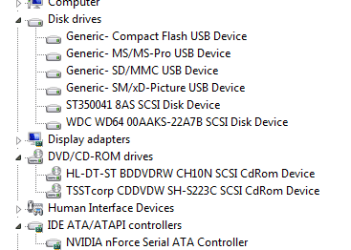
Windows sometimes call's SATA Drives, SCSI Drives.

CaptureSCSI.PNG
 

My Computer My Computer

At a glance

ME/XP/Vista/Win7
OS
ME/XP/Vista/Win7
Windows sometimes call's SATA Drives, SCSI Drives.

View attachment 148681

Never in my workings with PCs and Windows have I ever seen Windows report SATA drives as SCSI drives.

It your screen shot is of your system and there is NO SCSI device installed in your system, whether on board or add on card, this is the first time I have ever seen that.
 

My Computer My Computer

At a glance

Windows 7 Pro x64i5 76016GBNvidia GTS450
Computer Manufacturer/Model Number
Built be Me
OS
Windows 7 Pro x64
CPU
i5 760
Motherboard
Asus P7P55D-E Pro
Memory
16GB
Graphics Card(s)
Nvidia GTS450
Sound Card
On board
Monitor(s) Displays
Dell 2007WFP Dell 1800FP
Screen Resolution
1680x1050 1280x1024
Hard Drives
Seagate 250GB & 750GB
WD 1TB
PSU
Antec 750
Case
In Win
Cooling
Cooler Master Hyper 212+
Keyboard
IBM
Mouse
MS
I've had this on two computers I've worked on as well, so it does happen.
 

My Computer My Computer

At a glance

Windows 10 Pro X64Intel Quad Core i7-4770 @ 3.4Ghz16.0GB PC3-12800 DDR3 SDRAM 1600 MHzIntel Integrated HD Graphics
Computer type
PC/Desktop
Computer Manufacturer/Model Number
Lenovo IdeaCenter 450
OS
Windows 10 Pro X64
CPU
Intel Quad Core i7-4770 @ 3.4Ghz
Memory
16.0GB PC3-12800 DDR3 SDRAM 1600 MHz
Graphics Card(s)
Intel Integrated HD Graphics
Sound Card
Realtek HD Audio
Monitor(s) Displays
HP 22" LCD
Screen Resolution
1680 x 1050
Hard Drives
250GB Samsung EVO SATA-3 SSD
2TB Seagate ST2000DM001 SATA-2
1.5TB Seagate ST3150041AS SATA
Keyboard
Dell USB
Mouse
Lenovo USB
Internet Speed
Cable via Road Runner 3MB Upload, 30MB Download
Antivirus
Windows Defender, MBAM Pro, MBAE
Browser
Seamonkey
Other Info
UEFI/GPT
PLDS DVD-RW DH16AERSH
Back
Top