windows 7 installation cannot find drivers?

Zarosath

New member
Local time
2:41 PM
Messages
17
windows 7 installation cannot find drivers PLEASE HELP!

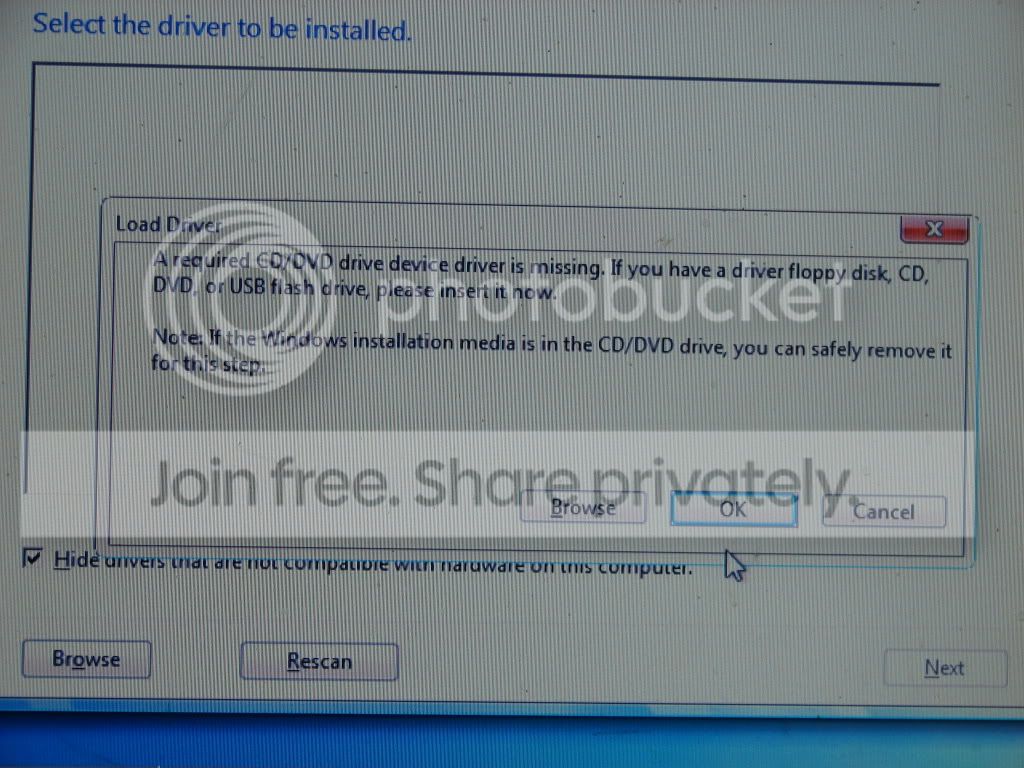
well when i boot from my windows 7 retail upgrade disk to do a clean install, it say's it cant find the drivers or something and notes that i can take the disk out to put one in for it if i have one, or browse my hard drive but what the hell is it going on about? do i need to install windows 7 drivers on my vista system before i do a clean install of windows 7? i tried both the 64 and 32 bit disks, same error.. it happens on step 5 of http://www.sevenforums.com/tutorials/1649-clean-install-windows-7-a.html it doesn't show a license agreement, just the driver problem but when i use the windows 7 upgrade adviser it say's my computer can handle it as i originally thought.. what the hell is the problem? i really do appreciate your input, thanks in advance.


EDIT: well i tried it on another vista computer, it works fine! what the hell?
 
Last edited:

My Computer

Computer Manufacturer/Model Number
gateway/GT5628
OS
Windows 7
Please be specific - post the exact error message you receive. What type of hard drive do you have - is it SATA, RAID, or IDE?
 

My Computer

Computer Manufacturer/Model Number
Dell XPS 15 L502x
OS
Windows 7 Ultimate x64 SP1
CPU
Core i7-2670QM
Memory
8GB DDR3 PC3-10600
Graphics Card(s)
Intel HD Graphics 3000 + GeForce GT 540M
Screen Resolution
1920x1080
Hard Drives
1TB 5400RPM Seagate
Is your computer connected to the internet during the installation?
 

My Computer

Computer type
PC/Desktop
Computer Manufacturer/Model Number
76~2.0
OS
Windows 7 Ult x64 - SP1/ Windows 8 Pro x64
CPU
Intel Core i5-3570K 4.6GHz
Motherboard
Gigabyte GA-Z77X UD3H, f18
Memory
8GB (2X4GB) DDR3 1600 Corsair Vengeance CL8 1.5v
Graphics Card(s)
Sapphire HD 7770 Vapor-X OC 1GB DDR5
Sound Card
Onboard VIA VT2021
Monitor(s) Displays
22" LCD Dell
Screen Resolution
1680x1050
Hard Drives
Samsung 840Pro 128GB SSD,
Seagate Barracuda 500GB SATA2 7200rpm 32MB cache, Seagate Barracuda 1TB SATA2 7200rpm 32MB cache,
PSU
Corsair HX650W
Case
Cooler Master Storm Scout
Cooling
Corsair H80 2x12cm Noctua NF P12 , 2x14cm case fans
Keyboard
Logitech Wave
Mouse
CM Sentinel
Internet Speed
Dismal
Antivirus
Avast
Browser
Opera Next
Other Info
Haswell laptop: HP Envy 17t-j, i7-4700MQ, GeForce 740M 2GB DDR3, 17.3" Full HD 1920x1080, 16GB RAM, Samsung 840 Pro 128GB, 1TB Hitachi 7200 HDD,
Desktop: eSATA ports,
External eSATA Seagate 500GB SATA2 7200rpm,
External WD USB 500GB
Please be specific - post the exact error message you receive. What type of hard drive do you have - is it SATA, RAID, or IDE?

well here's the pictures of whats going on

this happens at step 5
DSC05289.jpg


then i press ok and this pops up

DSC05297.jpg


i press ok and its this

DSC05298.jpg


and my hard drive? i'm not sure if this is it but

harddrive.jpg


edit: yes just looked on the side of my computer, 500 gb sata II hard drive.


Is your computer connected to the internet during the installation?

well its running off of the disc when i boot up so i dont think so but is this computer connected to the internet when i run my current os: vista? yes

hope this helped.
 

My Computer

Computer Manufacturer/Model Number
gateway/GT5628
OS
Windows 7
well when i boot from my windows 7 retail upgrade disk to do a clean install, it say's it cant find the drivers or something and notes that i can take the disk out to put one in for it if i have one, or browse my hard drive but what the hell is it going on about? do i need to install windows 7 drivers on my vista system before i do a clean install of windows 7? i tried both the 64 and 32 bit disks, same error.. it happens on step 5 of http://www.sevenforums.com/tutorials/1649-clean-install-windows-7-a.html it doesn't show a license agreement, just the driver problem but when i use the windows 7 upgrade adviser it say's my computer can handle it as i originally thought.. what the hell is the problem? i really do appreciate your input, thanks in advance.

I haven't seen this myself, but I believe that it's sometimes due to a defective install DVD. If you burned it yourself, try again at a slower burn speed. (Or use a utility like Nero, which can do a binary verification after the burn.)

Alternately, prepare a USB flash drive and install from it:

http://technet.microsoft.com/en-us/magazine/dd535816.aspx

It has the side effect of being much faster than doing it from the DVD.
 
Last edited:

My Computer

Computer Manufacturer/Model Number
homegrown
OS
Windows 7 Pro X64 SP1
CPU
Intel Core I7-3930k
Motherboard
Asus P9X79 Pro
Memory
16 GB Gskill DDR3-2133
Graphics Card(s)
eVGA GTX680
Sound Card
Creative X-Fi Titanium
Monitor(s) Displays
As PA246Q
Screen Resolution
1920 X 1200
Hard Drives
Corsair Force GT, 120 GB
WDC 1.5TB Caviar Black
PSU
PCP&C Silencer 750 Crossfire
Case
Silverstone FT02
Cooling
Noctua NH-D14
Keyboard
cheap Logitech USB
Mouse
Microsoft Intellimouse Explorer (old optical) USB
Internet Speed
6Mb cable
Other Info
Pioneer BDR-205
Samsung SH-203B
Monsoon 5.1 speakers
well when i boot from my windows 7 retail upgrade disk to do a clean install, it say's it cant find the drivers or something and notes that i can take the disk out to put one in for it if i have one, or browse my hard drive but what the hell is it going on about? do i need to install windows 7 drivers on my vista system before i do a clean install of windows 7? i tried both the 64 and 32 bit disks, same error.. it happens on step 5 of http://www.sevenforums.com/tutorials/1649-clean-install-windows-7-a.html it doesn't show a license agreement, just the driver problem but when i use the windows 7 upgrade adviser it say's my computer can handle it as i originally thought.. what the hell is the problem? i really do appreciate your input, thanks in advance.

I haven't seen this myself, but I believe that it's sometimes due to a defective install DVD. If you burned it yourself, try again at a slower burn speed. (Or use a utility like Nero, which can do a binary verification after the burn.)

Alternately, prepare a USB flash drive and install from it:

Use a USB Key to Install Windows 7?Even on a Netbook

It has the side effect of being much faster than doing it from the DVD.

well i did say it was retail, i didnt burn it myself.. unless you can pay and donwload a copy online.

EDIT: well i tried it on another vista computer, it works fine! what the hell?
 
Last edited:

My Computer

Computer Manufacturer/Model Number
gateway/GT5628
OS
Windows 7
well i did say it was retail, i didnt burn it myself.. unless you can pay and donwload a copy online.

EDIT: well i tried it on another vista computer, it works fine! what the hell?

Sure, the retail versions (upgrade and full) can be downloaded from the Microsoft store. That's how I acquired mine (retail upgrade).

Sound like your retail pressed disk is OK, but the DVD drive on the machine where it didn't work wasn't so good.

I suggest you make a backup copy of the disk, just in case. (Microsoft doesn't use copy protection.)

Try the USB flash drive on the first machine. It's really pretty easy. 4GB flash drives have gotten quite cheap.
 

My Computer

Computer Manufacturer/Model Number
homegrown
OS
Windows 7 Pro X64 SP1
CPU
Intel Core I7-3930k
Motherboard
Asus P9X79 Pro
Memory
16 GB Gskill DDR3-2133
Graphics Card(s)
eVGA GTX680
Sound Card
Creative X-Fi Titanium
Monitor(s) Displays
As PA246Q
Screen Resolution
1920 X 1200
Hard Drives
Corsair Force GT, 120 GB
WDC 1.5TB Caviar Black
PSU
PCP&C Silencer 750 Crossfire
Case
Silverstone FT02
Cooling
Noctua NH-D14
Keyboard
cheap Logitech USB
Mouse
Microsoft Intellimouse Explorer (old optical) USB
Internet Speed
6Mb cable
Other Info
Pioneer BDR-205
Samsung SH-203B
Monsoon 5.1 speakers
well i did say it was retail, i didnt burn it myself.. unless you can pay and donwload a copy online.

EDIT: well i tried it on another vista computer, it works fine! what the hell?

Sure, the retail versions (upgrade and full) can be downloaded from the Microsoft store. That's how I acquired mine (retail upgrade).

Sound like your retail pressed disk is OK, but the DVD drive on the machine where it didn't work wasn't so good.

I suggest you make a backup copy of the disk, just in case. (Microsoft doesn't use copy protection.)

Try the USB flash drive on the first machine. It's really pretty easy. 4GB flash drives have gotten quite cheap.


well i replaced the disc drive with the one it worked on, same problem and i don't have nor will have one some time soon a usb drive, this is really pissing me off..
 

My Computer

Computer Manufacturer/Model Number
gateway/GT5628
OS
Windows 7
You need to load your SATA controller driver when it prompts for driver during install.

Start up your Vista, right click Computer>Manage>Device Manager. Choose your SATA controller driver tab, look at Details and it will show your the location of that driver. Copy it onto a USB flash driver or disk and load it when prompted by the Win7 installer.

If this fails then check your BIOS to see that the optical drive is set to SATA.

You can also try running the Installer from your Vista desktop instructing it to stay connected to the internet. If this works, then choose Custom install and install over your Vista. The difference is that it will put your Vista files in a windows.old folder for later access.
 
You need to load your SATA controller driver when it prompts for driver during install.

Start up your Vista, right click Computer>Manage>Device Manager. Choose your SATA controller driver tab, look at Details and it will show your the location of that driver. Copy it onto a USB flash driver or disk and load it when prompted by the Win7 installer.

If this fails then check your BIOS to see that the optical drive is set to SATA.

You can also try running the Installer from your Vista desktop instructing it to stay connected to the internet. If this works, then choose Custom install and install over your Vista. The difference is that it will put your Vista files in a windows.old folder for later access.

sorry, but unless i did it wrong it didnt work.. i copied the single file it said it was, put it on disk and tried to load it in but didn't work..
 

My Computer

Computer Manufacturer/Model Number
gateway/GT5628
OS
Windows 7
Please don't edit the original post in the thread for anything other than grammar/spelling. Had I not skimmed the entire thread, I would not have known that you were able to upgrade another Vista computer.

Speaking of this other Vista computer - does it have the exact same hardware configuration as the problem computer?
 

My Computer

Computer Manufacturer/Model Number
Dell XPS 15 L502x
OS
Windows 7 Ultimate x64 SP1
CPU
Core i7-2670QM
Memory
8GB DDR3 PC3-10600
Graphics Card(s)
Intel HD Graphics 3000 + GeForce GT 540M
Screen Resolution
1920x1080
Hard Drives
1TB 5400RPM Seagate
You need to load your SATA controller driver when it prompts for driver during install.

Start up your Vista, right click Computer>Manage>Device Manager. Choose your SATA controller driver tab, look at Details and it will show your the location of that driver. Copy it onto a USB flash driver or disk and load it when prompted by the Win7 installer.

If this fails then check your BIOS to see that the optical drive is set to SATA.

You can also try running the Installer from your Vista desktop instructing it to stay connected to the internet. If this works, then choose Custom install and install over your Vista. The difference is that it will put your Vista files in a windows.old folder for later access.

sorry, but unless i did it wrong it didnt work.. i copied the single file it said it was, put it on disk and tried to load it in but didn't work..

Download drivers from:

http://downloadcenter.intel.com/Product_Filter.aspx?ProductID=2101
 

My Computer

OS
ME/XP/Vista/Win7
I had this same problems and could never find what driver it really needed--DVD drive, SATA controller, whatever. My DVD was hooked to a PCI SATA controller and I had a RAID array of hard drives connected to the the motherboard's SATA ports.

I was able to plug the DVD into the motherboard and install using one hard drive, but that wasn't what I wanted.

I resorted to the USB install, so that I could have the RAID array hooked up to the motherboard and that worked fine. It more trouble to do, but at least it worked.
 

My Computer

OS
Dual Boot Win XP / 64-bit Win7 Home
CPU
AMD 4800+
Motherboard
Biostar K8M800
Memory
2 GB DDR
Graphics Card(s)
ATI Radeon 9550/X1050 AGP
Sound Card
n/a
Monitor(s) Displays
Twin Princeton VL1716
Screen Resolution
1280x768
Cooling
Forced Air
Keyboard
yes
Mouse
yes
Internet Speed
Cable 3000kbs up / 768kbs down
Got it!

I was having the exact same trouble today when I tried to install W7. Tried a number of things...turns out, I just needed to boot the DVD from startup. So, if you haven't already, make an ISO out of the download, burn it to a DVD, put the DVD in the drive and restart. When it tells you to hit any button to load from CD, do so...and then go from there.

I'm positive it will work...only cause it did for me.
 

My Computer

OS
Vista
Please don't edit the original post in the thread for anything other than grammar/spelling. Had I not skimmed the entire thread, I would not have known that you were able to upgrade another Vista computer.

Speaking of this other Vista computer - does it have the exact same hardware configuration as the problem computer?
i do not know the stats or configuration of it, and i didnt upgrade i just got to what your supposed to on step 5 with the agreement, if you need i can find the configuration/hardware if i dont have to open her up, right now i'm going to bed though, i'll talk tomarrow.

and lol of course i boot off of the disk.

You need to load your SATA controller driver when it prompts for driver during install.

Start up your Vista, right click Computer>Manage>Device Manager. Choose your SATA controller driver tab, look at Details and it will show your the location of that driver. Copy it onto a USB flash driver or disk and load it when prompted by the Win7 installer.

If this fails then check your BIOS to see that the optical drive is set to SATA.

You can also try running the Installer from your Vista desktop instructing it to stay connected to the internet. If this works, then choose Custom install and install over your Vista. The difference is that it will put your Vista files in a windows.old folder for later access.

sorry, but unless i did it wrong it didnt work.. i copied the single file it said it was, put it on disk and tried to load it in but didn't work..

Download drivers from:

http://downloadcenter.intel.com/Product_Filter.aspx?ProductID=2101

put all of them on disk and put that in when it needs it?
 

My Computer

Computer Manufacturer/Model Number
gateway/GT5628
OS
Windows 7
Let's see what happens when you try to run the Install disk from your Vista desktop when the SATA driver is already loaded.

If it works you can proceed with a custom install which is clean enough in that it only leaves you with a windows.old folder where you can access your old files.
 
Let's see what happens when you try to run the Install disk from your Vista desktop when the SATA driver is already loaded.

If it works you can proceed with a custom install which is clean enough in that it only leaves you with a windows.old folder where you can access your old files.
yeah, the problem is i'm trying to get 64 bit on my pc and my current system is 32 so it say's i have to put a clean install on there, which i can only do when it boots from the dvd.. is it easy to upgrade to vista 64 without paying? i dont mean torrent i mean can i get a free upgrade from 32 to 64 bit?
 

My Computer

Computer Manufacturer/Model Number
gateway/GT5628
OS
Windows 7
You are entitled to either 64 or 32 bit versions with your Vista or Win7 license.

I would put the unzipped 64 bit SATA controller for your model on a disk or flash stick and browse to it to install when it reaches that point during 64 bit boot install.

Note that you will need to unzip it after downloading before putting it on the stick/disk, then keep browsing to the driver folders until the installer takes the driver.
 
Last edited:
I believe someone already mentioned trying a USB flash boot instead of the DVD. If not, you can create a bootable USB flash disk (4GB or larger), then copy all of the files from the DVD to the USB. Reboot, do whatever is necessary to boot from the USB (I can press F12 to get a one-time boot option and then select USB, YMMV), and see if you can install Windows 7.
 

My Computer

Computer Manufacturer/Model Number
Dell XPS 15 L502x
OS
Windows 7 Ultimate x64 SP1
CPU
Core i7-2670QM
Memory
8GB DDR3 PC3-10600
Graphics Card(s)
Intel HD Graphics 3000 + GeForce GT 540M
Screen Resolution
1920x1080
Hard Drives
1TB 5400RPM Seagate
Hi Zarosath, I had the same issue a couple of weeks ago. Spent 3 days trying to install. Tried a full install, fnally resorted to an upgrade install. 7 would not recognise my dvd drive. Since you already have an os sitting on the system may I suggest you copy the dvd over to a partition on your boot drive: C:\PARTITION and run the installer from your hard drive.
 

My Computer

Computer Manufacturer/Model Number
Custom Build
OS
Windows 7 7600 1 X64
CPU
AMD PHENOM II X 550 PROCESSOR 3.1 ghz
Motherboard
ASUS M4A78-TE
Memory
Corsair 4 gig ddr 3
Graphics Card(s)
ati radeon 3300
Sound Card
ati hd
Monitor(s) Displays
syncmaster 2033sw
Screen Resolution
1600X900 60 hz refresh
Hard Drives
twin_seagates SATA's 1 TB & 500 Gig, hitachi_slimline 160 gig
PSU
antec_550 watt
Case
cooler master GLite
Cooling
stock_heat sink
Internet Speed
20mbs up/ 1.5mbs down
Other Info
favorite child "stewie"
favorite dog "brian"
Back
Top