Solved Windows 7 Installation CD - Can boot in Legacy mode but not in UEFI

Osevend

New member
Local time
10:13 PM
Messages
8
When i try and boot my Windows 7 x64 DVD in UEFI mode my computer completely skips it and boots my hard drive. However when I boot in legacy mode i can boot the CD but i get the error 'Windows cannot be installed to this disk. The selected disk is of the GPT partition style'. I'm assuming i get this error because i'm not booting via UEFI mode.
 

My Computer My Computer

At a glance

Windows 7 Ultimate x64
OS
Windows 7 Ultimate x64
Where do you buy your Windows 7 DVD from?
 

My Computer My Computer

At a glance

ME/XP/Vista/Win7
OS
ME/XP/Vista/Win7
Where do you buy your Windows 7 DVD from?

Got it from Microsoft's Amazon Store. I checked if the DVD was working on my desktop PC and it worked fine. I'm assuming that there's something in the BIOS of my laptop that i'm missing.
 

My Computer My Computer

At a glance

Windows 7 Ultimate x64
OS
Windows 7 Ultimate x64
Try Resetting the BIOS to default
 

My Computer My Computer

At a glance

ME/XP/Vista/Win7
OS
ME/XP/Vista/Win7
Try Resetting the BIOS to default

I restored to default and i get the error:

'Windows cannot be installed to this disk. The selected disk is of the GPT partition style'

when selecting a partition. I've formatted it via Drive Options (Advanced) > Format and it still doesn't work.
 

My Computer My Computer

At a glance

Windows 7 Ultimate x64
OS
Windows 7 Ultimate x64
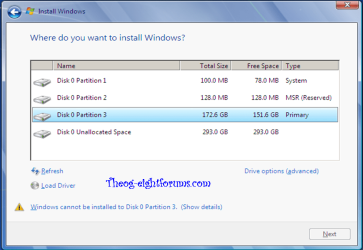
Is this your setup?

Windows 8 Downgrade-012 SB.PNG

If yes, click NEXT.

The popup is only a warning.
 

My Computer My Computer

At a glance

ME/XP/Vista/Win7
OS
ME/XP/Vista/Win7
Is this your setup?

View attachment 244052

If yes, click NEXT.

The popup is only a warning.

Yes, that's what I get. It wont allow me to click next.

Thank you for the quick replies.

The default settings on the BIOS look like this:

BOOT: Legacy Support
BOOT ORDER: UEFI FIRST
 

My Computer My Computer

At a glance

Windows 7 Ultimate x64
OS
Windows 7 Ultimate x64
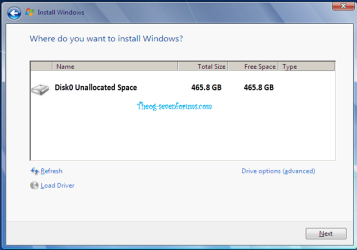
If NO,
Click Drive option
Delete

Windows 8 Downgrade-008 SB.png

New
 

My Computer My Computer

At a glance

ME/XP/Vista/Win7
OS
ME/XP/Vista/Win7
Your uEFI BIOS needs to be set to uEFI Support.
 

My Computer My Computer

At a glance

ME/XP/Vista/Win7
OS
ME/XP/Vista/Win7
Your uEFI BIOS needs to be set to uEFI Support.

When i change the settings to UEFI the DVD doesn't boot. Even after i set it as #1 boot order and choose it via F12.
 

My Computer My Computer

At a glance

Windows 7 Ultimate x64
OS
Windows 7 Ultimate x64
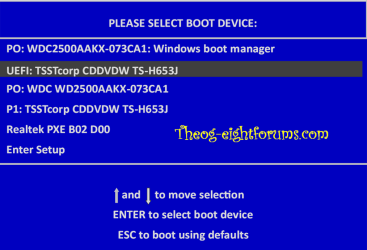
From F12, press on uEFI DVD Drive.

Windows 8 Downgrade-006 SB.PNG
 

My Computer My Computer

At a glance

ME/XP/Vista/Win7
OS
ME/XP/Vista/Win7
Boot mode is UEFI only; it only shows the devices which allow UEFI. There is only one option for the DVD drive.
 

My Computer My Computer

At a glance

Windows 7 Ultimate x64
OS
Windows 7 Ultimate x64
Sounds like you have a problem with your Windows 7 x64 DVD, or DVD Drive.
 

My Computer My Computer

At a glance

ME/XP/Vista/Win7
OS
ME/XP/Vista/Win7
Sound like you have a problem with your Windows 7 x64 DVD, or DVD Drive.

There was a recovery partition that was on my computer. I decided to delete the partition and now it's allowing me to carry on with my installation. I'll update when the installation has finished.

Thank you for spending your time to try and help me. I am very grateful.
 

My Computer My Computer

At a glance

Windows 7 Ultimate x64
OS
Windows 7 Ultimate x64
You are welcome, good luck.:dinesh:
 

My Computer My Computer

At a glance

ME/XP/Vista/Win7
OS
ME/XP/Vista/Win7
Yay! It worked!
 

My Computer My Computer

At a glance

Windows 7 Ultimate x64
OS
Windows 7 Ultimate x64
Hi Osevend, I have the same problem like you. You keep your W8 on mashine and add W7?

When you delete recovery partition, how much partition left on your PC? And how you install it, as UEFI or legacy mode?
 

My Computer My Computer

At a glance

W 8.1 64AMD A8-6410 Quad Core8 GAMD Radeon HD 8570M
Computer type
Laptop
Computer Manufacturer/Model Number
HP 15g 082no
OS
W 8.1 64
CPU
AMD A8-6410 Quad Core
Memory
8 G
Graphics Card(s)
AMD Radeon HD 8570M
Hard Drives
1 TB
Back
Top