windows 7 installation crashed

niharthekadi

New member
Local time
4:12 AM
Messages
5
hi
last days due to humidity i lost my mainboard and now having a new CPU.

i attached my old HD as there was an additional port on the board and transferred old files to new HD
Old HD had windows XP installation.
Due to some reason i formatted XP (only installation drive) on old HD (h:\) and it has done successfully

But the problem is it has changed the mbr of windows 7 installation, the PC starts with 2 HDs only.
Nothing happend to the files in win 7 installation drive (C:\). But i need to boot the win 7.

Files from the old HD (a win XP installed) are transferred it doesn't matter what happens to it.
so can some one help me to recover the windows 7 installation, i don't have any backup image i have only installation disk.
 

My Computer

OS
Windows XP SP2

My Computer

Computer Manufacturer/Model Number
HP Pavilion Elite 495UK
OS
Windows 7 Ultimate SP1 64-Bit
CPU
Intel Core i7 870 @ 2.93GHz
Motherboard
MSI 2A9C (CPU1)
Memory
8Gb Dual-Channel DDR3 @ 664MHz
Graphics Card(s)
nVidia GeForce GTX 460 1024MB dedicated RAM
Sound Card
Realtek HD Audio
Monitor(s) Displays
HP2310i
Screen Resolution
1920 x 1080
Hard Drives
1x1954GB Hitachi HDS22020ALA 330 (RAID), 1x1954GB Hitachi External for backup and storage
PSU
460W
Case
HP Elite
Cooling
Air cooled
Keyboard
Logitech K750 solar-powered keyboard
Mouse
Logitech Wireless M180 mouse
Internet Speed
2Mb
Other Info
Pure Avanti Flow Internet Radio with iPod Dock, 64Gb iPod, HP USB Speakers, Sony MDR-V500 Headphones, Sony Vaio F-Series Laptop
First check all the cables.

   Information
Boot up using the Startup Repair CD or Windows 7 DVD. (not the OEM manufacturer's Recovery Disk) If you have a Netbook, you will need a CD/DVD drive.
NOTE: Make sure no USB drives are plugged in.
Do not use a USB Pendrive for Startup Repair.
startup repair disc-create

Do a Strartup Repair:
http://www.sevenforums.com/tutorials/681-startup-repair.html?ltr=S
Note: You may need to do startup repair 3 to 4 times.
http://www.sevenforums.com/tutorials/105541-startup-repair-run-3-separate-times.html
 

My Computer

OS
ME/XP/Vista/Win7
start up repair not working.

> DVD boot :
OK when i tried to Start up repair with both Hard-disk, it said windows can not correct this automatically, and it detected the C:\ installation.

when tried with only new HD(and physically detached old one) , it did not detected c:\ installation and Start up repair said : Could not detect any problem.

> Boot with new HD :

it gives a long message :
-----------------------------------------------------------------------------------------------
Windows could not start because of a computer disk hardware
configuration problem.
Could not read from the selected boot disk. Check boot path
and disk hardware.
Please check the Windows documentation about hardware disk
configuration and your hardware reference manual for
additional information.
-----------------------------------------------------------------------------------------------
more over it starts only with 2 HDs connected and start only win xp,
with out any option and
I don't have the "Boot.ini" tab on the "msconfig" in the XP.
 

My Computer

OS
Windows XP SP2
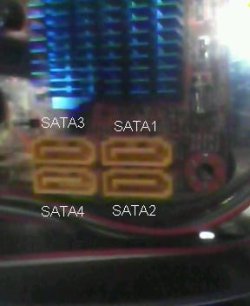
Make sure the Windows 7 HD Drive is plugged in to the first Sata port on the MOBO & first boot HD in BIOS.
 

My Computer

OS
ME/XP/Vista/Win7
BIOS settings are OK by sure but how to decide which port is first on the board.
OK i am checking it if numbers are written.
 

My Computer

OS
Windows XP SP2
OK on SATA1 : new HD, SATA2: old HD and on SATA3 : DVD drive.
but the problem is same. trying to boot through only new HD gives that long message and with both HDs only XP starts.
this times XP detected new HD as 'found new hardware' may be because i changed ports.
-------------------------
i have also tried :
when booted with DVD both HDs connected it detects C:\ win 7 installation,
now from "Repair Your computer > command prompt" -
"bootrec /fixmbr" (with out quotes)
but no effect even after "successfully done" message
also,
"bootsect /nt60 C:"
log :
------------------------
Target volumes will be updated with BOOTMGR compatible bootcode.

C: (\\?\Volume{0c715219-8105-11e0-9163-8b1d1c444d84})

Updated NTFS filesystem bootcode. The update may be unreliable since the
volume could not be locked during the update:
Access is denied.

Bootcode was successfully updated on all targeted volumes.
---------------------
but no effect.
 

My Computer

OS
Windows XP SP2
Are you sure there is no Sata 0 port?
 

My Computer

OS
ME/XP/Vista/Win7
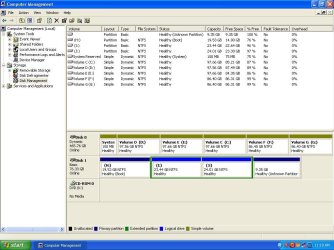
Please post back a screenshot of your maximized Disk Mgmt drive map with listings showing all columns, using the Snipping Tool in Start Menu.

The normal procedure when removing the System partition HD is to mark Win7 partition Active (you must do this, Startup Repair will not do it for you) then booting the Win7 DVD Repair console or Repair CD to run Startup Repair - Run 3 Separate Times.

However there may be complications now that you've added code that may have corrupted the MBR.

To mark Win7 partition Active now, use Diskpart from the DVD/Repair CD Command Line: Partition - Mark as Active (Method Two) or boot free Partition Wizard bootable CD to Modify>Set to Active. If you use PW CD you can then highlight the Win7 HD and from Disk tab select "Rebuild MBR" which will often work on its own.

Have you tried repairing XP using XP Repair Install ?
 

Attachments

  • Sata.JPG
    Sata.JPG
    14.6 KB · Views: 3
  • disk_partition.JPG
    disk_partition.JPG
    101.2 KB · Views: 9
Last edited:

My Computer

OS
Windows XP SP2
Make sure the Windows 7 HD Drive is plugged in to the first Sata port on the MOBO & first boot HD in BIOS.

On my MOBO, the HDD that is on the lowest numbered SATA port that is occupied must have the OS on board. That SATA port need not be SATA 1.

Said another way. If I connect the OS HDD to SATA 4, SATA 1 thru 3 must be unused.

I do not have a SATA 0.
 

My Computer

Computer Manufacturer/Model Number
Polywell
OS
Windows 7x32 Home Premium & XP SP3 x86
CPU
Athlon 64FX
Motherboard
ASUS M2N32SLI Delux
Memory
Corsair CM2X1024-8500C5
Graphics Card(s)
GeForce 7950X2 (Dual)
Monitor(s) Displays
ViewSonic A90f+ (Two)
Screen Resolution
1280x1024
Hard Drives
WD1500ADFD-00NLR1 (Originally Raid5)

Changed to three individual drives after HD crashed. May return to RAID5 if I locate a suitable HD.
PSU
TurboColl 1KW
Case
Polywell
Cooling
Cool'n'Quiet (Questionable Operation)
Keyboard
Logitech
Mouse
Logitech
Internet Speed
1GHertz (I think)
Other Info
Sony CD-RW CRX320EE

HP DVD Writer 1140d (may need to replace??)
It is quite a mess.

At some point when you were trying to add partitions to Disk0 it should have warned you it was converting to Dynamic disk, which is used only when spanning partitions over multiple HD's.

Best to offload the data and wipe Disk0 with Diskpart to convert to Basic, then clean reinstall following these steps to get it perfect: Reinstalling Windows 7

To undo what you have now would require removing all but four primary partitions, then converting one to Logical which can be extended with unlimited subpartitions. This will allow you to convert it back to Basic Disk using free Partition Wizard bootable CD v 4.2 which still offers Dynamic>Basic conversion for free: pw422.zip ISO - Windows Live. You can convert one the fourth Primary to Logical using PW CD, as well as delete the stray System Reserved partition.

Then unplug Disk0, plug its cable into Win7 HD, mark Win7 partiiton Active: Partition - Mark as Active (Method Two). Then boot the Win7 DVD Repair console or Repair CD to run Startup Repair - Run 3 Separate Times to write the System boot files to Win7 partition until it starts on its own.
 
Back
Top