Windows 7 Installation Get's Stuck

beanyymontana

New member
Local time
2:11 PM
Messages
10
After I format a partition and begin installing, it goes threw all of the steps and gets stuck on "installing updates". I've let it sit for 2 hours and still was stuck. I've tried a different disc, and even tried a usb. It still does the same thing. But I can install ubuntu on it and it works fine. and I don't get the option to turn off upgrades before it begins the installation.
 

My Computer

Computer Manufacturer/Model Number
Dell Latitude E6400
OS
Windows 7
Hello beanyymontana, welcome to Seven Forums!


What version of Windows 7 / where did you get the disk you're using?
 

My Computer

Computer Manufacturer/Model Number
* BFK Customs *
OS
W 7 64-bit Ultimate
CPU
Intel Q9550 Yorkfield
Motherboard
ASUS P5Q Pro
Memory
8GB Dominator 8500C5D
Graphics Card(s)
ATI : XFX 5870
Sound Card
Realtek HD Audio 7-1
Monitor(s) Displays
1x 47" LCD HDMI & 3x 26" LCD HDMI
Screen Resolution
1920x1080P & 1920x1200
Hard Drives
1x 80GB Intel X25-M G2 SSD : 1x 500GB & 1x 640GB WD Caviar Black(s)
PSU
Corsair 620HX
Case
Cooler Master RC-690
Cooling
Tuniq Tower 120, 2x 140mm and 3x 120mm case fans
Keyboard
Microsoft 500
Mouse
Razer Diamondback 3G
Internet Speed
14 Mb/s
Other Info
1x Koutech 3Gb/s SATA HDD Hot Swap Rack
After I format a partition and begin installing, it goes threw all of the steps and gets stuck on "installing updates". I've let it sit for 2 hours and still was stuck. I've tried a different disc, and even tried a usb. It still does the same thing. But I can install ubuntu on it and it works fine. and I don't get the option to turn off upgrades before it begins the installation.

All Linux code must be deleted.As you have had linux on the HD you need do a Clean all & full format.
http://www.sevenforums.com/tutorials/52129-disk-clean-clean-all-diskpart-command.html
http://www.sevenforums.com/tutorials/2668-partition-volume-delete.html?ltr=P
http://www.sevenforums.com/tutorials/2674-partition-volume-create-new.html?ltr=P
http://www.sevenforums.com/tutorials/71432-partition-mark-active.html?ltr=P
Try a full clean & full format in command prompt.
1) Boot DVD & Press Shift+F10 (for command prompt)
2) Boot DVD, & http://www.sevenforums.com/tutorials/682-command-prompt-startup.html(for command prompt)

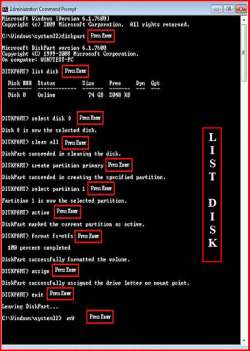
Type in command line
DISKPART
LIST DISK
SELECT DISK # (win HD)
CLEAN ALL
CREATE PARTITION PRIMARY
SELECT PARTITION 1
ACTIVE
FORMAT fs=NTFS
ASSIGN
EXIT
EXIT

List Disk.PNG


http://www.sevenforums.com/tutorials/91339-ssd-hdd-optimize-windows-reinstallation.html
 

My Computer

OS
ME/XP/Vista/Win7
After I format a partition and begin installing, it goes threw all of the steps and gets stuck on "installing updates". I've let it sit for 2 hours and still was stuck. I've tried a different disc, and even tried a usb. It still does the same thing. But I can install ubuntu on it and it works fine. and I don't get the option to turn off upgrades before it begins the installation.

All Linux code must be deleted.As you have had linux on the HD you need do a Clean all & full format.
http://www.sevenforums.com/tutorials/52129-disk-clean-clean-all-diskpart-command.html
http://www.sevenforums.com/tutorials/2668-partition-volume-delete.html?ltr=P
http://www.sevenforums.com/tutorials/2674-partition-volume-create-new.html?ltr=P
http://www.sevenforums.com/tutorials/71432-partition-mark-active.html?ltr=P
Try a full clean & full format in command prompt.
1) Boot DVD & Press Shift+F10 (for command prompt)
2) Boot DVD, & http://www.sevenforums.com/tutorials/682-command-prompt-startup.html(for command prompt)

Type in command line
DISKPART
LIST DISK
SELECT DISK # (win HD)
CLEAN ALL
CREATE PARTITION PRIMARY
SELECT PARTITION 1
ACTIVE
FORMAT fs=NTFS
ASSIGN
EXIT
EXIT

View attachment 87235


http://www.sevenforums.com/tutorials/91339-ssd-hdd-optimize-windows-reinstallation.html

How do i do that without having an operating system on it?
 

My Computer

Computer Manufacturer/Model Number
Dell Latitude E6400
OS
Windows 7
After I format a partition and begin installing, it goes threw all of the steps and gets stuck on "installing updates". I've let it sit for 2 hours and still was stuck. I've tried a different disc, and even tried a usb. It still does the same thing. But I can install ubuntu on it and it works fine. and I don't get the option to turn off upgrades before it begins the installation.

All Linux code must be deleted.As you have had linux on the HD you need do a Clean all & full format.
http://www.sevenforums.com/tutorials/52129-disk-clean-clean-all-diskpart-command.html
http://www.sevenforums.com/tutorials/2668-partition-volume-delete.html?ltr=P
http://www.sevenforums.com/tutorials/2674-partition-volume-create-new.html?ltr=P
http://www.sevenforums.com/tutorials/71432-partition-mark-active.html?ltr=P
Try a full clean & full format in command prompt.
1) Boot DVD & Press Shift+F10 (for command prompt)
2) Boot DVD, & http://www.sevenforums.com/tutorials/682-command-prompt-startup.html(for command prompt)

Type in command line
DISKPART
LIST DISK
SELECT DISK # (win HD)
CLEAN ALL
CREATE PARTITION PRIMARY
SELECT PARTITION 1
ACTIVE
FORMAT fs=NTFS
ASSIGN
EXIT
EXIT

View attachment 87235


http://www.sevenforums.com/tutorials/91339-ssd-hdd-optimize-windows-reinstallation.html

How do i do that without having an operating system on it?

1) Boot DVD & Press Shift+F10 (for command prompt)
1.PNG

2) Boot DVD, & http://www.sevenforums.com/tutorials/682-command-prompt-startup.htmlhttp://www.sevenforums.com/tutorials/682-command-prompt-startup.html (for
(for command prompt)

Command.jpg
 
Last edited:

My Computer

OS
ME/XP/Vista/Win7
All Linux code must be deleted.As you have had linux on the HD you need do a Clean all & full format.
http://www.sevenforums.com/tutorials/52129-disk-clean-clean-all-diskpart-command.html
http://www.sevenforums.com/tutorials/2668-partition-volume-delete.html?ltr=P
http://www.sevenforums.com/tutorials/2674-partition-volume-create-new.html?ltr=P
http://www.sevenforums.com/tutorials/71432-partition-mark-active.html?ltr=P
Try a full clean & full format in command prompt.
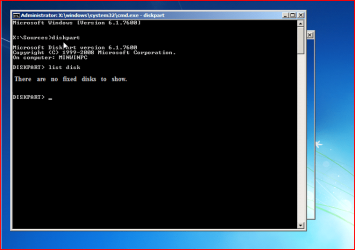
1) Boot DVD & Press Shift+F10 (for command prompt)
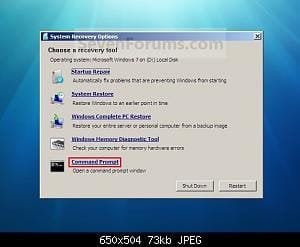
2) Boot DVD, & http://www.sevenforums.com/tutorials/682-command-prompt-startup.html(for command prompt)

Type in command line
DISKPART
LIST DISK
SELECT DISK # (win HD)
CLEAN ALL
CREATE PARTITION PRIMARY
SELECT PARTITION 1
ACTIVE
FORMAT fs=NTFS
ASSIGN
EXIT
EXIT

View attachment 87235


http://www.sevenforums.com/tutorials/91339-ssd-hdd-optimize-windows-reinstallation.html

How do i do that without having an operating system on it?

1) Boot DVD & Press Shift+F10 (for command prompt)
View attachment 87245

2) Boot DVD, & http://www.sevenforums.com/tutorials/682-command-prompt-startup.html
(for command prompt)

View attachment 87246

wow i feel stupid.lol it's in the process of formatting the partition. thanks alot!
 

My Computer

Computer Manufacturer/Model Number
Dell Latitude E6400
OS
Windows 7
Always do this, if you have had linux on a HD.

You are welcome, we are 24/7 to help.
 

My Computer

OS
ME/XP/Vista/Win7
Always do this, if you have had linux on a HD.

You are welcome, we are 24/7 to help.
Bad news, It still does the same thing
 

My Computer

Computer Manufacturer/Model Number
Dell Latitude E6400
OS
Windows 7
Verify the install DVD using ImgBurn. Load ISO, make sure it says Bootable in text at left, load DVD then Verify it against ISO.

If you downloaded the ISO, check HASH against official Win7 HASH. HashTab... is the coolest thing ever!.URL
Windows 7 RTM SHA-1 hash - checksums.URL

If necessary burn a new DVD using ImgBurn at 4x speed.

Next make sure you have the latest BIOS version update from Support Downloads webpage for computer model. Next Clear CMOS - 3 Ways to Clear the CMOS - Reset BIOS.URL Then check SATA controller setting: set to AHCI first, then IDE if necessary.

Remove all but 2gb of RAM to try install. Swap RAM, test RAM using memtest86 for 5-6 passes: Memtest86 - Download Page.URL

Test your HD using maker's full diag/repair CD scan: Hard Drive Diagnostics Tools and Utilities (Storage) - TACKtech Corp.URL

Back up your files, wipe your HD to get the cleanest slate: http://www.sevenforums.com/tutorials/91339-ssd-hdd-optimize-windows-reinstallation.html

Clean Install Windows 7 - Windows 7 Forums.URL
 
Back
Top