Solved Windows 7 installation hangs/black screen

Vazquez

New member
Local time
10:08 PM
Messages
9
Location
Horten, Norway
Hello

I have a problem with installing Windows 7 on my pc. I get either black screen or the installation hangs completly and the only thing I can do is restarting my pc. The black screen usually appears before reaching the very first window where you choose your OS language or right before the second boot at "completing installation" step. The installation hangs at random points but usually at "unpacking files". The weirdest thing is that I managed to install the Win 7 on Sunday (I turned off the VGA adapter but I'am not sure if that was what solved the problem) but it hanged/black screened 3 min after the "Welcome!" screen. Windows XP installs with no problem so I don't know what is the problem with the WIn 7. I also checked my PC before installing Win 7 with the program that checks hardware/software compatibility (I forgot what it's called). What is going on!??

I'am not english so I'am sorry if I misspelled something.
 

My Computer

OS
Windows 7 Home Premium x86
CPU
Intel Core 2 Quad Q6600 2.40GHz
Motherboard
Gigabyte GA-P35C-DS3R
Memory
Kingston 4GB DDR2
Graphics Card(s)
Gainward GeForce GTX 560Ti 1Gb
Monitor(s) Displays
LG Flatron L1918S & Samsung SyncMaster SA300
Screen Resolution
1280x1024 & 1920x1080
Hard Drives
Seagate Barracuda ST3250410AS 250GB
PSU
Corsair CX500 500W
Case
Modecom Step 407 Black
Keyboard
Natec Medusa Piano Black
Mouse
Sandstrøm SL33CHWH
Internet Speed
150 Mb/s
Where did you get Win7? Did you burn the Disk yourself? If so try another at 4x speed.

Unplug all other HD's and peripherals, Boot into BIOS setup to see if there is an EFI Boot Disk in BIOS Boot order. If so remove it, set DVD drive first to boot. If EFI BIOS also set to Legacy BIOS. Then set SATA controller to AHCI. Save changes and Exit.

Then boot into installer DVD or flash stick burned or written using tool and latest ISO here.
How to Boot your Computer from a Bootable CD or DVD

At first installer screen Press Shift + F10 to open a Command Box, type:

DISKPART
LIST DISK
SEL DIS 0 (after confirming Windows 7 target HD #)
CLEAN
CREATE PARTITION PRIMARY SIZE=102400 (for 100gb partition, adjust as desired)
FORMAT FS=NTFS LABEL="WINDOWS 7"
ACTIVE
EXIT
EXIT

Next click Install Now to Clean Install Windows 7 to the partition you created. If it fails then report back at which step and the verbatim error message.

In addition read over these steps to understand the tools and methods which work best to get and maintain a perfect Clean Reinstall - Factory OEM Windows 7. The steps are the same for retail.
 
I got the windows 7 disc from a computer store so it's original. I'am currently at school so I'll let you know If I installed it or not when I'am back at home. I think it's weird that Windows XP installs with completly no problem but Windows 7 needs to create random problems.
 

My Computer

OS
Windows 7 Home Premium x86
CPU
Intel Core 2 Quad Q6600 2.40GHz
Motherboard
Gigabyte GA-P35C-DS3R
Memory
Kingston 4GB DDR2
Graphics Card(s)
Gainward GeForce GTX 560Ti 1Gb
Monitor(s) Displays
LG Flatron L1918S & Samsung SyncMaster SA300
Screen Resolution
1280x1024 & 1920x1080
Hard Drives
Seagate Barracuda ST3250410AS 250GB
PSU
Corsair CX500 500W
Case
Modecom Step 407 Black
Keyboard
Natec Medusa Piano Black
Mouse
Sandstrøm SL33CHWH
Internet Speed
150 Mb/s
YES!! Thank you man! It worked! But there is one small problem that I bet is easy to fix. During the partitioning via the DISKPART command I made two partitions but now I see only one partition with the windows on it... What do you recommend to do now?
 

My Computer

OS
Windows 7 Home Premium x86
CPU
Intel Core 2 Quad Q6600 2.40GHz
Motherboard
Gigabyte GA-P35C-DS3R
Memory
Kingston 4GB DDR2
Graphics Card(s)
Gainward GeForce GTX 560Ti 1Gb
Monitor(s) Displays
LG Flatron L1918S & Samsung SyncMaster SA300
Screen Resolution
1280x1024 & 1920x1080
Hard Drives
Seagate Barracuda ST3250410AS 250GB
PSU
Corsair CX500 500W
Case
Modecom Step 407 Black
Keyboard
Natec Medusa Piano Black
Mouse
Sandstrøm SL33CHWH
Internet Speed
150 Mb/s
Please post back a screenshot of your maximized Disk Management drive map and listings:

1. Type Disk Management in Start Search box.
2. Open Disk Mgmt. window and maximize it.
3. Type Snipping Tool in Start Search box.
4. Open Snipping Tool, choose Rectangular Snip, click New, draw a box around full drive map and all listings.
5, Save Snip, attach using paper clip in Reply Box.

Tell us what is on each partition.

Did you see the second partition you created using Diskpart when you chose where to install Win7 on the drive selection screen during install?
 
I figured it out. There was no letter assigned to that partition and that's why it didn't show up for me. Thanks again for the help with the installation.
 

My Computer

OS
Windows 7 Home Premium x86
CPU
Intel Core 2 Quad Q6600 2.40GHz
Motherboard
Gigabyte GA-P35C-DS3R
Memory
Kingston 4GB DDR2
Graphics Card(s)
Gainward GeForce GTX 560Ti 1Gb
Monitor(s) Displays
LG Flatron L1918S & Samsung SyncMaster SA300
Screen Resolution
1280x1024 & 1920x1080
Hard Drives
Seagate Barracuda ST3250410AS 250GB
PSU
Corsair CX500 500W
Case
Modecom Step 407 Black
Keyboard
Natec Medusa Piano Black
Mouse
Sandstrøm SL33CHWH
Internet Speed
150 Mb/s
You can still post back the screenshot so we can check it over for you.

If performance is OK then when ready you can mark the thread Solved at top.
 
I got one more problem. Yesterday when I installed the OS everything seemed to be working fine but when I turned off the pc then turned it on 1 hour later a problem pooped up. Everything boots up fine all the way to the desktop but 5 minutes after the desktop shows for me the monitor goes to power saving mode, computer (processor?) makes "pulsating" (loud-silent-loud-silent) noises and I can't do anything. I can't even turn off Num Lock on my keyboard. The only option is to hold the power button to turn off the PC. Safe Mode works fine so If there is an option to fix the problem it's through the safe mode because I don't have enough time to do anything in normal mode before the screen goes black. I think that there could be something wrong with the drivers considering on that safe mode works fine using only basic drivers.

I also checked the RAM and it's fine.
 

My Computer

OS
Windows 7 Home Premium x86
CPU
Intel Core 2 Quad Q6600 2.40GHz
Motherboard
Gigabyte GA-P35C-DS3R
Memory
Kingston 4GB DDR2
Graphics Card(s)
Gainward GeForce GTX 560Ti 1Gb
Monitor(s) Displays
LG Flatron L1918S & Samsung SyncMaster SA300
Screen Resolution
1280x1024 & 1920x1080
Hard Drives
Seagate Barracuda ST3250410AS 250GB
PSU
Corsair CX500 500W
Case
Modecom Step 407 Black
Keyboard
Natec Medusa Piano Black
Mouse
Sandstrøm SL33CHWH
Internet Speed
150 Mb/s
Post the requested screenshot so we can determine the install's competence which is in question.

Do not ignore steps we take the time to write out for you and then expect to just continue on as though we are being led by you.
 
Ok. I'll post them as soonest I am back at home. I thought you wanted the screenshot only in the problem with the partition that was not showing up.
 

My Computer

OS
Windows 7 Home Premium x86
CPU
Intel Core 2 Quad Q6600 2.40GHz
Motherboard
Gigabyte GA-P35C-DS3R
Memory
Kingston 4GB DDR2
Graphics Card(s)
Gainward GeForce GTX 560Ti 1Gb
Monitor(s) Displays
LG Flatron L1918S & Samsung SyncMaster SA300
Screen Resolution
1280x1024 & 1920x1080
Hard Drives
Seagate Barracuda ST3250410AS 250GB
PSU
Corsair CX500 500W
Case
Modecom Step 407 Black
Keyboard
Natec Medusa Piano Black
Mouse
Sandstrøm SL33CHWH
Internet Speed
150 Mb/s
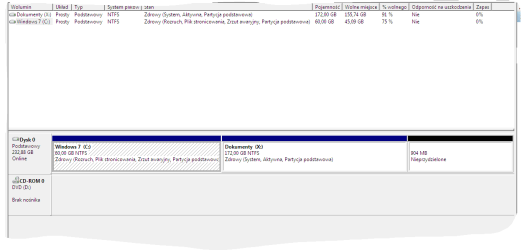
Here is the screenshot. If you need translation just ask.

And yes I saw the other partition when I was choosing where to install the Windows 7.
 

Attachments

  • Przechwytywanie.PNG
    Przechwytywanie.PNG
    12 KB · Views: 10
Last edited:

My Computer

OS
Windows 7 Home Premium x86
CPU
Intel Core 2 Quad Q6600 2.40GHz
Motherboard
Gigabyte GA-P35C-DS3R
Memory
Kingston 4GB DDR2
Graphics Card(s)
Gainward GeForce GTX 560Ti 1Gb
Monitor(s) Displays
LG Flatron L1918S & Samsung SyncMaster SA300
Screen Resolution
1280x1024 & 1920x1080
Hard Drives
Seagate Barracuda ST3250410AS 250GB
PSU
Corsair CX500 500W
Case
Modecom Step 407 Black
Keyboard
Natec Medusa Piano Black
Mouse
Sandstrøm SL33CHWH
Internet Speed
150 Mb/s
As suspected it is wrong. When you chose to make the second partition without consulting us you apparently applied the Active command which caused the installer to write the System boot files to your data partition.

Nothing was written about making a second partition, it should have been done in Disk Mgmt after install. The Diskpart commands to create an Active partition are only an attempt to troubleshoot a failed install on the C partition.

To correct this mark C Active in Disk Mgmt, reboot into Win7 installation DVD to run Startup Repair - Run up to 3 Separate Times until C is marked System Active Boot.

If problems persist read back over the steps to get a perfect Clean Reinstall - Factory OEM Windows 7 to see what you may be doing wrong, or work through these Troubleshooting Steps for Windows 7
 
I reinstalled the whole OS and it's working fine now and I don't get any black screens (I turned the pc on and off 12 times to be sure that it doesn't appear). I followed your instructions and created only one partition (50GB) for the system. Could you give me instructions on how to create the other partition?
 

My Computer

OS
Windows 7 Home Premium x86
CPU
Intel Core 2 Quad Q6600 2.40GHz
Motherboard
Gigabyte GA-P35C-DS3R
Memory
Kingston 4GB DDR2
Graphics Card(s)
Gainward GeForce GTX 560Ti 1Gb
Monitor(s) Displays
LG Flatron L1918S & Samsung SyncMaster SA300
Screen Resolution
1280x1024 & 1920x1080
Hard Drives
Seagate Barracuda ST3250410AS 250GB
PSU
Corsair CX500 500W
Case
Modecom Step 407 Black
Keyboard
Natec Medusa Piano Black
Mouse
Sandstrøm SL33CHWH
Internet Speed
150 Mb/s
Thank you for helping me with the installation!
 

My Computer

OS
Windows 7 Home Premium x86
CPU
Intel Core 2 Quad Q6600 2.40GHz
Motherboard
Gigabyte GA-P35C-DS3R
Memory
Kingston 4GB DDR2
Graphics Card(s)
Gainward GeForce GTX 560Ti 1Gb
Monitor(s) Displays
LG Flatron L1918S & Samsung SyncMaster SA300
Screen Resolution
1280x1024 & 1920x1080
Hard Drives
Seagate Barracuda ST3250410AS 250GB
PSU
Corsair CX500 500W
Case
Modecom Step 407 Black
Keyboard
Natec Medusa Piano Black
Mouse
Sandstrøm SL33CHWH
Internet Speed
150 Mb/s
Back
Top