Windows 7 installation issue

IbrahimKebir

New member
Local time
10:04 PM
Messages
12
Hi

My PC got strucked while running windows 7.
I re-installed the Windows7 again and now working fine.
The only problem now is that, when I start, it is showing 2 Windows 7 and I have to choose 1. Can you pls help me to delete/remove the old windows 7 from the system????

thank you,


Ibrahim
 

My Computer

OS
Windows 7
doh.gif
Try easybcd..

Download EasyBCD 2.1 - NeoSmart Technologies

It allows you to remove an entry, rename an entry etc etc.. Very easy to use. Make sure u delete the correct entry.
grouphug.gif
 

My Computer

Computer Manufacturer/Model Number
Intel
OS
Windows 7 Ultimate x64
CPU
Intel Pentium Dual core [email protected]
Motherboard
Gigabyte G41 COMBO
Memory
4GB
Graphics Card(s)
On Board
Sound Card
On Board
Monitor(s) Displays
LG 15inch
Screen Resolution
1360*768
Hard Drives
250GB SATA
Case
Intex
Cooling
Normal
Keyboard
Circle
Mouse
circle
Internet Speed
5Mbps
Devil1.gif

if EasyBCD is not compatible then you could try BCDEdit command in Win7

Just start a CMD with Admin
1. Type
bcdedit.exe
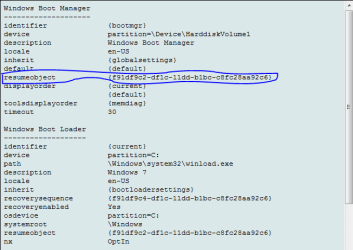
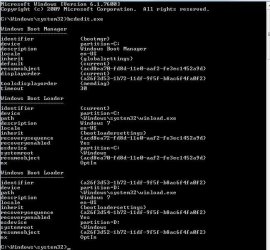
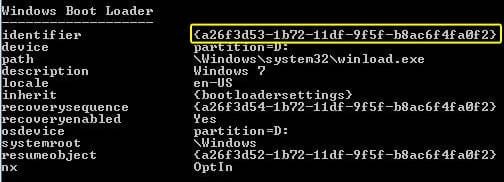
it should display something like this

then review and find the duplicate and its resumeobject id . for example if i want to delete windows vista here then my resumeobject id would be {a77450a3-92be-11dd-ac5c-991ff432a142}

then in the cmd prompt type

bcdedit /delete {a77450a3-92be-11dd-ac5c-991ff432a142} /cleanup

this will remove the entry from BCD store and list in the boot menu
 

Attachments

  • Capture2.PNG
    Capture2.PNG
    11.2 KB · Views: 9

My Computer

Computer Manufacturer/Model Number
Intel
OS
Windows 7 Ultimate x64
CPU
Intel Pentium Dual core [email protected]
Motherboard
Gigabyte G41 COMBO
Memory
4GB
Graphics Card(s)
On Board
Sound Card
On Board
Monitor(s) Displays
LG 15inch
Screen Resolution
1360*768
Hard Drives
250GB SATA
Case
Intex
Cooling
Normal
Keyboard
Circle
Mouse
circle
Internet Speed
5Mbps
Hi,

Thanks for your quick reply.

I typed the same in CMD.
Then, I got a message "The boot configuration data store could not be opened. Access is denied"
This is my laptop and I think I have Admin Prevliage. How I can check the previlage?
I have attached the snapshot of the message along with this.

Thank you,

Ibrahim
 

Attachments

  • cmd.JPG
    cmd.JPG
    20 KB · Views: 6

My Computer

OS
Windows 7
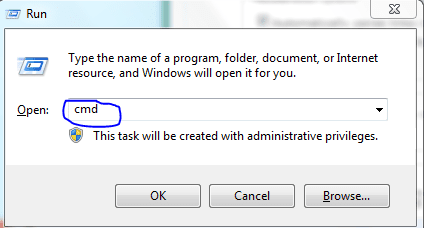
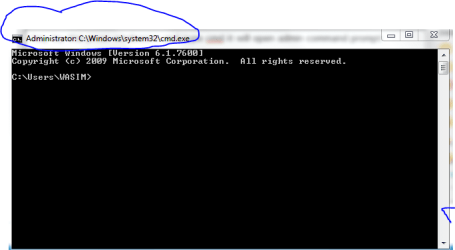
hey try this press windows+r and type cmd it will open admin command prompt


or
go to start>>All programs>> accessories>>
simply right on command prompt and run as administrate
 

Attachments

  • Capture.PNG
    Capture.PNG
    8.1 KB · Views: 3
  • Capture2.PNG
    Capture2.PNG
    10.8 KB · Views: 1

My Computer

Computer Manufacturer/Model Number
Intel
OS
Windows 7 Ultimate x64
CPU
Intel Pentium Dual core [email protected]
Motherboard
Gigabyte G41 COMBO
Memory
4GB
Graphics Card(s)
On Board
Sound Card
On Board
Monitor(s) Displays
LG 15inch
Screen Resolution
1360*768
Hard Drives
250GB SATA
Case
Intex
Cooling
Normal
Keyboard
Circle
Mouse
circle
Internet Speed
5Mbps
Tried. Getting the same message. No changes.
Any idea???
 

My Computer

OS
Windows 7
what the exactly happen when you do "right on command prompt and run as administrate" tell in brief
 

My Computer

Computer Manufacturer/Model Number
Intel
OS
Windows 7 Ultimate x64
CPU
Intel Pentium Dual core [email protected]
Motherboard
Gigabyte G41 COMBO
Memory
4GB
Graphics Card(s)
On Board
Sound Card
On Board
Monitor(s) Displays
LG 15inch
Screen Resolution
1360*768
Hard Drives
250GB SATA
Case
Intex
Cooling
Normal
Keyboard
Circle
Mouse
circle
Internet Speed
5Mbps
Hi

yes. now its clear.
i was little confused and didnt rightclick earlier.
i got the attached message now.
Now, how i can find out the non-active windows7?
thank you.

Ibrahim
 

Attachments

  • cmd1.JPG
    cmd1.JPG
    54.6 KB · Views: 14

My Computer

OS
Windows 7
it seems like ur current win7 is installed in C:/ drive

if ur sure that ur current win7 is in C:/ folder
then after that screen
in cmd type
bcdedit /delete {a77450a3-92be-11dd-ac5c-991ff432a142} /cleanup

insted of this number "{a77450a3-92be-11dd-ac5c-991ff432a142}" type ur number which i highlighted in yellow color provided by ur image
 

Attachments

  • Capture.PNG
    Capture.PNG
    16.3 KB · Views: 6

My Computer

Computer Manufacturer/Model Number
Intel
OS
Windows 7 Ultimate x64
CPU
Intel Pentium Dual core [email protected]
Motherboard
Gigabyte G41 COMBO
Memory
4GB
Graphics Card(s)
On Board
Sound Card
On Board
Monitor(s) Displays
LG 15inch
Screen Resolution
1360*768
Hard Drives
250GB SATA
Case
Intex
Cooling
Normal
Keyboard
Circle
Mouse
circle
Internet Speed
5Mbps
Sorry to trouble again. What should I type in D:/
pls find the details of my computer as attached.
thank you,
 

Attachments

  • MyComputer.JPG
    MyComputer.JPG
    40.6 KB · Views: 9

My Computer

OS
Windows 7
no no i am not saying D:/ drive
reload the page and see the modified Note
obove
 

My Computer

Computer Manufacturer/Model Number
Intel
OS
Windows 7 Ultimate x64
CPU
Intel Pentium Dual core [email protected]
Motherboard
Gigabyte G41 COMBO
Memory
4GB
Graphics Card(s)
On Board
Sound Card
On Board
Monitor(s) Displays
LG 15inch
Screen Resolution
1360*768
Hard Drives
250GB SATA
Case
Intex
Cooling
Normal
Keyboard
Circle
Mouse
circle
Internet Speed
5Mbps
Hang on, stop for a minute.

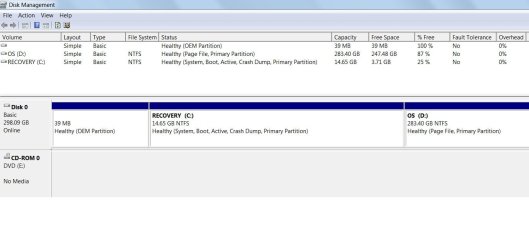
Looking at your disk management layout you have a recovery partition on drive C and Windows on drive D.

The recovery partition does what it says on the tin - it is used to recover your system to its factory state i.e. exactly how it was when you first bought it.

The reason Windows installed to drive D was because drive C is the recovery partition and too small to install Windows 7 on.

What computer do you have? We need to know which manufacturer so that we can recommend the correct recovery procedure - assuming you have a set of recovery discs.

We also need to know exactly how and with what disc you managed to install Windows a second time.
 

My Computer

Computer Manufacturer/Model Number
HP Pavilion Elite 495UK
OS
Windows 7 Ultimate SP1 64-Bit
CPU
Intel Core i7 870 @ 2.93GHz
Motherboard
MSI 2A9C (CPU1)
Memory
8Gb Dual-Channel DDR3 @ 664MHz
Graphics Card(s)
nVidia GeForce GTX 460 1024MB dedicated RAM
Sound Card
Realtek HD Audio
Monitor(s) Displays
HP2310i
Screen Resolution
1920 x 1080
Hard Drives
1x1954GB Hitachi HDS22020ALA 330 (RAID), 1x1954GB Hitachi External for backup and storage
PSU
460W
Case
HP Elite
Cooling
Air cooled
Keyboard
Logitech K750 solar-powered keyboard
Mouse
Logitech Wireless M180 mouse
Internet Speed
2Mb
Other Info
Pure Avanti Flow Internet Radio with iPod Dock, 64Gb iPod, HP USB Speakers, Sony MDR-V500 Headphones, Sony Vaio F-Series Laptop
Shouldn't he delete the indentifer


If he deletes the resumeobject that would only delete the Resume from Hibernate entry for that particular Windows Boot Loader, right?

IbrahimKebir do you have a Windows folder on both C: and D:?
 

Attachments

  • cmd.jpg
    cmd.jpg
    31.2 KB · Views: 4

My Computer

Computer Manufacturer/Model Number
Self built
OS
Windows 7 Ultimate x64
CPU
Intel Pentium Dual Core E5200 2.5GHz (3.77GHz OC)
Motherboard
Asus P5Q-E
Memory
Corsair 4GB DDR2 (4x1GB CM2X1024-6400C4)
Graphics Card(s)
Palit GeForce GTS 250 (1024MB)
Sound Card
On Board (ADI AD2000B 8ch HD)
Monitor(s) Displays
Samsung 32in LCD TV
Screen Resolution
1360x768
Hard Drives
2 x 1TB Samsung 103SJ (Raid0)
2 x External 500GB Samsung 502IJ (NexStar 3 HD Enclosures)
PSU
550W Antec Neo HE 550
Case
Antec P180
Cooling
Xigmatex Red Scorpion CPU Cooler. 3x120mm Fans
Keyboard
Logitech MX5000 Laser (Combo)
Mouse
Logitech MX5000 Laser (Combo)
Internet Speed
ADSL2+ (avg 10 Mbps Down, 0.80 Mbps up)
Other Info
Gigabyte GN-WP01GS 54g Wireless Lan Card
seavixen32 makes a good point, I didn't notice the size of C:. To me it looks like the new copy of Windows has been installed to your recovery partition, C: and the old one still exists on D:.
 

My Computer

Computer Manufacturer/Model Number
Self built
OS
Windows 7 Ultimate x64
CPU
Intel Pentium Dual Core E5200 2.5GHz (3.77GHz OC)
Motherboard
Asus P5Q-E
Memory
Corsair 4GB DDR2 (4x1GB CM2X1024-6400C4)
Graphics Card(s)
Palit GeForce GTS 250 (1024MB)
Sound Card
On Board (ADI AD2000B 8ch HD)
Monitor(s) Displays
Samsung 32in LCD TV
Screen Resolution
1360x768
Hard Drives
2 x 1TB Samsung 103SJ (Raid0)
2 x External 500GB Samsung 502IJ (NexStar 3 HD Enclosures)
PSU
550W Antec Neo HE 550
Case
Antec P180
Cooling
Xigmatex Red Scorpion CPU Cooler. 3x120mm Fans
Keyboard
Logitech MX5000 Laser (Combo)
Mouse
Logitech MX5000 Laser (Combo)
Internet Speed
ADSL2+ (avg 10 Mbps Down, 0.80 Mbps up)
Other Info
Gigabyte GN-WP01GS 54g Wireless Lan Card
We need to see a Disk Management screenshot. Type Disk Management in the Start Search box, select result under Control Panel, maximize window, use Snipping Tool in Start Menu to save a rectangular capture of the drive map and all listings. Post back using Paper clip in Reply box.

If you installed WIn7 to C you have overwritten your Recovery Partition and will need to clean reinstall following these steps to get a perfect install: Reinstalling Windows 7.
Use CUstom install>Drive Options to delete all partitions and create new or let the installer create your install partition by clicking Next.

Or if you wish to keep your current install we can help you delete D and using Disk Mgmt Extend C into its space.
 
Last edited:
I found 2 windows folders in my Laptop. 1 in C: and another in D: I think the old one is in D:
The Windows (Original in D:) was damaged and not running well saying "some files have been missing in D: ".
I re-installed the windows from a DVD received from the maufacturer (Dell) while I purchased the laptop. The DVD has labelled as "Re-installation DVD - Windows 7 Home Basic (EM) 32-Bit. The Software is already installed on your computer. Use this DVD only to re-install the Operating System on a Dell PC".
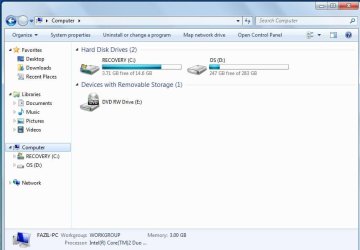
I found the Disk Drives in My Computer as labelled as "Recovery (C:)" and "OS(D:). Please find my previous posting with picture. I found more files in Windows folder of D: than C: Why it is so???
Is there any problem if I delete the Windows folder in D: directly ???

Thank you all

Ibrahim
 

My Computer

OS
Windows 7
Please post up the requested Disk Mgmt screenshot. I gave you the exact steps to do this in my last post.

You actually got a cleaner install of Win7 using the Reinstallation DVD and not Factory Recovery disks, however it's likely you reinstalled over your Recovery partition which we can confirm with the Disk Mgmt screenie.

You'll then have the choice to keep the new install on C, delete D and extend C into its space, or clean reinstall following these steps to get a perfect reinstall of factory OEM: Reinstalling Windows 7. Please click on the blue link to read over the steps to help you decide if you want to start over to get it perfect.
 
sending a screenshot of the same.
Sorry.... i didnt get what the snipping tool.
 

Attachments

  • disk management.jpg
    disk management.jpg
    63.8 KB · Views: 16

My Computer

OS
Windows 7
You did indeed overwrite your Recovery partition so if you ever decide you want to restore to factory condition you'd have to order Recovery Disks from Dell if you didn't already get them or make them yourself.

However you've gotten a superior clean reinstall so if you want to keep it then I would make sure all your files are copied over from D by browsing through it in Computer>D>Users. Once you're sure then you can delete D in Disk Mgmt and extend C into its space following these illustrated tutorials:
Partition or Volume - Delete
Partition or Volume - Extend

Label C correctly e.g "Win7 Home Premium" at Computer> rightclick C>Rename so you know where it is in the future.

If you'd prefer to start over then follow the steps I gave you earlier to get a Perfect Reinstall (below in my signature pic) using Custom Install>Drive Options to Delete all partitions, then I'd just click Next to let the installer create your boot and install partition.

The remaining OEM partiton at the front of the HD is normally Dell System Diagnostics which may still run from boot using the hotkey given on first boot screen. If not the space is almost too negligible to bother recovering into Win7 partition, although the tool to use to do so would be free Partition Wizard bootable CD.
 
Thank you for the link provided.
Is that possible to repair the original Windows in Drive D??? or Is there any problem if I completely delete the Windows folder direclty from the Drive D???
Please note that while running the Windows in Drive D, it is launching a Startup Repair and finally getting an error dialogue box saying "INI File not found: C:/Dell/DBRM.ini"
 

My Computer

OS
Windows 7
Back
Top