
Windows 7 installation keyboard and mouse disabled

uanime5

New member
Local time
3:19 PM
Messages
5
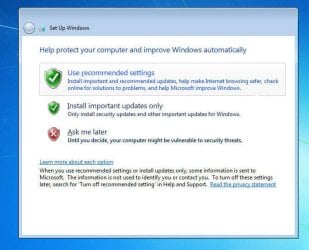
I was having some problems with Windows 7 and decided to use the upgrade feature to reinstall it. I used the CD that came with my PC, the Upgrading Windows part worked fine, and I was told that the Setup is preparing your computer for first use. However the password screen did not appear (stage 16) and on the 'Set-up Windows' page (stage 17) I cannot click on any of the three options (see below) because my keyboard and mouse do not respond.

383772d1458421038-windows-7-installation-keyboard-mouse-disabled-set-up.jpg


The keyboard and mouse are both plugged into a USB slot and I don't have any PS/2 slots on my PC. I have tried using all the USB slots on my PC but none of them work.

The keyboard and mouse work on BIOS but as soon as I go to the 'Set-up Windows' page they're both disabled (lights go out).

I've tried making an Windows 7 Home Professional 64 SP1 boot disk but this has not enabled me to use my mouse of keyboard.

I've checked my BIOS setup for the USB 3 and Legacy USB but cannot see either. Though my version of BIOS (American Megatrends V02.67) looks old so they may be called something else.

Please advise how I can select the options I need to select in order to finish reinstalling Win 7 onto my PC.
 

Attachments
  • set up.jpg
    set up.jpg
    66.7 KB · Views: 37
Last edited:

My Computer My Computer

Computer type
PC/Desktop
Computer Manufacturer/Model Number
Dell Inspiron 580
OS
Windows 7 Home Premium 64bit
CPU
Intel 2.93 GHz
Memory
6GB
Graphics Card(s)
Nvidia GeForce
Hard Drives
750 GB
1TB
PSU
600W
Keyboard
USB
Mouse
USB
Antivirus
Norton
Browser
Firefox
Id have just used the restore to factory default option.
And until the install is complete your using USB mouse/keyboard WONT work, use the arrow keys/enter.

Note you will have to re-install any USB3 drivers from the manufacturers website, none on W7

Roy
 

My Computer My Computer

Computer type
PC/Desktop
Computer Manufacturer/Model Number
medionl/Aspire 6930G/acer x55a
OS
W7 home premium 32bit/W7HP 64bit/w10 tp insider ring
CPU
E5300 dual core
Motherboard
medion MS7366
Memory
3gb
Graphics Card(s)
Nvidia Geforce 7100 Nforce 630i
Monitor(s) Displays
avixc
Internet Speed
n (isp resticted to 72)
Antivirus
mse/pands
Browser
palemoon
Other Info
Belkin Fd7050 n USB using Railink RT2870 drivers, more upto date
Id have just used the restore to factory default option.
And until the install is complete your using USB mouse/keyboard WONT work, use the arrow keys/enter.

Note you will have to re-install any USB3 drivers from the manufacturers website, none on W7

Roy

What arrow keys/enter are you talking about? My keyboard doesn't work so I can't use any keys on it.
 

My Computer My Computer

Computer type
PC/Desktop
Computer Manufacturer/Model Number
Dell Inspiron 580
OS
Windows 7 Home Premium 64bit
CPU
Intel 2.93 GHz
Memory
6GB
Graphics Card(s)
Nvidia GeForce
Hard Drives
750 GB
1TB
PSU
600W
Keyboard
USB
Mouse
USB
Antivirus
Norton
Browser
Firefox
ON an old style keyboard.

Roy
 

My Computer My Computer

Computer type
PC/Desktop
Computer Manufacturer/Model Number
medionl/Aspire 6930G/acer x55a
OS
W7 home premium 32bit/W7HP 64bit/w10 tp insider ring
CPU
E5300 dual core
Motherboard
medion MS7366
Memory
3gb
Graphics Card(s)
Nvidia Geforce 7100 Nforce 630i
Monitor(s) Displays
avixc
Internet Speed
n (isp resticted to 72)
Antivirus
mse/pands
Browser
palemoon
Other Info
Belkin Fd7050 n USB using Railink RT2870 drivers, more upto date
I don't have any PS/2 slots on my PC.
 

My Computer My Computer

Computer type
PC/Desktop
Computer Manufacturer/Model Number
Dell Inspiron 580
OS
Windows 7 Home Premium 64bit
CPU
Intel 2.93 GHz
Memory
6GB
Graphics Card(s)
Nvidia GeForce
Hard Drives
750 GB
1TB
PSU
600W
Keyboard
USB
Mouse
USB
Antivirus
Norton
Browser
Firefox
Enable Legacy USB support in the bios.

Why are you doing a repair install ?

Why no restore points saved ?

Why aren`t your mouse and keyboard working, make sure they`re in usb 2.0 (black) ports.

What PC are we using, a Dell what ??? Please fill in your specs.
 

My Computer My Computer

Computer type
PC/Desktop
Computer Manufacturer/Model Number
Skylake Special #666
OS
Windows 10 Pro x64
CPU
Intel Core i7 6700K
Motherboard
Asus Sabertooth Z170 Mark 1
Memory
GSkill TridentZ RGB 16GB 3600 16-16-16-36
Graphics Card(s)
EVGA GTX 980 Ti SC x2
Sound Card
Realtek High Definition
Monitor(s) Displays
AOC G2460PG
Screen Resolution
1920 x 1080 144Hz
Hard Drives
Samsung 860 Pro 256GB, Seagate Barracuda 4TB x2
PSU
EVGA 1000 P2, EVGA White Custom Braided Cables
Case
Corsair Vengeance C70 Gunmetal Black
Cooling
Corsair H100i v2, Corsair ML120 x2, Thermal Grizzly Kryonaut
Keyboard
Logitech G910 Orion Spectrum
Mouse
Logitech G700s
Internet Speed
Verizon Fios Quantum Gateway 75/75
Antivirus
Windows Defender, Malwarebytes Free 3.8.3
Browser
Chrome
Other Info
Corsair SP120 x4, LG Blu-ray Drive, Durabrand HT-395 100 Watt Dolby Digital Amp, Corsair H2100 Wireless 7.1 Headset
Enable Legacy USB support in the bios.

This option is not in my BIOS (American Megatrends V02.67).

Why are you doing a repair install ?
Win 7 kept having problems that the SFC/ scanow couldn't fix, so I thought doing a repair install may fix them. It also kept making new partitions; for example the C drive would become the D drive.

Why no restore points saved ?
I made a restore point but after I used it it just took me back to the screen I'm stuck on. Is it possible to use a restore point part way through a repair upgrade?

I couldn't use the backup or create image features as neither worked.

Why aren`t your mouse and keyboard working, make sure they`re in usb 2.0 (black) ports.
All my USB ports are black and none of them work. If I knew why they weren't working I'd be able to fix this problem.

What PC are we using, a Dell what ??? Please fill in your specs.
It's an Inspiron 580

What other specs do you need?
 
Last edited:

My Computer My Computer

Computer type
PC/Desktop
Computer Manufacturer/Model Number
Dell Inspiron 580
OS
Windows 7 Home Premium 64bit
CPU
Intel 2.93 GHz
Memory
6GB
Graphics Card(s)
Nvidia GeForce
Hard Drives
750 GB
1TB
PSU
600W
Keyboard
USB
Mouse
USB
Antivirus
Norton
Browser
Firefox

My Computer My Computer

Computer type
PC/Desktop
Computer Manufacturer/Model Number
Home made Desktop
OS
Windows 10 Pro. 64/ version 1709 Windows 7 Pro/64
CPU
Intel i7-6800K @ 4.3
Motherboard
ASUS X-99 Deluxe II
Memory
Corsair Platinum 16 gig @2400
Graphics Card(s)
EVGA GTX 1070 OC
Monitor(s) Displays
Asus 27" LED LCD/VE278Q
Screen Resolution
1920-1080 or 1280-720 HDMI
Hard Drives
INTEL SSD 730-240 Gb Sata 3.0/
PSU
EVGA Platium 1200W
Case
Phanteks Luxe Tempered Glass 8 fans/ one radiator
Cooling
XSPC/ Water Cooled CPU
Keyboard
Das 4 Professional
Mouse
Logitech M705/MX Anywhere 2-S
Internet Speed
100 mbits
Antivirus
Microsoft Security Essentials/ Malwarebytes Premium 3.0/ SAS
Browser
I.E. 11 default/Firefox/ ISP Time Warner Cable/Spectrum
Other Info
LG BluRay Burner/
Sound system-KLipsch-THX/
Icy Dock ssd Hot Swap bays.
Then you need to put it`s a Dell Inspiron 580 in your specs, all you have listed is Dell :(

And also fill in what video card it has, exactly.

Speccy will help you.

https://www.piriform.com/speccy
 

My Computer My Computer

Computer type
PC/Desktop
Computer Manufacturer/Model Number
Skylake Special #666
OS
Windows 10 Pro x64
CPU
Intel Core i7 6700K
Motherboard
Asus Sabertooth Z170 Mark 1
Memory
GSkill TridentZ RGB 16GB 3600 16-16-16-36
Graphics Card(s)
EVGA GTX 980 Ti SC x2
Sound Card
Realtek High Definition
Monitor(s) Displays
AOC G2460PG
Screen Resolution
1920 x 1080 144Hz
Hard Drives
Samsung 860 Pro 256GB, Seagate Barracuda 4TB x2
PSU
EVGA 1000 P2, EVGA White Custom Braided Cables
Case
Corsair Vengeance C70 Gunmetal Black
Cooling
Corsair H100i v2, Corsair ML120 x2, Thermal Grizzly Kryonaut
Keyboard
Logitech G910 Orion Spectrum
Mouse
Logitech G700s
Internet Speed
Verizon Fios Quantum Gateway 75/75
Antivirus
Windows Defender, Malwarebytes Free 3.8.3
Browser
Chrome
Other Info
Corsair SP120 x4, LG Blu-ray Drive, Durabrand HT-395 100 Watt Dolby Digital Amp, Corsair H2100 Wireless 7.1 Headset
Have you changed your motherboard?
You should not have (American Megatrends V02.67) on a true Dell system.

I haven't changed the motherboard. This is the BIOS and motherbord the PC came with.


I can't boot to desktop, so I can't use this tool on my computer. I'll try and fill it in the best I can.

And also fill in what video card it has, exactly.

I'll try to find out which one it has. I think it's an Geforce 400 or 600 series.


I can't boot to desktop, so I can't use this tool on my computer. I'll try and fill it in the best I can.
 

My Computer My Computer

Computer type
PC/Desktop
Computer Manufacturer/Model Number
Dell Inspiron 580
OS
Windows 7 Home Premium 64bit
CPU
Intel 2.93 GHz
Memory
6GB
Graphics Card(s)
Nvidia GeForce
Hard Drives
750 GB
1TB
PSU
600W
Keyboard
USB
Mouse
USB
Antivirus
Norton
Browser
Firefox
Back
Top