Windows 7 installation not working, for some reason

Laika

New member
Local time
4:58 AM
Messages
10
Hey guys, so I am trying to install windows 7 onto my laptop. It's a Toshiba satellite. anyways, first, the install windows...window, tells me it can't be installed to this disk.

Clicking show details, it says "This computer's hardware may not support booting to this disk. Ensure that the disk's controller is enabled in the computer's BIOS menu.".

okay.

So first, how do I "ensure" that? The next step i was going to take was adding a partition...because the disk, somehow, doesn't have any.

I...don't know how to do that, so there's that too.

anyone else have this problem?? ANY help would be wildly appreciated!
 

My Computer My Computer

OS
Windows 7
Liika,
Welcome to Sevenforums.

And you are trying to install to what ?

Fill in those system specs to the best of your ability.

thanks,
 

My Computer My Computer

Computer Manufacturer/Model Number
Toshiba Satellite S875D-S7239 laptop
OS
MS Windows 7 Ultimate SP1 64-bit
CPU
AMD A10-4600M
Motherboard
AMD Pumori (Socket FT1)
Memory
6.00 GB Dual-Channel DDR3 @ 798MHz (11-11-12-28)
Graphics Card(s)
AMD Radeon HD 7660G
Sound Card
High Definition Audio Device
Monitor(s) Displays
Generic PnP Monitor (1600x900@60Hz)
Screen Resolution
1600x900@60Hz
Hard Drives
SSD 119GB Corsair CSSD-V128GB2 ATA Device
Keyboard
Standard PS/2 Keyboard
Mouse
HP Wireless Optical Mobile Mouse Model FHA-3410
Internet Speed
What the local pub, local coffee shop offers.
Other Info
Optical Drive:MATSHITA BD-CMB UJ160B ATA Device


Also have an Asus ha1002xp netbook with Win 7 Ultimate installed.
Are you trying to install a 64-bit Windows 7 version on a 32-bit machine. Please check that.
 

My Computer My Computer

Computer Manufacturer/Model Number
Custom Built
OS
Windows 7 Pro with SP1 32bit
Motherboard
Intel D845GVS1 X86-based PC
Memory
2 gigs of RAM
Graphics Card(s)
Intel(R) 82845G/GL/GE/PE/GV Graphics Controller
Sound Card
Realtek AC'97 Audio
Monitor(s) Displays
Samsung SyncMaster 931BF Black 19" LCD Monitor
Screen Resolution
1280X960
Hard Drives
1. SAMSUNG SP0822N ATA Device ~ 80 GigaBytes

2. Seagate FreeAgent Go USB Device ~ 500 GigaBytes
Keyboard
COMPAQ Standard PS/2 Keyboard
Mouse
iBall Laser Precise Speedster
Internet Speed
4 mb/sec
oh guys, sorry for not being detailed!

so the laptop is a Toshiba SatelliteL305D-s5974
I bought this windows 7 cd from amazon.com

I don't exactly know wether or not it's a 32-bit machine

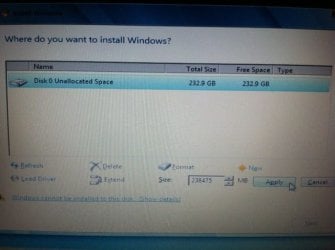
yeah, the pic attached is what the screen looks like right now, before i did any of your suggestions...

thanks guys, i just wanna download this windows 7 onto this computers, since my old one got corrupted
 

Attachments

  • photo (1).JPG
    photo (1).JPG
    38.2 KB · Views: 24

My Computer My Computer

OS
Windows 7
oh guys, sorry for not being detailed!

so the laptop is a Toshiba SatelliteL305D-s5974
I bought this windows 7 cd from amazon.com

I don't exactly know wether or not it's a 32-bit machine

yeah, the pic attached is what the screen looks like right now, before i did any of your suggestions...

thanks guys, i just wanna download this windows 7 onto this computers, since my old one got corrupted

You don't say whether you are installing the 32 or 64 bit version of Win7. The CPU on your laptop supports 64 bit, and there are 64 bit drivers available for download.

Model Content Page

The screen that you photographed is a normal one. If you install Windows to an unallocated drive, the installer will automatically partition and format it. (It creates a second 100MB partition for some recovery/housekeeping tasks. That's not mandatory, but it's recommended.)

Plunge right ahead. Things should be fine.
 

My Computer My Computer

Computer Manufacturer/Model Number
homegrown
OS
Windows 7 Pro X64 SP1
CPU
Intel Core I7-3930k
Motherboard
Asus P9X79 Pro
Memory
16 GB Gskill DDR3-2133
Graphics Card(s)
eVGA GTX680
Sound Card
Creative X-Fi Titanium
Monitor(s) Displays
As PA246Q
Screen Resolution
1920 X 1200
Hard Drives
Corsair Force GT, 120 GB
WDC 1.5TB Caviar Black
PSU
PCP&C Silencer 750 Crossfire
Case
Silverstone FT02
Cooling
Noctua NH-D14
Keyboard
cheap Logitech USB
Mouse
Microsoft Intellimouse Explorer (old optical) USB
Internet Speed
6Mb cable
Other Info
Pioneer BDR-205
Samsung SH-203B
Monsoon 5.1 speakers
What happens if you click Next? Is this when the error appears?

Try clicking New to create and Format an install partition from the entire HD.

Then work through the other steps I gave you if that fails, report back.
 
so I'm installing the 64 bit windows 7, so that should be okay

also, what would be the best size for the partition thing at the bottom of the pic to format it?
 

My Computer My Computer

OS
Windows 7
I did attempt that and it looked hopeful!

BUT

a failed to create partitions error came. something like Error:0x8007045d

what is going on guys? :((
 

My Computer My Computer

OS
Windows 7
This is an interactive process. Once you have reported completing each of the steps I have given you then there will be more.

The only way to succeed is to be completely thorough.

If you tried AHCI mode, change it to IDE next. What other settings are available for SATA controller?
 
well, greg, i didnt understand anything you just said!

explain how to do all that like switching modes and what an SATA controller is...please!

sorry I can't comprehend it!
 

My Computer My Computer

OS
Windows 7
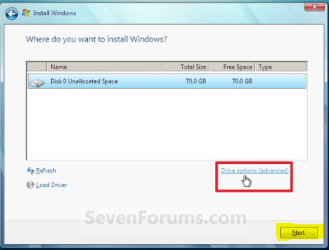
You never answered when I asked you what happens if you click Next on the Drives selection page. It is the button I highlighted in yellow below, not the Drive Options you were using in the red box:

Capture.PNG

What about the question is hard to understand? Would you try that now?
 
The problem in there, could be caused by the CD/DVD ROM when the data is read.
Sometimes the CD/DVD-ROM could've failed to read / write some data, even though it shows nothing, but when we try to run these data, some errors would appear. This could be a problem with the lens or the ROM cable.
According to these problems, here are some solutions that I can give you:

  1. Using a lens cleaner, try to clean your CD/DVD ROM. Now you can install again without any problem.
  2. If you have some experience on hardware, you can try to open your CPU casing, if no, you can try do this with carefully. Even this wouldn't cause any serious problems, if you just follow these instructions. Unplug any cables that are connected to the CD/DVD ROM, plug again and make sure all cables are plugged right. If the problem is caused by the cables, now these problems should be solved.
  3. If these two solution couldn't solve your problem, try to use/rent any CD/DVD ROM from your friend then plug that into your computer & try using them. If these errors don't appear again, that means your CD/DVD ROM has problems & you need to service your CD/DVD ROM or buy a new one.
Hope these solutions help you. Regards,
http://www.techyv.com/questions/error-installation-windows-7-notebook
 

My Computer My Computer

OS
Windows 7 Ultimate x64
so when I clicked Next, it says

"setup was unable to create a news system partition or locate an existing partition. see setup log files for more info"

it wouldn't let me go on after that.

what now?
 

My Computer My Computer

OS
Windows 7
Next try wiping the HD.

Boot Win7 DVD, press Shift + F10 at first screen to open a Command Prompt,

type Diskpart, then Enter following each command.

Nexzt type List disk, determine which disk number is the one for Win7.

Then type Select Disk followed by a space the number for Win7 disk.

If you're sure you've selected the Win7 disk, type Clean.

Now close the Command Box. click Install Now, on Drive Selection screen press Next.
 
its still not working :( i cleansed the disk and it was "successfully clean" but it still says windows cannot install to this disk
 

My Computer My Computer

OS
Windows 7
using command prompt, I went to create and I attempted to create a partition (primary) and after a minute or two, it said

"the request could not be performed because of an I/O device error.
see the system event log for more info"

I think that may be the problem, what do you think?
 

My Computer My Computer

OS
Windows 7
Also, you might want to review the steps taken so far. It was requested in post #3 to reset your BIOS and check/change one of the settings there. I saw some followup responses but never saw confirmation that you were able to successfully complete it.
 

My Computer My Computer

OS
Windows 7 Ultimate x64
Back
Top