Windows 7 installation says I cannot install on GPT drive on my laptop

skylos

New member
Local time
12:06 AM
Messages
21
Hi,
I'm trying to replace w8 on a brand new Samsung laptop.

Titles didn't work and it was a rather inconvenient o.s. for me altogether (you can check here for more).

I’ m running the Windows7 installation, right now, only to find out that W7 won’t install on a GPT drive.

What am I to do? I’d appreciate any help.
 

My Computer My Computer

At a glance

Windows 7 Ultimate x64i34 GB
Computer type
PC/Desktop
OS
Windows 7 Ultimate x64
CPU
i3
Motherboard
Asus
Memory
4 GB
Hard Drives
ssd for boot, data on sata
Antivirus
AVG
Browser
ff, chrome, opera

My Computer My Computer

At a glance

Desk1 7 Home Prem / Desk2 10 Pro / Main lap A...Desk1 i5 3750K / Laptop i7 GTX 860M / Desk2 i...Desk1 8GB (1866) / Desk2 16GB (1333) / Laptop...Desk 1& 2NVidia GTX 650 & Laptops on board Intel
Computer type
PC/Desktop
Computer Manufacturer/Model Number
Own build (new) Desk1 / Asus ROG Win 7 / Desk2 1st build
OS
Desk1 7 Home Prem / Desk2 10 Pro / Main lap Asus ROG 10 Pro 2 laptop Toshiba 7 Pro Asus P2520 7 & 10
CPU
Desk1 i5 3750K / Laptop i7 GTX 860M / Desk2 i5 2500
Motherboard
Desk1 Asus P877-V / Desk2 Gigabyte H67 UD3H / Laptop ?
Memory
Desk1 8GB (1866) / Desk2 16GB (1333) / Laptop 8Gb DDR3
Graphics Card(s)
Desk 1& 2NVidia GTX 650 & Laptops on board Intel
Sound Card
Desk 1 & 2 -XONAR DG Realtek High Def audio Laptop
Monitor(s) Displays
Desk 1 Benq HD 2450 / Desk2 Philips 24" / Laptop 17.5"
Screen Resolution
1920x1080 D1 & D2 & Laptop 1
Hard Drives
Desk1 Samsung 120GB 830 SSD
Asus ROG 256GB 850 Pro SSD
Desk2 Samsung 840 256 SSD
Toshiba 120GB EVO
PSU
Desk 1 Corsair HX 1050/ Laptop ? / Desk 2 Corsair HX 650
Case
Desk 1 Cooler HAF XM ? Toshiba laptop / Desk2 Coolermaster
Cooling
Fans on all Desk1 -2 Desk2 - all Coolermasters 5 Laptop ?
Keyboard
Desk 1 MS Sidewinder X6 Desk 2 MS Sidewinder X 4
Mouse
Desk 1&2 - Gigabyte MS 900 gamer - laptop - Logitec wireless
Internet Speed
ADSL2+
Other Info
One other Desktop (tester) and spare Toshba laptop both with SSD's
Running Kaspersky 2016 ISS on all machines config'd identically
Logitec audio stereo systems on each machine (x3)
Canon MG5250MFC
Router/modem TP-Link running WPA2SK
Is this a OEM manufacturer's PC with Pre-installed Windows 8?

1) Downgrade to Windows 7.
Downgrade Windows 8 to Windows 7
Warning you must have the UEFI/BIOS firmware setting in Step Three set.

Make sure you read the NOTE at Step three.

2) If Using a USB Pen drive on a PC with a UEFI BIOS.
USB Pen drive need to be formatted to FAT32 as in
UEFI Bootable USB Flash Drive - Create in Windows
Take note of Step 11 for Windows 7.
Also you will need to use a USB 2.0 port, as there are no USB 3.0 drivers in Windows 7.


You will need to buy Windows 7.
 

My Computer My Computer

At a glance

ME/XP/Vista/Win7
OS
ME/XP/Vista/Win7
First watch this video to understand the new UEFI BIOS vs. Legacy BIOS - YouTube.

If you want to install using UEFI (Unified Extensible Firmware Interface) - Install Windows 7 with - Windows 7 Forums. The disk you're trying to install upon now is GPT ready for a UEFI install so you'd need those extra steps to boot UEFI installer and proceed.

If you don't want UEFI but want to install normally then Bypass UEFI to Install WIn7.

And as Theog reminds and you must already know if you've gotten as far as you have, you must disable Secure Boot in BIOS on a Windows Ate computer.
 
@ICit2lol, theog
I had a look at the supplied links but right now i have no bootable windows on my laptop as the W7 installation was cut off halfway. And yes, it's a samsung laptop with W8 preinstalled...

( @gregrocker i'll check ur links later.. )

i called the samsung support yesterday, they were very friendly but the instructed steps weren't any good.. So they suggested that I should download some software like "pc check" and "destruct" the hard disk so that i can proceed with a W7 installation...

( Why is it that such vivid procedures, like the installation of a o.s., instead of getting simplier it gets harder and close to impossible? )

thanks for trying to help ppl
:)
 

My Computer My Computer

At a glance

Windows 7 Ultimate x64i34 GB
Computer type
PC/Desktop
OS
Windows 7 Ultimate x64
CPU
i3
Motherboard
Asus
Memory
4 GB
Hard Drives
ssd for boot, data on sata
Antivirus
AVG
Browser
ff, chrome, opera
Yes I agree that UEFI is a can of worms. I prefer normal MBR installs, so consider your two options carefully based on what you learn.

Whichever you decide adapt the steps in Clean Reinstall - Factory OEM Windows 7 which compiles everything needed to get and keep a perfect install.
 
How To Downgrade To Windows 7
Screenshots in the above link.

Samsung said:
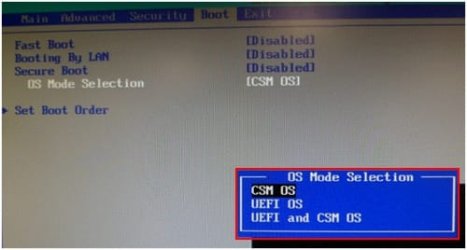
1) Enter the BIOS by pressing the F2 key while your system is booting up.

2) Move to the boot menu using the right arrow key.

3) Select 'Secure Boot' and then select 'DISABLED'

4) Select 'OS Mode Selection' and change it to 'UEFI OS'
theog said:
UEFI & CSM OS

5) Save the changed settings by pressing the F10 key and then restart the system.

Very easy on a Samsung.

1) DISABLE Secure Boot.

2) Set CSM to UEFI & CSM OS.

Samsung 3.jpg

3) Install Windows 7.
 

My Computer My Computer

At a glance

ME/XP/Vista/Win7
OS
ME/XP/Vista/Win7
My two cents worth again if you still have 8 on the machine which we don't have the model for why nit use one of the 7 style applications such as Classic Shell I did on my Sandy Bridge and Toshiba laptop and well it is just like running 7 except for a few minor differences for what I want anyway despite the criticisms the main one being my laptop is four time as fast at boot shut down and between programs.
 

My Computer My Computer

At a glance

Desk1 7 Home Prem / Desk2 10 Pro / Main lap A...Desk1 i5 3750K / Laptop i7 GTX 860M / Desk2 i...Desk1 8GB (1866) / Desk2 16GB (1333) / Laptop...Desk 1& 2NVidia GTX 650 & Laptops on board Intel
Computer type
PC/Desktop
Computer Manufacturer/Model Number
Own build (new) Desk1 / Asus ROG Win 7 / Desk2 1st build
OS
Desk1 7 Home Prem / Desk2 10 Pro / Main lap Asus ROG 10 Pro 2 laptop Toshiba 7 Pro Asus P2520 7 & 10
CPU
Desk1 i5 3750K / Laptop i7 GTX 860M / Desk2 i5 2500
Motherboard
Desk1 Asus P877-V / Desk2 Gigabyte H67 UD3H / Laptop ?
Memory
Desk1 8GB (1866) / Desk2 16GB (1333) / Laptop 8Gb DDR3
Graphics Card(s)
Desk 1& 2NVidia GTX 650 & Laptops on board Intel
Sound Card
Desk 1 & 2 -XONAR DG Realtek High Def audio Laptop
Monitor(s) Displays
Desk 1 Benq HD 2450 / Desk2 Philips 24" / Laptop 17.5"
Screen Resolution
1920x1080 D1 & D2 & Laptop 1
Hard Drives
Desk1 Samsung 120GB 830 SSD
Asus ROG 256GB 850 Pro SSD
Desk2 Samsung 840 256 SSD
Toshiba 120GB EVO
PSU
Desk 1 Corsair HX 1050/ Laptop ? / Desk 2 Corsair HX 650
Case
Desk 1 Cooler HAF XM ? Toshiba laptop / Desk2 Coolermaster
Cooling
Fans on all Desk1 -2 Desk2 - all Coolermasters 5 Laptop ?
Keyboard
Desk 1 MS Sidewinder X6 Desk 2 MS Sidewinder X 4
Mouse
Desk 1&2 - Gigabyte MS 900 gamer - laptop - Logitec wireless
Internet Speed
ADSL2+
Other Info
One other Desktop (tester) and spare Toshba laptop both with SSD's
Running Kaspersky 2016 ISS on all machines config'd identically
Logitec audio stereo systems on each machine (x3)
Canon MG5250MFC
Router/modem TP-Link running WPA2SK
the working solution was this:
during the W7 installation, at the moment when i needed to format the hard disk, i pressed Shft-F10 and got a command prompt where i could give the following commands:


Code:
DISKPART
  SELECT DISK 0
  CLEAN ALL
  CREAT PARTITION PRIMARY SIZE=150000
  FORMAT FS=NTFS
  ACTIVE
  EXIT


where DISK 0 is the destined hard disk (LIST DISK shows a list of the disks) and SIZE is the prefered partition size in MB.


Anyway, i got through with the installation only to find out that there are no W7 drivers for my samsung laptop (np275e5e-k01gr) and it cannot connect to the internet because W7 cannot recognize the ethernet card.

I inspected it and it's a Realtek with this id string: pci\ven_10EC&DEV_8136&SUBSYS_C680144D&REV_05

I looked a bit but found no drivers yet.. I suppose I'll have to search harder.

ms windows + samsung = simple stuff made impossible..
 

My Computer My Computer

At a glance

Windows 7 Ultimate x64i34 GB
Computer type
PC/Desktop
OS
Windows 7 Ultimate x64
CPU
i3
Motherboard
Asus
Memory
4 GB
Hard Drives
ssd for boot, data on sata
Antivirus
AVG
Browser
ff, chrome, opera
theog, the main problem with the drivers was that there was no internet connection in the first place..

anyway, the support helped me out, providing me with the correct drivers for the ethernet card.


hey, it took only three days of hard labor.. what do you think is my advice if someone asks me about a samsung laptop?
 

My Computer My Computer

At a glance

Windows 7 Ultimate x64i34 GB
Computer type
PC/Desktop
OS
Windows 7 Ultimate x64
CPU
i3
Motherboard
Asus
Memory
4 GB
Hard Drives
ssd for boot, data on sata
Antivirus
AVG
Browser
ff, chrome, opera
theog, the main problem with the drivers was that there was no internet connection in the first place..

anyway, the support helped me out, providing me with the correct drivers for the ethernet card.


hey, it took only three days of hard labor.. what do you think is my advice if someone asks me about a samsung laptop?

I am a FUJITSU man, so I would say, look for a FUJITSU. :) :D
 

My Computer My Computer

At a glance

ME/XP/Vista/Win7
OS
ME/XP/Vista/Win7
It seem to me their is a market for laptops with no installed operating system until you choose one or have the option of installing the operating system of your choice yourself. No removing one operating system to install the one you prefer. Possibly have to pay for 2 operating systems.
 

My Computer My Computer

At a glance

Windows 10 Pro. 64/ version 1709 Windows 7 Pr...Intel i7-6800K @ 4.3Corsair Platinum 16 gig @2400EVGA GTX 1070 OC
Computer type
PC/Desktop
Computer Manufacturer/Model Number
Home made Desktop
OS
Windows 10 Pro. 64/ version 1709 Windows 7 Pro/64
CPU
Intel i7-6800K @ 4.3
Motherboard
ASUS X-99 Deluxe II
Memory
Corsair Platinum 16 gig @2400
Graphics Card(s)
EVGA GTX 1070 OC
Monitor(s) Displays
Asus 27" LED LCD/VE278Q
Screen Resolution
1920-1080 or 1280-720 HDMI
Hard Drives
INTEL SSD 730-240 Gb Sata 3.0/
PSU
EVGA Platium 1200W
Case
Phanteks Luxe Tempered Glass 8 fans/ one radiator
Cooling
XSPC/ Water Cooled CPU
Keyboard
Das 4 Professional
Mouse
Logitech M705/MX Anywhere 2-S
Internet Speed
100 mbits
Antivirus
Microsoft Security Essentials/ Malwarebytes Premium 3.0/ SAS
Browser
I.E. 11 default/Firefox/ ISP Time Warner Cable/Spectrum
Other Info
LG BluRay Burner/
Sound system-KLipsch-THX/
Icy Dock ssd Hot Swap bays.
Layback Bear said:
It seem to me their is a market for laptops with no installed operating system until you choose one or have the option of installing the operating system of your choice yourself.

If look round the net you find new Notebooks with NO OS or Free DOS.

No removing one operating system to install the one you prefer. Possibly have to pay for 2 operating systems.

NO need to pay for two OS, look for a PC with Windows 8 Pro Pre-installed.

MICROSOFT said:
Can I downgrade the software?
Instead of using the Windows 8 Pro software, you may use one of the following earlier versions: Windows 7 Professional or Windows Vista Business.

This agreement applies to your use of the earlier versions. If the earlier version includes different components, any terms for those components in the agreement that come with the earlier version apply to your use of such components. Neither the manufacturer or installer, nor Microsoft, is obligated to supply earlier versions to you. You must obtain the earlier version separately. At any time, you may replace an earlier version with Windows 8 Pro. To enable downgrade on this computer to Windows 7, you must change the settings to boot into legacy BIOS mode. If the BIOS setting is not changed back to native UEFI mode boot prior to installing Windows 8 Pro, Windows 8 Pro will install; however, the following Windows 8 Pro functionalities will not work as they rely on UEFI mode boot:

OEM manufacturer to supply downgrade rights Vista/Win7 Install DVD's.

For example my OEM test rig, Fujitsu OEM manufacturer in box:

DVD 1) Drivers & Utlilties.

DVD 2) Windows 8 x64 DVD.

DVD 3) Windows 7 x64 DVD.

DVD 4) Windows 7 x32 DVD
 

My Computer My Computer

At a glance

ME/XP/Vista/Win7
OS
ME/XP/Vista/Win7
Thank you theog for the information. I learn something new every day.
I like to do that.
 

My Computer My Computer

At a glance

Windows 10 Pro. 64/ version 1709 Windows 7 Pr...Intel i7-6800K @ 4.3Corsair Platinum 16 gig @2400EVGA GTX 1070 OC
Computer type
PC/Desktop
Computer Manufacturer/Model Number
Home made Desktop
OS
Windows 10 Pro. 64/ version 1709 Windows 7 Pro/64
CPU
Intel i7-6800K @ 4.3
Motherboard
ASUS X-99 Deluxe II
Memory
Corsair Platinum 16 gig @2400
Graphics Card(s)
EVGA GTX 1070 OC
Monitor(s) Displays
Asus 27" LED LCD/VE278Q
Screen Resolution
1920-1080 or 1280-720 HDMI
Hard Drives
INTEL SSD 730-240 Gb Sata 3.0/
PSU
EVGA Platium 1200W
Case
Phanteks Luxe Tempered Glass 8 fans/ one radiator
Cooling
XSPC/ Water Cooled CPU
Keyboard
Das 4 Professional
Mouse
Logitech M705/MX Anywhere 2-S
Internet Speed
100 mbits
Antivirus
Microsoft Security Essentials/ Malwarebytes Premium 3.0/ SAS
Browser
I.E. 11 default/Firefox/ ISP Time Warner Cable/Spectrum
Other Info
LG BluRay Burner/
Sound system-KLipsch-THX/
Icy Dock ssd Hot Swap bays.
Anyway, i got through with the installation only to find out that there are no W7 drivers for my samsung laptop (np275e5e-k01gr) and it cannot connect to the internet because W7 cannot recognize the ethernet card.

I inspected it and it's a Realtek with this id string: pci\ven_10EC&DEV_8136&SUBSYS_C680144D&REV_05

I looked a bit but found no drivers yet.. I suppose I'll have to search harder.

ms windows + samsung = simple stuff made impossible..

It says quite clearly in the tutorial you were to be following to Clean Reinstall - Factory OEM Windows 7 to plug in by wire so it will start up with the ethernet driver in 70% of installs, but if not to have your ethernet and wireless drivers in the backup so you can install them to get online to get the rest of the drivers via Windows Update. These drivers can be found on the Support Downloads webpage for your model PC.

Since you ignored that did you also ignore enabling Automatically deliver drivers via Windows Update (Step 3) to Check for Updates, install all rounds of important and Optional Windows Updates with reboots until no more are offered? This is how drivers are updated and more delivered. Only after all rounds of Updates are finished would I import any drivers still missing in Device Manager.

If you were so careless you didn't even get the drivers right, I would read over Clean Reinstall - Factory OEM Windows 7 again to see what else you missed. It is the opportunity to get and keep a perfect install, one you can be preserved with a backup image so you never have to do it again. So why would you not want to do it correctly?
 
Back
Top