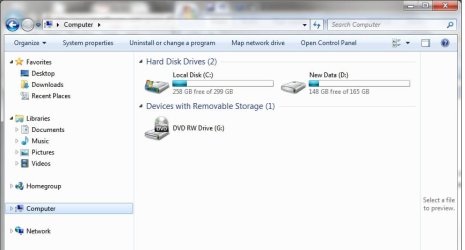
Windows 7 installed and D Drive now full

Geminineil

New member
Local time
11:27 AM
Messages
5
Hi, I have recently had to install Windows 7 to replace 'troublesome' Vista. All seems to have gone okay.. however, my D drive seems to have become the default for adding files and programs to.. and the 14.9Gb as I speak is full... the temporary internet files gulps up the 24mb that is free... I have tried to remove some program files but I get a message saying I don't have permission. How can I remove - or cleanup this D drive and also make the C drive the default for storage.
 

Attachments

My Computer My Computer

OS
Vista
It sounds like you have a Dell and you installed Windows 7 in the "recovery" partition rather than the "C" partition.
You will have to delete the Windows 7 installation in the Recovery partition and then do a new install to the C partition on the hard drive. Vista is probably still installed on the C partition. You can either delete Vista (reformat the C "drive") or just do an upgrade from Vista to Windows 7.
 

My Computer My Computer

Computer type
PC/Desktop
Computer Manufacturer/Model Number
My Own Build
OS
Windows 10 64 bit
CPU
Intel i7 6700K
Motherboard
ASUS ROG Maximus VIII Hero
Memory
16GB Corsair Dominator
Graphics Card(s)
Intel CPU Graphics
Sound Card
RealTek
Monitor(s) Displays
27" Dell S2719dgf
Screen Resolution
2560X1440
Hard Drives
1 TB Samsung 850 EVO SSD for Win 10 Pro
500GB Samsung 850 EVO SSD for Win 10 Insider
2 TB drive for backup
PSU
EVGA Supernova 750G2
Case
BeQuiet Silent Base 600
Cooling
Deepcool Captain 120EX
Keyboard
Microsoft Wireless 2000
Mouse
Microsoft wireless
Internet Speed
100 MB/sec (Cable)
Antivirus
Microsoft Defender and Malwarebytes
Browser
Edge/Firefox
Other Info
Cakewalk (Sonar) by BandLab and Studio One 4.1 Pro recording studio software. MOTU 896Mk3 Hybrid recording interface, Frontier Tranzport wireless control unit, Behringer X-Touch Control Surface.
Five USB connected optical drives for CD Audio production using Nero BurningROM
Thanks for the quick reply.... cannot remember but is there an option on where to install the Windows 7? How do I delete what is in D Partition while I am still logged on to Windows 7? also... it says I don't have permission to delete files... and wouldn't WIndows 7 take up more space than 14.9Gb?

It is a Dell Studio

Thanks for advice...
 

My Computer My Computer

OS
Vista

My Computer My Computer

Computer Manufacturer/Model Number
HP Pavilion Elite 495UK
OS
Windows 7 Ultimate SP1 64-Bit
CPU
Intel Core i7 870 @ 2.93GHz
Motherboard
MSI 2A9C (CPU1)
Memory
8Gb Dual-Channel DDR3 @ 664MHz
Graphics Card(s)
nVidia GeForce GTX 460 1024MB dedicated RAM
Sound Card
Realtek HD Audio
Monitor(s) Displays
HP2310i
Screen Resolution
1920 x 1080
Hard Drives
1x1954GB Hitachi HDS22020ALA 330 (RAID), 1x1954GB Hitachi External for backup and storage
PSU
460W
Case
HP Elite
Cooling
Air cooled
Keyboard
Logitech K750 solar-powered keyboard
Mouse
Logitech Wireless M180 mouse
Internet Speed
2Mb
Other Info
Pure Avanti Flow Internet Radio with iPod Dock, 64Gb iPod, HP USB Speakers, Sony MDR-V500 Headphones, Sony Vaio F-Series Laptop
Since it's a Dell, HERE is the Dell Manual Install instructions.

Also once you install some other OS on your system the Dell recovery partition is no longer useable (F8 at POST).
 

My Computer My Computer

Computer type
PC/Desktop
Computer Manufacturer/Model Number
My Own Build
OS
Windows 10 64 bit
CPU
Intel i7 6700K
Motherboard
ASUS ROG Maximus VIII Hero
Memory
16GB Corsair Dominator
Graphics Card(s)
Intel CPU Graphics
Sound Card
RealTek
Monitor(s) Displays
27" Dell S2719dgf
Screen Resolution
2560X1440
Hard Drives
1 TB Samsung 850 EVO SSD for Win 10 Pro
500GB Samsung 850 EVO SSD for Win 10 Insider
2 TB drive for backup
PSU
EVGA Supernova 750G2
Case
BeQuiet Silent Base 600
Cooling
Deepcool Captain 120EX
Keyboard
Microsoft Wireless 2000
Mouse
Microsoft wireless
Internet Speed
100 MB/sec (Cable)
Antivirus
Microsoft Defender and Malwarebytes
Browser
Edge/Firefox
Other Info
Cakewalk (Sonar) by BandLab and Studio One 4.1 Pro recording studio software. MOTU 896Mk3 Hybrid recording interface, Frontier Tranzport wireless control unit, Behringer X-Touch Control Surface.
Five USB connected optical drives for CD Audio production using Nero BurningROM
Gemini
There is something missing in your screenshot. I’ve replaced yours with mine:
DiskMangement.jpg
Please open control panel then administrative tools then computer management and select disk management then post a screenshot right here because your present screenshot don’t show us your other drives.
Thank you
 

My Computer My Computer

Computer Manufacturer/Model Number
HP pavilion DV6-Laptop
OS
win7 home premium-64bit-SP1-IE9RTM
CPU
Intel core2 duo - T6600 2.2GHZ
Memory
4.00Gb
Graphics Card(s)
ATI Mobility Radeon HD 4530
Sound Card
IDT audio Monitor
Screen Resolution
32Bpp,1366x768
Hard Drives
Western Digital 500Gb
Internet Speed
Fast DSL
Re-installed Windows 7

okay... I have formated D Partitition.... and reinstalled Windows 7 on the C Drive...

all seems to be working okay... (although I believe I have zapped the restore option from the D Drive)...

when I start the computer.. I get the black screen with TWO Options of choosing Windows 7 to boot up.... I don't actully want any option as I would like the computer to go straight to the 'enter pasword' option... any suggestions?
 

My Computer My Computer

OS
Vista
okay... I have formated D Partitition.... and reinstalled Windows 7 on the C Drive...

all seems to be working okay... (although I believe I have zapped the restore option from the D Drive)...

when I start the computer.. I get the black screen with TWO Options of choosing Windows 7 to boot up.... I don't actully want any option as I would like the computer to go straight to the 'enter pasword' option... any suggestions?

These should help you with that,

http://www.sevenforums.com/tutorials/2282-default-operating-system-change-default-boot-os.html

http://www.sevenforums.com/tutorials/2288-operating-system-start-delete-os-list-boot.html
 

My Computer My Computer

Computer type
PC/Desktop
Computer Manufacturer/Model Number
Self Built
OS
Win 10 Pro x64
CPU
Intel I5-2500K @3.3GHz
Motherboard
Asrock P67 Extreme4
Memory
16GB G.Skill Ripjaws X (4x4GB)
Graphics Card(s)
EVGA GeForce 750 Ti SC 2GB
Sound Card
ASUS Xonar DG 5.1 Channels 24-bit 96KHz PCI Interface Sound
Monitor(s) Displays
auria eq2367
Screen Resolution
1920 x 1080
Hard Drives
250GB Samsung 850 EVO SSD
1TB WD Blue
1TB Hitachi
PSU
SeaSonic X 650W 80 Plus Gold
Case
Corsair Obsidian 750D
Cooling
Corsair H60, Three 140mm case fans
Keyboard
Logitech Wireless Keyboard K520
Mouse
Logitech Wireless Mouse M310
Internet Speed
Wave Broadband ~ 100 dn 5 up
Antivirus
Windows Defender, Malwarebytes Premium
Browser
Edge, IE11, Chrome
Other Info
Laptop specs: HP g7-1365dx /
CPU: AMD A6-3420M APU with Radeon(tm) HD Graphics /
RAM: Crucial 8Gb (2x4Gb) /
SSD: Crucial M4-CT128M4SSD2 ATA Device/ FW 000F /
GFX: AMD Radeon HD 6520G /
OS: Windows 10 Pro x64
Back
Top