Windows 7 installed Hard Drive turned into Dynamic Disk - reboots

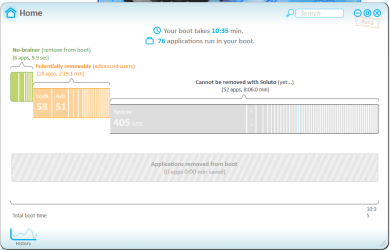
There is one more thing you could do. Run Soluto. It will tell you what is holding up the boot process. https://www.soluto.com/
 

My Computer My Computer

At a glance

Vista, Windows7, Mint Mate, Zorin, Windows 8from 1.6GHz Duo to i7
Computer Manufacturer/Model Number
HP, Dell, Gateway, Toshiba - 4 laptops and 2 desktops
OS
Vista, Windows7, Mint Mate, Zorin, Windows 8
CPU
from 1.6GHz Duo to i7
Monitor(s) Displays
2x HP w2207
Hard Drives
5x HDD, 7x SSD, 12x Externals
Keyboard
with trackball - no mices
Mouse
Trackball mice
Internet Speed
DSL 6000
I have downloaded the program but how do I use it?
Thanks whs
 

My Computer My Computer

At a glance

Windows 7 Home Premium x64Intel Core i7 860 @ 2.9Ghz6.00 GBATI Radeon HD 5570
Computer Manufacturer/Model Number
Packard Bell
OS
Windows 7 Home Premium x64
CPU
Intel Core i7 860 @ 2.9Ghz
Motherboard
ipower G5800
Memory
6.00 GB
Graphics Card(s)
ATI Radeon HD 5570
Sound Card
Realtek High Definition Audio
Screen Resolution
1920 x 1080
Keyboard
Standard PS/2 Keyboard
Mouse
Microsoft PS/2 Mouse
I have found out how to use it and it says that 400 seconds is spent on booting system. I have attached a picture.
 

Attachments

  • Capture.PNG
    Capture.PNG
    27.7 KB · Views: 12

My Computer My Computer

At a glance

Windows 7 Home Premium x64Intel Core i7 860 @ 2.9Ghz6.00 GBATI Radeon HD 5570
Computer Manufacturer/Model Number
Packard Bell
OS
Windows 7 Home Premium x64
CPU
Intel Core i7 860 @ 2.9Ghz
Motherboard
ipower G5800
Memory
6.00 GB
Graphics Card(s)
ATI Radeon HD 5570
Sound Card
Realtek High Definition Audio
Screen Resolution
1920 x 1080
Keyboard
Standard PS/2 Keyboard
Mouse
Microsoft PS/2 Mouse
I would like to ask if I haven't got a Windows 7 disc because it was pre-installed how do I get one so I can clean install? Wouldn't installing by an image or recovery CD's I made of the system mean the Factory bloat-ware goes back on the system because I would like to install without it.

Thanks,
 

My Computer My Computer

At a glance

Windows 7 Home Premium x64Intel Core i7 860 @ 2.9Ghz6.00 GBATI Radeon HD 5570
Computer Manufacturer/Model Number
Packard Bell
OS
Windows 7 Home Premium x64
CPU
Intel Core i7 860 @ 2.9Ghz
Motherboard
ipower G5800
Memory
6.00 GB
Graphics Card(s)
ATI Radeon HD 5570
Sound Card
Realtek High Definition Audio
Screen Resolution
1920 x 1080
Keyboard
Standard PS/2 Keyboard
Mouse
Microsoft PS/2 Mouse
Yes, using the recovery disks will put all the bloat back on.

Download a Windows ISO from mydigitallife.info. Burn in to a disk and install from it. Activate with your existing Product Key.

Make sure the version you download is exactly what was on the PC when you got it---for instance Home Premium, English, 64-bit.

http://www.mydigitallife.info/official-windows-7-sp1-iso-from-digital-river/
 

My Computer My Computer

At a glance

Windows 7 Home Premium SP1, 64-bitIntel Skylake i5-6600K, not overclocked8 GB HyperX DDR4-2666 (2 x 4 GB)none; graphics are integrated on CPU
Computer type
PC/Desktop
Computer Manufacturer/Model Number
Ignatz Special; 4 speed manual gearbox; factory air conditioning; one of one
OS
Windows 7 Home Premium SP1, 64-bit
CPU
Intel Skylake i5-6600K, not overclocked
Motherboard
AsRock Z170M Extreme 4, micro ATX
Memory
8 GB HyperX DDR4-2666 (2 x 4 GB)
Graphics Card(s)
none; graphics are integrated on CPU
Sound Card
onboard: Realtek ALC1150; external: USB Behringer UF0-202
Monitor(s) Displays
Dell S2340M 23 inch IPS
Screen Resolution
1600 x 900
Hard Drives
System: Crucial MX100 series SSD, 128 GB;
Data: Samsung Spinpoint 103SJ, 1 TB;
Backup: WD Caviar Green WD30EZRX-00D8PB0, 3 TB
PSU
Rosewill SilentNight 500 watt fanless, semi-modular
Case
Antec Solo II
Cooling
Noctua NH-U12S; Noctua F12 intake, Noctua S12A exhaust
Keyboard
Microsoft 200 6JH-00001 USB
Mouse
Dell or Microsoft optical wired; USB
Antivirus
Microsoft Security Essentials and Malwarebytes Premium
Browser
Pale Moon
Other Info
All fans PWM; speeds at idle: CPU circa 500 rpm; intake circa 600 rpm; exhaust circa 600 rpm; CPU temps 27 idle and 47 C load in a warm room (27 C/81 F) when running Intel Extreme Tuning Utility stress test.
Activate with your existing Product Key.
I assume that means with the product key on the COA sticker. The current OEM installation runs on a generic OEM key that works only with the OEM disc.
 

My Computer My Computer

At a glance

Vista, Windows7, Mint Mate, Zorin, Windows 8from 1.6GHz Duo to i7
Computer Manufacturer/Model Number
HP, Dell, Gateway, Toshiba - 4 laptops and 2 desktops
OS
Vista, Windows7, Mint Mate, Zorin, Windows 8
CPU
from 1.6GHz Duo to i7
Monitor(s) Displays
2x HP w2207
Hard Drives
5x HDD, 7x SSD, 12x Externals
Keyboard
with trackball - no mices
Mouse
Trackball mice
Internet Speed
DSL 6000
I would like to ask if I haven't got a Windows 7 disc because it was pre-installed how do I get one so I can clean install? Wouldn't installing by an image or recovery CD's I made of the system mean the Factory bloat-ware goes back on the system because I would like to install without it.

Thanks,

Everything you need is here to Clean Reinstall - Factory OEM Windows 7

if you have any further problems start a new thread in Installation.
 
Back
Top