Windows 7 installing Problems

shabee417

New member
Local time
8:42 PM
Messages
26
Dear Sir,

I Have two pc one is laptop one is desktop my problem i can inistal windows7 ultimat 32 bit into my laptop but when i going to inistal to my desktop 1st i put the dvd into drive then i press any key to boot the dvd after windows is loading file then starting windows after that display blank i had replaced my dvd drive, format all partition remove vga card then connect into board but same problem i can inistal by this way 1st inistal windows xp then put the windows7 dvd to drive then open the my computer then open dvd drive this way can inistal i am asking so many technicaian no body cudint find out this problem so pls help me to solve this problem

Thanks
Shabee
 

My Computer

Computer Manufacturer/Model Number
E7400
OS
windows7 ultimate 32bit
CPU
2core(TM)2duo CPU 2.80GHZ
Motherboard
intel
Memory
2 Gb
Graphics Card(s)
nvidia GeForce 9400GT
Sound Card
sound Blaster Audigy
Monitor(s) Displays
samsunng
Hard Drives
250 Sata

My Computer

OS
ME/XP/Vista/Win7
Last edited by a moderator:

My Computer

Computer Manufacturer/Model Number
E7400
OS
windows7 ultimate 32bit
CPU
2core(TM)2duo CPU 2.80GHZ
Motherboard
intel
Memory
2 Gb
Graphics Card(s)
nvidia GeForce 9400GT
Sound Card
sound Blaster Audigy
Monitor(s) Displays
samsunng
Hard Drives
250 Sata
Remove all but 2gb of RAM to try install.

Reset your CMOS: Clear CMOS - 3 Ways to Clear the CMOS - Reset BIOS

While in BIOS setup, set SATA controller to AHCI.

Try wiping the HD using Diskpart from DVD command prompt accessed by pressing Shift + F10 key at first DVD screen: Clean and Clean All with Diskpart Command
DISKPART At PC Startup

Unplug all peripherals and HD's.

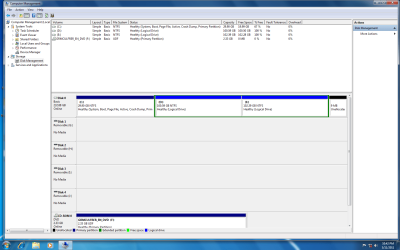
If the only way you can install is from XP, then go ahead and install Win7, post back a screenshot of your full Disk Management drive map with listings and we will show you how to remove XP and recover it's disk space and Win7 boot files placed there into the Win7 partition.
 
Last edited:

My Computer

Computer Manufacturer/Model Number
E7400
OS
windows7 ultimate 32bit
CPU
2core(TM)2duo CPU 2.80GHZ
Motherboard
intel
Memory
2 Gb
Graphics Card(s)
nvidia GeForce 9400GT
Sound Card
sound Blaster Audigy
Monitor(s) Displays
samsunng
Hard Drives
250 Sata
What is currently installed on C? DId you run the WIn7 installer from XP to overwrite XP there?
 
Yes Sir now in my pc windows7 on "c" i have over writ windows7 from xp. 1st i have inistaled xp then i put the windows7 os into drive then i went to my computer cd drivr then i inistaled windows7, i am using this methed by inistaling windows7 i want to inistal by booting level pls help me
 

My Computer

Computer Manufacturer/Model Number
E7400
OS
windows7 ultimate 32bit
CPU
2core(TM)2duo CPU 2.80GHZ
Motherboard
intel
Memory
2 Gb
Graphics Card(s)
nvidia GeForce 9400GT
Sound Card
sound Blaster Audigy
Monitor(s) Displays
samsunng
Hard Drives
250 Sata
What was the result for each step I gave you in post #4? You need to reply to each step so I know which new steps to give you.

If you have Win7 installed now, why do you want to reinstall from booted DVD? Are there performance problems?

We can easily help you change the partitioning if that is the issue.
 
Dear Sir 1st i clear cmos by removing jumber its done after that i am going to try to inistal w7 os agin same problem display balank after that i hve tryed to do other 2 option i dont thing its done or not but still my problem ****inue actulay this is hardware problem or softawre ? if i inistal w7 by this metode in c drive taking more sapce bcz my old xp file still balnce so i would like to inistal boot level, atleast i want know what is the problem in my pc why i cant inistal w7 by boot level
 

My Computer

Computer Manufacturer/Model Number
E7400
OS
windows7 ultimate 32bit
CPU
2core(TM)2duo CPU 2.80GHZ
Motherboard
intel
Memory
2 Gb
Graphics Card(s)
nvidia GeForce 9400GT
Sound Card
sound Blaster Audigy
Monitor(s) Displays
samsunng
Hard Drives
250 Sata
It is hard to help you troubleshoot the booted install when adequate feedback is not give about what you have already tried.

Did you try wiping the HD using DIskpart "Clean" command? You may have a corrupt boot sector. Follow the steps here, then boot the Win7 DVD to Custom Install, create your partition for install using Drive Options: SSD - HDD Optimize for Windows Reinstallation

If it fails again, do the "Clean" with Diskpart again, then use Step 2.2 in the tutorial above to create the partition and mark it Active.

Next try install from USB flash stick. Write the ISO to stick using this tool: Universal USB Installer – Easy as 1 2 3 | USB Pen Drive Linux

If you can install from XP, then one thing you can do to get a clean install is delete D and E partitions in Disk Management, create a 100gb Win7 install partition in that space, install Win7 to that empty space. We can then give you the steps to delete XP partition, recover its space and System boot files into Win7 partition using free Partition Wizard bootable CD.
 
Dear Sir Can i get your id pls ym or googletalk bcz i dont hve more experiance in software i am a technician of mobile phone
 

My Computer

Computer Manufacturer/Model Number
E7400
OS
windows7 ultimate 32bit
CPU
2core(TM)2duo CPU 2.80GHZ
Motherboard
intel
Memory
2 Gb
Graphics Card(s)
nvidia GeForce 9400GT
Sound Card
sound Blaster Audigy
Monitor(s) Displays
samsunng
Hard Drives
250 Sata
We troubleshoot in the thread here so others can learn.

Go step by step.

If you have a question on a step, ask back until you are clear how to do it.

The blue links are tutorials you can click on to read more on how to do the step.
 
I have had three rig do this all with the onboard Video Processor: GeForce 9400 GT, out of over 5000 installs.(Windows 7 no sp1)
All SOLVED by installing Vista first.
May be solved with Windows 7 sp1.(untested)
 

My Computer

OS
ME/XP/Vista/Win7
sir whn i going to clear all showing like this "vertual disk service error clean is not allowed on the disk containing the current sistem page file"
 
Last edited:

My Computer

Computer Manufacturer/Model Number
E7400
OS
windows7 ultimate 32bit
CPU
2core(TM)2duo CPU 2.80GHZ
Motherboard
intel
Memory
2 Gb
Graphics Card(s)
nvidia GeForce 9400GT
Sound Card
sound Blaster Audigy
Monitor(s) Displays
samsunng
Hard Drives
250 Sata
You'll need to boot into the Win7 DVD or Repair CD Command Line to run Diskpart Clean command.
DISKPART At PC Startup
Clean and Clean All with Diskpart Command

In light of theog's report above, since you know you can install Win7 from XP I suggest you install from XP to a new partition you create.

We can help you remove the XP partition afterwards, so it will be like a clean install.
 
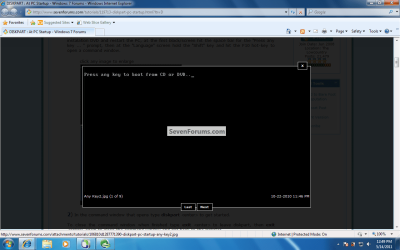
Look sir i will explain you properly about my problems please spend "10" mints for me 1st we put the windows7dvd into drive 1st we will get this stup

Untitled1.png

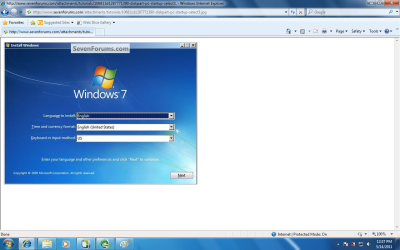
After i am going to press any key to boot the dvd now display showing "windows is loading file" ok the next stup disply showing "windows starting" after that usaly this stup will come in all pc


Untitled2.png

but in my pc this stup will not come. here dipaly fully black this is my problem

now i have inistaled windows7 from xp then i went to do as u told me Clean All a Disk with the Diskpart Command if iam typing "clean all" command showing like this look this screen shot

Untitled.png
 
Last edited:

My Computer

Computer Manufacturer/Model Number
E7400
OS
windows7 ultimate 32bit
CPU
2core(TM)2duo CPU 2.80GHZ
Motherboard
intel
Memory
2 Gb
Graphics Card(s)
nvidia GeForce 9400GT
Sound Card
sound Blaster Audigy
Monitor(s) Displays
samsunng
Hard Drives
250 Sata
Once again, you need to boot the Win7 DVD to run Diskpart Clean commands from the DVD's Command Line.

Once DVD boots at the first screen press Shift + F10 to open a Command Box to run the Diskpart Commands. These will wipe the entire HD clean so you can try installing Win7 by itself.

You may not be able to install Win7 with the Graphics Card you have. See Theog's post above. Since you know you can install from XP, I suggest you create a partition to clean install Win7 upon from your XP setup. We can then show you how to remove XP so only Win7 remains.
 

My Computer

Computer Manufacturer/Model Number
* BFK Customs *
OS
W 7 64-bit Ultimate
CPU
Intel Q9550 Yorkfield
Motherboard
ASUS P5Q Pro
Memory
8GB Dominator 8500C5D
Graphics Card(s)
ATI : XFX 5870
Sound Card
Realtek HD Audio 7-1
Monitor(s) Displays
1x 47" LCD HDMI & 3x 26" LCD HDMI
Screen Resolution
1920x1080P & 1920x1200
Hard Drives
1x 80GB Intel X25-M G2 SSD : 1x 500GB & 1x 640GB WD Caviar Black(s)
PSU
Corsair 620HX
Case
Cooler Master RC-690
Cooling
Tuniq Tower 120, 2x 140mm and 3x 120mm case fans
Keyboard
Microsoft 500
Mouse
Razer Diamondback 3G
Internet Speed
14 Mb/s
Other Info
1x Koutech 3Gb/s SATA HDD Hot Swap Rack
maybe a little something from my installation experience might help..

first, you cant upgrade from xp to windows 7; you must boot up from the dvd..
booting up from the disk, you can do a custom installation, meaning you can choose to overwrite your previous windows installation (format then fresh install) or you can install it on a different partition.

question.. did the installation finish? was it completed? it restarted? then the unexplainable blackout?
if you answered all yes, what display unit are you using? do you have an onboard gp?

if you have high definition display, you might need to disable first those hd options from your cmos.. (not really familiar with it so i cant give you enough details)..

or, if you have an onboard gp, i might suggest you use that instead of the pci-e..

if you're wondrin' why i suggested this.. windows 7 has this feature that it sets a recommended screen resolution which best works with your gpu, regardless of the display unit you are currently using (upon installation). now, if you're display unit cannot support this screen resolution, the only thing you will be seeing from your display unit is black..

try to boot your windows 7 again (if it has completed installation).. if you reach the screen displaying "preparing windows for first use" (or atleast something like that) then you're good to go..

if this did not solve the issue, im sorry coz i cant help you anymore.. this was based only from my experience installing windows 7 which had screen resolution problems..

goodluck!
 

My Computer

OS
Windows 7 Ultimate, Windows 8 CP
CPU
Athlon X2 7750
Motherboard
MSI 780
Memory
3Gb 800Mhz
Hard Drives
Maxtor 40Gb IDE
Seagate Barracuda 500Gb Sata
PSU
Cougar RS550
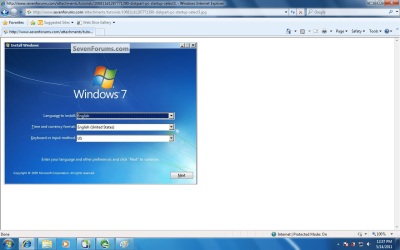
Dear Sir how can i get Diskpart Commands box i told you the language box will not come in my pc look into screen shot in this place showing display fully blank

Untitled2.png

Why in this place fullly blank when i inistaling time
 

My Computer

Computer Manufacturer/Model Number
E7400
OS
windows7 ultimate 32bit
CPU
2core(TM)2duo CPU 2.80GHZ
Motherboard
intel
Memory
2 Gb
Graphics Card(s)
nvidia GeForce 9400GT
Sound Card
sound Blaster Audigy
Monitor(s) Displays
samsunng
Hard Drives
250 Sata
Back
Top