Windows 7 installs a system on data disk

Bobke57

New member
Local time
7:43 PM
Messages
14
I have 2 physical disks: disk0 is completely for data, and disk1 has 3 partitions: one for Vista (that I already had), a second where I just installed Windows 7 (to have a dual boot system), and a third also for data.
After installation, I notice that on disk0 there is now also a system on it (according to disk management), which is probably the reason that when I want to make an Image Backup, it is selected by default as well, making it huge.
Is the reason why this happened the fact that my data disk is disk0? Is there a way to remove that system component, move it to another partition?
Before, when I had only Vista, I could create Image BU's of only the C-drive.
Any advise is much appreciated.
 

My Computer

OS
Windows 7
A snipit of your Disk Management window might help.

How did you boot before with Vista on Drive 1 instead of Drive 0? Do you know where the boot files were?

Would it be a problem for you to reinstall Win 7 or Vista?

Is it not an option to leave the Win 7 install on Drive 0 and adjusting the size of the partition if you needed to?
 

My Computer

Computer Manufacturer/Model Number
Homebuilt
OS
Windows 7 x64
CPU
i7-2600K
Motherboard
Asus P8Z77-v Pro
Memory
8 G
Graphics Card(s)
GTX 480
Sound Card
Onboard
Monitor(s) Displays
LG W2753V
Screen Resolution
1920x1080
Hard Drives
Crucial M4 128 G SSD
Sounds like your MBR has been derailed to the data partition, a good reason to unplug all other drives during install.

We help people fix these problems here every day. We only need to see a screenshot of your full Disk Management map to advise you of the exact steps. Use the Snipping tool in the Start menu, attach file using paper clip in reply box.

You'll be using the booted Win7 DVD repair console to mark Data partition inactive, Win7 partition active, then swap cables or change BIOS boot order so Win7 HD boots first, run Startup Repair 3 times to rewrite MBR to Win7.

But other settings may also be wrong, so we need to see the screenshot before advising for sure.
 
Thanks both of you for your quick reply.
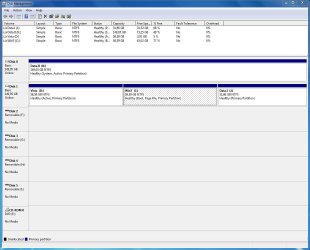
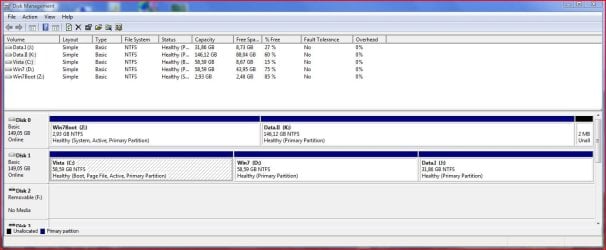
As requested, I attached snippets of the disk manager window (booted respectively in Windows 7 and in Vista). Immediately after installing Windows 7, Disk0 was not shown in Windows Explorer, I found out that it was not given a driveletter by the installation program. I also noticed that Windows 7 had placed his paging file on this Disk0/Data.II, but I already moved that to the Win7 partition.

@Saltgrass: I never knew where the boot files were when I only had Vista. But looking at the disk manager window, I guess that Vista has that on the Vista-partition?
No problem, if that is necessary, I can always reinstall Windows 7, since I don't have installed too many applications there. Reinstalling Vista would be a bit more work, but if there is no alternative, I can always do that.
Your suggestion to leave it there and adjust the size of the partition seem to be an excellent idea to me, thanks!
I can see a file 'bootmgr' on Data.II, as well as a 'Bootsec.bak'. If it concerns only those two files, a partition of a few MB's would be sufficient? Or I can make it larger, so it can also hold the paging file?

@Gregrocker: Would it indeed not the simplest solution to do as suggested by Saltgrass: leave it there, and shrink that partition, after moving all my data to a second partition on that disk? If necessary, I might use a tool like PerfectDisk to move the system components to the start of the existing partition?

Thanks again, I appreciate it very much!
 

Attachments

  • DiskmgmtWin7.JPG
    DiskmgmtWin7.JPG
    100.6 KB · Views: 64
  • DiskmgmtVista.JPG
    DiskmgmtVista.JPG
    99.1 KB · Views: 38

My Computer

OS
Windows 7
When you check the root folder of Drive 0, you show four items. A Boot folder, bootmgr, pagefile.sys, hiberfil.sys.

If this is the case, your disk 0 was the primary boot drive and it was set to active, so the boot files were placed there. Do you show those same files in the root directory of either Vista or Win 7 partitions?

What happens if you change the drive order in the bios? If vista was booting before, it should boot again, but you will probably not have a boot menu, but that can be fixed. If you go into the computer, you might swap the connections, but wait until you test it first.
 

My Computer

Computer Manufacturer/Model Number
Homebuilt
OS
Windows 7 x64
CPU
i7-2600K
Motherboard
Asus P8Z77-v Pro
Memory
8 G
Graphics Card(s)
GTX 480
Sound Card
Onboard
Monitor(s) Displays
LG W2753V
Screen Resolution
1920x1080
Hard Drives
Crucial M4 128 G SSD
[FONT=&quot]Hi Saltgrass,[/FONT]
[FONT=&quot]In the root folder of the drive 0, there is indeed a Boot folder, and bootmgr. But no pagefile.sys, and no hiberfil.sys. [/FONT]
[FONT=&quot]In the Windows 7 root folder, there is pagefile.sys and hiberfil.sys, no Boot folder, nor bootmgr. [/FONT]
[FONT=&quot]In the Vista root folder, there is a Boot folder, bootmgr and pagefile.sys. No hiberfil.sys (but is this not for hibernation? I remember deleting this with CleanUp, since I never go to hibernate in Vista, did not work well here).[/FONT]
[FONT=&quot]I will try to change the boot order in BIOS, but I would expect it will do as you said, it will boot in Vista, and in Vista only.[/FONT]
[FONT=&quot]Should I do both this change in the BIOS, and (at the same time) swap the connections? Or one after the other, so redo the change in Bios first?[/FONT]
[FONT=&quot]
[/FONT]
Maybe also important to know: after installation of Windows 7, it booted immediately in Windows 7, there was no option to go in Vista. It was only after I executed a Repair with the Vista DVD, that I got the dual boot option.

[FONT=&quot][/FONT]
[FONT=&quot]Could you please explain, if I change the primary boot drive, will I have the boot files for Windows 7 in the Vista drive? That would have for result that if I create an Image backup, I will always have both the Vista and Windows 7 selected by default, which I would not like, I prefer them separated.[/FONT]
[FONT=&quot]What are the disadvantages of leaving disk0 as the primary boot drive?[/FONT]
 

My Computer

OS
Windows 7
In order to achieve your goal of having Win7 be the System Active boot drive so that no other is included in Backup Imaging, we will remove Active from Data and Vista, hand it to Win7, recover System critical boot files into Win7, then from Win7 add Vista back to Dual Boot menu.

Backup your files and a Win7/Vista image.

Boot into Win7 DVD repair console, click through to Recovery tools list, open a Command Line and type:

DISKPART
LIST DISK
SELECT DISK # (for Data HD)
LIST PARTITION
SELECT PARTITION #
INACTIVE
SELECT DISK # (For Vista/Win7 HD)
LIST PARTITION
SELECT PARTITION # (For Vista partition)
INACTIVE
SELECT PARTITION # (For Win7 partition)
ACTIVE
EXIT

Power down to switch drive cables if possible. Reboot, Enter BIOS Setup (normally by tapping F2) to set Win7 as first HD in Boot order, after DVD.

Now boot into Win7 DVD Repair console, click through to Startup Repair and run 3 separate times to rewrite the MBR to Win7.

From Win7, check in Disk Mgmt. to confirm Win7 is now System drive. Install EasyBCD 2.0, on Add/Remove tab Add Vista by name, type, drive letter. View attachment 44355
 
I can confirm that when I changed the Boot order in BIOS, it boots up in Vista, without showing me a dual-boot option.

Hi Gregrocker, thanks for your explanation.
Will do as you suggest, but this will take some time for me, so I will report back afterwards. Since I also never used EasyBCD before, I will try to read about it before.

Could you provide a few clarifications to be sure: when doing Startup Repair 3 times, do I need to type/enter anything? And should I reboot each time, or can I just do it 3 times in a row?
In the tutorial for BCDEdit of this forum, there is a suggestion to make a backup of the BCD file first, which seem a very wise advise to me. Can I do that in EasyBCD as well?
Thanks again.
 

My Computer

OS
Windows 7
Since Vista will boot when you switch the BIOS boot order, I would follow Saltgrass's advice to switch the cables so Vista/Win7 HD is in DISK0 position, then set it to boot first.

Now unplug data drive, boot into Vista and install EasyBCD. Add Win7 on the Add/Remove tab by Name, Type and Drive letter, which should autocomplete. View attachment 44597

Now reboot to see if Dual Boot is recovered.

If not, Boot into Win7 DVD Repair console to run Startup Repair repeatedly until Win7 starts. From the Win7 desktop, run a http://www.sevenforums.com/tutorials/3413-repair-install.html?ltr=R to correctly reconfigure the Dual Boot as it does when installed last and there is no active data drive to derail the boot.

Then you can plug the data drive back in as DISK1 to format. To avoid data drives derailing the boot, format logical and have OS in DISK0 position.
 
Last edited:
I would, since you have confirmed Vista will boot normally, go inside and swap the connections to the hard drives, then change the boot order in the bios to set the System drive to boot first.

Another way would be to disconnect the Data drive until you get the dual boot working, then re-attach it. I just feel as long as the partition on the Data drive is active, it should not be drive 0.

EasyBCD should then be able to set up the dual boot and you are set.

If you want, after everything is set up, you can delete the boot files on the DATA disk, just make sure which disk you are looking at.
 

My Computer

Computer Manufacturer/Model Number
Homebuilt
OS
Windows 7 x64
CPU
i7-2600K
Motherboard
Asus P8Z77-v Pro
Memory
8 G
Graphics Card(s)
GTX 480
Sound Card
Onboard
Monitor(s) Displays
LG W2753V
Screen Resolution
1920x1080
Hard Drives
Crucial M4 128 G SSD
To all of you: Happy New Year! I hope that 2010 will be a healthy, happy and prosperous year for both of you!

If I understand it correctly, the difference between the 2 solutions that you suggested (either execute the Diskpart commands first as you suggested earlier, Gregrocker, or starting with the switch of the cables according the last suggestion of you both), is that I would have as active partition either the Win7 partition, or the Vista partition, and the dual boot option would reside in the BCD of that active partition.
But than, either way, an image backup of the other system would select that active partition as well by default, isn't that correct? So I would only achieve it half way, my goal of having each of those image backups separately.

Now what I have been doing untill now, is according to the idea that you Saltgrass gave me on your very first reply in this thread: moving my data from the data disk0 to somewhere else, and shrink the data partition to a small size.
The configuration that I have now, is the following (see also the snippet attached):
- disk0 has 2 partitions: a small one (3 GB) with the boot files of Win7 (I named it Win7Boot), and a second one with my data (Data.II).
- disk1 has still 3 partitions: one for Vista, one for Windows 7, and a last one for data (Data.I)
Boot sequence is unchanged as before: booting in disk0.
I already made image backups:
- for Windows 7 it included Win7Boot and Win7, which is normal I think
- for Vista it included Win7Boot and Vista, I guess because Win7Boot is a common system component since I booted from there. Because Win7Boot is small, this is OK for me.
So, although it might seem to be an unusual configuration, I reached my goal fully.
The question is then: what are the disadvantages of this configuration (apart from the fact that I will always need both disks) ? Can I just keep it this way, or will I encouter problems in the future if I do that?

The most ideal situation would probably be to have on the same physical disk, the 3 different partitions: Win7Boot, Win7 and Vista. But I don't know if there is a way to make that? Is there a way to just move a partition to another location, even to another physical disk (simple copy and paste will not work, I presume) ?

Somewhere in the future, it is possible that I want to return to a single boot configuration, getting rid of Vista and keeping only Windows 7. I don't know if this should be a consideration in making the choice for today? Probably I will be able to do that no matter what dual boot configuration I have ?

By the way, I found on disk0 actually a 3rd partition at the end of it, a 2 MB Unallocated partition, that Disk Management left there when I created the Data.II partition. It has the status of unallocated, but I can't extend the Data.II partition to include those 2 MB. What is that? Can it be part of Windows 7 as well?

My apologies for the so many questions I have, but I am learnig a lot!

 

Attachments

  • Diskmgmt.JPG
    Diskmgmt.JPG
    95.4 KB · Views: 5

My Computer

OS
Windows 7
The optimal way to achieve your goal of only having Win7 included in Win7 Backup Image is to recover the System Active boot into Win7, then add Vista to the dual boot with EasyBCD 2.0.

The MBR was derailed to the data drive during install because it was in DISK0 position and somehow got marked Active. Windows looks for the first Active partition to place the MBR when configuring a dual boot.

I personally would not operate this way since the fix is known and failsafe with a Win7 backup image to start over at any time.
 
Back
Top