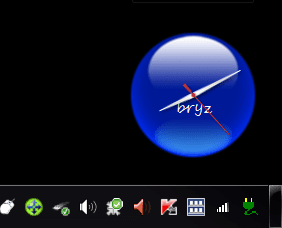
windows 7 internet connection in taskbar is not working i found this on the Microsoft site > but it still dont work on my machine !!! please help !!!!!!
United Kingdom Change | All Microsoft Sites
Help and Support
Support Home Solution Centers Advanced Search Downloads Buy products
Article ID: 937477 - Last Review: October 30, 2009 - Revision: 2.0
After you wake a Windows Vista-based computer or a Windows 7-based computer from sleep or from hibernation, the network icon and the speaker icon in the notification area do not show the correct status
View products that this article applies to.
Expand all | Collapse all
SYMPTOMS
After you wake a Windows Vista-based computer or a Windows 7-based computer from sleep or from hibernation, you experience the following symptoms:
The network icon in the notification area at the far right of the taskbar is not updated to show the connectivity status of the computer.
The network icon in the notification area at the far right of the taskbar may show a red "X" mark instead of showing the correct connectivity status of the computer.
If you connect a network cable to the computer or if you connect to a wireless network, the network icon in the notification area incorrectly shows the connectivity status as disconnected.
If you move the pointer over the network icon in the notification area, the Currently connected to ScreenTip does not appear as expected.
If you click the network icon in the notification area, the Currently connected to ScreenTip does not appear as expected.
Note In this case, the expected ScreenTip should contain a Connect to a network link and a Network and Sharing Center link.
The speaker icon in the notification area at the far right of the taskbar may show a red "X" mark instead of showing the correct speaker status.
You experience these symptoms even though you can successfully connect both to wired networks and to wireless networks and the speakers are functioning correctly.
Back to the top
CAUSE
This issue occurs if the computer enters sleep or hibernation before it finishes notifying the part of the system that controls the network-icon functionality.
Back to the top
WORKAROUND
To work around this issue, use one of the following procedures:
Restart the computer.
Use the Network and Sharing Center to view the connectivity status of the computer. To open the Network and Sharing Center, click Start, type Network and Sharing Center in the Start Search box, and then click Network and Sharing Center in the Programs list.
End the Explorer.exe process, and then restart this process. To do this, follow these steps:
Open Task Manager. To do this, press CTRL+SHIFT+ESC.
Click the Processes tab.
In the list of processes, click explorer.exe, and then click End Process.
When you are prompted to confirm that you want to continue, click End process.
On the File menu, click New Task (Run...).
In the Create New Task dialog box, type %systemroot%\explorer.exe in the Open box, and then click OK.
Back to the top
MORE INFORMATION
This issue occurs very rarely.
For more information about the sleep state and about the hibernation state in Windows Vista, see the "Turn off a computer: frequently asked questions" topic in Windows Help and Support. To view this information online, visit the following Microsoft Web site:
Turn off a computer: frequently asked questions
Back to the top
APPLIES TO
Windows 7 Enterprise
Windows 7 Home Basic
Windows 7 Home Premium
Windows 7 Professional
Windows 7 Starter
Windows 7 Ultimate
Windows Vista Ultimate
Windows Vista Enterprise
Windows Vista Business
Windows Vista Home Premium
Windows Vista Home Basic
Windows Vista Ultimate 64-bit Edition
Windows Vista Enterprise 64-bit Edition
Windows Vista Business 64-bit Edition
Windows Vista Home Premium 64-bit Edition
Windows Vista Home Basic 64-bit Edition
Windows Vista Starter
Back to the top
Keywords:
kbprb kbexpertisebeginner kbtshoot KB937477
Back to the top
Get Help Now
Contact a support professional by E-mail, Online, or Phone
Article Translations
View related content
802.11g is displayed instead of 802.11n for the wireless network ...
How do I know if a wireless network is secure?
Vista SP2 will not connect to WEP network
After a Windows Vista-based computer resumes from hibernation, the ...
virtualboy : Network Location Settings in Windows Vista
Search related topics
Notification area
Hibernation problem
Network cable
Print notification
Turn off print notification
Related Support Centers
Windows 7
Windows Vista
Page Tools
Print this page
E-mail this page
Get Help Now
Contact a support professional by E-mail, Online, or Phone
Microsoft Support
Services Agreement
Contact Us | Terms of Use | Trademarks | Privacy Statement
©2010 Microsoft
United Kingdom Change | All Microsoft Sites
Help and Support
Support Home Solution Centers Advanced Search Downloads Buy products
Article ID: 937477 - Last Review: October 30, 2009 - Revision: 2.0
After you wake a Windows Vista-based computer or a Windows 7-based computer from sleep or from hibernation, the network icon and the speaker icon in the notification area do not show the correct status
View products that this article applies to.
Expand all | Collapse all
SYMPTOMS
After you wake a Windows Vista-based computer or a Windows 7-based computer from sleep or from hibernation, you experience the following symptoms:
The network icon in the notification area at the far right of the taskbar is not updated to show the connectivity status of the computer.
The network icon in the notification area at the far right of the taskbar may show a red "X" mark instead of showing the correct connectivity status of the computer.
If you connect a network cable to the computer or if you connect to a wireless network, the network icon in the notification area incorrectly shows the connectivity status as disconnected.
If you move the pointer over the network icon in the notification area, the Currently connected to ScreenTip does not appear as expected.
If you click the network icon in the notification area, the Currently connected to ScreenTip does not appear as expected.
Note In this case, the expected ScreenTip should contain a Connect to a network link and a Network and Sharing Center link.
The speaker icon in the notification area at the far right of the taskbar may show a red "X" mark instead of showing the correct speaker status.
You experience these symptoms even though you can successfully connect both to wired networks and to wireless networks and the speakers are functioning correctly.
Back to the top
CAUSE
This issue occurs if the computer enters sleep or hibernation before it finishes notifying the part of the system that controls the network-icon functionality.
Back to the top
WORKAROUND
To work around this issue, use one of the following procedures:
Restart the computer.
Use the Network and Sharing Center to view the connectivity status of the computer. To open the Network and Sharing Center, click Start, type Network and Sharing Center in the Start Search box, and then click Network and Sharing Center in the Programs list.
End the Explorer.exe process, and then restart this process. To do this, follow these steps:
Open Task Manager. To do this, press CTRL+SHIFT+ESC.
Click the Processes tab.
In the list of processes, click explorer.exe, and then click End Process.
When you are prompted to confirm that you want to continue, click End process.
On the File menu, click New Task (Run...).
In the Create New Task dialog box, type %systemroot%\explorer.exe in the Open box, and then click OK.
Back to the top
MORE INFORMATION
This issue occurs very rarely.
For more information about the sleep state and about the hibernation state in Windows Vista, see the "Turn off a computer: frequently asked questions" topic in Windows Help and Support. To view this information online, visit the following Microsoft Web site:
Turn off a computer: frequently asked questions
Back to the top
APPLIES TO
Windows 7 Enterprise
Windows 7 Home Basic
Windows 7 Home Premium
Windows 7 Professional
Windows 7 Starter
Windows 7 Ultimate
Windows Vista Ultimate
Windows Vista Enterprise
Windows Vista Business
Windows Vista Home Premium
Windows Vista Home Basic
Windows Vista Ultimate 64-bit Edition
Windows Vista Enterprise 64-bit Edition
Windows Vista Business 64-bit Edition
Windows Vista Home Premium 64-bit Edition
Windows Vista Home Basic 64-bit Edition
Windows Vista Starter
Back to the top
Keywords:
kbprb kbexpertisebeginner kbtshoot KB937477
Back to the top
Get Help Now
Contact a support professional by E-mail, Online, or Phone
Article Translations
View related content
802.11g is displayed instead of 802.11n for the wireless network ...
How do I know if a wireless network is secure?
Vista SP2 will not connect to WEP network
After a Windows Vista-based computer resumes from hibernation, the ...
virtualboy : Network Location Settings in Windows Vista
Search related topics
Notification area
Hibernation problem
Network cable
Print notification
Turn off print notification
Related Support Centers
Windows 7
Windows Vista
Page Tools
Print this page
E-mail this page
Get Help Now
Contact a support professional by E-mail, Online, or Phone
Microsoft Support
Services Agreement
Contact Us | Terms of Use | Trademarks | Privacy Statement
©2010 Microsoft
My Computer
- Computer Manufacturer/Model Number
- packard bell IXTREME M5722
- OS
- Operating System : Windows 7 Home Premium Edition 6.01.7600 SP1 (x64)
- CPU
- Processor : Intel Core 2 Quad Q8300 @ 2500 MHz
- Motherboard
- Mainboard : Packard Bell (Acer EG43M )
- Memory
- Physical Memory :8GB Corsair4x 2GB 800MHz C5 DDR2
- Graphics Card(s)
- Video Card : XFX 6700 AMD
- Monitor(s) Displays
- Maestro 234DL - BenQ V2220 - BenQ VW2420H
- Screen Resolution
- Current Display :1920x1080p pixels at 60 Hz in HD LED
- Hard Drives
- Hard Disks : WDC (1000 GB)
Drive C: (Hard Disk) : 428 GB available on 491 GB
Drive D: (Hard Disk) : 426 GB available on 492 GB
SAMSUNG spinpoint HD103SJ 1000.2 GB
(X 2) KINGSTON SSD NOW V 30GB
- PSU
- XFX ProSeries 550W PSU
- Case
- PACKARD BELL IXTREME
- Cooling
- System Blower Current: 150mA Air Flow16CFM ;Akasa 90mm rear
- Keyboard
- Gigabyte Aivia K8100
- Mouse
- TRUST-Wireless Laser Mouse - Carbon edition MI-7770C
- Internet Speed
- TP-LINK > TL-WN951N / AV500 Gigabit Powerline Adapters
- Browser
- chrome dev
- Other Info
- EXTRA COOLING>(FAN CONTROLLER) PC Bay Cooler 3 x 40mm fans; Akasa AK-HD-BL Blue hard drive cooler 2 x 40 mm fan 4500 rpm 29.7 dBA
Bios> American Megatrends Inc.
Version : P01-A1
Date : 08/31/2009

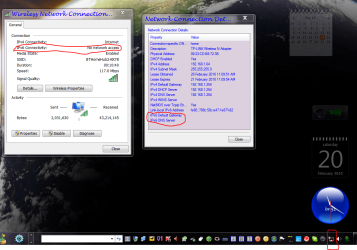

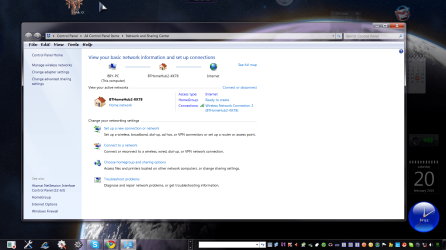
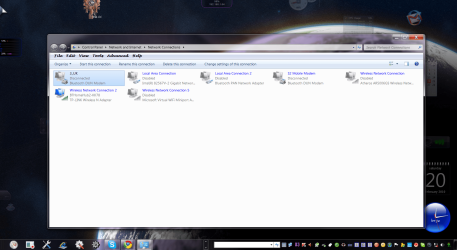
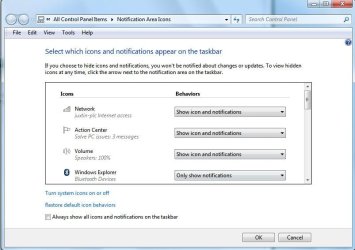
 so anyone else out there with this problem check what you have installed to do with networking!!!!