Windows 7 keeps moving my paging file back to C drive

CPU101

New member
Local time
7:08 AM
Messages
3
So I see many many threads in here about how to move a paging file to a different drive and change its size. My question is, how do you force windows to keep those settings and not set them back to default.

For about a week now I've been trying to get my paging file to stay on my HDD instead of SSD. And no, I don't really care for "just keep it on your SSD" comments - that's not the point.

What can be causing windows to reset my paging file? It doens't just happen on a reboot, it usually happens on the next day after 2-3 reboots. After I change the settings and reboot, it appears that windows keeps them for a bit.

My TMP and TEMP environment variables keep getting reset to C:\WINDOWS\TEMP as well, and I keep changing them to E:\TEMP. And on top of all that, IE will also reset Temporary Internet Files folder.

I have only one account on my PC, so it's not due to the lack of administator priviliges either.
 

My Computer My Computer

At a glance

Windows 7 64 bit
Computer type
PC/Desktop
OS
Windows 7 64 bit
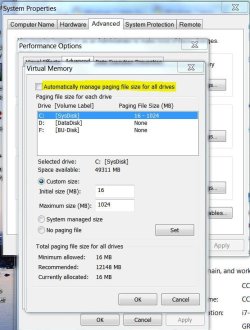
Post a snipit of your pagefile options. Make sure the highligted option is unchecked. (See below)
 

Attachments

  • Pagefile.JPG
    Pagefile.JPG
    66.1 KB · Views: 17

My Computer My Computer

At a glance

Windows 7 Pro-x64i7-2600 3.4GHz - 3.8GHz Turbo8Gb - 2x4GB, Muskin 991770 PC3-1333Integrated Intel HD 2000
Computer type
PC/Desktop
Computer Manufacturer/Model Number
Built 2/11/2011
OS
Windows 7 Pro-x64
CPU
i7-2600 3.4GHz - 3.8GHz Turbo
Motherboard
Intel DH67BL-B3
Memory
8Gb - 2x4GB, Muskin 991770 PC3-1333
Graphics Card(s)
Integrated Intel HD 2000
Sound Card
Integrated Intel 10.1 HD, RealTek ALC892
Monitor(s) Displays
Asus LCD VH222H, Haier HL24XSL2a
Screen Resolution
1920x1080, 1920x1080
Hard Drives
Crucial SSD C300-128Gb,
Western Digital WD5002AALX - 500Gb,
Western Digital WD7501AALS - 750Gb
PSU
Seasonic 650W 80+ Gold Modular
Case
Rosewill Defender
Cooling
Stock CPU, Four 120mm case fans, PCH fan added
Keyboard
Logitech EX100 Y-RBH94 Wireless
Mouse
Logitech EX100 M-RCE95 Wireless
Internet Speed
3.0/1.5 Mbs
Antivirus
Microsoft Security Essentials
Browser
Microsoft Internet Explorer 11
Other Info
Antec Veris Premier-Multimedia IR Station,
Cyber Accoustics-3602 Speakers,
AFT XM-5U Card Reader,
Hauppauge TV-HVR-2250,
Sony LX300 USB Turntable
By the way, all you'll achieve by moving those files is slow down your computer.
 

My Computer My Computer

At a glance

Windows 7 Pro-x64i7-2600 3.4GHz - 3.8GHz Turbo8Gb - 2x4GB, Muskin 991770 PC3-1333Integrated Intel HD 2000
Computer type
PC/Desktop
Computer Manufacturer/Model Number
Built 2/11/2011
OS
Windows 7 Pro-x64
CPU
i7-2600 3.4GHz - 3.8GHz Turbo
Motherboard
Intel DH67BL-B3
Memory
8Gb - 2x4GB, Muskin 991770 PC3-1333
Graphics Card(s)
Integrated Intel HD 2000
Sound Card
Integrated Intel 10.1 HD, RealTek ALC892
Monitor(s) Displays
Asus LCD VH222H, Haier HL24XSL2a
Screen Resolution
1920x1080, 1920x1080
Hard Drives
Crucial SSD C300-128Gb,
Western Digital WD5002AALX - 500Gb,
Western Digital WD7501AALS - 750Gb
PSU
Seasonic 650W 80+ Gold Modular
Case
Rosewill Defender
Cooling
Stock CPU, Four 120mm case fans, PCH fan added
Keyboard
Logitech EX100 Y-RBH94 Wireless
Mouse
Logitech EX100 M-RCE95 Wireless
Internet Speed
3.0/1.5 Mbs
Antivirus
Microsoft Security Essentials
Browser
Microsoft Internet Explorer 11
Other Info
Antec Veris Premier-Multimedia IR Station,
Cyber Accoustics-3602 Speakers,
AFT XM-5U Card Reader,
Hauppauge TV-HVR-2250,
Sony LX300 USB Turntable
By the way, all you'll achieve by moving those files is slow down your computer.
Perhaps. Again, I don't really care about that. It would be nice to be able to actually compare two different settings. But for right now I'm forced with just one option.

Here's how my settings look like right after I reboot:
settings.jpg
 

My Computer My Computer

At a glance

Windows 7 64 bit
Computer type
PC/Desktop
OS
Windows 7 64 bit
We need more information on your system. Is it an OEM PC or did you assemble it yourself? Some OEMs lock those settings. The environment variables being reset for Temp files may be a clue too but we need to know what type of drives are listed and are any used for Windows Backup?. Why does "System Reserved" have a drive letter? Did you assign the letter D or did you attempt re-install Windows?

Submitting the files in this procedure will provide the detail needed to review your system settings and hardware. There won't be any dumps unless you have old ones on disk but that's not what's needed anyway.
 

My Computer My Computer

At a glance

Windows 7 Pro-x64i7-2600 3.4GHz - 3.8GHz Turbo8Gb - 2x4GB, Muskin 991770 PC3-1333Integrated Intel HD 2000
Computer type
PC/Desktop
Computer Manufacturer/Model Number
Built 2/11/2011
OS
Windows 7 Pro-x64
CPU
i7-2600 3.4GHz - 3.8GHz Turbo
Motherboard
Intel DH67BL-B3
Memory
8Gb - 2x4GB, Muskin 991770 PC3-1333
Graphics Card(s)
Integrated Intel HD 2000
Sound Card
Integrated Intel 10.1 HD, RealTek ALC892
Monitor(s) Displays
Asus LCD VH222H, Haier HL24XSL2a
Screen Resolution
1920x1080, 1920x1080
Hard Drives
Crucial SSD C300-128Gb,
Western Digital WD5002AALX - 500Gb,
Western Digital WD7501AALS - 750Gb
PSU
Seasonic 650W 80+ Gold Modular
Case
Rosewill Defender
Cooling
Stock CPU, Four 120mm case fans, PCH fan added
Keyboard
Logitech EX100 Y-RBH94 Wireless
Mouse
Logitech EX100 M-RCE95 Wireless
Internet Speed
3.0/1.5 Mbs
Antivirus
Microsoft Security Essentials
Browser
Microsoft Internet Explorer 11
Other Info
Antec Veris Premier-Multimedia IR Station,
Cyber Accoustics-3602 Speakers,
AFT XM-5U Card Reader,
Hauppauge TV-HVR-2250,
Sony LX300 USB Turntable
Ok, I'll get some more quick data and will work on that diagnostic tool.

Self-build box, Windows 7 64bit on it. C drive is on SSD, it hosts UEFI system partition and the main boot partition. The other three letters are the 1 TB Samsung HDD, which used to host previous Win7 32bit in my old box - that's why there's a letter D for "system reserved". Drive E: used to be the boot partition for that version of windows.

Basically, the way I see it, the most likely cause for this strange behavior would be due to windows somehow thinking that paths for the page file, temp directory, and internet temporary files are not vaild at some point during startup. I'm going to format E: drive and perhaps change some settings in BIOS for the HDD - I think I may have it set to be hot-swappable.
 

My Computer My Computer

At a glance

Windows 7 64 bit
Computer type
PC/Desktop
OS
Windows 7 64 bit
1. The Temp folder you cannot move. Windows will always recreate it.
2. The pagefile you can move, but I think a minimum file of 16MB has to remain on C. If you have more than 4GB of RAM, the pagefile is probably hardly ever used. So I would set it to a very small value.
 

My Computer My Computer

At a glance

Vista, Windows7, Mint Mate, Zorin, Windows 8from 1.6GHz Duo to i7
Computer Manufacturer/Model Number
HP, Dell, Gateway, Toshiba - 4 laptops and 2 desktops
OS
Vista, Windows7, Mint Mate, Zorin, Windows 8
CPU
from 1.6GHz Duo to i7
Monitor(s) Displays
2x HP w2207
Hard Drives
5x HDD, 7x SSD, 12x Externals
Keyboard
with trackball - no mices
Mouse
Trackball mice
Internet Speed
DSL 6000
Windows won't write system files to a disk that is used or has been used for backup. The reserved area should not have a drive letter--It's reserved for Windows. It shouldn't be on that disk anyway. I would save what you want off the F: drive and get it cleaned up. You should see drive C and drive D on your system unless you partition the D drive and assign multiple drives to it. Some do, I just don't see the point.

The reserved area should be on your system drive so I'm beginning to think this is a hacked system. I'm finished here until we see the uploads.
 

My Computer My Computer

At a glance

Windows 7 Pro-x64i7-2600 3.4GHz - 3.8GHz Turbo8Gb - 2x4GB, Muskin 991770 PC3-1333Integrated Intel HD 2000
Computer type
PC/Desktop
Computer Manufacturer/Model Number
Built 2/11/2011
OS
Windows 7 Pro-x64
CPU
i7-2600 3.4GHz - 3.8GHz Turbo
Motherboard
Intel DH67BL-B3
Memory
8Gb - 2x4GB, Muskin 991770 PC3-1333
Graphics Card(s)
Integrated Intel HD 2000
Sound Card
Integrated Intel 10.1 HD, RealTek ALC892
Monitor(s) Displays
Asus LCD VH222H, Haier HL24XSL2a
Screen Resolution
1920x1080, 1920x1080
Hard Drives
Crucial SSD C300-128Gb,
Western Digital WD5002AALX - 500Gb,
Western Digital WD7501AALS - 750Gb
PSU
Seasonic 650W 80+ Gold Modular
Case
Rosewill Defender
Cooling
Stock CPU, Four 120mm case fans, PCH fan added
Keyboard
Logitech EX100 Y-RBH94 Wireless
Mouse
Logitech EX100 M-RCE95 Wireless
Internet Speed
3.0/1.5 Mbs
Antivirus
Microsoft Security Essentials
Browser
Microsoft Internet Explorer 11
Other Info
Antec Veris Premier-Multimedia IR Station,
Cyber Accoustics-3602 Speakers,
AFT XM-5U Card Reader,
Hauppauge TV-HVR-2250,
Sony LX300 USB Turntable
Kelstra

I don't know if this will work for you but I had exactly the same problem.

The paging file would last on my HDDs for about two days then it was back to the SSD - C drive. Went on for months.

I gave up and because I had a heap of RAM, disabled the page file completely. Everything was fine, then after about two weeks I thought I would try again. For some reason, which defies logic, it has stayed on the HDDs. Has lasted now for about a month so I figure that it's OK.

My HDDs are running RAID 1 and I thought that may have been the cause but apparently it wasn't.

I guess this means, do away with the paging file for a week or so and then try again.

Hopefully this works for you.
 

My Computer My Computer

At a glance

Windows 7 Professional 64 bitIntel I7 377016 gbytnVidia 660Ti
Computer type
PC/Desktop
Computer Manufacturer/Model Number
Custom build
OS
Windows 7 Professional 64 bit
CPU
Intel I7 3770
Motherboard
AsRock Z77
Memory
16 gbyt
Graphics Card(s)
nVidia 660Ti
Hard Drives
Sandisk SDSSD 240 gbyt
2 x Seagate 1Tbyt HDDs in Raid 1 configuration
Antivirus
Trens Micro
Browser
Firefox
Back
Top