
windows 7 libraries with unusual syntax

archp2008

New member
Local time
8:25 PM
Messages
23
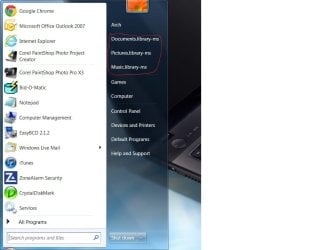
On my Win7 laptop I notice my libraries listed in the format documents.library-ms (with periods and hyphen) instead of simply being listed as documents, similarly for pictures being listed as pictures-library-ms instead of just pictures and videos.library-ms instead of simply videos. These "libraries" are not accessible when I try to open them. I have not seen this happen on other windows7 machines. I don't know if this is interfering with sharing of folders on the laptop. Any explanation would be appreciated.
 

My Computer

OS
XP MCE/32/64 Vista 32/64 Win7 Ubuntu Linux Mint
Hello Arch,

Could you post a screenshot showing this just to be certain? It sounds like you are looking at it's referenced name in properties "Details" tab. If so, that is normal.

The library folders are located in the hidden folder location below.

C:\Users\(User-Name)\AppData\Roaming\Microsoft\Windows\Libraries
 

My Computer

Computer type
PC/Desktop
Computer Manufacturer/Model Number
Self built custom
OS
64-bit Windows 11 Pro for Workstations
CPU
Intel i7-8700K OC'd to 5 GHz
Motherboard
ASUS ROG Maximus XI Formula Z390
Memory
64 GB (4x16GB) G.SKILL TridentZ RGB DDR4 3600 MHz
Graphics Card(s)
ASUS ROG-STRIX-GTX1080TI-O11G-GAMING
Sound Card
Integrated
Monitor(s) Displays
2 x Samsung Odyssey G7 27"
Screen Resolution
2560x1440
Hard Drives
1TB Samsung 990 PRO M.2,
4TB Samsung 990 PRO PRO M.2,
TerraMaster F8 SSD Plus NAS
PSU
Seasonic Prime Titanium 850W
Case
Thermaltake Core P3
Cooling
Corsair Hydro H115i
Keyboard
Logitech wireless K800
Mouse
Logitech MX Master 4
Internet Speed
2 Gb/s Download and 100 Mb/s Upload
Antivirus
Malwarebyte Anti-Malware Premium
Browser
Google Chrome
Other Info
Logitech Z625 speaker system,
Logitech BRIO 4K Pro webcam,
HP Color LaserJet Pro MFP M477fdn,
APC SMART-UPS RT 1000 XL - SURT1000XLI,
Galaxy S23 Plus phone
I have them circled with a faint red line. If these are empty I'd prefer to not have them showing here. Ditto for the recently opened programs on the left except for default browser and email.
 

Attachments

  • screen.jpg
    screen.jpg
    53.7 KB · Views: 23
Last edited by a moderator:

My Computer

OS
XP MCE/32/64 Vista 32/64 Win7 Ubuntu Linux Mint
Arch,

If you have a restore point dated before this started available, then doing a system restore using that restore point could be an easy way to fix this.
 

My Computer

Computer type
PC/Desktop
Computer Manufacturer/Model Number
Self built custom
OS
64-bit Windows 11 Pro for Workstations
CPU
Intel i7-8700K OC'd to 5 GHz
Motherboard
ASUS ROG Maximus XI Formula Z390
Memory
64 GB (4x16GB) G.SKILL TridentZ RGB DDR4 3600 MHz
Graphics Card(s)
ASUS ROG-STRIX-GTX1080TI-O11G-GAMING
Sound Card
Integrated
Monitor(s) Displays
2 x Samsung Odyssey G7 27"
Screen Resolution
2560x1440
Hard Drives
1TB Samsung 990 PRO M.2,
4TB Samsung 990 PRO PRO M.2,
TerraMaster F8 SSD Plus NAS
PSU
Seasonic Prime Titanium 850W
Case
Thermaltake Core P3
Cooling
Corsair Hydro H115i
Keyboard
Logitech wireless K800
Mouse
Logitech MX Master 4
Internet Speed
2 Gb/s Download and 100 Mb/s Upload
Antivirus
Malwarebyte Anti-Malware Premium
Browser
Google Chrome
Other Info
Logitech Z625 speaker system,
Logitech BRIO 4K Pro webcam,
HP Color LaserJet Pro MFP M477fdn,
APC SMART-UPS RT 1000 XL - SURT1000XLI,
Galaxy S23 Plus phone
My memory for things that far back is not great. I'm thinking this has been showing for a very long time. I have had the laptop for nearly 2 years and my guess is that it has been like that for most if not all of that time. There is no doubt it has been like it for more than 6 months. Attempting a restore to a point that far back would likely cause more trouble than it would be worth. Do you think this is symptomatic of a serious basic problem with the Windows installation? The computer runs fine. The only other issue I can think of is that I have been uanble to access the laptop from my desktop computers running xp even though I can access the other computers from the laptop. So file transfer is not a problem. In recent months I also have Win8 preview running on a second partition. I wonder could that be related?
 

My Computer

OS
XP MCE/32/64 Vista 32/64 Win7 Ubuntu Linux Mint
Arch,

This is a shot in the dark, but if you like, download and merge (run) the REG file below and restart the computer afterwards to see if it may be able to help. It restores the default registry entries for all libraries. It's not going to hurt anything since they are the default entries. You will need to be logged in an administrator account for it to work though.

Hope this helps. :)
 

Attachments

My Computer

Computer type
PC/Desktop
Computer Manufacturer/Model Number
Self built custom
OS
64-bit Windows 11 Pro for Workstations
CPU
Intel i7-8700K OC'd to 5 GHz
Motherboard
ASUS ROG Maximus XI Formula Z390
Memory
64 GB (4x16GB) G.SKILL TridentZ RGB DDR4 3600 MHz
Graphics Card(s)
ASUS ROG-STRIX-GTX1080TI-O11G-GAMING
Sound Card
Integrated
Monitor(s) Displays
2 x Samsung Odyssey G7 27"
Screen Resolution
2560x1440
Hard Drives
1TB Samsung 990 PRO M.2,
4TB Samsung 990 PRO PRO M.2,
TerraMaster F8 SSD Plus NAS
PSU
Seasonic Prime Titanium 850W
Case
Thermaltake Core P3
Cooling
Corsair Hydro H115i
Keyboard
Logitech wireless K800
Mouse
Logitech MX Master 4
Internet Speed
2 Gb/s Download and 100 Mb/s Upload
Antivirus
Malwarebyte Anti-Malware Premium
Browser
Google Chrome
Other Info
Logitech Z625 speaker system,
Logitech BRIO 4K Pro webcam,
HP Color LaserJet Pro MFP M477fdn,
APC SMART-UPS RT 1000 XL - SURT1000XLI,
Galaxy S23 Plus phone
Arch,

This is a shot in the dark, but if you like, download and merge (run) the REG file below and restart the computer afterwards to see if it may be able to help. It restores the default registry entries for all libraries. It's not going to hurt anything since they are the default entries. You will need to be logged in an administrator account for it to work though.

Hope this helps. :)

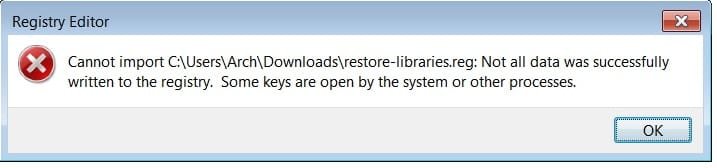
I got an error message (attached) Same thing in safe mode. No difference in those library entries after restarts.
 

Attachments

  • cannot_import.jpg
    cannot_import.jpg
    22.3 KB · Views: 10

My Computer

OS
XP MCE/32/64 Vista 32/64 Win7 Ubuntu Linux Mint
That's great news.

Were you logged in an administrator account when you merged the REG file?
 

My Computer

Computer type
PC/Desktop
Computer Manufacturer/Model Number
Self built custom
OS
64-bit Windows 11 Pro for Workstations
CPU
Intel i7-8700K OC'd to 5 GHz
Motherboard
ASUS ROG Maximus XI Formula Z390
Memory
64 GB (4x16GB) G.SKILL TridentZ RGB DDR4 3600 MHz
Graphics Card(s)
ASUS ROG-STRIX-GTX1080TI-O11G-GAMING
Sound Card
Integrated
Monitor(s) Displays
2 x Samsung Odyssey G7 27"
Screen Resolution
2560x1440
Hard Drives
1TB Samsung 990 PRO M.2,
4TB Samsung 990 PRO PRO M.2,
TerraMaster F8 SSD Plus NAS
PSU
Seasonic Prime Titanium 850W
Case
Thermaltake Core P3
Cooling
Corsair Hydro H115i
Keyboard
Logitech wireless K800
Mouse
Logitech MX Master 4
Internet Speed
2 Gb/s Download and 100 Mb/s Upload
Antivirus
Malwarebyte Anti-Malware Premium
Browser
Google Chrome
Other Info
Logitech Z625 speaker system,
Logitech BRIO 4K Pro webcam,
HP Color LaserJet Pro MFP M477fdn,
APC SMART-UPS RT 1000 XL - SURT1000XLI,
Galaxy S23 Plus phone
I am set up as only user and administrator. The way it's set up, I have no separate way of logging into administrator alone. It asks for a password and I never set up one. I marked this thread "solved" too early. Five or ten minutes later I clicked the wrong setting and my "new classic start menu" changed back to the old buggy start menu for Windows 7, and I couldn't figure out how to get it back. Uninstalling and re-installing it didn't help. Also other weird things started happening like the mouse moving on it's own which may or may not have been related to the fact that the "classic start menu" is still a beta version. Anywho, I ended up doing a system restore to the point before we started attempting to change the registry. The initial bug that I have pointed out is only academic. I never use the Windows library and am not much interested in learning how. I have been accustomed to making my own desktop shortcuts for things like pictures and videos. I'm losing interest in trying to fix something that shouldn't have to be fixed and shouldn't have happened in the first place. It's only one of a hundred things that's wrong with every OS and every application I have ever used. Thankfully, we don't have to use code for every change that we make like we do in Linux. I gave up Linux a few years back. They say Apples are better than PC's but I can't afford paying $2000 plus and then have to learn still another new OS which I'm sure has bugs of its own. Thanks for trying.
 

My Computer

OS
XP MCE/32/64 Vista 32/64 Win7 Ubuntu Linux Mint
Where did you get you copy of Windows 7 from? Perhaps it may be corrupted?
 

My Computer

Computer type
PC/Desktop
Computer Manufacturer/Model Number
Self built custom
OS
64-bit Windows 11 Pro for Workstations
CPU
Intel i7-8700K OC'd to 5 GHz
Motherboard
ASUS ROG Maximus XI Formula Z390
Memory
64 GB (4x16GB) G.SKILL TridentZ RGB DDR4 3600 MHz
Graphics Card(s)
ASUS ROG-STRIX-GTX1080TI-O11G-GAMING
Sound Card
Integrated
Monitor(s) Displays
2 x Samsung Odyssey G7 27"
Screen Resolution
2560x1440
Hard Drives
1TB Samsung 990 PRO M.2,
4TB Samsung 990 PRO PRO M.2,
TerraMaster F8 SSD Plus NAS
PSU
Seasonic Prime Titanium 850W
Case
Thermaltake Core P3
Cooling
Corsair Hydro H115i
Keyboard
Logitech wireless K800
Mouse
Logitech MX Master 4
Internet Speed
2 Gb/s Download and 100 Mb/s Upload
Antivirus
Malwarebyte Anti-Malware Premium
Browser
Google Chrome
Other Info
Logitech Z625 speaker system,
Logitech BRIO 4K Pro webcam,
HP Color LaserJet Pro MFP M477fdn,
APC SMART-UPS RT 1000 XL - SURT1000XLI,
Galaxy S23 Plus phone
It's official and genuine. I bought the laptop new from Futureshop with the Windows preinstalled. I'm thinking this issue must occur with other users. I doubt if most users would even take notice of it.
 

My Computer

OS
XP MCE/32/64 Vista 32/64 Win7 Ubuntu Linux Mint
Back
Top