Windows 7 Licenses

skelbley

New member
So, this is a fun one:

Laptop - Windows 7 Pro x64
Desktop - Windows 7 Home Premium x64

The laptop is dying. I want to uninstall and move Pro to my desktop, and use the Premium license on a netbook that I'll be buying.

Any way to do this? Thanks in advance for any advice!
 

My Computer

Computer Manufacturer/Model Number
N/A
OS
Windows 7
CPU
Intel i5 750
Memory
4GB OCZ @ 1333MHz
Graphics Card(s)
GTX 260 Core 216
Monitor(s) Displays
17" Acer
Case
Ultra
What kind of licenses are these? There are various kinds:

1) If you purchase a retail copy from a store (it'll come in a nice box) or an Upgrade copy, then you can move it to another computer, provided you completely uninstall it from the first. The retail license/ upgrade license can only be used on one computer at any given time. Depending on how long ago it was activated, you may have to call MS for activation.

2) If win7 came preinstalled on a computer (typically when you buy a big brand like Dell, HP, Lenovo), or if you purchased an OEM System builder license from Newegg, Amazon etc., then that license is tied to the original computer. It cannot be moved to another computer.
 

My Computer

Computer Manufacturer/Model Number
Too many to describe...
OS
Windows 7 x64 pro/ Windows 7 x86 Pro/ XP SP3 x86
Both copies were purchased from the Win741 deal online for students, both were upgrades. And how would I "uninstall" Windows that would let them know that copy has been deactivated? Is there a different way other than just writing over the original?

Also, could I upgrade the Home to Pro, and then use the Home license? I'd rather not have to wipe it clean if I don't have to, but I'm willing to if it's necessary.

And thanks for the quick responses :-D

Edit: The licenses are both about a year old now.
 

My Computer

Computer Manufacturer/Model Number
N/A
OS
Windows 7
CPU
Intel i5 750
Memory
4GB OCZ @ 1333MHz
Graphics Card(s)
GTX 260 Core 216
Monitor(s) Displays
17" Acer
Case
Ultra
1) You can uninstall the licenses either by installing another OS (say XP or win98 or Linux) over the current install. Or by completely formatting the hard drive so that the OS is completely wiped out.

2) You cannot upgrade Home Premium to pro using the Upgrade disks you have. You can only do a clean install, that'll wipe out the previous install. After that, you can reuse the Home premium license.
 

My Computer

Computer Manufacturer/Model Number
Too many to describe...
OS
Windows 7 x64 pro/ Windows 7 x86 Pro/ XP SP3 x86
You can in-place Upgrade your Home Premium to Pro, which will reset activation. When you activate with the Pro Product Key, it will require a robocall to MS which exchanges a series of numbers that update the hardware signature assigned to the Pro license. Home Premium is then released for later use.

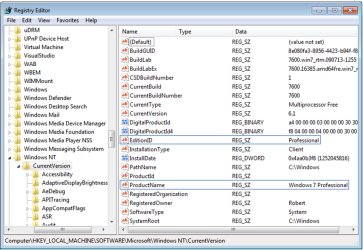
MS wants in-place Upgrades within Win7 to be done using Anytime Upgrades. However, there is a workaround to change versions within Win7 by changing two registry keys, tricking the installer into thinking it is doing an (always allowed) Repair Install on the same version.

Set a restore point, type Regedit in Start Search box, rightclick to Run as Admin, navigate to key shown at bottom below to make the exact changes shown:
Capture.PNG

Now run the DVD from Premium desktop, select Upgrade, remain connected to internet to get latest Updates/drivers into installer, and it should work as it has every time it has been tried here so far.
 
Thanks

Thanks all for your help, I really appreciate it :-D
 

My Computer

Computer Manufacturer/Model Number
N/A
OS
Windows 7
CPU
Intel i5 750
Memory
4GB OCZ @ 1333MHz
Graphics Card(s)
GTX 260 Core 216
Monitor(s) Displays
17" Acer
Case
Ultra
Back
Top